You Might Also Like
Learn Coding Visually
Learn to code with interactive, live-preview playgrounds — HTML, CSS, JavaScript, React & more.
 HTML Playground42 lessons · Click-based · Live preview
 CSS PlaygroundLearn CSS with a live editor
 JavaScript Playground60 lessons · DOM · Async · Canvas
 React PlaygroundLearn React with a live code editor
 GSAP PlaygroundLearn GSAP animation interactively
 SVG Playground44 lessons · shapes · paths · animation
 SCSS Playground45 lessons · Sass modules · tokens
 Tailwind PlaygroundLearn Tailwind CSS with a live editor
 Bootstrap 5 Playground50 lessons · live preview
Bug Hunt Game — Free HTML CSS JS Snippet
Bug Hunt Game · Games · Plain HTML, CSS & JS · Live preview
What's included
Features
About this UI Snippet
Bug Hunt Game — Clickable Code Lines, Real Failure Modes & A Fix Shown After Every Guess
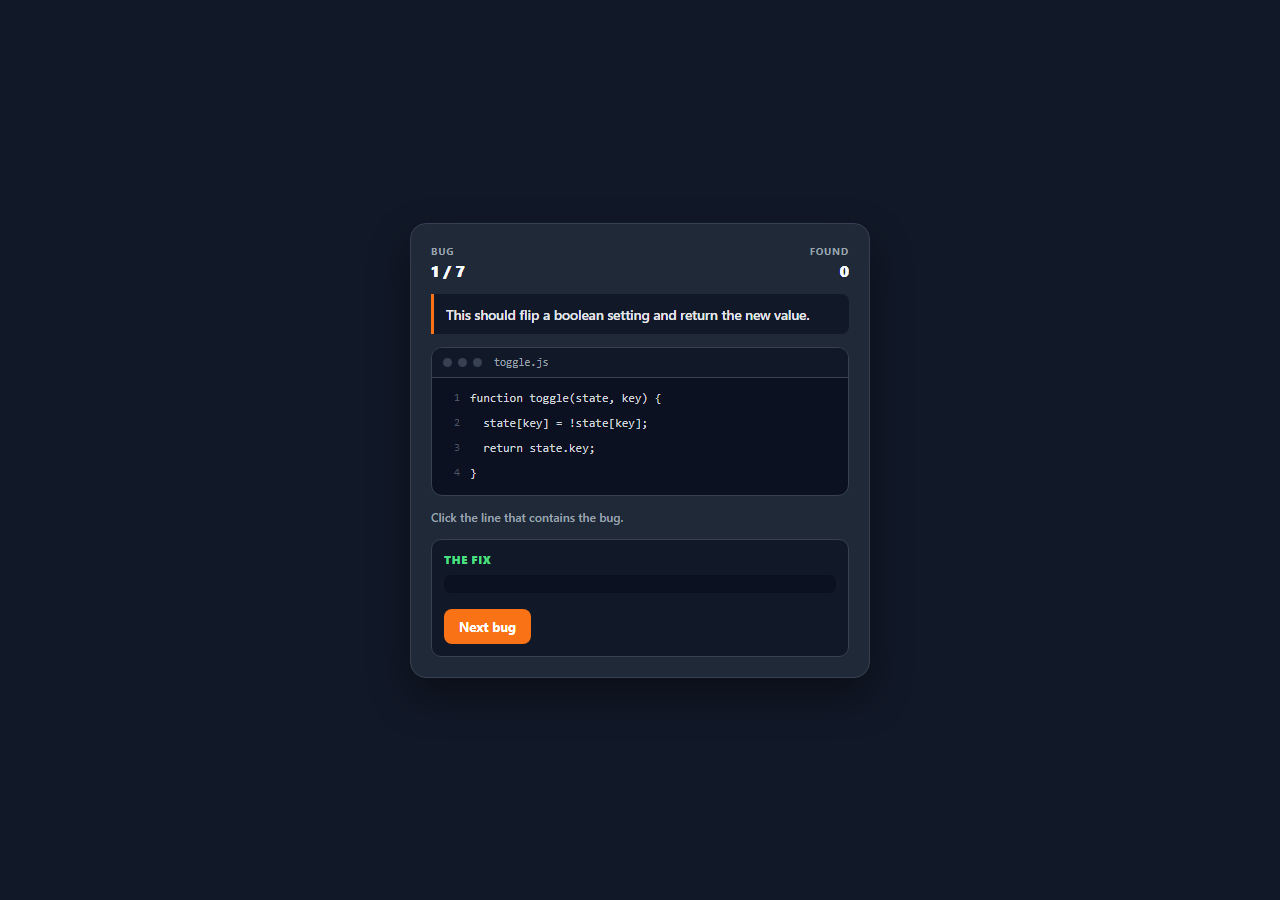
Reading code for defects is a skill nobody is explicitly taught — it is absorbed slowly through code review, usually after shipping the same bug once. This snippet compresses that loop into something playable: a short function with a stated purpose, a file-window UI with numbered lines, and one click to say where the defect is. Every round ends by showing the corrected line and explaining exactly how the original fails, so a wrong guess costs nothing but still teaches the pattern.
Seven defects that are real, not typos
The bugs are chosen because each represents a class of failure rather than a one-off slip: seeding a maximum at 0 so all-negative input returns a value that was never in the array; the <= off-by-one that reads one past the end and throws on property access; dot notation used for a dynamic property so state.key looks up a literal "key"; return inside a forEach callback, which exits the callback and is silently discarded, making the function always return false; a debounce that never calls clearTimeout, so every event still fires — just late; assigning an object and mutating the "copy", which writes through to the caller's original; and a stray semicolon after if (...) that empties the conditional's body so the discount applies to every order. Each why string names the mechanism, and each fix shows the corrected line ready to read.
Clickable lines built from data, numbered by CSS
Each bug is a data object holding the file name, a brief describing intended behaviour, an array of source lines, the index of the defective line, the corrected line, and the explanation. Lines render as <li> elements carrying a data-index, and line numbers come from a CSS counter-reset/counter-increment pair with the value drawn in a ::before pseudo-element — so the numbers are presentational only. That matters more than it sounds: a player who selects and copies the code gets the code, not a column of numbers glued to it, which is exactly how a real editor behaves.
A brief that makes the bug findable
Every level states what the function is *supposed* to do before showing the code, because a defect is only a defect relative to an intention. Without the brief, the max = 0 seed and the forEach return are unfalsifiable — the code is internally consistent and syntactically fine. Giving the intent first is also the honest model of real review: you cannot review code whose purpose you do not know.
One guess, then the answer
A locked flag makes each round single-shot: the first click resolves it. The correct line is always highlighted green whether or not the player found it, and a wrong pick is marked red simultaneously, so both pieces of information are on screen at once. The container also gets a locked class that removes the hover affordance and the pointer cursor, which is the visual signal that the round is over — state expressed through a class on the parent rather than by unbinding listeners, so nothing has to be re-bound on the next render.
Shuffled rounds over an index array
start() shuffles an array of indices with Fisher-Yates and walks that, leaving BUGS itself untouched, so a replay presents the same seven defects in a new order. Finishing the last bug reports the round score and restarts automatically after a short pause.
Build with AI
Build, Understand, Optimize, and Extend It With AI
Paste this snippet into an AI assistant like Claude and ask it to add a second phase per round where, after finding the buggy line, the player has to pick the correct fix from three plausible candidates — spotting a defect and knowing how to repair it are different skills, and the wrong-but-tempting fixes are where the real teaching happens. Other extensions worth requesting: a timer with a par time per bug, a difficulty ramp that shows longer functions with more distractor lines, a category tag per bug (async, mutation, off-by-one) with per-category accuracy tracked in localStorage so weak areas can be replayed, or a mode that shows a failing test output instead of a written brief so players debug from a symptom rather than a description.
Prompt to recreate it
Copy this into your AI assistant of choice to build the effect from scratch, or as a jumping-off point for your own variant:
Build a playable "spot the bug" code review game in plain HTML, CSS, and JavaScript — no frameworks or libraries.

Requirements:
- A BUGS array where each entry has a file name, a brief describing what the code is SUPPOSED to do, an array of source lines, the zero-based index of the defective line, the corrected line, and an explanation of how the original fails.
- Choose defects that represent real failure classes rather than typos: an accumulator seeded at 0 that breaks on all-negative input, a <= loop bound that reads past the end, dot notation used for a dynamic property key, return inside a forEach callback being discarded, a debounce missing clearTimeout, an object assignment mistaken for a copy, and a stray semicolon after an if condition.
- Render the code in a file-window UI as a list of clickable lines, with line numbers produced by CSS counters in a ::before pseudo-element so copied code stays clean.
- Always show the brief above the code — a defect is only judgeable against stated intent.
- Allow one guess per round using a locked flag. On the guess, highlight the correct line green whether or not the player found it, mark a wrong pick red at the same time, and reveal both the corrected line as copy-ready code and the written explanation.
- Express the round-over state as a class on the code container that removes hover affordances, rather than unbinding event listeners.
- Use event delegation with a data-index attribute for line clicks, shuffle the round order with Fisher-Yates over an array of indices (never mutating the source data), and report the round score before reshuffling for another pass.
Want to tighten it up first? Run this prompt through the AI Prompt Studio to score it across 8 quality dimensions, catch anti-patterns, and tune the wording for Claude, ChatGPT, or Gemini before you paste it in.
Step by step
How to Use
- 1Read the brief firstThe orange-bordered line states what the function is supposed to do. That intent is what makes the defect findable — several of these bugs are syntactically valid code that is simply wrong for the stated purpose.
- 2Scan the numbered linesThe code renders in a file-window with numbered lines, and hovering highlights the line under your cursor. Line numbers come from a CSS counter, so selecting and copying the code gives you clean source without the numbers.
- 3Click the line you think is wrongYou get one click per round. The correct line highlights green regardless of your answer, and a wrong pick is marked red at the same time so you can compare the two directly.
- 4Read the fix and the explanationEvery round shows the corrected line as copy-ready code plus a written explanation of the failure — why returning inside forEach is discarded, why <= reads past the end, why a stray semicolon empties an if body.
- 5Continue through all seven bugsThe found counter tracks how many you spotted on the first try. After the last bug the round score is announced and the game reshuffles automatically for another pass.
- 6Replay for a different orderEach round shuffles an array of indices with a Fisher-Yates pass rather than mutating the source data, so the same seven defects arrive in a new sequence every time.
Real-world uses
Common Use Cases
Got questions?
Frequently Asked Questions
Because a bug only exists relative to intended behaviour. Several of these samples — seeding max at 0, returning inside forEach — are perfectly valid JavaScript that simply does not do what was wanted. Without the stated intent there is nothing to judge the code against, which is also true of real code review.
With CSS counters: counter-reset on the list, counter-increment on each item, and the value drawn in a ::before pseudo-element. They are presentational only, so a player who selects and copies the code gets the source without a column of numbers merged into it — the same behaviour a real editor gives you.
No — a locked flag makes each round single-shot, which keeps the game honest about whether you actually spotted the defect. The correct line highlights green either way and a wrong pick is marked red at the same time, so a miss still shows you both what you chose and what was right.
Push an object onto the BUGS array with six keys: file (the filename shown in the window chrome), brief (what the code should do), lines (an array of source lines, one string per line), bug (the zero-based index of the defective line), fix (the corrected line), and why (the explanation). Keep samples short — seven lines or fewer reads well without scrolling.
Yes. Keep BUGS in a module, hold the shuffled order, position, score and locked flag in component state, and render the lines from the data array with the highlight classes derived from state rather than added imperatively. A single click handler on the list with the index from the rendered item replaces the delegated listener, and the auto-restart timeout should be cleared on unmount in useEffect / onUnmounted / ngOnDestroy.