Learn Coding Visually
Learn to code with interactive, live-preview playgrounds — HTML, CSS, JavaScript, React & more.
 HTML Playground42 lessons · Click-based · Live preview
 CSS PlaygroundLearn CSS with a live editor
 JavaScript Playground60 lessons · DOM · Async · Canvas
 React PlaygroundLearn React with a live code editor
 GSAP PlaygroundLearn GSAP animation interactively
 SVG Playground44 lessons · shapes · paths · animation
 SCSS Playground45 lessons · Sass modules · tokens
 Tailwind PlaygroundLearn Tailwind CSS with a live editor
 Bootstrap 5 Playground50 lessons · live preview
Breakout Brick Breaker — Free HTML CSS JS Snippet
Breakout Brick Breaker · Games · Plain HTML, CSS & JS · Live preview
What's included
Features
About this UI Snippet
Breakout Brick Breaker — AABB Collision, Face-Aware Bounce Reflection & Grid-Based Brick Layout
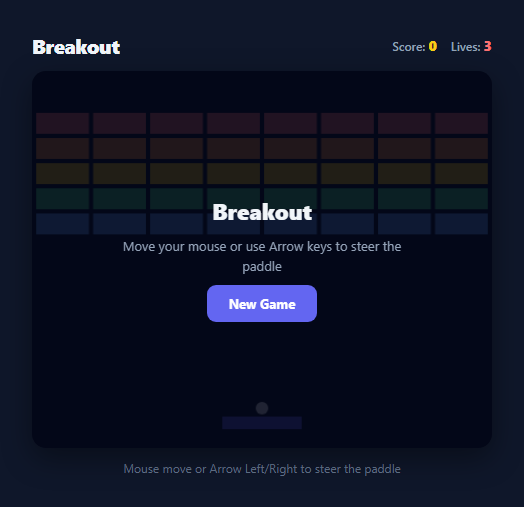
Breakout (and its spiritual successor Arkanoid) is a brick-clearing paddle game whose entire challenge rests on one piece of physics: a ball must bounce correctly off a paddle, walls, and a grid of bricks, reflecting from the correct face on every single collision. This snippet implements a complete, dependency-free version of that physics using axis-aligned bounding box (AABB) collision detection with proper face-of-impact reflection, plus a paddle bounce that varies the return angle by contact position, exactly like the games it is modelled on.
Grid-generated brick layout
Bricks are not hand-placed — buildBricks() generates a ROWS x COLS (5x8) grid programmatically, computing each brick's x and y from its row and column index: x: BRICK_PAD + c * (BRICK_W + BRICK_PAD), y: BRICK_TOP + r * (BRICK_H + BRICK_PAD). BRICK_W itself is derived from the canvas width so the grid always fills the play area evenly regardless of column count: (W - BRICK_PAD * (COLS + 1)) / COLS. Each brick object also stores a color drawn from a five-entry ROW_COLORS palette (indexed by row) and an alive boolean, which is the only piece of state that changes when a brick is destroyed — the brick object itself is never removed from the array, it is simply skipped during both collision checks and drawing once alive is false.
AABB collision with face-aware reflection
The core physics challenge in Breakout is not detecting *that* the ball hit a brick, but determining *which face* it hit, since a top/bottom hit should flip vertical velocity while a left/right hit should flip horizontal velocity. This snippet solves it with an overlap-comparison technique: on collision, it computes how far the ball has penetrated into the brick from each of the four sides — overlapLeft, overlapRight, overlapTop, overlapBottom — and finds minOverlap, the smallest of the four. The smallest overlap identifies the face the ball crossed most recently, since a ball approaching from the left will have a small overlapLeft and large overlaps on the other three sides at the moment of first contact. If the minimum overlap is on the left or right, ball.vx *= -1; otherwise ball.vy *= -1. This is a lightweight, effective substitute for full swept collision detection and correctly handles all four approach directions.
Paddle bounce with variable angle, mirroring real Arkanoid feel
Like the Pong vs Computer snippet's paddle physics, the paddle here does not simply invert vy on contact — relativeHit = (ball.x - paddleX) / PADDLE_W computes where along the paddle's width the ball landed (0 at the left edge, 1 at the right edge), and maps that to a launch angle spanning roughly ±63 degrees from vertical (Math.PI * 0.7 total range) via angle = (relativeHit - 0.5) * (Math.PI * 0.7). The resulting velocity is always forced upward (ball.vy = -Math.abs(...)) regardless of the angle sign, preventing the ball from ever being redirected back downward through the paddle. Ball speed increases slightly on every paddle hit (* 1.03, capped at 8.5) so extended rallies build gradual tension.
Lives, scoring, and win/loss states
Each brick destroyed adds 10 points via score += 10. When the ball falls past the paddle (ball.y - BALL_RADIUS > H), lives decrements; reaching zero triggers loseGame(). Clearing every brick — checked with bricks.every(b => !b.alive) immediately after any brick is destroyed — triggers winGame(). serveBall() launches the ball on both the initial serve and every life-lost respawn with horizontalKick = (Math.random() * 2 - 1) * 1.5, a small randomised horizontal component, so the ball is never launched perfectly vertically and rallies do not degenerate into a repetitive straight-line bounce pattern.
Build with AI
Build, Understand, Optimize, and Extend It With AI
Paste this snippet's HTML, CSS, and JS into an AI coding assistant like Claude and ask it to walk through exactly how the four overlap distances (overlapLeft, overlapRight, overlapTop, overlapBottom) are used to decide whether a brick collision should flip the ball's horizontal or vertical velocity — that overlap-comparison technique is the trickiest part of the physics and is worth understanding before extending it. It's also a great candidate for AI-assisted features: ask the assistant to add power-ups that drop from specific bricks and grant effects like a wider paddle or multi-ball, to add a second and third level with a different brick layout that loads once the current board is cleared, or to add a subtle screen-shake or particle burst when a brick is destroyed for extra game feel. You could also ask it to check whether the ball can ever tunnel through a paddle or brick at high speed on a slow device (a classic bug where large per-frame movement skips over a thin collision zone) and suggest a fix such as sub-stepping the ball's movement. Use it to interrogate and extend the physics, not just to copy the code.
Prompt to recreate it
Copy this into your AI assistant of choice to build the effect from scratch, or as a jumping-off point for your own variant:
Build a Breakout / brick-breaker game using the HTML5 Canvas API in plain HTML, CSS, and JavaScript — no frameworks, no build tooling.

Requirements:
- A paddle at the bottom of the canvas controlled by mouse movement (correctly scaled from screen pixels to canvas coordinates) and by Arrow Left/Right keys, restricted to horizontal movement only and clamped within the canvas bounds.
- A ball that moves continuously via a requestAnimationFrame loop, bounces off the left, right, and top walls with simple reflection, and is lost (costing a life) if it passes below the bottom of the canvas past the paddle.
- A grid of colored bricks generated programmatically from row/column counts near the top of the play area, where each brick is destroyed on contact using real axis-aligned bounding box (AABB) collision detection, and the ball's bounce direction is correctly determined by which face of the brick (top, bottom, left, or right) it actually struck — not just a flat vertical-only bounce.
- A paddle bounce where the ball's rebound angle varies meaningfully based on exactly where along the paddle's width contact occurred, rather than a flat mirror bounce, similar to real Arkanoid/Breakout paddle physics.
- A lives counter starting at 3 that decrements each time the ball is lost past the paddle (re-serving a fresh ball rather than ending the game immediately), with game over triggered only once lives reach zero.
- A score counter that increases by a fixed amount for every brick destroyed, and a win state triggered the moment every brick on the board has been destroyed, distinct from the game-over/lose state.
- Ensure the ball's launch angle on every serve (both the initial serve and every respawn after losing a life) includes a slight randomized horizontal component rather than launching perfectly vertically, so play does not degenerate into a repetitive straight bounce. Include a "New Game" control that fully resets bricks, score, and lives.
Want to tighten it up first? Run this prompt through the AI Prompt Studio to score it across 8 quality dimensions, catch anti-patterns, and tune the wording for Claude, ChatGPT, or Gemini before you paste it in.
Source Code
<div class="bo-wrap">
  <div class="bo-header">
    <h2>Breakout</h2>
    <div class="bo-stats">
      <span>Score: <strong id="bo-score">0</strong></span>
      <span>Lives: <strong id="bo-lives">3</strong></span>
    </div>
  </div>

  <div class="bo-canvas-wrap">
    <canvas id="bo-canvas" width="440" height="360"></canvas>
    <div class="bo-overlay" id="bo-overlay">
      <p class="bo-overlay-title" id="bo-overlay-title">Breakout</p>
      <p class="bo-overlay-sub" id="bo-overlay-sub">Move your mouse or use Arrow keys to steer the paddle</p>
      <button class="bo-new-btn" id="bo-new-btn">New Game</button>
    </div>
  </div>

  <p class="bo-hint">Mouse move or Arrow Left/Right to steer the paddle</p>
</div>
* { box-sizing: border-box; margin: 0; padding: 0; }
body { font-family: system-ui, sans-serif; background: #0f172a; min-height: 100vh; display: flex; align-items: center; justify-content: center; padding: 24px; }
.bo-wrap { display: flex; flex-direction: column; align-items: center; gap: 12px; width: 100%; max-width: 460px; }
.bo-header { width: 100%; display: flex; align-items: center; justify-content: space-between; }
.bo-header h2 { color: #f1f5f9; font-size: 20px; font-weight: 800; letter-spacing: -0.02em; }
.bo-stats { display: flex; gap: 14px; font-size: 12px; color: #94a3b8; font-weight: 600; }
.bo-stats strong { color: #facc15; font-size: 14px; }
#bo-lives { color: #f87171; }
.bo-canvas-wrap { position: relative; width: 100%; aspect-ratio: 11 / 9; border-radius: 14px; overflow: hidden; box-shadow: 0 10px 30px rgba(0,0,0,0.4); }
#bo-canvas { width: 100%; height: 100%; display: block; background: #0b1120; cursor: none; }
.bo-overlay {
position: absolute; inset: 0;
background: rgba(2, 6, 23, 0.88);
display: flex; flex-direction: column; align-items: center; justify-content: center; gap: 10px;
text-align: center; padding: 20px;
}
.bo-overlay.hidden { display: none; }
.bo-overlay-title { color: #f1f5f9; font-size: 22px; font-weight: 800; }
.bo-overlay-sub { color: #94a3b8; font-size: 13px; max-width: 280px; line-height: 1.5; }
.bo-new-btn {
padding: 10px 22px; font-size: 13px; font-weight: 700; border-radius: 9px;
border: none; background: #6366f1; color: #fff; cursor: pointer;
font-family: inherit; transition: background 0.15s, transform 0.1s;
}
.bo-new-btn:hover { background: #4f46e5; }
.bo-new-btn:active { transform: scale(0.96); }
.bo-hint { color: #64748b; font-size: 12px; }const canvas = document.getElementById('bo-canvas');
const ctx = canvas.getContext('2d');
const W = canvas.width, H = canvas.height;
const PADDLE_W = 76, PADDLE_H = 12, PADDLE_Y = H - 30;
const BALL_RADIUS = 6;
const ROWS = 5, COLS = 8;
const BRICK_PAD = 4, BRICK_TOP = 40, BRICK_H = 20;
const BRICK_W = (W - BRICK_PAD * (COLS + 1)) / COLS;
const ROW_COLORS = ['#f87171', '#fb923c', '#facc15', '#4ade80', '#60a5fa'];
const scoreEl = document.getElementById('bo-score');
const livesEl = document.getElementById('bo-lives');
const overlayEl = document.getElementById('bo-overlay');
const overlayTitleEl = document.getElementById('bo-overlay-title');
const overlaySubEl = document.getElementById('bo-overlay-sub');
const newBtn = document.getElementById('bo-new-btn');
let paddleX, ball, bricks, score, lives, running, rafHandle;
function clamp(v, min, max) { return Math.max(min, Math.min(max, v)); }
function buildBricks() {
const list = [];
for (let r = 0; r < ROWS; r++) {
for (let c = 0; c < COLS; c++) {
list.push({
x: BRICK_PAD + c * (BRICK_W + BRICK_PAD),
y: BRICK_TOP + r * (BRICK_H + BRICK_PAD),
w: BRICK_W, h: BRICK_H,
color: ROW_COLORS[r % ROW_COLORS.length],
alive: true,
});
}
}
return list;
}
function serveBall() {
const horizontalKick = (Math.random() * 2 - 1) * 1.5;
ball = {
x: W / 2, y: PADDLE_Y - BALL_RADIUS - 2,
vx: horizontalKick,
vy: -4,
};
}
function resetGame() {
paddleX = W / 2 - PADDLE_W / 2;
bricks = buildBricks();
score = 0;
lives = 3;
running = false;
scoreEl.textContent = '0';
livesEl.textContent = '3';
serveBall();
draw();
}
canvas.addEventListener('mousemove', e => {
const rect = canvas.getBoundingClientRect();
const scaleX = W / rect.width;
const mouseX = (e.clientX - rect.left) * scaleX;
paddleX = clamp(mouseX - PADDLE_W / 2, 0, W - PADDLE_W);
});
const keys = {};
document.addEventListener('keydown', e => {
if (e.key === 'ArrowLeft' || e.key === 'ArrowRight') e.preventDefault();
keys[e.key] = true;
});
document.addEventListener('keyup', e => { keys[e.key] = false; });
function startGame() {
if (running) return;
running = true;
overlayEl.classList.add('hidden');
cancelAnimationFrame(rafHandle);
loop();
}
function loop() {
if (!running) return;
update();
draw();
rafHandle = requestAnimationFrame(loop);
}
function update() {
if (keys['ArrowLeft']) paddleX = clamp(paddleX - 7, 0, W - PADDLE_W);
if (keys['ArrowRight']) paddleX = clamp(paddleX + 7, 0, W - PADDLE_W);
ball.x += ball.vx;
ball.y += ball.vy;
if (ball.x - BALL_RADIUS <= 0) {
ball.x = BALL_RADIUS;
ball.vx *= -1;
} else if (ball.x + BALL_RADIUS >= W) {
ball.x = W - BALL_RADIUS;
ball.vx *= -1;
}
if (ball.y - BALL_RADIUS <= 0) {
ball.y = BALL_RADIUS;
ball.vy *= -1;
}
if (
ball.vy > 0 &&
ball.y + BALL_RADIUS >= PADDLE_Y &&
ball.y + BALL_RADIUS <= PADDLE_Y + PADDLE_H + 6 &&
ball.x >= paddleX && ball.x <= paddleX + PADDLE_W
) {
const relativeHit = (ball.x - paddleX) / PADDLE_W;
const angle = (relativeHit - 0.5) * (Math.PI * 0.7);
const speed = Math.min(8.5, Math.hypot(ball.vx, ball.vy) * 1.03);
ball.vx = speed * Math.sin(angle);
ball.vy = -Math.abs(speed * Math.cos(angle));
ball.y = PADDLE_Y - BALL_RADIUS - 1;
}
for (const brick of bricks) {
if (!brick.alive) continue;
if (
ball.x + BALL_RADIUS > brick.x && ball.x - BALL_RADIUS < brick.x + brick.w &&
ball.y + BALL_RADIUS > brick.y && ball.y - BALL_RADIUS < brick.y + brick.h
) {
brick.alive = false;
score += 10;
scoreEl.textContent = score;
const overlapLeft = (ball.x + BALL_RADIUS) - brick.x;
const overlapRight = (brick.x + brick.w) - (ball.x - BALL_RADIUS);
const overlapTop = (ball.y + BALL_RADIUS) - brick.y;
const overlapBottom = (brick.y + brick.h) - (ball.y - BALL_RADIUS);
const minOverlap = Math.min(overlapLeft, overlapRight, overlapTop, overlapBottom);
if (minOverlap === overlapLeft || minOverlap === overlapRight) {
ball.vx *= -1;
} else {
ball.vy *= -1;
}
if (bricks.every(b => !b.alive)) {
winGame();
}
break;
}
}
if (ball.y - BALL_RADIUS > H) {
lives--;
livesEl.textContent = lives;
if (lives <= 0) {
loseGame();
} else {
running = false;
cancelAnimationFrame(rafHandle);
serveBall();
overlayTitleEl.textContent = 'Ball Lost';
overlaySubEl.textContent = 'Lives left: ' + lives + '. Click to continue.';
overlayEl.classList.remove('hidden');
newBtn.textContent = 'Continue';
}
}
}
function winGame() {
running = false;
cancelAnimationFrame(rafHandle);
overlayTitleEl.textContent = 'You Win!';
overlaySubEl.textContent = 'All bricks cleared. Final score: ' + score + '.';
overlayEl.classList.remove('hidden');
newBtn.textContent = 'New Game';
}
function loseGame() {
running = false;
cancelAnimationFrame(rafHandle);
overlayTitleEl.textContent = 'Game Over';
overlaySubEl.textContent = 'Final score: ' + score + '. Click New Game to try again.';
overlayEl.classList.remove('hidden');
newBtn.textContent = 'New Game';
}
function draw() {
ctx.fillStyle = '#0b1120';
ctx.fillRect(0, 0, W, H);
for (const brick of bricks) {
if (!brick.alive) continue;
ctx.fillStyle = brick.color;
ctx.fillRect(brick.x, brick.y, brick.w, brick.h);
}
ctx.fillStyle = '#6366f1';
ctx.fillRect(paddleX, PADDLE_Y, PADDLE_W, PADDLE_H);
ctx.fillStyle = '#f1f5f9';
ctx.beginPath();
ctx.arc(ball.x, ball.y, BALL_RADIUS, 0, Math.PI * 2);
ctx.fill();
}
newBtn.addEventListener('click', () => {
if (newBtn.textContent === 'Continue') {
newBtn.textContent = 'New Game';
overlayEl.classList.add('hidden');
startGame();
return;
}
// Fresh game: rebuild the board, then actually start the loop. Re-showing the
// overlay here instead left the button with nothing to do — the only way in
// was the "Ball Lost" canvas click, so a first-time player could never start.
resetGame();
overlayTitleEl.textContent = 'Breakout';
overlaySubEl.textContent = 'Move your mouse or use Arrow keys to steer the paddle';
newBtn.textContent = 'New Game';
startGame();
});
canvas.addEventListener('click', () => {
if (!running && !overlayEl.classList.contains('hidden') && overlayTitleEl.textContent === 'Ball Lost') {
overlayEl.classList.add('hidden');
startGame();
}
});
resetGame();Step by step
How to Use
- 1Start the gameClick "New Game" to reveal a fresh 5x8 grid of bricks and begin the requestAnimationFrame loop. The ball serves upward from just above the paddle with a small randomised horizontal component so no two serves are identical.
- 2Steer the paddleMove your mouse over the canvas to position the paddle directly under your cursor (scaled correctly from screen pixels to canvas coordinates), or hold Arrow Left/Right to nudge it 7px per frame — both control methods are clamped within the canvas edges.
- 3Break bricks with correct-face bouncesEach brick destroyed on contact awards 10 points. The collision code compares penetration overlap on all four sides of the brick to determine whether the hit was on a vertical or horizontal face, and flips the correct velocity component so the bounce direction always looks physically correct.
- 4Aim your paddle returnsWhere the ball lands on the paddle changes its rebound angle — hitting near either edge sends it off at a steep angle (up to roughly 63 degrees from vertical), while a centre hit returns it close to straight up, giving you control over where the ball travels next.
- 5Manage your livesLosing the ball past the paddle costs one life from the starting total of 3 and re-serves a fresh ball; losing all three lives before clearing the board ends the game with a "Game Over" overlay showing your final score.
- 6Clear the board to winDestroying all 40 bricks (5 rows x 8 columns) triggers bricks.every(b => !b.alive), ending the round immediately with a "You Win!" overlay and your final score, regardless of remaining lives.
Real-world uses
Common Use Cases
Got questions?
Frequently Asked Questions
On collision, the code calculates how far the ball has penetrated the brick from each of the four sides (overlapLeft, overlapRight, overlapTop, overlapBottom) and finds the smallest of the four values. The smallest overlap corresponds to the face the ball crossed most recently — if it is the left or right overlap, the horizontal velocity is inverted; otherwise the vertical velocity is inverted. This overlap-comparison approach correctly resolves bounce direction for all four approach angles without full swept collision detection.
serveBall() adds a small randomised horizontal component, (Math.random() * 2 - 1) * 1.5, to every serve — both the initial one and every respawn after losing a life. A perfectly vertical serve combined with a centred paddle return would create a repetitive straight-line rally with no strategic variation, so this small randomisation keeps every serve and rally meaningfully different.
relativeHit calculates where along the paddle's width (0 to 1) the ball made contact, which is mapped to a launch angle of roughly ±63 degrees from vertical via (relativeHit - 0.5) * (Math.PI * 0.7). A hit near the left edge sends the ball off to the left at a steep angle; a hit near the right edge sends it right; a centre hit returns it close to straight up. The vertical component is always forced negative (upward) so the ball never gets redirected back down through the paddle.
No — losing a life only resets the ball's position and re-serves it with a fresh random angle; the brick grid, score, and remaining lives all persist. The overlay shows "Ball Lost" with the remaining life count and a "Continue" button (or a click anywhere on the canvas) resumes play from where you left off. Only reaching zero lives or clicking "New Game" resets the full brick grid and score.
Yes — adjust the ROWS and COLS constants at the top of the JS panel. BRICK_W is automatically recalculated from the canvas width and column count, so the brick grid always fills the play area evenly regardless of how many columns you choose. Add more entries to ROW_COLORS if you increase ROWS beyond 5 so every row still gets a distinct colour.