Learn Coding Visually
Learn to code with interactive, live-preview playgrounds — HTML, CSS, JavaScript, React & more.
 HTML Playground42 lessons · Click-based · Live preview
 CSS PlaygroundLearn CSS with a live editor
 JavaScript Playground60 lessons · DOM · Async · Canvas
 React PlaygroundLearn React with a live code editor
 GSAP PlaygroundLearn GSAP animation interactively
 SVG Playground44 lessons · shapes · paths · animation
 SCSS Playground45 lessons · Sass modules · tokens
 Tailwind PlaygroundLearn Tailwind CSS with a live editor
 Bootstrap 5 Playground50 lessons · live preview
Hangman Word Guessing Game — Free HTML CSS JS Snippet
Hangman Word Guessing Game · Games · Plain HTML, CSS & JS · Live preview
What's included
Features
About this UI Snippet
Hangman Word Guessing Game — SVG Gallows Reveal, On-Screen Keyboard & Word State Machine
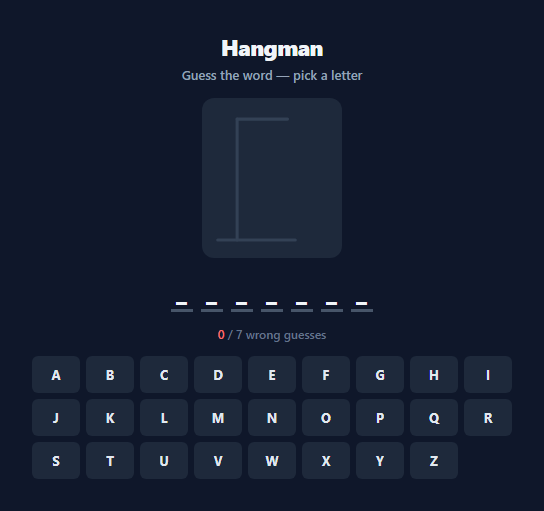
Hangman is one of the oldest word-guessing games, and its core mechanic translates cleanly into a small, self-contained state machine: a hidden word, a limited number of wrong guesses, and a visual penalty that escalates with every mistake. This snippet builds a fully playable version with a real SVG-drawn gallows figure that reveals one new body part per wrong guess, a clickable on-screen QWERTY keyboard, and full physical-keyboard support, all driven by a small set of JavaScript functions with no external word-guessing library.
The gallows as layered, pre-drawn SVG
Rather than drawing the hangman figure with JavaScript canvas calls or swapping image files, the entire gallows and figure are pre-drawn once as a single SVG containing eight separate shape elements: the gallows post and beam (always visible), then seven body-part elements — the rope, head, body, both arms, and both legs — each given the class hm-part and starting at opacity: 0. A PART_ORDER array in JavaScript lists these seven part class names in the exact sequence they should appear. Every time a wrong guess is made, revealBodyPart(wrongCount - 1) looks up the next class name in that array and adds a .show class, which flips opacity to 1 with a CSS transition. This means the entire drawing logic is just an array index lookup plus a class toggle — no path recalculation, no redraw, and the reveal animation is handled entirely by the CSS transition: opacity 0.25s ease rule.
Word state and letter-slot rendering
The secret word is chosen once per game with WORDS[Math.floor(Math.random() * WORDS.length)] from a small hardcoded word list, and correctly-guessed letters are tracked in a Set called guessedLetters — a Set is used specifically because it gives O(1) has() lookups and naturally prevents duplicate guesses from being counted twice. renderWord() rebuilds the row of letter slots on every guess: it iterates each character of the secret word and, for characters present in guessedLetters, renders the actual letter with a .revealed class that switches its underline to the accent colour; otherwise it renders an underscore placeholder. Because a Set lookup is used rather than tracking revealed positions directly, a single correct guess of a repeated letter (for example guessing "A" in "GALAXY") reveals every occurrence of that letter simultaneously, exactly as the physical game works.
Dual input: on-screen keyboard and real keyboard
The on-screen keyboard is generated programmatically by looping character codes 65 through 90 (A-Z) and creating one button per letter, each wired to guessLetter(letter) via addEventListener. A parallel keydown listener on document normalises e.key to uppercase and, if it is a single A-Z character, calls the exact same guessLetter() function — so physical typing and on-screen clicking share one code path with no duplicated logic. Once a letter has been guessed, its corresponding button gets disabled = true plus either a .correct (green) or .wrong (red) class, which both greys it out via reduced opacity and blocks further clicks or accidental re-guesses of the same letter from the keyboard listener, since guessedLetters.has(letter) short-circuits guessLetter() at the top.
Win and loss detection
After every guess, checkGameEnd() runs two checks: [...secretWord].every(ch => guessedLetters.has(ch)) tests whether every unique character in the word has been guessed (a win), and wrongCount >= MAX_WRONG (set to 7, matching the seven gallows parts revealed after the always-visible frame) tests for a loss. On a loss, revealWordFully() forcibly renders every letter of the secret word regardless of what was guessed, so the player sees the answer. Either outcome disables the entire keyboard and reveals the "Play Again" button, which calls newGame() to pick a fresh random word, reset guessedLetters, hide all gallows parts, and rebuild the keyboard from scratch.
Build with AI
Build, Understand, Optimize, and Extend It With AI
Paste this snippet's HTML, CSS, and JS into an AI coding assistant like Claude and ask it to explain how PART_ORDER and revealBodyPart() work together to turn a single wrongCount integer into the correct sequence of visible SVG body parts — that indirection is the cleverest part of the implementation and worth understanding fully before you extend it. It's also a strong candidate for AI-assisted improvements: ask the assistant to add word categories or difficulty levels by restructuring the WORDS array, to add a hint system that reveals one free letter after three wrong guesses, or to add a simple win/loss streak counter persisted in localStorage across rounds. You could also ask it to review the shared guessLetter() code path for the on-screen keyboard and the physical keydown listener and confirm there's no way for a disabled key's guess to be double-counted. Use it as a live collaborator to poke at the logic, not just a black box to copy.
Prompt to recreate it
Copy this into your AI assistant of choice to build the effect from scratch, or as a jumping-off point for your own variant:
Build a classic Hangman word-guessing game in plain HTML, CSS, and JavaScript — no frameworks, no build tooling.

Requirements:
- A hidden word chosen randomly from a small hardcoded word list at the start of each game, displayed as a row of underscore placeholders that reveal the correct letter (in every matching position at once) as soon as it is guessed correctly.
- A visual penalty figure (built from layered SVG or stacked CSS shapes, for example a hangman gallows) that reveals exactly one additional piece for each wrong guess, up to a maximum of 7 wrong guesses before the game ends in a loss.
- Both a clickable on-screen QWERTY keyboard and support for real physical keyboard input, routed through the same underlying guess-handling function so behavior never diverges between the two input methods.
- Already-guessed letters must become visually disabled/greyed out on the on-screen keyboard immediately after being guessed, with a distinct visual treatment for correct versus incorrect guesses, and must not be guessable again from either input method.
- A win condition when every letter in the word has been guessed before running out of wrong guesses, and a loss condition when wrong guesses reach the maximum — on loss, reveal the full secret word even if it was not completed.
- A "Play again" control that starts a brand-new round with a new random word, resets the wrong-guess count, hides the penalty figure, and re-enables the full keyboard.
- Handle repeated letters correctly (for example guessing a letter that appears multiple times in the word reveals all of its occurrences in a single guess) and ignore invalid input (non-letter keys, already-guessed letters) without penalising the player.
Want to tighten it up first? Run this prompt through the AI Prompt Studio to score it across 8 quality dimensions, catch anti-patterns, and tune the wording for Claude, ChatGPT, or Gemini before you paste it in.
Source Code
<div class="hm-wrap">
  <div class="hm-header">
    <h2>Hangman</h2>
    <div class="hm-status" id="hm-status">Guess the word — pick a letter</div>
  </div>

  <svg class="hm-figure" id="hm-figure" viewBox="0 0 160 180" width="140" height="160">
    <line x1="10" y1="170" x2="110" y2="170" stroke="#334155" stroke-width="4" stroke-linecap="round"/>
    <line x1="35" y1="170" x2="35" y2="14" stroke="#334155" stroke-width="4" stroke-linecap="round"/>
    <line x1="35" y1="14" x2="100" y2="14" stroke="#334155" stroke-width="4" stroke-linecap="round"/>
    <line class="hm-part hm-rope" x1="100" y1="14" x2="100" y2="34" stroke="#334155" stroke-width="4" stroke-linecap="round"/>
    <circle class="hm-part hm-head" cx="100" cy="50" r="16" stroke="#f87171" stroke-width="4" fill="none"/>
    <line class="hm-part hm-body" x1="100" y1="66" x2="100" y2="110" stroke="#f87171" stroke-width="4" stroke-linecap="round"/>
    <line class="hm-part hm-arm-l" x1="100" y1="78" x2="78" y2="98" stroke="#f87171" stroke-width="4" stroke-linecap="round"/>
    <line class="hm-part hm-arm-r" x1="100" y1="78" x2="122" y2="98" stroke="#f87171" stroke-width="4" stroke-linecap="round"/>
    <line class="hm-part hm-leg-l" x1="100" y1="110" x2="80" y2="140" stroke="#f87171" stroke-width="4" stroke-linecap="round"/>
    <line class="hm-part hm-leg-r" x1="100" y1="110" x2="120" y2="140" stroke="#f87171" stroke-width="4" stroke-linecap="round"/>
  </svg>

  <div class="hm-word" id="hm-word"></div>

  <div class="hm-meta">
    <span id="hm-wrong-count">0</span> / 7 wrong guesses
  </div>

  <div class="hm-keyboard" id="hm-keyboard"></div>

  <button class="hm-again-btn" id="hm-again-btn" style="display:none;">Play Again</button>
</div>
* { box-sizing: border-box; margin: 0; padding: 0; }
body { font-family: system-ui, sans-serif; background: #0f172a; min-height: 100vh; display: flex; align-items: center; justify-content: center; padding: 24px; }
.hm-wrap { display: flex; flex-direction: column; align-items: center; gap: 14px; width: 100%; max-width: 480px; }
.hm-header { text-align: center; }
.hm-header h2 { color: #f1f5f9; font-size: 22px; font-weight: 800; letter-spacing: -0.02em; }
.hm-status { color: #94a3b8; font-size: 13px; font-weight: 600; margin-top: 4px; min-height: 18px; }
.hm-status.win { color: #22c55e; }
.hm-status.lose { color: #f87171; }
.hm-figure { background: #1e293b; border-radius: 12px; padding: 8px; }
.hm-part { opacity: 0; transition: opacity 0.25s ease; }
.hm-part.show { opacity: 1; }
.hm-word {
display: flex;
gap: 8px;
flex-wrap: wrap;
justify-content: center;
font-size: 26px;
font-weight: 800;
letter-spacing: 0.05em;
color: #f1f5f9;
min-height: 36px;
}
.hm-letter-slot {
min-width: 22px;
text-align: center;
border-bottom: 3px solid #475569;
padding-bottom: 2px;
}
.hm-letter-slot.revealed { border-color: #6366f1; }
.hm-meta { color: #64748b; font-size: 12px; font-weight: 600; }
.hm-meta #hm-wrong-count { color: #f87171; }
.hm-keyboard {
display: grid;
grid-template-columns: repeat(9, 1fr);
gap: 6px;
width: 100%;
}
.hm-key {
padding: 10px 0;
font-size: 13px;
font-weight: 700;
border-radius: 6px;
border: none;
background: #1e293b;
color: #e2e8f0;
cursor: pointer;
font-family: inherit;
transition: background 0.15s, transform 0.1s;
}
.hm-key:hover:not(:disabled) { background: #334155; transform: translateY(-1px); }
.hm-key:disabled { cursor: not-allowed; opacity: 0.35; }
.hm-key.correct { background: #16653f; color: #86efac; }
.hm-key.wrong { background: #7f1d1d; color: #fca5a5; }
.hm-again-btn {
padding: 10px 22px;
font-size: 13px;
font-weight: 700;
border-radius: 9px;
border: none;
background: #6366f1;
color: #fff;
cursor: pointer;
font-family: inherit;
transition: background 0.15s, transform 0.1s;
}
.hm-again-btn:hover { background: #4f46e5; }
.hm-again-btn:active { transform: scale(0.97); }
@media (max-width: 420px) {
.hm-keyboard { grid-template-columns: repeat(7, 1fr); }
.hm-word { font-size: 20px; }
}const WORDS = ['JAVASCRIPT', 'KEYBOARD', 'GRADIENT', 'FUNCTION', 'BROWSER', 'ANIMATION', 'ELEPHANT', 'MOUNTAIN', 'PUZZLE', 'RAINBOW', 'PYTHON', 'GALAXY', 'WHISPER', 'CANDLE', 'JOURNEY'];
const MAX_WRONG = 7;
const PART_ORDER = ['hm-rope', 'hm-head', 'hm-body', 'hm-arm-l', 'hm-arm-r', 'hm-leg-l', 'hm-leg-r'];
let secretWord = '';
let guessedLetters = new Set();
let wrongCount = 0;
let gameOver = false;
const wordEl = document.getElementById('hm-word');
const keyboardEl = document.getElementById('hm-keyboard');
const statusEl = document.getElementById('hm-status');
const wrongCountEl = document.getElementById('hm-wrong-count');
const againBtn = document.getElementById('hm-again-btn');
function buildKeyboard() {
keyboardEl.innerHTML = '';
for (let i = 65; i <= 90; i++) {
const letter = String.fromCharCode(i);
const btn = document.createElement('button');
btn.className = 'hm-key';
btn.textContent = letter;
btn.dataset.letter = letter;
btn.addEventListener('click', () => guessLetter(letter));
keyboardEl.appendChild(btn);
}
}
function renderWord() {
wordEl.innerHTML = '';
for (const ch of secretWord) {
const slot = document.createElement('span');
slot.className = 'hm-letter-slot';
if (guessedLetters.has(ch)) {
slot.textContent = ch;
slot.classList.add('revealed');
} else {
slot.textContent = '_';
}
wordEl.appendChild(slot);
}
}
function revealBodyPart(index) {
const partClass = PART_ORDER[index];
if (!partClass) return;
const partEl = document.querySelector('.' + partClass);
if (partEl) partEl.classList.add('show');
}
function guessLetter(letter) {
if (gameOver || guessedLetters.has(letter)) return;
guessedLetters.add(letter);
const keyBtn = keyboardEl.querySelector('[data-letter="' + letter + '"]');
if (secretWord.includes(letter)) {
if (keyBtn) { keyBtn.classList.add('correct'); keyBtn.disabled = true; }
} else {
wrongCount++;
wrongCountEl.textContent = wrongCount;
if (keyBtn) { keyBtn.classList.add('wrong'); keyBtn.disabled = true; }
revealBodyPart(wrongCount - 1);
}
renderWord();
checkGameEnd();
}
function checkGameEnd() {
const isWordComplete = [...secretWord].every(ch => guessedLetters.has(ch));
if (isWordComplete) {
endGame(true);
} else if (wrongCount >= MAX_WRONG) {
endGame(false);
}
}
function endGame(won) {
gameOver = true;
keyboardEl.querySelectorAll('.hm-key').forEach(btn => btn.disabled = true);
if (won) {
statusEl.textContent = 'You win! The word was ' + secretWord + '.';
statusEl.className = 'hm-status win';
} else {
statusEl.textContent = 'Game over — the word was ' + secretWord + '.';
statusEl.className = 'hm-status lose';
revealWordFully();
}
againBtn.style.display = 'inline-block';
}
function revealWordFully() {
wordEl.innerHTML = '';
for (const ch of secretWord) {
const slot = document.createElement('span');
slot.className = 'hm-letter-slot revealed';
slot.textContent = ch;
wordEl.appendChild(slot);
}
}
function newGame() {
secretWord = WORDS[Math.floor(Math.random() * WORDS.length)];
guessedLetters = new Set();
wrongCount = 0;
gameOver = false;
wrongCountEl.textContent = '0';
statusEl.textContent = 'Guess the word — pick a letter';
statusEl.className = 'hm-status';
againBtn.style.display = 'none';
document.querySelectorAll('.hm-part').forEach(el => el.classList.remove('show'));
buildKeyboard();
renderWord();
}
document.addEventListener('keydown', e => {
const letter = e.key.toUpperCase();
if (letter.length === 1 && letter >= 'A' && letter <= 'Z') {
guessLetter(letter);
}
});
againBtn.addEventListener('click', newGame);
newGame();Step by step
How to Use
- 1Guess a letterClick any letter on the on-screen keyboard, or simply type on your physical keyboard — the document-level keydown listener normalises input and calls the same guessLetter() function either way.
- 2Watch correct guesses reveal instantlyA correct letter reveals every matching position in the word at once via the guessedLetters Set lookup in renderWord(), and the corresponding on-screen key turns green and becomes disabled.
- 3Track wrong guesses on the gallowsEach wrong guess increments wrongCount, updates the "X / 7 wrong guesses" counter, and calls revealBodyPart() to fade in the next SVG body part — rope, head, body, arm, arm, leg, leg — in that fixed order.
- 4Reach a win or loss stateGuessing every letter in the word before reaching 7 wrong guesses triggers a win message; reaching 7 wrong guesses first triggers a loss message and forcibly reveals the full word via revealWordFully().
- 5Start a new roundClick "Play Again" to call newGame(), which picks a new random word from the WORDS array, clears guessedLetters, resets wrongCount to zero, hides all gallows parts, and rebuilds a fully enabled keyboard.
- 6Expand the word listAdd or replace entries in the WORDS array at the top of the JS panel — keep them uppercase since guessLetter() compares against uppercase input, or add a themed category selector that swaps in a different array before calling newGame().
Real-world uses
Common Use Cases
Got questions?
Frequently Asked Questions
A PART_ORDER array lists the CSS class names of the seven hangman parts in the exact sequence they should appear (rope, head, body, both arms, both legs). Each wrong guess calls revealBodyPart(wrongCount - 1), which looks up PART_ORDER at that index and adds a .show class to the matching SVG element, flipping its opacity from 0 to 1 via a CSS transition — no coordinate math or redrawing is involved.
A Set gives constant-time has() lookups, which keeps duplicate-guess checking and word-completion checking fast regardless of word length, and it inherently rejects duplicate values so the same letter can never be counted twice even if guessLetter() were somehow called twice with the same letter.
Yes. A single keydown listener on document normalises e.key to uppercase and, if it is a letter A-Z, calls the exact same guessLetter() function that the on-screen keyboard buttons call. There is no separate code path for physical typing, so behaviour (including duplicate-guess prevention and disabling used keys visually) stays consistent between both input methods.
Seven, defined by the MAX_WRONG constant, which matches the seven SVG parts revealed after the always-visible gallows frame (rope, head, body, two arms, two legs). Change MAX_WRONG to make the game easier or harder — note you would also need to adjust PART_ORDER if you change the total number of visual stages.
Yes — replace the single flat WORDS array with an object of categories, for example { easy: [...], hard: [...] }, add a category selector to the HTML, and update newGame() to pick a random word from the currently selected category array instead of the single WORDS constant. The rest of the game logic (guessing, rendering, win/loss detection) needs no changes.