You Might Also Like
Learn Coding Visually
Learn to code with interactive, live-preview playgrounds — HTML, CSS, JavaScript, React & more.
 HTML Playground42 lessons · Click-based · Live preview
 CSS PlaygroundLearn CSS with a live editor
 JavaScript Playground60 lessons · DOM · Async · Canvas
 React PlaygroundLearn React with a live code editor
 GSAP PlaygroundLearn GSAP animation interactively
 SVG Playground44 lessons · shapes · paths · animation
 SCSS Playground45 lessons · Sass modules · tokens
 Tailwind PlaygroundLearn Tailwind CSS with a live editor
 Bootstrap 5 Playground50 lessons · live preview
Guess the Hex Color Code Game — Free JS Snippet
Guess the Hex Color Code Game · Games · Plain HTML, CSS & JS · Live preview
What's included
Features
About this UI Snippet
Guess the Hex Color Code Game — RGB-to-Hex Math, Near-Miss Decoy Generation & Streak Tracking
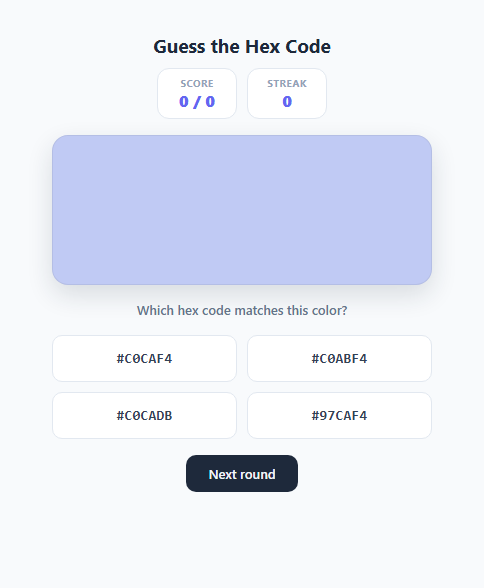
Reading hex colour codes fluently — glancing at #3B82F6 and having a rough sense it's a mid-blue — is a skill most front-end developers pick up slowly through repetition. This snippet turns that repetition into a genuine quiz: a random colour swatch is shown, and the player must pick its exact hex code from four options, three of which are deliberately close, plausible near-misses rather than obviously wrong colours.
How hex codes encode RGB values
A CSS hex colour like #3B82F6 is three two-digit hexadecimal numbers packed together, one each for red, green, and blue: 3B, 82, and F6. Each pair ranges from 00 (0 in decimal, no intensity on that channel) to FF (255 in decimal, full intensity), because two hex digits give exactly 16 x 16 = 256 possible values (0-15 per digit, 0-255 combined). randomHex() generates a colour by picking three independent random integers in the 0-255 range with Math.floor(Math.random() * 256) and converting each to a two-digit uppercase hex string with toHexPart(), which calls .toString(16) (base-16 conversion) and .padStart(2, '0') to guarantee a leading zero for values below 16 (so decimal 5 becomes 05, not just 5, keeping every channel exactly two characters).
Generating decoys that actually test color literacy
A multiple-choice quiz is trivial if the wrong answers are wildly different colours — anyone can spot that #3B82F6 (blue) doesn't match a red swatch without reading a single digit. The real test is distinguishing #3B82F6 from #3B82D8 or #2E82F6. makeDecoy() builds each wrong answer by taking the correct colour's actual RGB channels (extracted with hexToRgb(), which slices the hex string into three two-character substrings and parseInt(..., 16)s each one back to a 0-255 integer), picking one of the three channels at random, and nudging it by a random signed offset between 18 and 47 ((Math.random() < 0.5 ? -1 : 1) * (18 + Math.floor(Math.random() * 30))), clamped back into the valid 0-255 range. That offset range is deliberately tuned: large enough that the resulting swatch really is a distinguishably different colour if you looked at it side-by-side, but small enough that its hex string looks superficially similar to the real one, forcing genuine digit-by-digit comparison rather than colour memory alone. A dedup loop guards against ever generating a decoy that collides with the real answer or another decoy.
Fisher-Yates shuffling for fair answer positions
Once the correct hex and three decoys exist, shuffle() runs a standard Fisher-Yates shuffle (iterating from the last index down to 1, swapping each element with a random earlier one) so the correct answer's position among the four buttons is different every round — without this, a player could learn to always click the same button position rather than actually reading the colour.
Scoring, streaks, and immediate feedback
Every answer immediately disables all four option buttons to prevent double-clicking, then flashes the clicked button green (.correct-flash) or red (.wrong-flash); on a wrong answer, the actual correct button is also highlighted green so the player learns the real value regardless of outcome. score and rounds track a running "X / N correct" ratio, while a separate streak counter increments on consecutive correct answers and resets hard to zero on any miss — rewarding sustained accuracy rather than just overall percentage, and giving players a reason to keep playing to beat their own best run.
Build with AI
Build, Understand, Optimize, and Extend It With AI
Paste this snippet's HTML, CSS, and JS into an AI coding assistant like Claude and ask it to explain exactly how makeDecoy() perturbs a single RGB channel to build a plausible-but-wrong hex option, and why the Fisher-Yates shuffle() is preferred over a naive Math.random()-based sort for randomizing the answer positions. It's a good candidate for extension too — ask the assistant to add difficulty levels that tighten or loosen the decoy offset range, a timer that scores faster correct answers higher, or a "reveal RGB sliders" mode that lets a player build the guessed colour manually with three 0-255 range inputs instead of picking from multiple choice. You could also ask it to persist the best streak across sessions using localStorage so returning players have a personal record to beat.
Prompt to recreate it
Copy this into your AI assistant of choice to build the effect from scratch, or as a jumping-off point for your own variant:
Build a hex color code guessing game in plain HTML, CSS, and JavaScript — a random color swatch, four multiple-choice hex code buttons, and score/streak tracking.

Requirements:
- Generate a random RGB color, convert it to a properly zero-padded six-digit uppercase hex string, and display it as a large solid color swatch.
- Generate exactly three wrong-answer hex codes that are close in numeric value to the real one (by nudging one RGB channel of the real color by a moderate random amount) rather than obviously different colors, so the game genuinely tests hex-reading skill; guarantee no duplicate values appear among the four options.
- Randomize the position of the correct answer among the four buttons every round using an unbiased shuffle algorithm.
- On a correct click, flash that button with clear success styling and reveal the exact matching hex value in a feedback message; on a wrong click, flash that button with error styling AND highlight which button was actually correct.
- Disable all four option buttons immediately after the first click each round so a user cannot submit multiple guesses on the same round.
- Track and display a running "X / N correct" score across rounds, plus a separate consecutive-correct-answers streak counter that resets to zero on any wrong guess.
- Provide a "Next round" control that generates a brand new color, a fresh set of decoys, and a freshly shuffled button order, and re-enables input.
Want to tighten it up first? Run this prompt through the AI Prompt Studio to score it across 8 quality dimensions, catch anti-patterns, and tune the wording for Claude, ChatGPT, or Gemini before you paste it in.
Step by step
How to Use
- 1Study the swatch and pick a hex codeA random colour fills the swatch box, and four hex code buttons appear below it in monospace font. Click the one you believe exactly matches the swatch — one is always correct and three are close decoys generated by makeDecoy() from the real value.
- 2Read the feedbackA correct guess flashes your button green and confirms the exact hex value in the feedback text. A wrong guess flashes your button red and highlights the actual correct button in green so you can see how close (or far) your answer was, via the correctBtn lookup in onAnswer().
- 3Track your score and streakThe Score stat shows a running "X / N correct" ratio across every round played this session. The Streak stat counts consecutive correct answers and resets to 0 immediately on any wrong guess, tracked in the streak variable inside onAnswer().
- 4Start a new roundClick "Next round" to call newRound(), which generates a fresh random hex colour, three new decoys, re-shuffles all four options into new button positions, and re-enables the buttons for a fresh guess.
- 5Adjust the decoy difficultyIn makeDecoy(), change the offset range 18 + Math.floor(Math.random() * 30) (currently 18-47) to a smaller range like 8-20 for a harder, more subtle quiz, or a larger range like 40-80 for an easier one where decoys are more visually distinguishable from the correct swatch.
- 6Export and add to your projectClick HTML to download a standalone file, or JSX for a React component. In React, move currentHex, score, streak, and the options array into useState, and regenerate them together inside a single newRound() callback wrapped in useCallback so the swatch and buttons always update atomically.
Real-world uses
Common Use Cases
Got questions?
Frequently Asked Questions
The six characters after the # split into three pairs: 3B for red, 82 for green, F6 for blue. Each pair is a base-16 (hexadecimal) number from 00 to FF, which equals 0 to 255 in decimal — so 3B converts to 59, 82 to 130, and F6 to 246, giving the RGB triple (59, 130, 246), a mid-tone blue. Two hex digits per channel exist because 16 x 16 = 256, exactly matching the 0-255 range that 8-bit colour channels use.
makeDecoy() starts from the real colour's exact RGB values, picks one of the three channels at random, and shifts it by a random amount between 18 and 47 (in either direction, clamped to the valid 0-255 range), then converts back to hex. This produces a colour that is visibly different if compared side-by-side but numerically close enough in its hex digits that you cannot tell it apart from the real answer without actually reading and comparing the digits carefully.
Score is a lifetime accuracy ratio (score / rounds) meant to reflect overall performance across a whole session, so it simply stops incrementing on a miss rather than decreasing. Streak specifically measures consecutive correct answers as a separate, more demanding metric — resetting it hard to zero on any miss is what makes maintaining a long streak meaningfully harder than just having a good overall score, encouraging more careful attention on every single round.
No — makeDecoy() takes a usedHexes Set containing the real answer and any decoys already generated, and loops (up to 30 attempts) until it produces a hex value not already in that set, guaranteeing all four displayed options are unique. This prevents the degenerate case where two buttons show the same hex code, which would make one of them unambiguously guessable as wrong by elimination even without understanding the colour.
Array.sort(() => Math.random() - 0.5) is a commonly used but statistically biased shuffle — it does not give every permutation equal probability because comparison-based sorts make an inconsistent, unequal number of comparisons per element. The Fisher-Yates algorithm used here (iterating backward and swapping each element with a uniformly random earlier index) is the standard, provably unbiased way to shuffle an array in place, ensuring the correct answer's button position is genuinely random every round.