You Might Also Like
Learn Coding Visually
Learn to code with interactive, live-preview playgrounds — HTML, CSS, JavaScript, React & more.
 HTML Playground42 lessons · Click-based · Live preview
 CSS PlaygroundLearn CSS with a live editor
 JavaScript Playground60 lessons · DOM · Async · Canvas
 React PlaygroundLearn React with a live code editor
 GSAP PlaygroundLearn GSAP animation interactively
 SVG Playground44 lessons · shapes · paths · animation
 SCSS Playground45 lessons · Sass modules · tokens
 Tailwind PlaygroundLearn Tailwind CSS with a live editor
 Bootstrap 5 Playground50 lessons · live preview
Number Guessing Game 1-100 — Free JS Snippet
Number Guessing Game (1-100) · Games · Plain HTML, CSS & JS · Live preview
What's included
Features
About this UI Snippet
Number Guessing Game (1-100) — Higher/Lower Feedback, Guess History & the Binary Search Connection
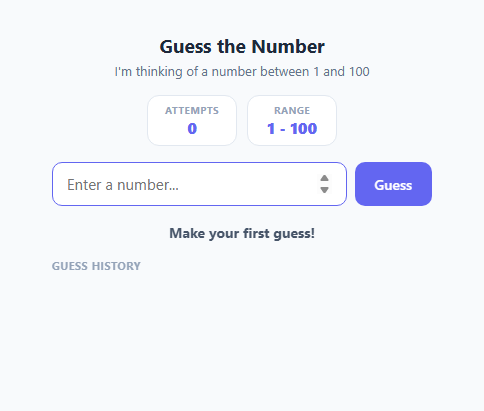
The classic "guess the number between 1 and 100" game is a staple first project for learning conditional logic, but it's also a surprisingly direct, hands-on demonstration of binary search — one of the most important algorithms in computer science. This snippet builds the full game loop with real input validation, a persistent guess history so players can visually trace their own narrowing strategy, and an explicit callout connecting the gameplay to the underlying algorithm once the player wins.
The core game loop
On load, newGame() picks a secret target with Math.floor(Math.random() * 100) + 1, which produces a uniformly random integer from 1 to 100 inclusive (the + 1 shifts Math.random()'s natural 0-to-0.999... range up by one so 0 is never a possible target and 100 is reachable). Every submitted guess runs through submitGuess(), which first validates the input — rejecting empty submissions, non-numeric input via isNaN(), and anything outside the 1-100 range — before comparing the guess to target and branching into exactly one of three outcomes: a win, "too high," or "too low." Each guess increments a live attempts counter displayed at the top of the game, so players always know exactly how many tries they've used.
Visualising the narrowing range
Beyond the pass/fail feedback, the game tracks a running low/high bound: any guess that comes back "too high" tightens high down to that guess (since the target must be below it), and any "too low" guess raises low up to that guess. This bound is rendered live as a "Range" stat (e.g. "34 - 67") that visibly shrinks after every guess, making the search space contraction — the entire idea behind binary search — directly visible rather than something the player has to track mentally.
The guess history as a strategy mirror
Every guess, right or wrong, is appended as a small coloured chip to a running history list: red chips with a down arrow for "too high," blue chips with an up arrow for "too low," and a green checkmark chip for the final correct guess. Because the chips accumulate in submission order, a player can look back at their own sequence after finishing and immediately see whether they played efficiently — someone who bounced between 1, 100, 2, 99, 3 played essentially randomly, while someone who went 50, 75, 62, 68 was narrowing the interval in half each time, which is precisely optimal play.
Why binary search guarantees a win in at most 7 guesses
Binary search always guesses the midpoint of the remaining possible range, which discards roughly half of the remaining candidates with every single guess regardless of whether the result is "too high" or "too low." Starting from 100 possible values, repeatedly halving gives 100 → 50 → 25 → 13 → 7 → 4 → 2 → 1, which takes ceil(log2(100)) = 7 halvings to guarantee narrowing down to exactly one possible value. This is why the win panel explicitly states that optimal play — always guessing the midpoint of what's left, i.e. Math.floor((low + high) / 2) on each turn — solves any 1-100 instance of this game in at most 7 guesses, no matter how unlucky the target number is. It's a concrete, playable way to feel why binary search is O(log n) rather than O(n): doubling the range to 1-200 only adds one more guess in the worst case (8, since ceil(log2(200)) = 8), not twice as many.
Input handling details worth noting
The number <input> is cleared and refocused after every guess (input.value = ''; input.focus();) so players can keep typing rapid guesses without touching the mouse, and both the input and submit button are disabled once the game is won to make it unambiguous that the round has ended and "Play again" is the only next action.
Build with AI
Build, Understand, Optimize, and Extend It With AI
Paste this snippet's HTML, CSS, and JS into an AI coding assistant like Claude and ask it to explain exactly how the low/high bound tracking in submitGuess() mirrors the binary search algorithm, and why ceil(log2(100)) gives the guaranteed 7-guess worst case shown in the win panel. It's also a strong base for extension — ask the assistant to add a "hint" button that reveals whether the optimal next guess (the true midpoint of the current low/high range) would beat your next guess, a difficulty selector that changes the range to 1-1000 or 1-10, or a small results chart comparing your attempts this round against the theoretical optimal. You could also ask it to implement the reverse game mode where the computer guesses a number you're thinking of using the same binary-search midpoint strategy.
Prompt to recreate it
Copy this into your AI assistant of choice to build the effect from scratch, or as a jumping-off point for your own variant:
Build a number guessing game in plain HTML, CSS, and JavaScript where the computer picks a random target between 1 and 100 and the player tries to find it through repeated guesses.

Requirements:
- On game start (and on replay), silently pick a new random integer target between 1 and 100 inclusive.
- Provide a number input and submit control where the player enters a guess; validate that the input is a whole number between 1 and 100 before scoring it, showing an inline message for invalid input without counting it as an attempt.
- After each valid guess, give immediate directional feedback (a clear "too high" or "too low" message, visually distinguished, for example by color and a directional icon) and increment a visible attempts counter.
- Maintain a running low/high bound implied by the guesses so far and display it, so the player can see the possible range narrowing after each guess.
- Keep a visible, ordered history of every guess made this round, each one labeled with whether it was too high, too low, or the final correct guess.
- On a correct guess, show a clear win message including the total number of attempts taken, explain in the UI that always guessing the midpoint of the remaining range (binary search) guarantees solving any 1-100 instance in at most 7 guesses, and disable further guessing until the player chooses to play again.
- Provide a "Play again" control that fully resets all game state (new target, zero attempts, cleared history, reset bounds) without requiring a page reload.
Want to tighten it up first? Run this prompt through the AI Prompt Studio to score it across 8 quality dimensions, catch anti-patterns, and tune the wording for Claude, ChatGPT, or Gemini before you paste it in.
Step by step
How to Use
- 1Enter a guessType a whole number between 1 and 100 into the input and press Enter or click Guess. submitGuess() validates the input, rejecting empty, non-numeric, or out-of-range values with an inline message before comparing it against the hidden target.
- 2Read the higher/lower feedbackEvery valid guess shows an immediate directional message — "Too high! Try lower." in red with a down arrow, or "Too low! Try higher." in blue with an up arrow — and the Attempts counter increments by one on every submission, right or wrong.
- 3Watch the range and history narrowThe Range stat updates after every guess to show the current low-high bounds implied by your guesses so far, and each guess is appended as a colour-coded chip to the guess history below the form so you can review your full sequence at a glance.
- 4Win the roundGuessing the exact target number shows a green success message, disables further input, and opens the win panel with your total attempts and a note on optimal binary-search play, generated dynamically from the attempts variable in submitGuess().
- 5Play againClick "Play again" to call newGame(), which picks a brand new random target, resets attempts to zero, clears the low/high bounds back to 1-100, empties the guess history, hides the win panel, and re-enables the input.
- 6Export and add to your projectClick HTML to download a standalone file, or JSX for a React component. In React, move target, attempts, low, high, gameOver, and the history array into useState, and derive the range display and history chips from that state rather than direct DOM manipulation.
Real-world uses
Common Use Cases
Got questions?
Frequently Asked Questions
With 100 possible target values, always guessing the exact midpoint of the remaining range eliminates roughly half of the remaining candidates on every single guess, regardless of whether the feedback is "too high" or "too low." The number of halvings needed to reduce 100 possibilities down to 1 is ceil(log2(100)), which equals 7 — so no matter how unlucky the target is, a player following the midpoint strategy perfectly will always find it in 7 guesses or fewer, and will often find it sooner.
submitGuess() first trims the raw input and returns early if it is an empty string, then runs parseInt(raw, 10) and checks isNaN(guess) to catch non-numeric text, and finally checks guess < 1 || guess > 100 to reject out-of-bounds numbers — showing an inline message and not incrementing the attempts counter for any of these invalid cases, so only genuine 1-100 integer guesses count toward your attempt total.
low and high represent the tightest known bounds on where the target must be, based purely on the feedback received so far: any "too high" guess becomes the new high (since the target must be strictly below it), and any "too low" guess becomes the new low (since the target must be strictly above it). They start at 1 and 100 respectively and only ever tighten, never loosen, which is exactly the invariant that makes binary search correct.
No — newGame() clears historyEl.innerHTML at the start of every round, so the history list always reflects only the current round's guesses. This is intentional: comparing your current round's strategy against a clean slate is more useful for self-assessment than an ever-growing list mixing guesses from unrelated rounds with different targets.
Yes — update Math.floor(Math.random() * 100) + 1 to Math.floor(Math.random() * 1000) + 1 in newGame(), change the initial high value from 100 to 1000, update the input's max attribute and the range-bound validation check in submitGuess(), and adjust the displayed "1 - 100" text. The worst-case optimal guess count becomes ceil(log2(1000)) = 10, so you may also want to update the win-note copy to reflect the new number.