Learn Coding Visually
Learn to code with interactive, live-preview playgrounds — HTML, CSS, JavaScript, React & more.
 HTML Playground42 lessons · Click-based · Live preview
 CSS PlaygroundLearn CSS with a live editor
 JavaScript Playground60 lessons · DOM · Async · Canvas
 React PlaygroundLearn React with a live code editor
 GSAP PlaygroundLearn GSAP animation interactively
 SVG Playground44 lessons · shapes · paths · animation
 SCSS Playground45 lessons · Sass modules · tokens
 Tailwind PlaygroundLearn Tailwind CSS with a live editor
 Bootstrap 5 Playground50 lessons · live preview
Connect Four vs Computer — Free HTML CSS JS Snippet
Connect Four vs Computer · Games · Plain HTML, CSS & JS · Live preview
What's included
Features
About this UI Snippet
Connect Four vs Computer — Grid Gravity Drop, 4-Direction Win Detection & Heuristic AI Opponent
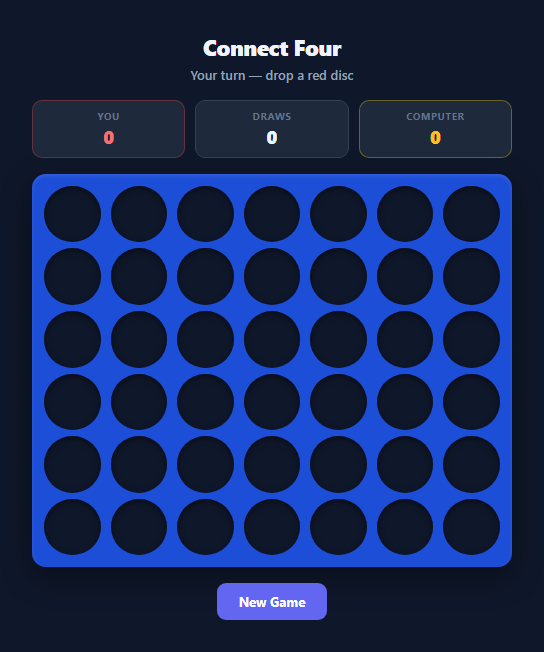
Connect Four is a two-player strategy game built on a deceptively simple mechanic: discs fall under gravity into one of seven columns, stacking on top of whatever is already there, and the first player to line up four discs of their own colour horizontally, vertically, or diagonally wins. This snippet implements the full game as a genuine playable board — not a static mockup — complete with real gravity simulation, four-direction win checking, and a heuristic computer opponent that plays a credible game rather than moving randomly.
The gravity model: a 2D array, not pixel maths
The board is represented as a 7-column array of 6-row arrays, board[col][row], where row 0 is the bottom of the column. Instead of placing a disc exactly where the user clicked, lowestEmptyRow(col) scans the column from the bottom upward and returns the first null slot — that index is where the disc actually lands. This is the real mechanic behind Connect Four's gravity: clicking anywhere in a column always drops into the lowest available cell, and the CSS reinforces it visually by laying each column out with flex-direction: column-reverse so cell index 0 renders at the bottom. The falling animation itself is pure CSS — a .c4-disc starts at transform: scale(0) translateY(-140%) and animates to scale(1) translateY(0) with a bouncy cubic-bezier(0.34, 1.56, 0.64, 1) easing curve that gives the drop a satisfying overshoot.
Four-direction win detection
After every move, checkWin(col, row, player) walks outward from the just-placed disc along four axis pairs: horizontal [1, 0], vertical [0, 1], and both diagonals [1, 1] and [1, -1]. For each direction it counts matching discs going forward and then counts again going backward along the same axis, because a winning line can extend on either side of the disc that completed it. If the combined run reaches four or more, the coordinates of that line are returned and each winning cell gets a .win-cell class that adds a glowing green ring and a slow pulsing brightness animation, making the winning line immediately obvious.
The heuristic AI: three priorities, no brute force
The computer opponent does not use minimax or a deep search tree — it applies three ordered heuristics that are exactly how a competent human casual player thinks about the game. First, wouldWin(col, COMPUTER) temporarily drops a yellow disc into every legal column and re-runs checkWin to see whether that move produces an immediate four-in-a-row; if any column does, the computer takes it and wins on the spot. Second, if no winning move exists, the same check runs with HUMAN as the hypothetical player — if the human could win next turn by dropping into some column, the computer occupies that column itself to block it. Third, if neither an immediate win nor a necessary block exists, the computer falls back to positional strategy: it prefers columns in centerOrder = [3, 2, 4, 1, 5, 0, 6], trying the centre column first and working outward. This reflects real Connect Four theory — the centre column participates in more possible four-in-a-row lines (horizontal, vertical, and both diagonals) than any edge column, so occupying it early creates more future winning threats.
Session scoring and disc rendering
A running tally of wins, losses, and draws persists across rounds in a scores object and renders in three coloured score pills above the board. Each disc is a separate absolutely-positioned <div> layered on top of an empty circular cell rather than a background-colour change, which is what makes the drop-in scale animation possible — the disc element itself animates in, rather than a colour simply appearing.
Build with AI
Build, Understand, Optimize, and Extend It With AI
Paste this snippet's full HTML, CSS, and JS into an AI coding assistant like Claude and ask it to trace exactly how lowestEmptyRow() and the column-reverse CSS layout work together to simulate gravity, since that combination is the trickiest part of the whole implementation to reason about from code alone. It's also a great candidate for AI-assisted extension: ask it to add a minimax search with alpha-beta pruning to the computer opponent so it can look several moves ahead instead of only checking immediate wins and blocks, or ask it to implement a local two-player hot-seat mode by removing the setTimeout(computerMove) call. You could also ask the assistant to explain why centerOrder prioritises the middle columns from a game-theory perspective, or to add a move-undo feature that pops the last disc off both the board array and the DOM. Treat this as a working reference to interrogate and build on, not a finished black box.
Prompt to recreate it
Copy this into your AI assistant of choice to build the effect from scratch, or as a jumping-off point for your own variant:
Build a playable Connect Four game in plain HTML, CSS, and JavaScript against a heuristic computer opponent — no frameworks, no build step.

Requirements:
- A 7-column by 6-row grid where clicking a column drops a disc into the lowest currently-empty cell of that column via real gravity simulation (an internal 2D array, not pixel-position placement), animated with a bouncy CSS drop-in transition.
- Win detection that checks all four directions (horizontal, vertical, both diagonals) from the most recently placed disc, correctly counting matches in both directions along each axis so a line completed on either side of the new disc is detected.
- A computer opponent that, on each of its turns, first checks every legal column for an immediate winning move and takes it if one exists; otherwise checks whether the human has an immediate winning move available and blocks it; otherwise chooses the most central available column, since central columns participate in more potential four-in-a-row lines.
- A clear visual highlight (for example a glowing outline) applied specifically to the four discs that form a winning line, distinguishing a win from a normal board state at a glance.
- A running scoreboard tracking wins, losses, and draws across multiple rounds within the same session, updated automatically at the end of each game.
- A "New Game" control that resets the board state and all disc elements without resetting the session scoreboard.
- Prevent any interaction with full columns or with the board after a game has ended, and clearly communicate the game state (whose turn it is, thinking, win, loss, draw) via a status message.
Want to tighten it up first? Run this prompt through the AI Prompt Studio to score it across 8 quality dimensions, catch anti-patterns, and tune the wording for Claude, ChatGPT, or Gemini before you paste it in.
Source Code
<div class="c4-wrap">
  <div class="c4-header">
    <h2>Connect Four</h2>
    <div class="c4-status" id="c4-status">Your turn — drop a red disc</div>
  </div>

  <div class="c4-scoreboard">
    <div class="score-pill red">
      <span class="score-label">You</span>
      <span class="score-value" id="score-human">0</span>
    </div>
    <div class="score-pill draw">
      <span class="score-label">Draws</span>
      <span class="score-value" id="score-draw">0</span>
    </div>
    <div class="score-pill yellow">
      <span class="score-label">Computer</span>
      <span class="score-value" id="score-computer">0</span>
    </div>
  </div>

  <div class="c4-board" id="c4-board" role="grid" aria-label="Connect Four board"></div>

  <button class="c4-new-btn" id="c4-new-btn">New Game</button>
</div>
* { box-sizing: border-box; margin: 0; padding: 0; }
body { font-family: system-ui, sans-serif; background: #0f172a; min-height: 100vh; display: flex; align-items: center; justify-content: center; padding: 24px; }
.c4-wrap { display: flex; flex-direction: column; align-items: center; gap: 16px; width: 100%; max-width: 480px; }
.c4-header { text-align: center; }
.c4-header h2 { color: #f1f5f9; font-size: 22px; font-weight: 800; letter-spacing: -0.02em; }
.c4-status { color: #94a3b8; font-size: 13px; font-weight: 600; margin-top: 4px; min-height: 18px; }
.c4-status.win { color: #22c55e; }
.c4-status.lose { color: #f87171; }
.c4-status.draw { color: #fbbf24; }
.c4-scoreboard { display: flex; gap: 10px; width: 100%; }
.score-pill { flex: 1; background: #1e293b; border-radius: 10px; padding: 8px 10px; display: flex; flex-direction: column; align-items: center; gap: 2px; border: 1.5px solid #334155; }
.score-pill.red { border-color: rgba(239,68,68,0.35); }
.score-pill.yellow { border-color: rgba(250,204,21,0.35); }
.score-label { font-size: 10px; text-transform: uppercase; letter-spacing: 0.05em; color: #64748b; font-weight: 700; }
.score-value { font-size: 18px; font-weight: 800; color: #f1f5f9; }
.score-pill.red .score-value { color: #f87171; }
.score-pill.yellow .score-value { color: #fbbf24; }
.c4-board {
display: grid;
grid-template-columns: repeat(7, 1fr);
gap: 6px;
background: #1d4ed8;
padding: 10px;
border-radius: 14px;
width: 100%;
box-shadow: 0 10px 30px rgba(0,0,0,0.4), inset 0 2px 4px rgba(255,255,255,0.1);
}
.c4-col {
display: flex;
flex-direction: column-reverse;
gap: 6px;
cursor: pointer;
border-radius: 8px;
padding: 2px;
transition: background 0.15s;
}
.c4-col:hover { background: rgba(255,255,255,0.08); }
.c4-col.disabled { cursor: not-allowed; }
.c4-cell {
aspect-ratio: 1 / 1;
width: 100%;
border-radius: 50%;
background: #0f172a;
position: relative;
box-shadow: inset 0 2px 6px rgba(0,0,0,0.5);
}
.c4-disc {
position: absolute;
inset: 0;
border-radius: 50%;
transform: scale(0);
animation: dropIn 0.35s cubic-bezier(0.34, 1.56, 0.64, 1) forwards;
}
.c4-disc.red { background: radial-gradient(circle at 35% 30%, #fca5a5, #ef4444 60%, #b91c1c); }
.c4-disc.yellow { background: radial-gradient(circle at 35% 30%, #fef08a, #facc15 60%, #ca8a04); }
.c4-disc.win-cell { box-shadow: 0 0 0 3px #22c55e, 0 0 16px 4px rgba(34,197,94,0.7); animation: dropIn 0.35s cubic-bezier(0.34, 1.56, 0.64, 1) forwards, pulseWin 0.9s ease-in-out infinite 0.35s; }
@keyframes dropIn {
from { transform: scale(0) translateY(-140%); }
to { transform: scale(1) translateY(0); }
}
@keyframes pulseWin {
0%, 100% { filter: brightness(1); }
50% { filter: brightness(1.25); }
}
.c4-new-btn {
padding: 10px 22px;
font-size: 13px;
font-weight: 700;
border-radius: 9px;
border: none;
background: #6366f1;
color: #fff;
cursor: pointer;
font-family: inherit;
transition: background 0.15s, transform 0.1s;
}
.c4-new-btn:hover { background: #4f46e5; }
.c4-new-btn:active { transform: scale(0.97); }
@media (max-width: 420px) {
.c4-board { gap: 4px; padding: 6px; }
.c4-col { gap: 4px; }
}const ROWS = 6;
const COLS = 7;
const HUMAN = 'red';
const COMPUTER = 'yellow';
let board = [];
let gameOver = false;
let scores = { human: 0, computer: 0, draw: 0 };
const boardEl = document.getElementById('c4-board');
const statusEl = document.getElementById('c4-status');
const newBtn = document.getElementById('c4-new-btn');
function createBoard() {
board = Array.from({ length: COLS }, () => Array(ROWS).fill(null));
gameOver = false;
boardEl.innerHTML = '';
statusEl.textContent = 'Your turn — drop a red disc';
statusEl.className = 'c4-status';
for (let c = 0; c < COLS; c++) {
const colEl = document.createElement('div');
colEl.className = 'c4-col';
colEl.dataset.col = c;
for (let r = 0; r < ROWS; r++) {
const cellEl = document.createElement('div');
cellEl.className = 'c4-cell';
cellEl.dataset.row = r;
cellEl.dataset.col = c;
colEl.appendChild(cellEl);
}
colEl.addEventListener('click', () => handleColumnClick(c));
boardEl.appendChild(colEl);
}
}
function lowestEmptyRow(col) {
for (let r = 0; r < ROWS; r++) {
if (!board[col][r]) return r;
}
return -1;
}
function handleColumnClick(col) {
if (gameOver) return;
const row = lowestEmptyRow(col);
if (row === -1) return;
placeDisc(col, row, HUMAN);
const winLine = checkWin(col, row, HUMAN);
if (winLine) {
endGame('win', winLine);
return;
}
if (isBoardFull()) {
endGame('draw');
return;
}
statusEl.textContent = 'Computer is thinking...';
setTimeout(computerMove, 450);
}
function placeDisc(col, row, player) {
board[col][row] = player;
const cellEl = boardEl.querySelector('.c4-cell[data-col="' + col + '"][data-row="' + row + '"]');
const disc = document.createElement('div');
disc.className = 'c4-disc ' + player;
cellEl.appendChild(disc);
}
function isBoardFull() {
return board.every(col => col[ROWS - 1] !== null);
}
const DIRECTIONS = [
[1, 0], [0, 1], [1, 1], [1, -1],
];
function checkWin(col, row, player) {
for (const [dc, dr] of DIRECTIONS) {
const line = [[col, row]];
for (let step = 1; step < 4; step++) {
const c = col + dc * step, r = row + dr * step;
if (c < 0 || c >= COLS || r < 0 || r >= ROWS || board[c][r] !== player) break;
line.push([c, r]);
}
for (let step = 1; step < 4; step++) {
const c = col - dc * step, r = row - dr * step;
if (c < 0 || c >= COLS || r < 0 || r >= ROWS || board[c][r] !== player) break;
line.push([c, r]);
}
if (line.length >= 4) return line.slice(0, 4);
}
return null;
}
function wouldWin(col, player) {
const row = lowestEmptyRow(col);
if (row === -1) return null;
board[col][row] = player;
const line = checkWin(col, row, player);
board[col][row] = null;
return line ? row : null;
}
function computerMove() {
if (gameOver) return;
const validCols = [];
for (let c = 0; c < COLS; c++) if (lowestEmptyRow(c) !== -1) validCols.push(c);
if (validCols.length === 0) return;
let chosenCol = null;
for (const c of validCols) {
if (wouldWin(c, COMPUTER) !== null) { chosenCol = c; break; }
}
if (chosenCol === null) {
for (const c of validCols) {
if (wouldWin(c, HUMAN) !== null) { chosenCol = c; break; }
}
}
if (chosenCol === null) {
const centerOrder = [3, 2, 4, 1, 5, 0, 6];
for (const c of centerOrder) {
if (validCols.includes(c)) { chosenCol = c; break; }
}
}
const row = lowestEmptyRow(chosenCol);
placeDisc(chosenCol, row, COMPUTER);
const winLine = checkWin(chosenCol, row, COMPUTER);
if (winLine) {
endGame('lose', winLine);
return;
}
if (isBoardFull()) {
endGame('draw');
return;
}
statusEl.textContent = 'Your turn — drop a red disc';
}
function endGame(result, winLine) {
gameOver = true;
if (winLine) {
for (const [c, r] of winLine) {
const cellEl = boardEl.querySelector('.c4-cell[data-col="' + c + '"][data-row="' + r + '"]');
const disc = cellEl.querySelector('.c4-disc');
if (disc) disc.classList.add('win-cell');
}
}
if (result === 'win') {
scores.human++;
statusEl.textContent = 'You win! Four in a row.';
statusEl.className = 'c4-status win';
} else if (result === 'lose') {
scores.computer++;
statusEl.textContent = 'Computer wins this round.';
statusEl.className = 'c4-status lose';
} else {
scores.draw++;
statusEl.textContent = "It's a draw — board is full.";
statusEl.className = 'c4-status draw';
}
updateScoreboard();
}
function updateScoreboard() {
document.getElementById('score-human').textContent = scores.human;
document.getElementById('score-computer').textContent = scores.computer;
document.getElementById('score-draw').textContent = scores.draw;
}
newBtn.addEventListener('click', createBoard);
createBoard();Step by step
How to Use
- 1Drop a discClick anywhere in a column to drop a red disc into the lowest empty cell of that column. The disc animates in with a bouncy fall — you cannot click a specific row, only a column, exactly like the physical game.
- 2Watch the computer respondAfter your move, the status line reads "Computer is thinking..." for a short 450ms delay before computerMove() runs. This pause exists purely for pacing — the AI itself resolves instantly via the three-tier heuristic in wouldWin() and centerOrder.
- 3Read the win highlightWhen four discs connect in any of the four directions, checkWin() returns the exact winning coordinates and each of those four discs gets the .win-cell class, adding a glowing green ring and pulsing brightness so the winning line is unmistakable.
- 4Track the session tallyThe three score pills above the board (You / Draws / Computer) increment automatically via updateScoreboard() at the end of every round and persist in memory across "New Game" clicks within the same page load.
- 5Start a fresh boardClick "New Game" to call createBoard(), which resets the board array to a 7x6 grid of nulls, clears all disc elements, and re-enables column clicks without touching the session score tally.
- 6Customise the AI difficultyTo make the computer weaker, remove the wouldWin(c, HUMAN) blocking check so it only takes immediate wins. To make it stronger, extend wouldWin() to look two moves ahead, or add a check for moves that create a double-threat (two simultaneous three-in-a-rows).
Real-world uses
Common Use Cases
Got questions?
Frequently Asked Questions
No — the AI always follows the same three-tier priority: take an immediate winning move if one exists, otherwise block the human's immediate winning move if one exists, otherwise pick the most central available column. It never makes a deliberately weak or random move, so it plays a consistent, fair, moderately challenging game every round.
checkWin() iterates over four direction vectors: [1,0] for horizontal, [0,1] for vertical, [1,1] for the rising diagonal, and [1,-1] for the falling diagonal. For each vector it counts matching discs both forward and backward from the placed disc along that same axis, so a diagonal line that extends on either side of the new disc is still correctly detected as connected.
Yes. The current wouldWin() helper only simulates one move ahead. To add lookahead, extend it into a minimax function that recursively simulates the human's best response to each computer move and scores the resulting position, then picks the column with the best worst-case outcome. A depth of 4-6 plies is typically enough to make Connect Four very difficult to beat for a casual player.
Column-first indexing matches how the player actually interacts with the game — clicking a column and letting gravity decide the row. lowestEmptyRow(col) can then simply scan board[col] from index 0 upward without needing to transpose coordinates, which keeps both the drop logic and the CSS column-reverse layout consistent with the same mental model.
Not out of the box, but it is a small change: remove the setTimeout(computerMove) call inside handleColumnClick and instead track whose turn it is with a currentPlayer variable that toggles between red and yellow after every successful drop, calling placeDisc and checkWin identically for both players.