You Might Also Like
Learn Coding Visually
Learn to code with interactive, live-preview playgrounds — HTML, CSS, JavaScript, React & more.
 HTML Playground42 lessons · Click-based · Live preview
 CSS PlaygroundLearn CSS with a live editor
 JavaScript Playground60 lessons · DOM · Async · Canvas
 React PlaygroundLearn React with a live code editor
 GSAP PlaygroundLearn GSAP animation interactively
 SVG Playground44 lessons · shapes · paths · animation
 SCSS Playground45 lessons · Sass modules · tokens
 Tailwind PlaygroundLearn Tailwind CSS with a live editor
 Bootstrap 5 Playground50 lessons · live preview
Bubble Wrap Popper — Free HTML CSS JS Stress Relief Snippet
Bubble Wrap Popper (Stress Relief) · Animations · Plain HTML, CSS & JS · Live preview
What's included
Features
About this UI Snippet
Bubble Wrap Popper — CSS Squash Animation, Web Audio Pop Synthesis & Staggered Re-Inflation
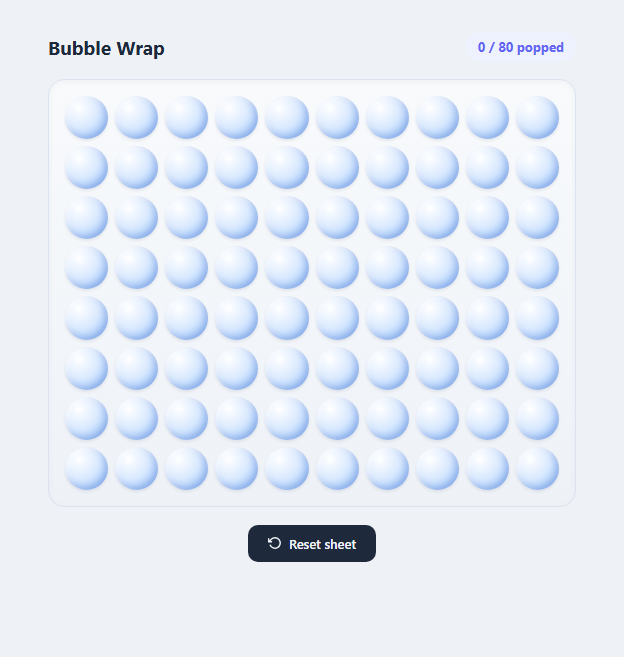
Real bubble wrap is oddly satisfying to pop because it combines three sensory cues at once: a visible pressure change, a physical squash, and a sharp little sound. This snippet reconstructs all three in the browser with an 8x10 grid of 80 individually poppable bubbles, each one a plain div rendered as a raised plastic dome using layered CSS box-shadow and radial-gradient, and permanently flattened once popped so the sheet fills up exactly like the real thing.
Making a flat div look like a raised bubble
Each .bubble is a circle (border-radius: 50% on a square aspect-ratio: 1 element inside a CSS grid) whose 3D "puffed up" appearance comes entirely from layered shadows and a gradient, no images involved. The background uses radial-gradient(circle at 32% 28%, #ffffff, #dbeafe 45%, #93c5fd 100%) — the light spot is offset toward the upper-left, mimicking a light source hitting a convex dome. Two inset shadows reinforce the illusion: a dark inset shadow on the opposite (lower-right) side suggests the shaded underside of the bulge, while a light inset shadow near the highlight corner adds a subtle rim-light. A third, non-inset shadow beneath the whole shape gives it a slight lift off the sheet.
The pop animation
Clicking an unpopped bubble adds a .popping class that runs a single @keyframes popAnim over 280ms: scale drops sharply to 0.72 with a -6deg rotation (the "squash" and a bit of jitter for a tactile, slightly chaotic feel), overshoots back up to 0.9 with a +4deg rotation, and settles at a permanent 0.8 scale. When the animationend event fires, the JS swaps .popping for a persistent .popped class that flips the gradient to flat greys and swaps the shadow to a fully inset, pressed-in look with no more raised highlight — that's what makes a popped bubble read as genuinely "spent" rather than just temporarily squished, and it stays that way since onPop() checks classList.contains('popped') and returns immediately for bubbles that are already flat.
Synthesizing the pop sound with the Web Audio API
Rather than loading an audio file, playPop() builds a tiny two-node graph on demand: an OscillatorNode whose frequency is swept from 520 Hz down to 140 Hz in 90 milliseconds using exponentialRampToValueAtTime, layered with a GainNode envelope that starts at a modest 0.22 and decays to near-silent over 100 milliseconds using the same exponential ramp shape. A falling-pitch, fast-decaying sine burst is a classic, cheap synthesis trick for a soft "thock" or "pop" sound — it's the same principle used for kick-drum and UI-click synthesis, just tuned higher and shorter here to stay gentle rather than loud or jarring. Because it's generated in code, there's no audio file to load and no latency waiting on a network request.
The staggered reset ripple
The "Reset sheet" button doesn't snap every bubble back instantly — resetSheet() iterates the 80 bubbles and staggers each one's re-inflate animation by i * 12 milliseconds using setTimeout, so the sheet visibly refills in a left-to-right, top-to-bottom ripple over roughly one second. Each bubble's .reinflate class plays a bouncy cubic-bezier(0.34, 1.56, 0.64, 1) keyframe that overshoots to 1.12 scale before settling at 1, giving the refill a springy, elastic pop-back feel that mirrors the original pop's overshoot.
Why it works as a stress-relief interaction
The appeal of bubble wrap is that each pop is small, irreversible, low-stakes, and immediately rewarding — you get instant visual, physical, and audible confirmation with zero cognitive load. This snippet's live "X / 80 popped" counter adds a light completionist pull that keeps people popping until the sheet is done, and the reset ripple turns "starting over" into its own small moment of visual satisfaction rather than an abrupt reset.
Build with AI
Build, Understand, Optimize, and Extend It With AI
Paste this snippet's HTML, CSS, and JS into an AI coding assistant like Claude and ask it to explain exactly how the layered radial-gradient and inset box-shadow combination on .bubble creates the illusion of a raised 3D dome using only flat CSS, and how that visual state flips when .popped is applied. It's a great base to extend from there — ask the assistant to add a "pop all" button that triggers every bubble in a fast cascading sequence, a small particle-burst effect on pop using a few absolutely-positioned dots that fly outward and fade, or a persistence layer using localStorage so a partially popped sheet survives a page refresh. You could also ask it to vary the pop sound pitch slightly at random for each bubble so a rapid popping streak sounds less repetitive and more like a real sheet of bubble wrap.
Prompt to recreate it
Copy this into your AI assistant of choice to build the effect from scratch, or as a jumping-off point for your own variant:
Build an interactive bubble wrap popping toy in plain HTML, CSS, and JavaScript — an 8x10 grid of 80 poppable bubbles, no external libraries or images.

Requirements:
- Render each bubble as a div styled with CSS gradients and box-shadows to look like a raised, convex plastic bubble, arranged in a responsive grid.
- Clicking or tapping an unpopped bubble must play a short squash-and-settle animation (quick scale-down with a slight rotation jitter, then settle smaller) and permanently switch it to a visually distinct "popped/flat" state that cannot be re-popped or re-inflated by clicking again.
- Trigger a brief, quiet synthesized "pop" sound effect using the Web Audio API on every successful pop — no audio files.
- Maintain and display a live "X / 80 popped" counter that updates the instant a bubble is popped.
- Add a "Reset sheet" button that re-inflates every popped bubble back to its raised state, staggered across the grid so it visibly ripples/refills rather than snapping back all at once instantly.
- Ensure clicking an already-popped bubble is a safe no-op and does not increment the counter or replay the pop animation or sound.
- Keep the whole thing dependency-free and performant even while rapidly popping many bubbles in a row.
Want to tighten it up first? Run this prompt through the AI Prompt Studio to score it across 8 quality dimensions, catch anti-patterns, and tune the wording for Claude, ChatGPT, or Gemini before you paste it in.
Step by step
How to Use
- 1Pop a bubbleClick or tap any raised bubble to pop it. The bubble briefly squashes and jitters via the .popping animation class, plays a short synthesized pop sound through playPop(), and then permanently settles into the flat .popped visual state — clicking an already-popped bubble does nothing.
- 2Watch the live counterThe header counter reads directly from the poppedCount variable, which increments by one inside onPop() every time a fresh bubble is popped. It is updated synchronously with the click, before the animation even finishes, so the number always matches reality immediately.
- 3Reset the whole sheetClick "Reset sheet" to run resetSheet(), which walks every bubble and, for any currently in the .popped state, removes that class and adds .reinflate with a setTimeout delay of i * 12ms per bubble index — producing the staggered ripple refill rather than an instant snap-back.
- 4Change the grid sizeEdit the ROWS and COLS constants at the top of the JS panel (default 8 x 10 = 80) and update grid-template-columns: repeat(10, 1fr) in the CSS to match your new COLS value, then update the "/ 80" text in the HTML header to reflect the new TOTAL.
- 5Tune the pop soundIn playPop(), adjust the frequency sweep (osc.frequency.setValueAtTime(520, now) down to exponentialRampToValueAtTime(140, now + 0.09)) for a higher, lighter or lower, deeper pop, and change the gain.gain starting value (0.22) to make pops louder or quieter relative to your page.
- 6Export and add to your projectClick HTML to download a standalone file, or JSX for a React component. In React, replace the imperative buildSheet()/onPop() DOM manipulation with a poppedIndices state array (e.g. a Set) and derive each bubble's className from whether its index is in that set, keeping the same animation classes and timing.
Real-world uses
Common Use Cases
Got questions?
Frequently Asked Questions
onPop() checks classList.contains('popped') at the very top and returns immediately if it is true, so clicks on an already-popped bubble are simply ignored. This intentionally mirrors real bubble wrap, where a popped bubble cannot be re-inflated by hand — the only way back is the deliberate "Reset sheet" action, which is what makes finishing a whole sheet feel like a real accomplishment.
playPop() creates a fresh OscillatorNode and GainNode for every pop: the oscillator's frequency sweeps from 520 Hz down to 140 Hz over 90ms using exponentialRampToValueAtTime, while the gain envelope starts at 0.22 and decays to near-zero over 100ms with the same exponential ramp shape. A fast falling-pitch tone with a quick decay reads as a soft "pop" or "thock" — the same lightweight synthesis trick used for many UI click and notification sounds, avoiding any network request or file size cost.
resetSheet() delays each bubble's re-inflation by i * 12 milliseconds, where i is its index in the grid, so bubble 0 flips almost immediately and bubble 79 flips roughly 950ms later — producing a visible left-to-right, top-to-bottom ripple across the sheet. An instant reset (all 80 bubbles changing in the same frame) is far less satisfying to watch and loses the tactile, sequential feel that makes the pop-and-refill loop enjoyable.
Yes — change the addEventListener('click', onPop) call in buildSheet() to addEventListener('mouseenter', onPop), which lets users pop a whole row by dragging their cursor across it. Keep the classList.contains('popped') guard in place so hovering an already-popped bubble is still a no-op, and consider adding a matching touchmove-based handler for a similar swipe-to-pop effect on touch devices.
Yes, because getCtx() only creates or resumes the shared AudioContext inside a real click event handler, satisfying every major browser's requirement that audio contexts originate from a direct user gesture. There is no autoplay on page load, so no permission or interaction warning is ever triggered.