

Learn Coding Visually
Learn to code with interactive, live-preview playgrounds — HTML, CSS, JavaScript, React & more.
 HTML Playground42 lessons · Click-based · Live preview
 CSS PlaygroundLearn CSS with a live editor
 JavaScript Playground60 lessons · DOM · Async · Canvas
 React PlaygroundLearn React with a live code editor
 GSAP PlaygroundLearn GSAP animation interactively
 SVG Playground44 lessons · shapes · paths · animation
 SCSS Playground45 lessons · Sass modules · tokens
 Tailwind PlaygroundLearn Tailwind CSS with a live editor
 Bootstrap 5 Playground50 lessons · live preview
Virtual Piano Keyboard — Free HTML CSS JS Snippet
Virtual Piano Keyboard · Buttons · Plain HTML, CSS & JS · Live preview
What's included
Features
About this UI Snippet
Virtual Piano Keyboard — Web Audio Oscillator Synthesis with CSS-Positioned Black Keys
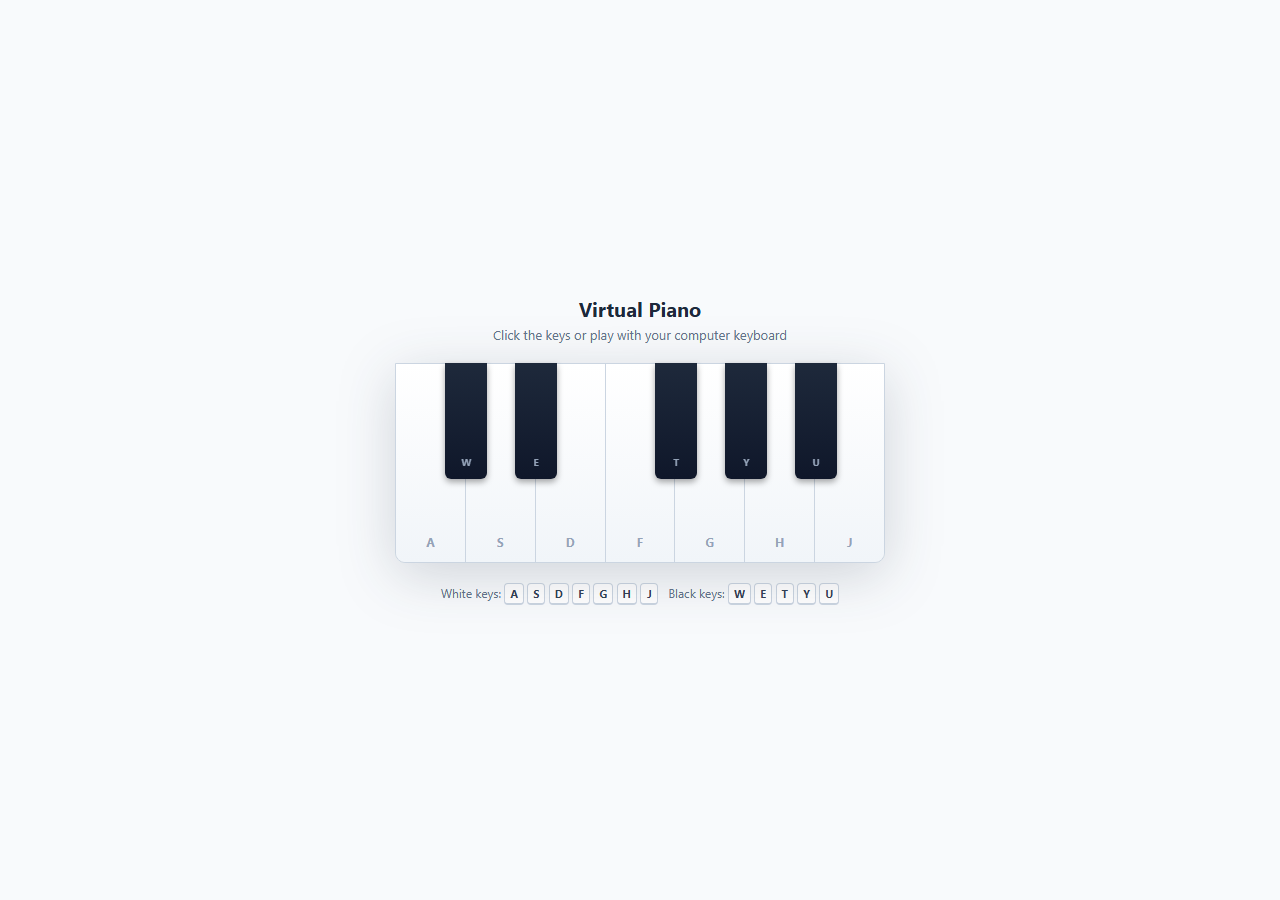
Most "piano" demos on the web are static images or, at best, buttons that toggle a colour with no actual sound. This snippet is a genuine playable instrument: seven white keys and five black keys spanning one octave (C4 through C5), each producing a real musical tone generated live in the browser via the Web Audio API — no audio files, no samples, no external libraries.
How the keyboard layout is built in pure CSS
A real piano's black keys don't sit between white keys edge to edge — they overlap, floating above the boundary between two adjacent white keys, and two of the seven white-key gaps (E-F and B-C) have no black key at all. This snippet reproduces that exactly. The white keys are a simple display: flex row where each .key.white takes an equal flex: 1 share of the container. The black keys live in a separate .black-keys layer with position: absolute; top: 0; height: 58%, and each individual black key is positioned with an explicit left percentage computed from the white-key grid: for seven equal keys each spanning 100/7 ≈ 14.29% of the width, a black key sitting on the boundary after white key index i is centred at (i+1) * 14.29% - halfBlackWidth. That arithmetic is baked into the five left values in the HTML (10.29%, 24.57%, 53.14%, 67.43%, 81.71%), which is why C#, D#, F#, G#, and A# land in exactly the right visual gaps and the E-F / B-C gaps stay open, matching a real keyboard.
How the sound is actually synthesized
Every key press calls noteOn(note, freq, keyEl), which lazily creates a single shared AudioContext (browsers require it to originate from a user gesture, so it's only instantiated on first interaction and resumed if suspended). For each note it builds an OscillatorNode set to type: 'triangle' — a triangle wave gives a softer, more piano-like timbre than the harsh default sine or buzzy square/sawtooth — tuned to the note's real equal-tempered frequency (C4 = 261.63 Hz, up through B4 = 493.88 Hz, using standard concert pitch where A4 = 440 Hz). The oscillator is routed through a dedicated GainNode that implements a simple attack/sustain envelope: gain.gain.linearRampToValueAtTime(0.32, now + 0.02) ramps volume up over 20 ms to avoid the sharp audible "click" a hard setValueAtTime jump would cause, then exponentialRampToValueAtTime(0.16, now + 0.35) eases into a sustain level so held notes don't stay at full volume indefinitely. Releasing the key (mouseup, touchend, or keyup) calls noteOff, which ramps gain down to near-zero over 400 ms with another linearRampToValueAtTime before calling osc.stop(), producing a natural decay instead of an abrupt cutoff.
Why this is genuinely educational
This snippet is a compact demonstration of three separate front-end skills at once: percentage-based absolute positioning to reconstruct a real-world physical layout in CSS, the Web Audio node graph (oscillator → gain → destination) as the standard pattern for programmatic sound synthesis, and dual input handling that keeps mouse, touch, and keyboard interactions perfectly in sync through a single shared active note-tracking object keyed by note name — which also elegantly solves the "don't retrigger a note that's already sounding" problem when a held keyboard key fires repeated keydown events.
Why it's fun to play with
Because every note is a real, correctly-tuned pitch rather than a placeholder beep, you can actually play recognisable melodies on it — and the pressed-key animation (a colour shift plus a 3px translateY "dip" with an inset shadow to simulate the key physically depressing) gives the same tactile feedback loop that makes real electronic keyboards satisfying to noodle on.
Build with AI
Build, Understand, Optimize, and Extend It With AI
Paste this snippet's HTML, CSS, and JS into an AI coding assistant like Claude and ask it to trace exactly how noteOn() and noteOff() build and tear down the oscillator/gain node graph for a single key press, and why the gain envelope uses a linear ramp for attack but a mix of exponential and linear ramps for decay. It's also a great starting point to ask the assistant to extend: request a second full octave with correctly recalculated black-key positioning percentages, a sustain pedal toggle that keeps notes ringing after keyup, or a simple recording feature that logs each noteOn call's timestamp and note name so a melody can be played back later. You could also ask it to add a visual waveform or frequency-spectrum display using an AnalyserNode tapped off the shared audio graph, which is a natural next step once the oscillator routing is understood.
Prompt to recreate it
Copy this into your AI assistant of choice to build the effect from scratch, or as a jumping-off point for your own variant:
Build a playable one-octave virtual piano in plain HTML, CSS, and JavaScript using the Web Audio API for real synthesized tones — no audio files or external libraries.

Requirements:
- Seven white keys (C D E F G A B) laid out with CSS flexbox, and five black keys (C# D# F# G# A#) absolutely positioned to overlap the correct boundaries between white keys, leaving no black key between E-F and B-C exactly like a real piano.
- Each key must be playable by mouse/touch (press and release) AND by a mapped computer keyboard letter, with the mapped letter shown as a small visible label on the key.
- Pressing a key must create an OscillatorNode tuned to that note's real equal-tempered frequency in Hz, routed through a GainNode with a fast linear attack ramp and a slower decay/release ramp on key-up, so notes never click or cut off abruptly.
- Holding a keyboard key down must sustain the note without retriggering on the browser's automatic key-repeat events, and releasing it must stop the note cleanly.
- Multiple keys pressed at once (mouse plus keyboard, or several keydown events) must be able to sound together as a chord, each with its own independent oscillator.
- Give pressed keys a clear visual "depressed" state (color change plus a small downward shift) that is removed exactly when the note stops.
- Handle the edge case where the browser window loses focus while a key is still held down, ensuring no note gets stuck playing forever.
Want to tighten it up first? Run this prompt through the AI Prompt Studio to score it across 8 quality dimensions, catch anti-patterns, and tune the wording for Claude, ChatGPT, or Gemini before you paste it in.
Source Code
<div class="piano-wrap">
<div class="piano-header">
<h2>Virtual Piano</h2>
<p>Click the keys or play with your computer keyboard</p>
</div>
<div class="piano" id="piano">
<div class="white-keys">
<div class="key white" data-note="C4" data-freq="261.63" data-key="a"><span class="label">A</span></div>
<div class="key white" data-note="D4" data-freq="293.66" data-key="s"><span class="label">S</span></div>
<div class="key white" data-note="E4" data-freq="329.63" data-key="d"><span class="label">D</span></div>
<div class="key white" data-note="F4" data-freq="349.23" data-key="f"><span class="label">F</span></div>
<div class="key white" data-note="G4" data-freq="392.00" data-key="g"><span class="label">G</span></div>
<div class="key white" data-note="A4" data-freq="440.00" data-key="h"><span class="label">H</span></div>
<div class="key white" data-note="B4" data-freq="493.88" data-key="j"><span class="label">J</span></div>
</div>
<div class="black-keys">
<div class="key black" data-note="C#4" data-freq="277.18" data-key="w" style="left:10.29%"><span class="label">W</span></div>
<div class="key black" data-note="D#4" data-freq="311.13" data-key="e" style="left:24.57%"><span class="label">E</span></div>
<div class="key black" data-note="F#4" data-freq="369.99" data-key="t" style="left:53.14%"><span class="label">T</span></div>
<div class="key black" data-note="G#4" data-freq="415.30" data-key="y" style="left:67.43%"><span class="label">Y</span></div>
<div class="key black" data-note="A#4" data-freq="466.16" data-key="u" style="left:81.71%"><span class="label">U</span></div>
</div>
</div>
<p class="hint">White keys: <kbd>A</kbd> <kbd>S</kbd> <kbd>D</kbd> <kbd>F</kbd> <kbd>G</kbd> <kbd>H</kbd> <kbd>J</kbd> Black keys: <kbd>W</kbd> <kbd>E</kbd> <kbd>T</kbd> <kbd>Y</kbd> <kbd>U</kbd></p>
</div>* { box-sizing: border-box; margin: 0; padding: 0; }
body { font-family: system-ui, sans-serif; background: #f8fafc; min-height: 100vh; }
.piano-wrap { display: flex; flex-direction: column; align-items: center; justify-content: center; min-height: 100vh; gap: 20px; padding: 32px 16px; }
.piano-header { text-align: center; }
.piano-header h2 { font-size: 20px; font-weight: 700; color: #1e293b; margin-bottom: 4px; }
.piano-header p { font-size: 13px; color: #64748b; }
.piano {
position: relative;
width: 490px; max-width: 94vw;
height: 200px;
user-select: none;
filter: drop-shadow(0 12px 28px rgba(30,41,59,0.18));
}
.white-keys {
display: flex;
width: 100%; height: 100%;
border-radius: 0 0 10px 10px;
overflow: hidden;
border: 1px solid #cbd5e1;
}
.key.white {
flex: 1;
background: linear-gradient(#ffffff, #f1f5f9);
border-right: 1px solid #cbd5e1;
display: flex; align-items: flex-end; justify-content: center;
padding-bottom: 12px;
cursor: pointer;
transition: background 0.08s, transform 0.08s, box-shadow 0.08s;
}
.key.white:last-child { border-right: none; }
.key.white .label { font-size: 12px; font-weight: 700; color: #94a3b8; pointer-events: none; }
.key.white.active {
background: linear-gradient(#e0e7ff, #c7d2fe);
transform: translateY(3px);
box-shadow: inset 0 6px 10px rgba(30,41,59,0.18);
}
.key.white.active .label { color: #4f46e5; }
.black-keys {
position: absolute; top: 0; left: 0;
width: 100%; height: 58%;
pointer-events: none;
}
.key.black {
position: absolute; top: 0;
width: 8.5%; height: 100%;
background: linear-gradient(#1e293b, #0f172a);
border-radius: 0 0 6px 6px;
pointer-events: all;
display: flex; align-items: flex-end; justify-content: center;
padding-bottom: 10px;
cursor: pointer;
box-shadow: 0 3px 6px rgba(0,0,0,0.35);
transition: background 0.08s, transform 0.08s;
z-index: 2;
}
.key.black .label { font-size: 10px; font-weight: 700; color: #94a3b8; pointer-events: none; }
.key.black.active {
background: linear-gradient(#4338ca, #3730a3);
transform: translateY(3px);
}
.key.black.active .label { color: #e0e7ff; }
.hint { font-size: 12px; color: #64748b; text-align: center; }
.hint kbd {
display: inline-block; min-width: 18px; padding: 2px 5px;
background: #fff; border: 1px solid #cbd5e1; border-bottom-width: 2px;
border-radius: 4px; font-size: 11px; font-weight: 700; color: #334155;
font-family: inherit;
}let audioCtx = null;
const active = {};
function getCtx() {
if (!audioCtx) {
audioCtx = new (window.AudioContext || window.webkitAudioContext)();
}
if (audioCtx.state === 'suspended') audioCtx.resume();
return audioCtx;
}
function noteOn(note, freq, keyEl) {
if (active[note]) return;
const ctx = getCtx();
const osc = ctx.createOscillator();
const gain = ctx.createGain();
osc.type = 'triangle';
osc.frequency.value = freq;
gain.gain.setValueAtTime(0.0001, ctx.currentTime);
gain.gain.linearRampToValueAtTime(0.32, ctx.currentTime + 0.02);
gain.gain.exponentialRampToValueAtTime(0.16, ctx.currentTime + 0.35);
osc.connect(gain).connect(ctx.destination);
osc.start();
active[note] = { osc, gain };
if (keyEl) keyEl.classList.add('active');
}
function noteOff(note, keyEl) {
const a = active[note];
if (!a) return;
const ctx = getCtx();
const now = ctx.currentTime;
a.gain.gain.cancelScheduledValues(now);
a.gain.gain.setValueAtTime(a.gain.gain.value, now);
a.gain.gain.linearRampToValueAtTime(0.0001, now + 0.4);
a.osc.stop(now + 0.45);
delete active[note];
if (keyEl) keyEl.classList.remove('active');
}
const keyEls = Array.from(document.querySelectorAll('.key'));
const keyByLetter = {};
keyEls.forEach(el => {
const note = el.dataset.note;
const freq = parseFloat(el.dataset.freq);
const letter = el.dataset.key;
keyByLetter[letter] = { el, note, freq };
const press = (e) => { e.preventDefault(); noteOn(note, freq, el); };
const release = (e) => { e.preventDefault(); noteOff(note, el); };
el.addEventListener('mousedown', press);
el.addEventListener('mouseup', release);
el.addEventListener('mouseleave', release);
el.addEventListener('touchstart', press, { passive: false });
el.addEventListener('touchend', release);
el.addEventListener('touchcancel', release);
});
document.addEventListener('keydown', (e) => {
if (e.repeat) return;
const k = keyByLetter[e.key.toLowerCase()];
if (k) noteOn(k.note, k.freq, k.el);
});
document.addEventListener('keyup', (e) => {
const k = keyByLetter[e.key.toLowerCase()];
if (k) noteOff(k.note, k.el);
});
window.addEventListener('blur', () => {
Object.keys(active).forEach(note => {
const k = keyEls.find(el => el.dataset.note === note);
noteOff(note, k);
});
});Step by step
How to Use
- 1Play a note with your mouse or fingerClick and hold any white or black key to sound its note — the key visually dips down and changes colour while the tone plays. Release the mouse or lift your finger (mouseup, touchend) to stop the note, which triggers the gain envelope's release ramp in noteOff().
- 2Play with your computer keyboardPress A S D F G H J for the seven white keys (C D E F G A B) and W E T Y U for the five black keys (C# D# F# G# A#), matching the small letter labels printed on each key. Holding a key down sustains the note; the e.repeat check in the keydown listener prevents the browser's key-repeat events from re-triggering noteOn() and cutting off the sustain.
- 3Understand the frequency valuesEach key element carries a data-freq attribute with its real equal-tempered frequency in Hz (e.g. data-freq="261.63" for C4). These come from the standard 12-tone equal temperament formula freq = 440 * 2^((n-49)/12), where n is the key's position on an 88-key piano and 440 Hz is A4 — you can verify any value by running that formula for the corresponding key number.
- 4Change the timbre or extend the rangeIn the JS panel, change osc.type from 'triangle' to 'sine' for a purer, softer tone, 'sawtooth' for a brighter synth-lead sound, or 'square' for a retro chiptune feel. To add a second octave, duplicate the .key.white and .key.black HTML blocks with new data-note and data-freq values (C5 = 523.25 Hz onward) and extend the black-key left percentages using the same (i+1)*14.29%-halfWidth formula.
- 5Add a visible note name displayAdd a <div id="now-playing"> above the piano, and inside noteOn() set now-playing.textContent = note.replace('4', '') to show which note is currently sounding. This is useful if you want to turn the piano into a simple ear-training or note-recognition tool.
- 6Export and add to your projectClick HTML to download a standalone file, or JSX to get a React component. In React, wrap the AudioContext creation in a ref (useRef(null)) instead of a module-level variable so it survives re-renders correctly, and initialise it lazily inside the first user-gesture handler exactly as this snippet does, since browsers block audio contexts created before any interaction.
Real-world uses
Common Use Cases
Got questions?
Frequently Asked Questions
Browsers require an AudioContext to be created or resumed inside a direct user-gesture handler (click, touch, or keydown), which is why getCtx() lazily instantiates the context on the very first noteOn() call rather than at page load, and calls audioCtx.resume() if the browser auto-suspended it. If you still hear nothing, check that your browser tab isn't muted and that the system output volume is up — some browsers also block autoplay-adjacent audio contexts until a click occurs anywhere on the page first.
They use standard 12-tone equal temperament: freq = 440 * 2^((n-49)/12), where 440 Hz is the reference pitch A4 and n is the note's position on a standard 88-key piano (A4 is key 49). Plugging in n for C4 through B4 yields the exact values baked into each key's data-freq attribute (261.63 Hz through 493.88 Hz), which is the same tuning system used by every standard acoustic and digital piano.
Yes — duplicate the .key.white and .key.black blocks in the HTML with new note names, frequencies (multiply or divide by 2 to shift a full octave, e.g. C5 = 523.25 Hz), and keyboard letters, then extend .white-keys to hold more flex items and recompute the black-key left percentages using 100/totalWhiteKeys per key width. The JS requires no changes since it reads data-note, data-freq, and data-key generically from whatever elements exist.
A pure sine wave sounds like a plain electronic tone with no harmonic content, while a triangle wave has odd harmonics that roll off quickly, giving it a softer, slightly richer character closer to an acoustic instrument without the buzzy edge of a sawtooth or square wave. It's a common quick approximation used in simple synthesizers when a full sampled piano isn't available.
Yes — each note gets its own independent OscillatorNode and GainNode routed to the same AudioContext destination, so pressing several keys simultaneously (with a mouse plus keyboard, or multiple simultaneous keydown events) mixes all of their signals together automatically, which is exactly how you would play a chord on this virtual keyboard.