
Learn Coding Visually
Learn to code with interactive, live-preview playgrounds — HTML, CSS, JavaScript, React & more.
 HTML Playground42 lessons · Click-based · Live preview
 CSS PlaygroundLearn CSS with a live editor
 JavaScript Playground60 lessons · DOM · Async · Canvas
 React PlaygroundLearn React with a live code editor
 GSAP PlaygroundLearn GSAP animation interactively
 SVG Playground44 lessons · shapes · paths · animation
 SCSS Playground45 lessons · Sass modules · tokens
 Tailwind PlaygroundLearn Tailwind CSS with a live editor
 Bootstrap 5 Playground50 lessons · live preview
Simple Tone Synth Pad — Free HTML CSS JS Snippet
Simple Tone Synth Pad · Misc · Plain HTML, CSS & JS · Live preview
What's included
Features
About this UI Snippet
Simple Tone Synth Pad — Playable Note Grid With Web Audio API
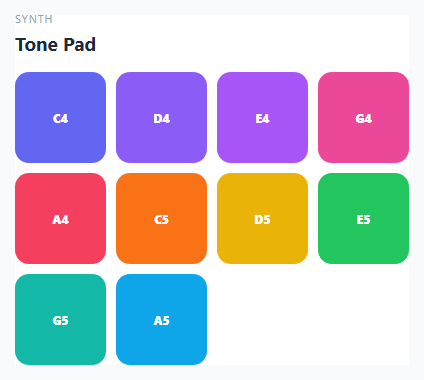
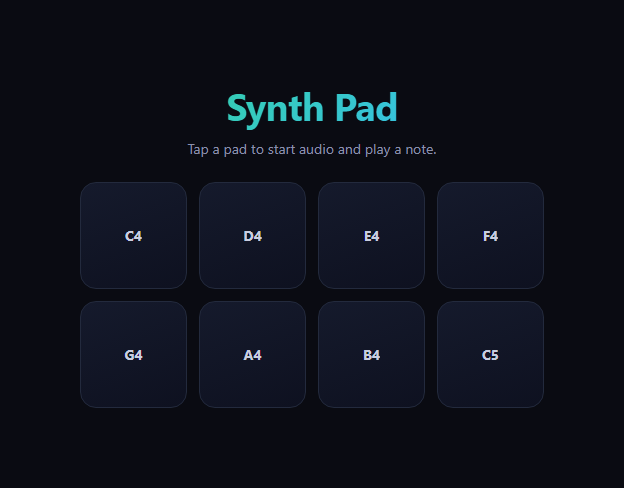
This snippet turns a grid of colored buttons into a playable mini-instrument. Each pad is mapped to a note in a C major scale, and clicking or tapping it triggers a freshly synthesized, percussive tone via the Web Audio API — no samples, no audio files, just oscillators and a shaped volume envelope.
A note per pad
The NOTES array pairs ten notes across an octave and a bit (C4 through A5) with their exact frequencies in Hz and a distinct accent color. Each pad in the grid is generated from this array rather than hand-written in the markup, so adding, removing, or retuning notes only requires editing one array.
Making a plucked sound out of a sustained oscillator
An OscillatorNode by itself produces a constant tone for as long as it runs — it doesn't naturally sound "plucked." The percussive character comes entirely from the GainNode envelope in playNote(): gain jumps up almost instantly with an exponential ramp (a fast attack), then decays back down over half a second with a second exponential ramp (the decay), which is what makes a continuous tone read as a short, struck note rather than a held drone.
A fresh oscillator per hit
Every pad press calls playNote() again, which creates a brand new OscillatorNode and GainNode, starts them, and schedules the oscillator to stop shortly after the envelope finishes. This means multiple pads (or the same pad tapped repeatedly) can overlap and sound simultaneously, exactly like a real synth pad controller, since each note lives in its own independent node graph rather than sharing one oscillator.
Visual feedback synced to the sound
Each press toggles a .sp-pressed class that scales the pad down and brightens it briefly, giving immediate tactile visual confirmation that lines up with the short, percussive nature of the sound itself.
Build with AI
Build, Understand, Optimize, and Extend It With AI
Hand this snippet's HTML, CSS, and JavaScript to an AI coding assistant like Claude and ask it to adapt "Simple Tone Synth Pad" to your project — restyle it to match your design system, wire it up to real data instead of the static example, or port it to the framework you're building in.
Prompt to recreate it
Copy this into your AI assistant of choice to build the effect from scratch, or as a jumping-off point for your own variant:
Build a misc component called "Simple Tone Synth Pad" using plain HTML, CSS, and vanilla JavaScript — no framework, no build step.

Requirements:
- Match the structure and behavior of the "Simple Tone Synth Pad" snippet from the UI Snippets Library.
- Keep the markup semantic and the styling self-contained (no external dependencies beyond what the original snippet uses).
- Keep the JavaScript vanilla, with no framework runtime required.
- Make it easy to restyle via CSS custom properties or class overrides so it can be dropped into a real project.
Want to tighten it up first? Run this prompt through the AI Prompt Studio to score it across 8 quality dimensions, catch anti-patterns, and tune the wording for Claude, ChatGPT, or Gemini before you paste it in.
Source Code
<div class="sp-card">
  <div class="sp-head">
    <span class="sp-eyebrow">Synth</span>
    <h2>Tone Pad</h2>
  </div>
  <div class="sp-grid" id="spGrid"></div>
</div>*{box-sizing:border-box}
body{font-family:system-ui,-apple-system,sans-serif;background:#f8fafc;min-height:100vh;display:flex;align-items:center;justify-content:center;padding:24px}
.sp-card{font-family:system-ui,-apple-system,sans-serif;background:#fff;color:#1e293b;border:1px solid #e2e8f0;border-radius:18px;padding:22px;max-width:440px;width:100%;margin:0 auto;box-shadow:0 12px 30px rgba(30,41,59,0.06)}
.sp-head{margin-bottom:16px}
.sp-eyebrow{display:block;font-size:11px;letter-spacing:.08em;text-transform:uppercase;color:#94a3b8;margin-bottom:4px}
.sp-head h2{font-size:19px;margin:0}
.sp-grid{display:grid;grid-template-columns:repeat(4,1fr);gap:10px}
.sp-pad{aspect-ratio:1;border:none;border-radius:14px;cursor:pointer;font-size:12px;font-weight:800;color:#fff;display:flex;align-items:center;justify-content:center;transition:transform .08s;user-select:none;font-family:inherit}
.sp-pad:active,.sp-pad.sp-pressed{transform:scale(.9)}
.sp-pad.sp-pressed{filter:brightness(1.3)}var NOTES = [
{ name: 'C4', freq: 261.63, color: '#6366f1' },
{ name: 'D4', freq: 293.66, color: '#8b5cf6' },
{ name: 'E4', freq: 329.63, color: '#a855f7' },
{ name: 'G4', freq: 392.0, color: '#ec4899' },
{ name: 'A4', freq: 440.0, color: '#f43f5e' },
{ name: 'C5', freq: 523.25, color: '#f97316' },
{ name: 'D5', freq: 587.33, color: '#eab308' },
{ name: 'E5', freq: 659.25, color: '#22c55e' },
{ name: 'G5', freq: 783.99, color: '#14b8a6' },
{ name: 'A5', freq: 880.0, color: '#0ea5e9' },
];
var grid = document.getElementById('spGrid');
var audioCtx = null;
function getCtx() {
if (!audioCtx) {
audioCtx = new (window.AudioContext || window.webkitAudioContext)();
}
return audioCtx;
}
function playNote(freq) {
var ctx = getCtx();
var osc = ctx.createOscillator();
var gain = ctx.createGain();
osc.type = 'triangle';
osc.frequency.value = freq;
var now = ctx.currentTime;
gain.gain.setValueAtTime(0.0001, now);
gain.gain.exponentialRampToValueAtTime(0.3, now + 0.008);
gain.gain.exponentialRampToValueAtTime(0.0001, now + 0.5);
osc.connect(gain);
gain.connect(ctx.destination);
osc.start(now);
osc.stop(now + 0.55);
}
NOTES.forEach(function (note) {
var pad = document.createElement('button');
pad.className = 'sp-pad';
pad.style.background = note.color;
pad.textContent = note.name;
pad.setAttribute('aria-label', 'Play ' + note.name);
function trigger() {
playNote(note.freq);
pad.classList.add('sp-pressed');
setTimeout(function () {
pad.classList.remove('sp-pressed');
}, 140);
}
pad.addEventListener('mousedown', trigger);
pad.addEventListener('touchstart', function (e) {
e.preventDefault();
trigger();
}, { passive: false });
grid.appendChild(pad);
});Step by step
How to Use
- 1Load the snippetClick "Simple Tone Synth Pad" in the sidebar to load its HTML, CSS, and JS into the editor panels. The preview updates instantly.
- 2Edit the codeModify any panel — HTML, CSS, or JS. The preview refreshes as you type. Use Reset in each panel header to restore the original.
- 3Preview on devicesClick the Mobile (375px), Tablet (768px), or Desktop buttons in the preview header to check responsiveness.
- 4Export in your formatClick "HTML" to download a standalone file, "JSX" for a React component, "Tailwind" for a React + Tailwind CSS component, "Tailwind HTML" for a standalone HTML file with Tailwind CDN, "Vue" for a Vue 3 SFC with <template>/<script setup>/<style scoped>, or "Angular" for a standalone Angular .component.ts file. "Copy all" copies the full code to clipboard.
- 5Save your versionClick "Save as", type a name, and press Enter. Your snippet saves to IndexedDB and appears in the Saved tab.
Real-world uses
Common Use Cases
Got questions?
Frequently Asked Questions
Yes. Each press creates an entirely new OscillatorNode and GainNode pair, so pressing multiple pads in quick succession, or even the same pad rapidly, produces overlapping, independent notes rather than cutting each other off.
The GainNode envelope in playNote() ramps volume up almost instantly and then decays it exponentially over about half a second. That shape — fast attack, quick decay — is what makes a plain oscillator tone perceptually read as a short plucked note.
Edit the NOTES array — add, remove, or retune any {name, freq, color} entry, and the grid, click handlers, and pad rendering all update automatically since the pads are generated from that array.