You Might Also Like
Learn Coding Visually
Learn to code with interactive, live-preview playgrounds — HTML, CSS, JavaScript, React & more.
 HTML Playground42 lessons · Click-based · Live preview
 CSS PlaygroundLearn CSS with a live editor
 JavaScript Playground60 lessons · DOM · Async · Canvas
 React PlaygroundLearn React with a live code editor
 GSAP PlaygroundLearn GSAP animation interactively
 SVG Playground44 lessons · shapes · paths · animation
 SCSS Playground45 lessons · Sass modules · tokens
 Tailwind PlaygroundLearn Tailwind CSS with a live editor
 Bootstrap 5 Playground50 lessons · live preview
Tone.js Synth Pad — Free Web Audio Note Grid Snippet
Tone.js Synth Pad · Animations · Plain HTML, CSS & JS · Live preview
What's included
Features
About this UI Snippet
Tone.js Synth Pad — Click-to-Play Notes With Correct Autoplay Handling
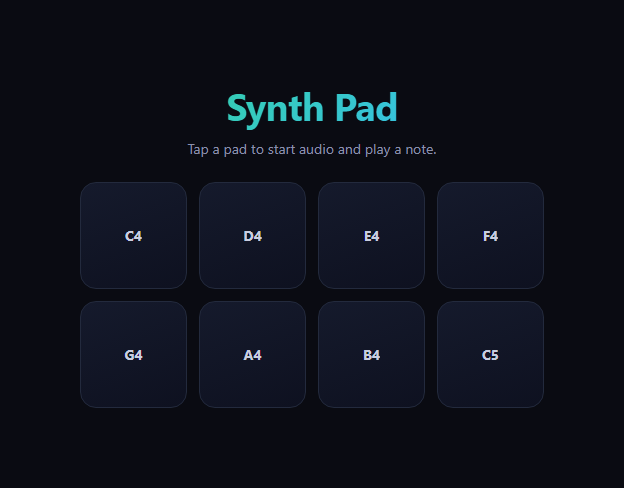
Tone.js wraps the Web Audio API in a musician-friendly API — synths, envelopes, effects, and scheduling — so a click-to-play instrument doesn't require hand-building an oscillator graph. This snippet is a small eight-pad grid, each pad mapped to a note in a C major scale, where pressing a pad calls synth.triggerAttackRelease(note, '8n') and flashes a glow so the interaction reads clearly even with the sound off.
The autoplay rule, handled correctly
Browsers refuse to let audio play until a real user gesture unlocks the page's AudioContext — starting Tone (or any Web Audio graph) on page load simply does nothing silently. This snippet calls await Tone.start() from inside the first pointerdown handler, not from a page-load script, which is the one place browsers reliably honor as a qualifying gesture. A started flag makes sure it only runs once; every pad press after that goes straight to triggerAttackRelease.
One PolySynth, many notes
Rather than creating a synth per pad, a single Tone.PolySynth(Tone.Synth, {...}) handles all eight — PolySynth manages voice allocation internally, so overlapping presses (or a fast double-tap) don't cut each other off. The triangle oscillator and short envelope (fast attack, quick decay, low sustain, moderate release) give each note a soft pluck rather than a harsh buzz or a synth-pad drone.
Visual feedback independent of audio
flash() adds an is-active class for 220ms regardless of whether sound is actually audible (muted tab, no speakers) — a glowing ring and background shift on the CSS side, not tied to any Tone.js callback. That separation matters: the pad always looks pressed, even in edge cases where audio output isn't available.
Where this fits
For animating elements on scroll or hover rather than triggering sound, see scroll reveal grid or interactive hover button; for a celebratory click effect with confetti instead of audio, see confetti button. The pattern of "unlock on first gesture, feed a flag" generalizes to any Web Audio-based interaction, not just Tone.js.
Customizing it
Swap Tone.Synth for Tone.FMSynth/Tone.MembraneSynth for a different timbre, change the note list to a different scale or chord voicing, or route the synth through a Tone.Reverb/Tone.FeedbackDelay before toDestination() for a fuller sound. Change '8n' to a different note duration for longer or shorter notes.
Build with AI
Build, Understand, Optimize, and Extend It With AI
You don't have to guess why a synth sometimes stays silent on first click. Paste this snippet's HTML, CSS, and JS into an AI coding assistant like Claude and ask it to explain exactly why Tone.start() must be called from inside a genuine user gesture handler rather than on page load, and why a single Tone.PolySynth instance is enough to safely handle overlapping notes from multiple pads instead of needing one synth per pad. The same assistant can help you extend it — asking how to route the synth through a Tone.Reverb or Tone.FeedbackDelay before toDestination() for a fuller sound, or how to add keyboard support so pressing letter keys triggers the corresponding pads. It's also useful for exploring Tone.js more broadly: ask it to compare Tone.Synth, Tone.FMSynth, and Tone.MembraneSynth for this same pad grid and explain how their oscillator and envelope differences change the resulting timbre. Treat the code less like a finished artifact and more like a starting point for a conversation.
Prompt to recreate it
Copy this into your AI assistant of choice to build the effect from scratch, or as a jumping-off point for your own variant:
Build a grid of playable synth pads using Tone.js (load it from a CDN), handling the browser's audio autoplay restrictions correctly.

Requirements:
- A grid of at least 8 button elements, each labeled with and mapped to a distinct musical note (for example a C major scale from C4 to C5) via a data attribute.
- Create a single Tone.PolySynth instance (not one synth per pad) configured with a specific oscillator type and a short envelope (fast attack, quick decay, low sustain, moderate release) suited to a plucked note, connected to the audio destination.
- Do not call Tone.start() on page load or outside of a user gesture. Instead, call it (with await, since it returns a promise) the first time any pad is pressed, guarded by a boolean flag so it only actually runs once even though the same handler fires on every press afterward.
- On each pad press (use a pointer event so it works for touch, mouse, and pen), after ensuring audio is started, call the synth's trigger-attack-and-release method with that pad's note and a short duration like an eighth note.
- Add a visual flash — a CSS class toggled on and briefly removed via a timeout — on every pad press regardless of whether audio actually played, so the interaction always gives clear visual feedback even if the browser tab is muted.
- Update a status text element to confirm when audio has started, so it's clear to the user why the first tap might feel different from subsequent ones.
Want to tighten it up first? Run this prompt through the AI Prompt Studio to score it across 8 quality dimensions, catch anti-patterns, and tune the wording for Claude, ChatGPT, or Gemini before you paste it in.
Step by step
How to Use
- 1Add the Tone.js CDNInclude Tone.js from the CDN panel.
- 2Paste HTML, CSS, and JSAn 8-pad grid renders, silent until the first tap.
- 3Tap any padTone.start() unlocks audio; the note plays.
- 4Tap other padsEach plays instantly, no further unlock needed.
- 5Watch the glowEvery press flashes regardless of audio output.
- 6Change the soundSwap Tone.Synth for a different synth type.
Real-world uses
Common Use Cases
Got questions?
Frequently Asked Questions
Browsers enforce an autoplay policy that blocks any AudioContext from producing sound until the user has performed a genuine gesture like a click or tap on the page. Calling Tone.start() (which resolves Tone's shared AudioContext) has to happen inside a real event handler — attempting it on page load or in a setTimeout without a preceding gesture silently fails to unlock audio in most browsers.
Once the AudioContext has been successfully resumed, it stays running for the rest of the page's lifetime — calling Tone.start() again is harmless but unnecessary. The started flag just avoids an extra await on every subsequent press, so notes after the first one trigger with no perceptible delay.
Tone.PolySynth internally manages a pool of voices for a single synth definition, allocating and releasing them as notes are triggered and released. That means one PolySynth instance can play all eight pads' notes, including overlapping ones from a fast double-tap, without needing to manage eight separate synth objects or worry about one note cutting another off.
It combines two steps — starting a note's envelope (attack) and releasing it (release) — into one call with a specified note and duration, here "8n" (an eighth note at the current tempo). That's the right method for a single tap-and-release pad interaction; triggerAttack and triggerRelease as separate calls are more useful when you want a note to sustain for as long as a button stays held down.
No — flash() runs purely by adding and removing a CSS class on a timer, completely independent of Tone.js's playback state or whether the browser tab is muted or has no audio output device. That separation means the pad always gives clear visual confirmation of a press, even in situations where sound isn't actually audible.