You Might Also Like
Learn Coding Visually
Learn to code with interactive, live-preview playgrounds — HTML, CSS, JavaScript, React & more.
 HTML Playground42 lessons · Click-based · Live preview
 CSS PlaygroundLearn CSS with a live editor
 JavaScript Playground60 lessons · DOM · Async · Canvas
 React PlaygroundLearn React with a live code editor
 GSAP PlaygroundLearn GSAP animation interactively
 SVG Playground44 lessons · shapes · paths · animation
 SCSS Playground45 lessons · Sass modules · tokens
 Tailwind PlaygroundLearn Tailwind CSS with a live editor
 Bootstrap 5 Playground50 lessons · live preview
Paper.js Vector Blob — Free Mouse-Reactive Organic Shape Snippet
Paper.js Vector Blob · Animations · Plain HTML, CSS & JS · Live preview
What's included
Features
About this UI Snippet
Paper.js Vector Blob — A Wobbling, Cursor-Reactive Organic Shape
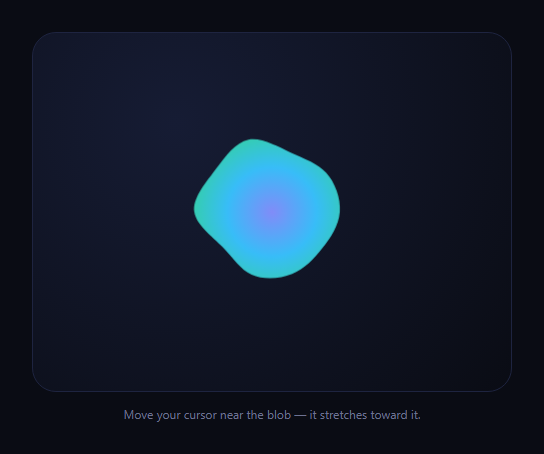
Paper.js is a vector graphics scripting engine for the browser — it gives you a scene graph of Path, Point, and Segment objects with real vector math (.add, .subtract, .normalize, .length) instead of raw canvas pixel pushing. This snippet uses that to build an organic blob: ten points arranged on a circle, each with an independent sine-wave wobble, smoothed into a continuous curve and redrawn every frame via paper.view.onFrame — with the whole shape leaning toward the cursor as it moves nearby.
Points, not a fixed path
Rather than drawing one static Path and animating its transform, this snippet rebuilds the path's segments from scratch every frame. Ten anchor points sit on a circle at even angular intervals, each carrying its own random phase and speed so Math.sin(time * speed + phase) produces a wobble that's never in sync across points — that desynchronization is what makes the blob read as organic rather than a pulsing circle.
Continuous smoothing turns points into curves
After the ten distorted points are added, path.smooth({ type: 'continuous' }) converts the straight-line polygon between them into a smooth, C1-continuous curve — Paper.js computes handle positions automatically so there's no visible corner even where a point moves sharply between frames. This single call is what turns "ten dots on a circle" into a fluid blob shape.
Mouse reactivity via vector subtraction
Each frame, every point's position is compared to an eased mouse position (itself lerped toward the real cursor with .add(...).multiply(0.08) for smoothing) using mouse.subtract(pointPos) to get a direction-and-distance vector. Points within 220px of the cursor get pushed outward along that vector, scaled by proximity — Math.max(0, 1 - dist / 220) * 40 — so the blob stretches toward wherever the cursor lingers and relaxes back when it moves away.
Where this fits
For a mouse-reactive cursor trail rather than a shape distortion, see quickto cursor; for a CSS-only organic shape without vector math, see liquid blob. Paper.js is the right tool specifically when you need real per-point vector operations rather than a CSS filter or SVG morph.
Customizing it
Change POINTS for a smoother (more points) or more angular (fewer points) blob, adjust BASE_RADIUS and wobble amplitude, or swap the gradient fill for a flat color. Increase the 220/40 proximity constants for a more dramatic, longer-reaching cursor pull.
Build with AI
Build, Understand, Optimize, and Extend It With AI
You don't have to trace through Paper.js's Point and Path APIs from the documentation alone. Paste this snippet's HTML, CSS, and JS into an AI coding assistant like Claude and ask it to explain exactly how ten points with independent sine-wave phases get smoothed into a continuous organic outline via path.smooth(), and how the vector subtraction between each point and the eased mouse position produces distance-proportional distortion toward the cursor. The same assistant can help you extend it — asking how to add a second, larger blob layered behind the first for more depth, or how to make the wobble amplitude respond to scroll position instead of staying constant. It's also useful for comparing approaches: ask it to explain the tradeoffs between this canvas/Paper.js technique and an SVG path-morphing or CSS border-radius animation approach like the liquid blob snippet for achieving a similar organic shape. Treat the code less like a finished artifact and more like a starting point for a conversation.
Prompt to recreate it
Copy this into your AI assistant of choice to build the effect from scratch, or as a jumping-off point for your own variant:
Build a wobbling, mouse-reactive organic blob shape using Paper.js (load paper-full.min.js from a CDN, no build step), rendered on a canvas.

Requirements:
- Set up Paper.js against a canvas element and construct a single closed vector Path representing the blob, filled with a radial gradient rather than a flat color.
- Generate the blob from a fixed number of anchor points (at least 8) arranged at even angles around a circle, where each point carries its own randomly assigned phase offset and speed multiplier so their motion is not synchronized.
- On every frame (using the library's own frame-update callback, not a manual requestAnimationFrame loop), recompute each anchor point's radius using a sine wave driven by elapsed time, that point's individual phase and speed, and a base radius — then clear and rebuild the path's points from these newly computed positions.
- After rebuilding the points each frame, call the path's built-in smoothing method with continuous-curve smoothing so the outline reads as a fluid organic shape rather than a faceted polygon connecting straight lines between the points.
- Track the mouse/pointer position via the library's own view-level mouse-move event, and ease the tracked position toward the real cursor position gradually each frame (a simple lerp) rather than using the raw position directly, so the follow feels smooth rather than snapping.
- Before finalizing each point's position within the frame update, compute a vector from that point to the eased mouse position; if the point is within roughly 200-250 pixels of the mouse, offset the point outward along that vector by an amount that increases the closer the point is to the mouse, so the blob visibly stretches toward the cursor rather than the whole shape translating.
Want to tighten it up first? Run this prompt through the AI Prompt Studio to score it across 8 quality dimensions, catch anti-patterns, and tune the wording for Claude, ChatGPT, or Gemini before you paste it in.
Step by step
How to Use
- 1Add the paper.js CDNInclude paper-full.min.js from the CDN panel.
- 2Paste HTML, CSS, and JSA canvas renders with a gradient-filled blob.
- 3Watch it idleThe blob wobbles continuously via per-point sine waves.
- 4Move your cursor near itNearby points stretch outward toward the cursor.
- 5Move awayThe blob relaxes back to its base wobble.
- 6Tune the shapeAdjust POINTS, BASE_RADIUS, and pull constants.
Real-world uses
Common Use Cases
Got questions?
Frequently Asked Questions
The blob's shape itself changes — points wobble at independent rates and distort toward the cursor — not just its position or scale, so a single CSS-style transform can't express it. Rebuilding segments from ten freshly calculated points each frame, then re-smoothing, is how Paper.js redraws a genuinely different outline every tick rather than moving a fixed shape around.
It takes the current straight-line segments (the raw points just added) and computes Bezier handle positions for each one so the resulting curve passes through all the points with continuous (no visible corner) curvature — similar to a Catmull-Rom-style spline. Without calling it, connecting the ten points directly would produce a jagged, faceted polygon instead of a smooth organic outline.
On every frame, each point's position is subtracted from an eased mouse position to get a vector pointing from that point toward the cursor, and its length gives the distance. Points within 220 pixels get moved along that vector by an amount that shrinks linearly with distance (closer points move more), which is why only the part of the blob nearest the cursor visibly stretches rather than the whole shape shifting.
mouse.add(targetMouse.subtract(mouse).multiply(0.08)) moves the tracked position only 8% of the way toward the real cursor each frame, so fast mouse movements produce a smooth trailing pull rather than the blob snapping instantly to match cursor position. That's the same easing technique used for smooth-following cursors and camera-follow effects generally.
If all ten points used the same sine wave, the whole blob would pulse in and out uniformly like a breathing circle rather than looking organic. Giving each point its own random phase offset and slightly different speed means they reach their wobble peaks and troughs at different times, producing the uneven, fluid motion that reads as an organic shape rather than a synchronized pulse.