You Might Also Like
Learn Coding Visually
Learn to code with interactive, live-preview playgrounds — HTML, CSS, JavaScript, React & more.
 HTML Playground42 lessons · Click-based · Live preview
 CSS PlaygroundLearn CSS with a live editor
 JavaScript Playground60 lessons · DOM · Async · Canvas
 React PlaygroundLearn React with a live code editor
 GSAP PlaygroundLearn GSAP animation interactively
 SVG Playground44 lessons · shapes · paths · animation
 SCSS Playground45 lessons · Sass modules · tokens
 Tailwind PlaygroundLearn Tailwind CSS with a live editor
 Bootstrap 5 Playground50 lessons · live preview
GSAP Draggable Inertia — Free Momentum Drag & Snap Snippet
GSAP Draggable Inertia · Animations · Plain HTML, CSS & JS · Live preview
What's included
Features
About this UI Snippet
GSAP Draggable Inertia — Flick-and-Coast Dragging With Bounded Momentum
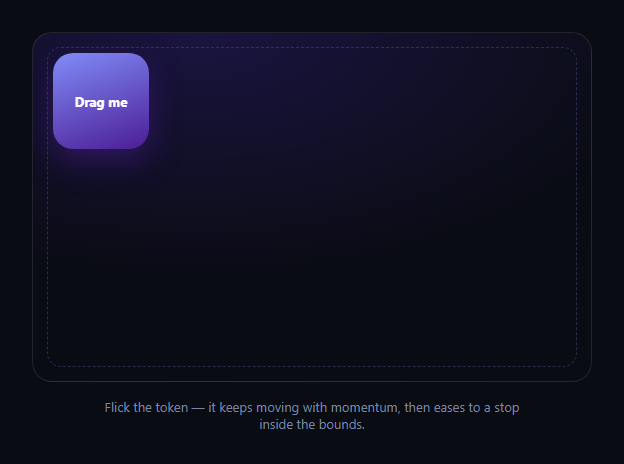
The GSAP Draggable Inertia snippet is the difference between a drag interaction that feels mechanical and one that feels physical — release the token mid-flick and it keeps traveling in the direction and speed you threw it, decelerating naturally instead of stopping dead the instant your pointer lifts. It's built with GSAP's Draggable utility plus the InertiaPlugin, loaded from a CDN, and a single bounded stage element.
Draggable does the pointer work
Draggable.create('#diToken', { type: 'x,y', bounds: '#diStage', ... }) hands off all the pointer and touch tracking — mouse, touch, and pen input are normalized into one API, so the token drags smoothly across desktop and mobile without you writing a single pointermove listener. type: 'x,y' lets it move freely in both axes.
Inertia is the momentum
Setting inertia: true (with InertiaPlugin registered) is what turns a plain drag into a throw. When you release the token while it's still moving, GSAP calculates its velocity at release and continues the motion, decaying it smoothly to zero rather than an abrupt stop — the same feel as flicking a card across a table.
Bounds keep it honest
bounds: '#diStage' constrains both the drag and the inertial coast to the stage element, and edgeResistance: 0.65 adds resistance as the token nears the edge during an active drag, so it feels like it's pushing against a soft wall rather than hitting a hard stop. The coast phase respects the same bounds, so a hard flick toward the edge settles just inside it instead of overshooting.
Feedback on grab and release
onDragStart and onDragEnd callbacks scale the token up slightly and deepen its shadow while held, then relax it back — a small tactile cue that reinforces the drag without interfering with Draggable's own transform handling.
Customizing it
Swap type: 'x,y' for 'x' or 'y' to constrain to one axis, tune edgeResistance for a softer or firmer edge feel, or add onThrowComplete to react once the coast finishes. Pair it with a drag sort list or drag throw notes for a board of independently-flickable items.
Build with AI
Build, Understand, Optimize, and Extend It With AI
Paste this snippet's HTML, CSS, and JS into an AI coding assistant like Claude and ask it to explain how InertiaPlugin derives release velocity from Draggable's pointer history to produce the coast-and-decelerate motion, and why bounds constrains both the active drag and the inertial phase rather than just the drag. The assistant can also help you extend it — ask for multiple independently-throwable tokens with collision avoidance, a snap-to-grid behavior once the coast finishes, or a version that swaps InertiaPlugin for a hand-rolled velocity tracker if licensing is a concern for your project. Treat the code as a starting point to interrogate, not a black box to copy blindly.
Prompt to recreate it
Copy this into your AI assistant of choice to build the effect from scratch, or as a jumping-off point for your own variant:
Build a "draggable inertia" interaction in plain HTML, CSS, and JavaScript using GSAP with its Draggable and InertiaPlugin plugins (load all three from a CDN).

Requirements:
- A bounded stage container and a single draggable token inside it, styled with a gradient background and rounded corners.
- Use Draggable.create with type: 'x,y', bounds set to the stage element (not the viewport), inertia: true, and a moderate edgeResistance so the token resists near the stage edges during an active drag.
- On release, the token must continue moving in the direction and at a speed derived from the drag's release velocity, decelerating smoothly to a stop rather than stopping instantly where the pointer lifted — this is the core inertia behavior, do not fake it with a manual CSS transition.
- The inertial coast must still respect the stage bounds, so a hard flick toward an edge settles just inside the boundary instead of exiting the stage.
- Add onDragStart and onDragEnd callbacks that give the token a subtle scale-up and shadow change while held, reverting on release, without interfering with Draggable's own transform updates.
- Set touch-action: none on the token so touch drags do not trigger page scrolling on mobile.
Want to tighten it up first? Run this prompt through the AI Prompt Studio to score it across 8 quality dimensions, catch anti-patterns, and tune the wording for Claude, ChatGPT, or Gemini before you paste it in.
Step by step
How to Use
- 1Add the GSAP CDNsInclude gsap, Draggable, and InertiaPlugin from the CDN panel.
- 2Paste HTML, CSS, and JSA bounded stage with one draggable token renders.
- 3Drag the tokenIt follows the pointer and resists near the edges.
- 4Flick and releaseIt keeps coasting with momentum, then eases to a stop.
- 5Try a slow drag and releaseWith little velocity, it stops close to where you let go.
- 6Adjust bounds or resistanceChange #diStage or edgeResistance to retune the feel.
Real-world uses
Common Use Cases
Got questions?
Frequently Asked Questions
Plain Draggable stops the element exactly where the pointer releases it. InertiaPlugin calculates the element's velocity at the moment of release and continues its motion, decelerating it smoothly to zero — that's what produces the throw-and-coast feel instead of an abrupt stop.
InertiaPlugin is a Club GreenSock bonus plugin. Recent versions of the public gsap npm/CDN package have bundled it for no-signup use in many contexts, but licensing terms can change and commercial use may require a Club GreenSock membership depending on your use case — check GreenSock's current licensing page before shipping this in a commercial product.
Yes. bounds: '#diStage' constrains both the active drag and the inertial coast, so a hard flick toward an edge decelerates and settles just inside the boundary rather than flying out of the stage.
Yes. Draggable normalizes mouse, touch, and pen input into one API, and touch-action: none on the token stops the browser from interpreting the drag as a page scroll, so flicks register cleanly on mobile.
Render the stage and token, then in a mount effect register Draggable and InertiaPlugin and call Draggable.create scoped to the container. Store the returned Draggable instance and call .kill() in the cleanup function to avoid duplicate instances on re-render or unmount.