You Might Also Like
Learn Coding Visually
Learn to code with interactive, live-preview playgrounds — HTML, CSS, JavaScript, React & more.
 HTML Playground42 lessons · Click-based · Live preview
 CSS PlaygroundLearn CSS with a live editor
 JavaScript Playground60 lessons · DOM · Async · Canvas
 React PlaygroundLearn React with a live code editor
 GSAP PlaygroundLearn GSAP animation interactively
 SVG Playground44 lessons · shapes · paths · animation
 SCSS Playground45 lessons · Sass modules · tokens
 Tailwind PlaygroundLearn Tailwind CSS with a live editor
 Bootstrap 5 Playground50 lessons · live preview
Draggable Throw Notes — Free GSAP Inertia Snippet
Draggable Throw Notes · Cards · Plain HTML, CSS & JS · Live preview
What's included
Features
About this UI Snippet
Draggable Throw Notes — Momentum Dragging With GSAP’s InertiaPlugin
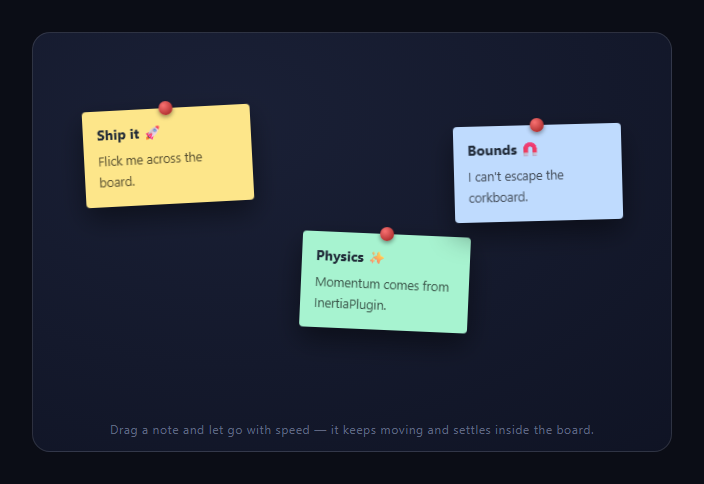
Plain HTML5 drag feels dead: the element stops the instant your pointer does. These sticky notes feel alive — grab one, flick it, and it keeps traveling with realistic momentum before gliding to a stop, always inside the corkboard. That's GSAP's Draggable paired with InertiaPlugin (both free on the CDN since GSAP 3.13), which together replace an entire physics-and-input layer with one Draggable.create() call.
inertia: true is where the physics lives
Draggable continuously tracks pointer velocity while you drag. On release, inertia: true hands that velocity to InertiaPlugin, which computes a natural deceleration curve — how far the note *would* slide given friction — and tweens it there. Crucially, the plugin solves the end position *first*: it knows the note's destination the moment you let go, which is why it can guarantee the landing spot respects bounds instead of clamping mid-flight with an ugly wall-stop.
bounds turns the board into a container, not a cage wall
bounds: '#dtnBoard' constrains both dragging and thrown travel to the board's box. During an over-drag past the edge, edgeResistance: 0.72 makes the note move only ~28% of your pointer's distance — the rubbery tension every native app uses to say "you've hit the edge" — and on release it settles back inside. A thrown note aimed at the edge decelerates to land exactly at the boundary, because InertiaPlugin factored the bounds into its end-point solve.
Grab feedback is choreography, not physics
onPress bumps the note's z-index above its siblings (an incrementing counter, so the most recently touched note always wins) and animates a 1.06 scale with rotation zeroed — the note "lifts off the board" and squares up in your hand. onRelease settles it back down with a fresh random(-4, 4) rotation, so every throw leaves the board looking naturally messy rather than snapping notes back to fixed angles. GSAP's string-based random() makes that one line.
touch-action: none is the mobile linchpin
Each note sets touch-action: none so mobile browsers hand the touch to Draggable instead of scrolling the page — without it, vertical flicks would scroll instead of throw. Draggable normalizes mouse, touch, and pointer events internally, so the one config works everywhere, including the user-select: none needed to stop text selection during fast drags.
Transforms only, so throws stay smooth
Draggable moves elements via x/y transforms (not left/top), so dragging and inertia glides are compositor work. The CSS positions notes initially with left/top percentages purely for layout convenience; Draggable layers transforms on top from then on.
Where you'd take it further
Real boards persist positions (write this.x / this.y to storage in onThrowComplete), add snap to align notes to a grid, or set throwResistance to tune how far flicks travel. For rotation-based dragging, see the drag spin dial; for pointer-ordered lists, drag sort list; for scroll-driven momentum instead, drag scroll row; and for resizable workspaces, drag resize panels.
Build with AI
Build, Understand, Optimize, and Extend It With AI
Rather than guessing at how the physics is wired, paste this snippet's HTML, CSS, and JS into an AI coding assistant like Claude and ask it to explain exactly how InertiaPlugin solves a note's resting position before the throw animation even starts, and why that ordering is what lets bounds be respected without a mid-flight clamp. The same assistant can help you optimize it, for instance checking whether the incrementing z counter in onPress could overflow or misbehave after thousands of grabs in a long-running session. It's also useful for extending the board: ask it to persist each note's final x/y to localStorage in onThrowComplete so the layout survives a reload, add a snap-to-grid option for tidier arrangements, or let a double-click spawn a brand new note at the cursor. Treat the code less like a finished artifact and more like a starting point for a conversation.
Prompt to recreate it
Copy this into your AI assistant of choice to build the effect from scratch, or as a jumping-off point for your own variant:
Build a corkboard of draggable, flickable sticky notes in plain HTML, CSS, and JavaScript using GSAP's Draggable plugin with InertiaPlugin (load both from a CDN alongside core GSAP) — no manual velocity tracking or physics code.

Requirements:
- Several note elements, each absolutely positioned at a different starting spot on a bounded board container, styled as rotated sticky notes with a distinct background color per note.
- Make every note draggable with inertia enabled, so releasing a note mid-flick continues its motion and glides to a natural stop, constrained so the note can never leave the board's bounds even during the momentum glide (the bounds must be respected by the solved end position, not enforced by clamping mid-animation).
- Set edge resistance so that dragging a note past the board's boundary only moves it a fraction of the pointer's actual movement, producing a rubbery resistance effect, with the note settling back inside the bounds on release.
- On press, lift the grabbed note above all its siblings using an ever-incrementing z-index counter (so whichever note was most recently touched always renders on top) and animate it to a slightly larger scale with its rotation temporarily leveled to zero.
- On release, animate the note back to its normal scale and assign it a new small random rotation angle (a few degrees in either direction) so the board looks naturally messy after every throw rather than resetting to a fixed tilt.
- Set touch-action: none and disable text selection on the notes so touch dragging is not hijacked by page scrolling or accidental text selection.
Want to tighten it up first? Run this prompt through the AI Prompt Studio to score it across 8 quality dimensions, catch anti-patterns, and tune the wording for Claude, ChatGPT, or Gemini before you paste it in.
Step by step
How to Use
- 1Add the GSAP CDNsInclude gsap, Draggable, and InertiaPlugin from the CDN panel.
- 2Paste HTML, CSS, and JSThree sticky notes render pinned to a corkboard.
- 3Grab a noteIt lifts, squares up, and jumps above its siblings.
- 4Flick and releaseMomentum carries it to a natural stop inside bounds.
- 5Push past an edgeRubbery resistance, then it settles back in.
- 6Tune the feeledgeResistance and throwResistance set the physics.
Real-world uses
Common Use Cases
Got questions?
Frequently Asked Questions
Draggable tracks your pointer's velocity throughout the drag; with inertia: true, that velocity is handed to InertiaPlugin on release, which computes a natural deceleration tween. It solves the final resting position up front — factoring in bounds — then animates there, which is why throws glide to elegant stops instead of hitting invisible walls.
It damps over-drag: at 0.72, once your pointer crosses the board's boundary the note follows only 28% of the pointer's movement, producing the rubber-band tension native apps use to signal an edge. On release the note animates back inside bounds. Set it to 1 for a hard wall or 0 to allow free dragging outside.
Because on touch devices the browser defaults to interpreting vertical drags as page scrolling. touch-action: none tells the browser this element handles its own gestures, so flicks reach Draggable instead of scrolling. Combined with user-select: none (preventing text selection mid-drag), it's the difference between a demo that works on desktop and one that works everywhere.
An incrementing z counter: onPress assigns ++z to the grabbed note's z-index, so each grab claims a value higher than every previous one. It's simpler and cheaper than re-sorting siblings, and it matches physical intuition — whatever you touched last is the note sitting highest on the pile.
Yes — pass snap: { x: value => Math.round(value / 40) * 40, y: same } and InertiaPlugin will target the nearest snap point when solving the throw's end position, so notes glide into alignment rather than stopping arbitrarily. An array of pixel values works too for fixed slots, and liveSnap: true snaps during the drag itself.
Create the Draggable instances in a mount effect — useEffect, onMounted, or ngAfterViewInit — from a container ref, and call .kill() on each instance (or revert a gsap.context) in the cleanup so listeners detach on unmount. Register both plugins once at module scope. To persist positions, read this.x/this.y in onThrowComplete into state or storage; note styling maps directly to Tailwind utilities.