You Might Also Like
Learn Coding Visually
Learn to code with interactive, live-preview playgrounds — HTML, CSS, JavaScript, React & more.
 HTML Playground42 lessons · Click-based · Live preview
 CSS PlaygroundLearn CSS with a live editor
 JavaScript Playground60 lessons · DOM · Async · Canvas
 React PlaygroundLearn React with a live code editor
 GSAP PlaygroundLearn GSAP animation interactively
 SVG Playground44 lessons · shapes · paths · animation
 SCSS Playground45 lessons · Sass modules · tokens
 Tailwind PlaygroundLearn Tailwind CSS with a live editor
 Bootstrap 5 Playground50 lessons · live preview
Drag Scroll Row — Free HTML CSS JS Momentum Carousel Snippet
Drag Scroll Row · Navigation · Plain HTML, CSS & JS · Live preview
What's included
Features
About this UI Snippet
Drag Scroll Row — Flick-to-Scroll Gallery With Momentum
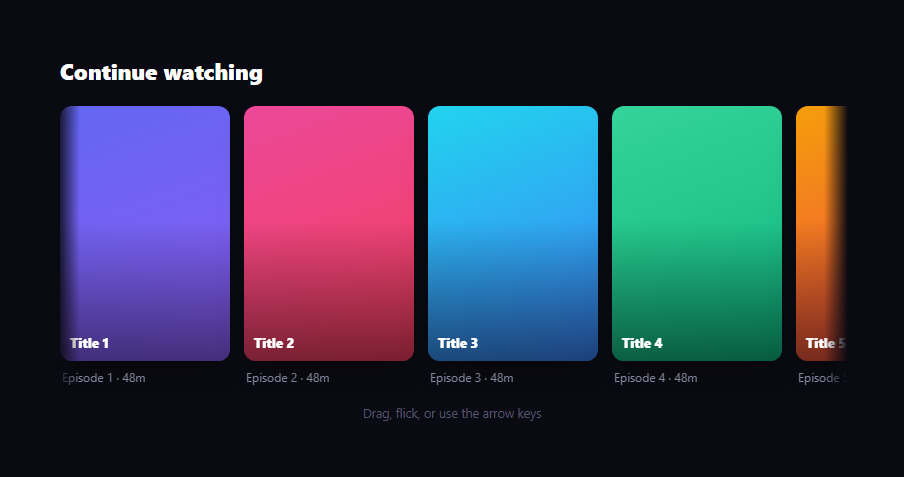
The drag scroll row is the Netflix-style horizontal shelf you grab and fling: press anywhere on the row and drag to scroll, flick and release to let it glide on momentum, and it eases to a stop at the edges. This snippet builds it with plain HTML, CSS, and vanilla JavaScript using Pointer Events, so it works identically for mouse and touch.
Dragging with Pointer Events and capture
On pointerdown, the row records the start cursor x and the current track position, then calls setPointerCapture so it keeps receiving move events even if the pointer leaves the element mid-drag. As you move, the track's translateX is set to the start position plus the cursor delta, clamped to the scrollable range. Using Pointer Events (rather than separate mouse and touch handlers) means one code path drives both desktop dragging and mobile swiping.
Momentum on release
The flick feel comes from velocity tracking. During the drag, each move records the per-frame cursor delta as vel. On release, a glide() loop keeps moving the track by vel while multiplying vel by 0.93 every frame, so it decays exponentially and coasts to a stop — just like flicking a physical shelf. The loop ends once velocity drops below a small threshold. Cancelling any running glide on the next pointerdown lets you catch a moving row mid-flight.
Edge clamping
The track can only scroll between 0 and a negative minimum equal to rowWidth - trackWidth (computed in bounds()). Every position update runs through clamp(), so neither dragging nor momentum can push the content past its ends — it stops cleanly at the first and last tiles. A resize listener recomputes the bounds and re-clamps, so the row stays valid when the viewport changes.
Edge fade and grab cursors
A horizontal mask-image gradient fades the row's left and right edges so tiles dissolve in and out rather than hard-cutting at the container border. The cursor switches between grab and grabbing via a .drag class so it's obvious the row is draggable. Tiles set user-select: none so dragging never accidentally selects text or images.
Keyboard accessible
The row is focusable (tabindex="0") with a visible focus ring, and Arrow Left/Right nudge it by one tile width — so it's fully operable without a pointer, which a drag-only carousel would fail. An aria-label describes it as a draggable gallery.
Image-free, data-driven tiles
Tiles are gradient "posters" with a title and caption, generated from a palette so the demo is dependency-free. Swap each poster's --g background for a real image to make it an actual media shelf; the drag, momentum, clamping, and keyboard logic are independent of the content.
Customizing it
Tune the 0.93 decay for longer or shorter glides, change the velocity cutoff, adjust the arrow-key nudge distance, resize the tiles, or drop in real images. Add more shelves by repeating the structure. Pair it with a recently viewed carousel or an Instagram gallery for a complete media UI.
Build with AI
Build, Understand, Optimize, and Extend It With AI
Rather than reasoning through the physics yourself, paste this snippet's HTML, CSS, and JS into an AI coding assistant like Claude and ask it to explain exactly why multiplying vel by 0.93 every animation frame inside glide() produces a natural-feeling deceleration, and how bounds() combined with clamp() guarantees the track can never be dragged or flung past its first or last tile. The same assistant can help optimize it, for instance checking whether recomputing bounds() on every resize event is sufficient or whether it should also rerun after images/tiles finish loading and change the track's scrollWidth. It's also useful for extending the row: ask it to snap to the nearest tile boundary when the glide settles instead of stopping at an arbitrary offset, add visible scroll-position dots below the row, or support mouse-wheel horizontal scrolling as an additional input alongside drag and arrow keys. Treat the code less like a finished artifact and more like a starting point for a conversation.
Prompt to recreate it
Copy this into your AI assistant of choice to build the effect from scratch, or as a jumping-off point for your own variant:
Build a horizontally draggable media row with momentum scrolling in plain HTML, CSS, and JavaScript using the Pointer Events API — no carousel library.

Requirements:
- A row container with overflow hidden and a horizontal mask-image gradient that fades tiles out near the left and right edges, containing an inner track element that holds all the tiles and is moved purely with a CSS transform: translateX, never by changing scrollLeft.
- Use pointerdown, pointermove, pointerup, and pointercancel (not separate mouse and touch listeners) so one code path handles both mouse dragging and touch swiping, calling setPointerCapture on pointerdown so the drag keeps tracking even if the pointer leaves the row's bounds.
- While dragging, compute the track's new translateX from the drag start position plus the cursor delta, clamped so the track can never be dragged further right than 0 or further left than the negative difference between the track's scroll width and the row's visible width.
- On pointer release, do not stop immediately: track the cursor's per-frame velocity during the drag, and on release run a requestAnimationFrame loop that keeps moving the track by the current velocity while multiplying that velocity by a decay factor (around 0.93) every frame, stopping the loop once velocity drops below a small threshold, and clamping every position update through the same bounds check used during dragging.
- If a new pointerdown occurs while a momentum glide is still animating, cancel the in-progress requestAnimationFrame so the drag can immediately take over from the row's current position.
- Make the row keyboard accessible: give it tabindex and a visible focus style, and handle ArrowLeft/ArrowRight keydown events to nudge the translateX by one tile's width (including its gap) through the same clamped positioning logic used by dragging and momentum.
- Recompute the scrollable bounds and re-clamp the current position on window resize so the row never ends up in an invalid, out-of-range position after a viewport change.
Want to tighten it up first? Run this prompt through the AI Prompt Studio to score it across 8 quality dimensions, catch anti-patterns, and tune the wording for Claude, ChatGPT, or Gemini before you paste it in.
Step by step
How to Use
- 1Paste HTML, CSS, and JSA horizontal shelf of poster tiles renders.
- 2Drag the rowPress and move to scroll the tiles left or right.
- 3Flick and releaseThe row glides on momentum and eases to a stop.
- 4Reach an edgeScrolling clamps cleanly at the first and last tiles.
- 5Use arrow keysFocus the row and press Left or Right to nudge it.
- 6Swap in imagesSet each poster's --g to a real image.
Real-world uses
Common Use Cases
Got questions?
Frequently Asked Questions
Pointer Events unify mouse, touch, and pen into one API, so a single set of pointerdown/move/up handlers drives both desktop dragging and mobile swiping. setPointerCapture also keeps the row receiving move events even if the pointer drifts off the element mid-drag, which separate mouse/touch code makes awkward.
During the drag, each move records the per-frame cursor delta as velocity. On release, a glide loop keeps translating the track by that velocity while multiplying it by 0.93 each frame, so it decays exponentially and coasts to a stop — like flicking a physical shelf. The loop ends when velocity falls below a small threshold.
The scrollable range is 0 to a negative minimum equal to the row width minus the track width. Every position update — from dragging or from momentum — passes through a clamp to that range, so the content can never be pushed past its first or last tile. A resize listener recomputes the bounds and re-clamps when the viewport changes.
Yes. The row is focusable with a visible focus ring, and Arrow Left/Right nudge it by one tile width, so keyboard users can browse it. It also carries an aria-label describing it as a draggable gallery. A drag-only carousel would exclude keyboard users, so the arrow support matters for accessibility.
Render the tiles from data and keep position, velocity, and dragging in refs (not state) so dragging doesn't re-render. Attach the pointer and keydown handlers in a mount effect with cleanup, using refs for the row and track. The momentum loop lives in the same effect. The CSS, including the edge mask, ports directly; in Tailwind use overflow-hidden with an arbitrary mask-image.