
Learn Coding Visually
Learn to code with interactive, live-preview playgrounds — HTML, CSS, JavaScript, React & more.
 HTML Playground42 lessons · Click-based · Live preview
 CSS PlaygroundLearn CSS with a live editor
 JavaScript Playground60 lessons · DOM · Async · Canvas
 React PlaygroundLearn React with a live code editor
 GSAP PlaygroundLearn GSAP animation interactively
 SVG Playground44 lessons · shapes · paths · animation
 SCSS Playground45 lessons · Sass modules · tokens
 Tailwind PlaygroundLearn Tailwind CSS with a live editor
 Bootstrap 5 Playground50 lessons · live preview
Recently Viewed Carousel — Product Strip HTML CSS JS
Recently Viewed Carousel · Cards · Plain HTML, CSS & JS · Live preview
What's included
Features
About this UI Snippet
Recently Viewed Carousel — Scroll-Snap Product Strip with Arrow Paging
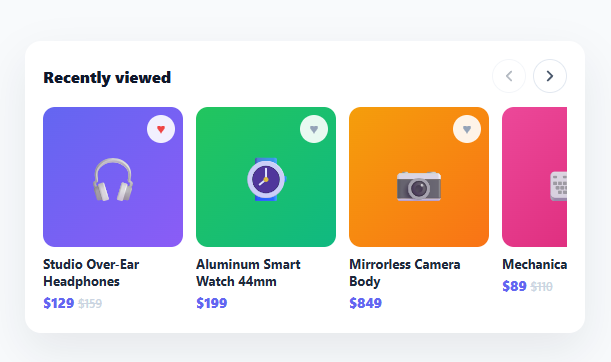
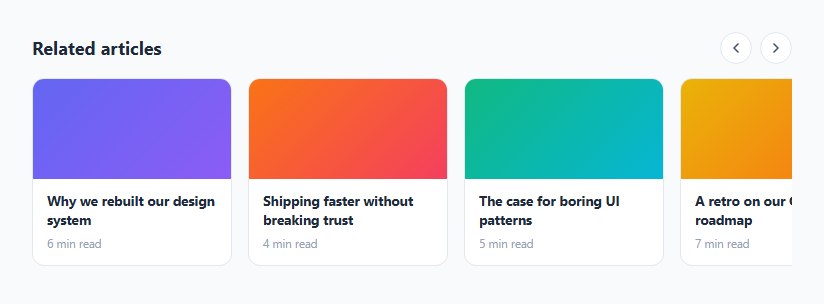
The "Recently viewed" strip — a horizontal row of product cards you can scroll or page through — is on nearly every e-commerce site, because reminding shoppers of items they looked at is one of the highest-converting forms of merchandising. This snippet builds that carousel in plain HTML, CSS, and vanilla JavaScript: smooth scroll-snap, arrow buttons that page by a screenful and disable at the edges, save hearts, and a clean hidden scrollbar.
Native scroll-snap, not a JS animation loop
The track is a flex row with overflow-x: auto and scroll-snap-type: x mandatory, so items snap neatly into place as the user swipes, drags, or pages — using the browser's native, momentum-aware scrolling rather than a JavaScript animation loop. Each card has scroll-snap-align: start, so scrolling always lands on a card edge, never mid-card. This is the right foundation: native scroll is buttery on touch devices, respects the OS's scroll physics, and needs no library, while the arrows are a desktop convenience layered on top.
Arrows that page by a screenful and know the edges
The previous/next arrows scroll by a computed "page" — pageWidth() measures how many whole cards fit in the visible track and scrolls by that many, so a click reveals a fresh set rather than nudging one card. Critically, the arrows disable at the boundaries: updateArrows() checks scrollLeft against 0 and against the maximum scroll, greying out the left arrow at the start and the right arrow at the end. This edge-awareness — recomputed on every scroll and resize — is what makes the paging feel finished; an arrow that does nothing because you're already at the end is a common rough edge this avoids.
Hidden scrollbar, kept scrollable
The scrollbar is hidden (scrollbar-width: none and the WebKit pseudo-element) for a clean look, but the track stays fully scrollable by touch, trackpad, and the arrows — hiding the bar is purely cosmetic and never removes the scrolling itself. This gives the polished, app-like appearance of a custom carousel while keeping all the native scroll behavior.
Product cards with save and click
Each card shows the product image (a gradient placeholder here, ready for a real photo), a two-line clamped name, and a price with an optional struck-through original. A heart button in the corner toggles a saved state, with its click stopped from also triggering the card's own click (which would open the product) — the stopPropagation that keeps "save" and "open" as distinct actions on overlapping targets. The cards lift slightly on hover for tactility.
Data-driven and drop-in
The whole strip renders from a PRODUCTS array, so it's populated from your recently-viewed data (typically read from localStorage or your backend, in view order). Swap the emoji/gradient images for real product photos and wire the card click to your product route and the heart to your wishlist. Because it's compact and self-contained, the same component works for "Recommended," "On sale," or any horizontal product row, not just recently viewed.
Build with AI
Build, Understand, Optimize, and Extend It With AI
You do not have to reverse-engineer the paging math by hand. Paste this snippet's HTML, CSS, and JS into an AI coding assistant like Claude and ask it to explain exactly how pageWidth() figures out how many whole cards fit in the visible track and why that number, not a fixed pixel amount, is what the arrows scroll by. The same assistant can help you optimize it — ask whether recomputing pageWidth() on every single arrow click is necessary or whether it could be cached and only recalculated on resize, and whether the scroll and resize listeners calling updateArrows() could be throttled for a smoother experience with many cards. It's also useful for extending the carousel: ask it to persist the saved-heart state to localStorage, add keyboard arrow-key support for paging without a mouse, or lazy-load product images only as cards approach the visible track. Treat the code less like a finished artifact and more like a starting point for a conversation.
Prompt to recreate it
Copy this into your AI assistant of choice to build the effect from scratch, or as a jumping-off point for your own variant:
Build a horizontally scrolling product carousel with arrow paging in plain HTML, CSS, and JavaScript with no library.

Requirements:
- The card track must use native CSS scroll-snap: a flex row with overflow-x auto, scroll-snap-type set to x mandatory, and each card given scroll-snap-align start — the actual scrolling and momentum must come from native browser scrolling, not a JavaScript animation loop.
- Hide the scrollbar visually (using the standard cross-browser scrollbar-hiding CSS properties) while keeping the track fully scrollable by touch, trackpad, and the arrow buttons.
- Implement a function that measures a single card's rendered width plus the gap between cards, divides the track's visible width by that to find how many whole cards currently fit, and returns that count times the card-plus-gap size as the "page" distance.
- Wire the previous and next arrow buttons to scroll the track by that computed page distance (not a fixed pixel value) using smooth scrolling.
- Disable the previous arrow when the track's scroll position is at or near the very start, and disable the next arrow when it is at or near the maximum scrollable position, recalculating this on every scroll event and on window resize.
- Each card must have a heart-shaped save button in its corner that toggles a saved visual state on click without also triggering the card's own "open product" click handler — the two click targets overlap, so the heart's click handling must stop the event from propagating to the card.
Want to tighten it up first? Run this prompt through the AI Prompt Studio to score it across 8 quality dimensions, catch anti-patterns, and tune the wording for Claude, ChatGPT, or Gemini before you paste it in.
Source Code
<div class="rvc-card">
  <div class="rvc-head">
    <h3>Recently viewed</h3>
    <div class="rvc-arrows">
      <button type="button" class="rvc-arrow" id="rvcPrev" aria-label="Scroll left" disabled>
        <svg width="18" height="18" viewBox="0 0 24 24" fill="none" stroke="currentColor" stroke-width="2.4" stroke-linecap="round" stroke-linejoin="round"><polyline points="15 18 9 12 15 6"/></svg>
      </button>
      <button type="button" class="rvc-arrow" id="rvcNext" aria-label="Scroll right">
        <svg width="18" height="18" viewBox="0 0 24 24" fill="none" stroke="currentColor" stroke-width="2.4" stroke-linecap="round" stroke-linejoin="round"><polyline points="9 18 15 12 9 6"/></svg>
      </button>
    </div>
  </div>

  <div class="rvc-track" id="rvcTrack"></div>
</div>*{box-sizing:border-box;margin:0;padding:0}
body{font-family:system-ui,-apple-system,sans-serif;background:#f8fafc;min-height:100vh;display:flex;align-items:center;justify-content:center;padding:24px}
.rvc-card{background:#fff;border-radius:16px;padding:18px;width:100%;max-width:560px;box-shadow:0 18px 44px rgba(15,23,42,.08)}
.rvc-head{display:flex;align-items:center;justify-content:space-between;margin-bottom:14px}
.rvc-head h3{font-size:16px;font-weight:800;color:#0f172a}
.rvc-arrows{display:flex;gap:7px}
.rvc-arrow{width:34px;height:34px;border-radius:50%;border:1.5px solid #e2e8f0;background:#fff;color:#475569;cursor:pointer;display:flex;align-items:center;justify-content:center;transition:border-color .15s,opacity .15s,background .15s}
.rvc-arrow:hover:not(:disabled){border-color:#6366f1;color:#6366f1}
.rvc-arrow:disabled{opacity:.4;cursor:default}
.rvc-track{display:flex;gap:13px;overflow-x:auto;scroll-behavior:smooth;scroll-snap-type:x mandatory;padding-bottom:4px;
scrollbar-width:none;-ms-overflow-style:none}
.rvc-track::-webkit-scrollbar{display:none}
.rvc-item{flex:0 0 140px;scroll-snap-align:start;cursor:pointer;position:relative}
.rvc-img{height:140px;border-radius:12px;display:flex;align-items:center;justify-content:center;font-size:44px;margin-bottom:9px;transition:transform .2s}
.rvc-item:hover .rvc-img{transform:translateY(-3px)}
.rvc-fav{position:absolute;top:8px;right:8px;width:28px;height:28px;border-radius:50%;border:none;background:rgba(255,255,255,.9);color:#94a3b8;cursor:pointer;display:flex;align-items:center;justify-content:center;font-size:14px;backdrop-filter:blur(2px)}
.rvc-fav.on{color:#ef4444}
.rvc-name{font-size:13px;font-weight:700;color:#1e293b;line-height:1.3;margin-bottom:3px;display:-webkit-box;-webkit-line-clamp:2;-webkit-box-orient:vertical;overflow:hidden}
.rvc-price{font-size:13.5px;font-weight:800;color:#6366f1}
.rvc-price s{font-size:11.5px;color:#cbd5e1;font-weight:600;margin-left:4px}var PRODUCTS = [
{ id: 1, name: 'Studio Over-Ear Headphones', price: 129, was: 159, emoji: '🎧', c1: '#6366f1', c2: '#8b5cf6' },
{ id: 2, name: 'Aluminum Smart Watch 44mm', price: 199, emoji: '⌚', c1: '#22c55e', c2: '#10b981' },
{ id: 3, name: 'Mirrorless Camera Body', price: 849, emoji: '📷', c1: '#f59e0b', c2: '#f97316' },
{ id: 4, name: 'Mechanical Keyboard', price: 89, was: 110, emoji: '⌨️', c1: '#ec4899', c2: '#db2777' },
{ id: 5, name: 'Portable Bluetooth Speaker', price: 59, emoji: '🔊', c1: '#0ea5e9', c2: '#0284c7' },
{ id: 6, name: 'Wireless Charging Pad', price: 35, emoji: '🔌', c1: '#a855f7', c2: '#9333ea' },
{ id: 7, name: 'Noise-Cancel Earbuds', price: 149, was: 179, emoji: '🎵', c1: '#14b8a6', c2: '#0d9488' },
];
var track = document.getElementById('rvcTrack');
var prev = document.getElementById('rvcPrev');
var next = document.getElementById('rvcNext');
track.innerHTML = PRODUCTS.map(function (p) {
return '<div class="rvc-item" data-id="' + p.id + '">' +
'<div class="rvc-img" style="background:linear-gradient(135deg,' + p.c1 + ',' + p.c2 + ')">' + p.emoji +
'<button type="button" class="rvc-fav" data-fav="' + p.id + '" aria-label="Save">♥</button>' +
'</div>' +
'<div class="rvc-name">' + p.name + '</div>' +
'<div class="rvc-price">$' + p.price + (p.was ? '<s>$' + p.was + '</s>' : '') + '</div>' +
'</div>';
}).join('');
function pageWidth() {
var item = track.querySelector('.rvc-item');
if (!item) return 300;
var gap = 13;
var per = Math.max(1, Math.floor(track.clientWidth / (item.offsetWidth + gap)));
return per * (item.offsetWidth + gap);
}
function updateArrows() {
prev.disabled = track.scrollLeft <= 2;
next.disabled = track.scrollLeft >= track.scrollWidth - track.clientWidth - 2;
}
prev.addEventListener('click', function () { track.scrollBy({ left: -pageWidth(), behavior: 'smooth' }); });
next.addEventListener('click', function () { track.scrollBy({ left: pageWidth(), behavior: 'smooth' }); });
track.addEventListener('scroll', updateArrows);
window.addEventListener('resize', updateArrows);
track.addEventListener('click', function (e) {
var fav = e.target.closest('.rvc-fav');
if (fav) { e.stopPropagation(); fav.classList.toggle('on'); return; }
var item = e.target.closest('.rvc-item');
if (item) console.log('Open product ' + item.dataset.id);
});
updateArrows();Step by step
How to Use
- 1Paste HTML, CSS, and JSA "Recently viewed" strip renders with product cards; the left arrow is disabled at the start.
- 2Scroll or swipeDrag, swipe, or trackpad-scroll the row — cards snap into place via native scroll-snap.
- 3Page with arrowsClick the arrows to move by a screenful of cards; they disable at the start and end.
- 4Save an itemClick a card's heart to toggle saved (it turns red) without opening the product.
- 5Populate from your dataReplace the PRODUCTS array with your recently-viewed items (from localStorage or your API, in view order).
- 6Use real images and linksSwap the gradient placeholders for product photos and wire the card click to your product page.
Real-world uses
Common Use Cases
Got questions?
Frequently Asked Questions
Track viewed product ids in localStorage (push to an array on each product-page visit, dedupe, cap the length, keep most-recent-first), then on render look up those products and pass them as the PRODUCTS array in that order. For logged-in users, store the history server-side so it follows them across devices. The carousel just renders whatever array you give it.
pageWidth() measures a card's width plus the gap, divides the visible track width by that to find how many whole cards fit, and scrolls by that many cards' worth — so each click advances a full screen of items rather than one card. It recomputes on each click, so it adapts to viewport size and any responsive card-width changes automatically.
Hiding the scrollbar (scrollbar-width: none plus the WebKit pseudo-element) is purely cosmetic for a clean, app-like look — it doesn't disable scrolling. The track remains fully scrollable by touch, trackpad, mouse wheel (with shift), and the arrow buttons. Always keep an alternative way to scroll (the arrows) so mouse-only users without horizontal scroll can still navigate.
The heart and the card share overlapping click areas, so the heart's handler calls e.stopPropagation() to prevent the click from also bubbling to the card's open handler. This keeps the two actions distinct — clicking the heart saves, clicking anywhere else on the card opens it — which is the expected behavior for an action button layered on a clickable card.
In React, render items from the array with .map(), use a ref to the track for scrollBy, and update arrow disabled state from an onScroll handler; in Vue, use v-for with a template ref and @scroll; in Angular, use *ngFor with ViewChild and (scroll). The scroll-snap CSS and paging math port unchanged — only the arrow state and scroll calls use each framework's ref mechanism.