You Might Also Like
Learn Coding Visually
Learn to code with interactive, live-preview playgrounds — HTML, CSS, JavaScript, React & more.
 HTML Playground42 lessons · Click-based · Live preview
 CSS PlaygroundLearn CSS with a live editor
 JavaScript Playground60 lessons · DOM · Async · Canvas
 React PlaygroundLearn React with a live code editor
 GSAP PlaygroundLearn GSAP animation interactively
 SVG Playground44 lessons · shapes · paths · animation
 SCSS Playground45 lessons · Sass modules · tokens
 Tailwind PlaygroundLearn Tailwind CSS with a live editor
 Bootstrap 5 Playground50 lessons · live preview
Session Timeout Warning Modal — Free HTML CSS JS Snippet
Session Timeout Warning Modal · Modals · Plain HTML, CSS & JS · Live preview
What's included
Features
About this UI Snippet
Session Timeout Warning Modal — Idle Detection, Ring Countdown & Calm Auto-Logout UX
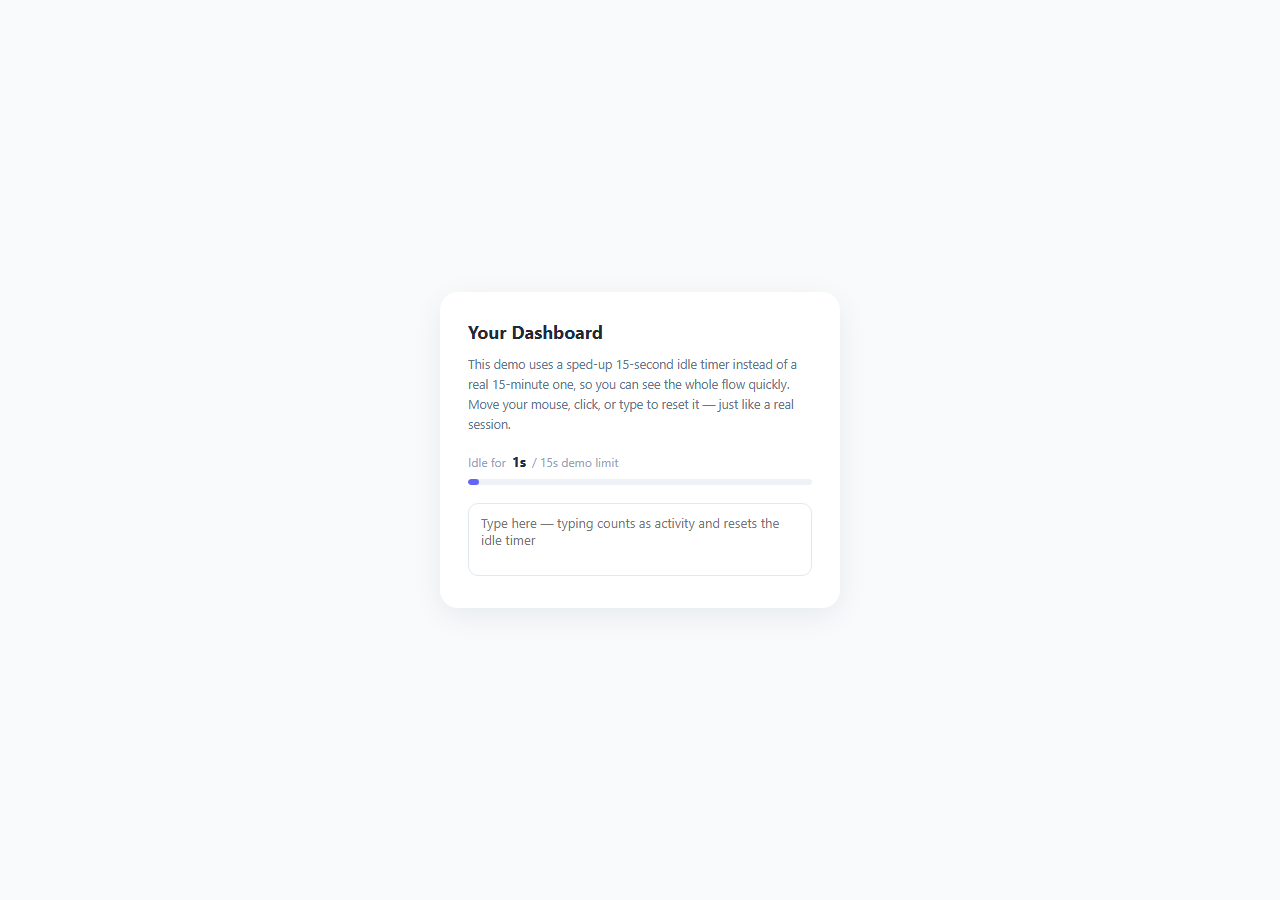
Session timeout warnings exist to protect users on shared or unattended devices — banking portals, healthcare records, and admin dashboards routinely sign users out after a period of inactivity to reduce the window during which a walked-away, unlocked screen could expose sensitive data. This snippet implements the complete pattern: real idle detection tied to genuine user activity, a calm (not jarring) warning modal with a visible countdown, and two clearly differentiated actions — stay signed in, or log out immediately.
Real activity detection, not just a fixed timer
The core of a trustworthy session-timeout system is that the idle clock resets on genuine user activity, not only when the user happens to click a specific button. This snippet attaches listeners for mousemove, keydown, click, scroll, and touchstart directly on document, and every one of them calls registerActivity(), which restarts startIdleTimer() from zero. Without this, a user actively reading a long document or filling out a multi-minute form — who is genuinely present and engaged, just not clicking anything for a while — would get logged out mid-task, which is exactly the kind of jarring, trust-eroding surprise that calm interface design tries to avoid. The listeners are registered with { passive: true } since none of them need to call preventDefault(), which keeps scrolling and touch interactions smooth.
Throttling to avoid interval churn
A raw mousemove listener can fire dozens of times per second during normal cursor movement. Calling startIdleTimer() — which clears and restarts a setInterval — on every single one of those events would be wasteful and could cause visible jank. The registerActivity() function guards against this with a simple throttled boolean flag: once activity resets the timer, further activity events are ignored for 400ms before the guard resets, so the interval is restarted at most a couple of times per second during continuous activity rather than hundreds.
Why the warning modal is calm, not a jump-scare
A poorly designed session-timeout UX slams a full-screen red modal onto the page the instant a countdown hits zero, with no warning beforehand — a jarring interruption regardless of what the user was doing. This snippet instead surfaces a visible countdown before the modal even needs to appear: the demo page shows a live "idle for Ns / 15s" readout and a progress bar that gradually shifts from the accent color to amber as the limit approaches, so a genuinely attentive user has ambient awareness the whole time, not just a sudden alert. When the modal does appear, it uses a soft blurred backdrop, a centered card with generous padding, a neutral icon (a clock, not a warning triangle), and calm, first-person copy ("You've been idle a while... we'll sign you out soon") rather than alarmist language. The countdown itself is rendered as a smooth SVG ring (stroke-dashoffset animated via transition: stroke-dashoffset 1s linear) alongside a large numeral, giving the user a precise, low-anxiety sense of exactly how much time remains and genuine control to act.
Two clearly weighted actions
The modal offers "Stay signed in" as the visually primary, filled button and "Log out now" as a secondary outlined button — both fully functional, both a single click away, with neither hidden or de-emphasized to the point of being hard to find. This respects user agency: someone who genuinely wants to end their session on a shared computer should be able to do so immediately, not be funneled only toward staying logged in.
Why this matters for 2026 calm interfaces
Session timeout handling is one of the clearest real-world tests of "calm interface" design — it is a security-critical interruption that must not feel like a jump-scare. Getting it right (ambient countdown before the modal, activity-based resets, equally weighted actions, smooth ring animation) is what separates a security feature that builds trust from one that trains users to reflexively dismiss security prompts.
Build with AI
Build, Understand, Optimize, and Extend It With AI
Paste this snippet into an AI coding assistant like Claude and ask it to explain exactly why activity listeners are throttled with a 400ms guard rather than resetting the interval on every raw event, and how the SVG ring's stroke-dashoffset math converts warningSeconds into the animated arc. It's also a good candidate to extend with AI help: ask it to add cross-tab synchronization using the BroadcastChannel API so the idle timer is shared across every open tab of the app, wire staySignedIn() and forceSignOut() to real fetch calls against session-refresh and logout endpoints, or add a reduced-motion-aware fallback that swaps the animated ring for a simple numeric countdown when the user has prefers-reduced-motion enabled.
Prompt to recreate it
Copy this into your AI assistant of choice to build the effect from scratch, or as a jumping-off point for your own variant:
Build a session idle-timeout warning system in plain HTML, CSS, and JavaScript, with a sped-up demo timer (a handful of seconds) clearly labeled as compressed from a real-world minutes-long timeout, for demonstration purposes.

Requirements:
- Track genuine user activity — mouse movement, key presses, clicks, and scrolling — with throttled document-level event listeners, and reset an idle countdown any time real activity is detected, not only through a dedicated button.
- Show ambient awareness of the idle state on the page itself before any modal appears, such as a live "idle for Ns" readout or a progress bar, so an attentive user is never surprised.
- When the idle limit is reached, show a calm (not jarring) modal dialog — soft backdrop, neutral security-style icon (not an alarming red warning triangle), and reassuring first-person copy — containing a second, shorter countdown before automatic logout.
- Animate the in-modal countdown as a circular progress ring (using SVG stroke-dasharray/stroke-dashoffset, not a library) alongside a large numeral, and visually shift its color as time runs low.
- Provide two clearly visible, roughly equally weighted actions in the modal: a primary "stay signed in" action that resets the idle timer and closes the modal, and a secondary "log out now" action that ends the session immediately — neither should be hidden, tiny, or hard to find compared to the other.
- If the in-modal countdown reaches zero without the user acting, automatically trigger the same logout behavior as the "log out now" button, and show some form of after-the-fact confirmation (e.g. a toast) explaining that the session ended due to inactivity.
- While the modal is open, activity elsewhere on the page must not silently reset the timer without the user explicitly interacting with the modal's own buttons — the modal should be the sole decision point once it appears.
- Use proper dialog accessibility semantics: an alertdialog role, aria-modal, and labels tied to the modal's heading and description text.
Want to tighten it up first? Run this prompt through the AI Prompt Studio to score it across 8 quality dimensions, catch anti-patterns, and tune the wording for Claude, ChatGPT, or Gemini before you paste it in.
Step by step
How to Use
- 1Watch the sped-up idle timerThe demo card shows a live "idle for Ns / 15s demo limit" readout and a progress bar driven by startIdleTimer()'s setInterval. In production, swap IDLE_LIMIT_SECONDS for a real value like 15 * 60 (15 minutes).
- 2Let it idle to see the modal, or reset it with activityStop interacting for 15 seconds and openWarningModal() fires automatically. Alternatively, move the mouse, type in the scratch textarea, click, or scroll at any time and registerActivity() calls startIdleTimer() to reset the clock back to zero.
- 3Watch the ring countdown inside the modalOnce open, updateRing() runs every second, updating both the numeral in #countdown-number and the SVG ring's stroke-dashoffset proportionally to warningSeconds / WARNING_COUNTDOWN_SECONDS, turning amber in the final 3 seconds.
- 4Click Stay Signed In to resumebtnStay triggers staySignedIn(), which calls closeWarningModal() and immediately restarts startIdleTimer() from zero — functionally identical to a real "extend session" API call that refreshes an auth token's expiry.
- 5Let it expire or click Log Out Now to see forced sign-outEither letting warningSeconds reach 0 or clicking btnLogout calls forceSignOut(), which closes the modal and shows a confirmation toast. In production, forceSignOut() would call your real logout endpoint and redirect to the login page.
- 6Tune timings and wire real auth callsChange IDLE_LIMIT_SECONDS and WARNING_COUNTDOWN_SECONDS to real-world values (e.g. 900 and 60). Replace the setTimeout/setInterval demo logic in staySignedIn() and forceSignOut() with real calls to your session-refresh and logout API endpoints.
Real-world uses
Common Use Cases
Got questions?
Frequently Asked Questions
If the timer only reset when a user clicked a specific button, anyone reading a long article, reviewing a document, or watching an embedded video without clicking anything would still get logged out mid-task despite being fully present and engaged. Binding the reset to mousemove, keydown, click, scroll, and touchstart captures the much broader range of signals that indicate a real, attentive user, which is standard practice in production session-timeout implementations.
A mousemove listener alone can fire 60+ times per second during normal cursor movement. Calling clearInterval/setInterval that frequently is wasteful and can cause visible jank, especially on lower-powered devices. The registerActivity() function uses a simple throttled boolean guarded by a 400ms setTimeout so the timer restarts at most a couple of times per second during continuous activity, which is more than sufficient responsiveness for a session-timeout feature.
Real session timeouts are typically 10 to 30 minutes of idle time with a 30-to-90-second warning window before forced logout — far too long to demonstrate interactively. The IDLE_LIMIT_SECONDS and WARNING_COUNTDOWN_SECONDS constants at the top of the JS panel are the only two values you need to change to restore realistic timing, e.g. IDLE_LIMIT_SECONDS = 15 * 60 for a 15-minute idle window.
Inside staySignedIn(), after closeWarningModal(), add an API call such as await fetch('/api/session/refresh', { method: 'POST' }) to extend the server-side session or refresh an auth token before restarting the client-side idle timer. Inside forceSignOut(), replace or supplement the toast with await fetch('/api/logout', { method: 'POST' }) followed by window.location.href = '/login' to actually terminate the server-side session and redirect.
As written, each tab tracks its own independent idle timer, so a user active in one tab could still see a timeout modal pop up in a background tab. Production implementations typically synchronize activity across tabs using the BroadcastChannel API or a shared localStorage timestamp key that every tab's activity listener updates and reads, so the idle clock is effectively shared across the whole browser session rather than per-tab.