Learn Coding Visually
Learn to code with interactive, live-preview playgrounds — HTML, CSS, JavaScript, React & more.
 HTML Playground42 lessons · Click-based · Live preview
 CSS PlaygroundLearn CSS with a live editor
 JavaScript Playground60 lessons · DOM · Async · Canvas
 React PlaygroundLearn React with a live code editor
 GSAP PlaygroundLearn GSAP animation interactively
 SVG Playground44 lessons · shapes · paths · animation
 SCSS Playground45 lessons · Sass modules · tokens
 Tailwind PlaygroundLearn Tailwind CSS with a live editor
 Bootstrap 5 Playground50 lessons · live preview
Scroll Lava Lamp Blobs — Free HTML CSS JS Snippet
Scroll Lava Lamp Blobs · Scroll · Plain HTML, CSS & JS · Live preview
What's included
Features
About this UI Snippet
Scroll Lava Lamp Blobs — SVG Goo Filter, Blurred Blend and a Scrubbed Timeline
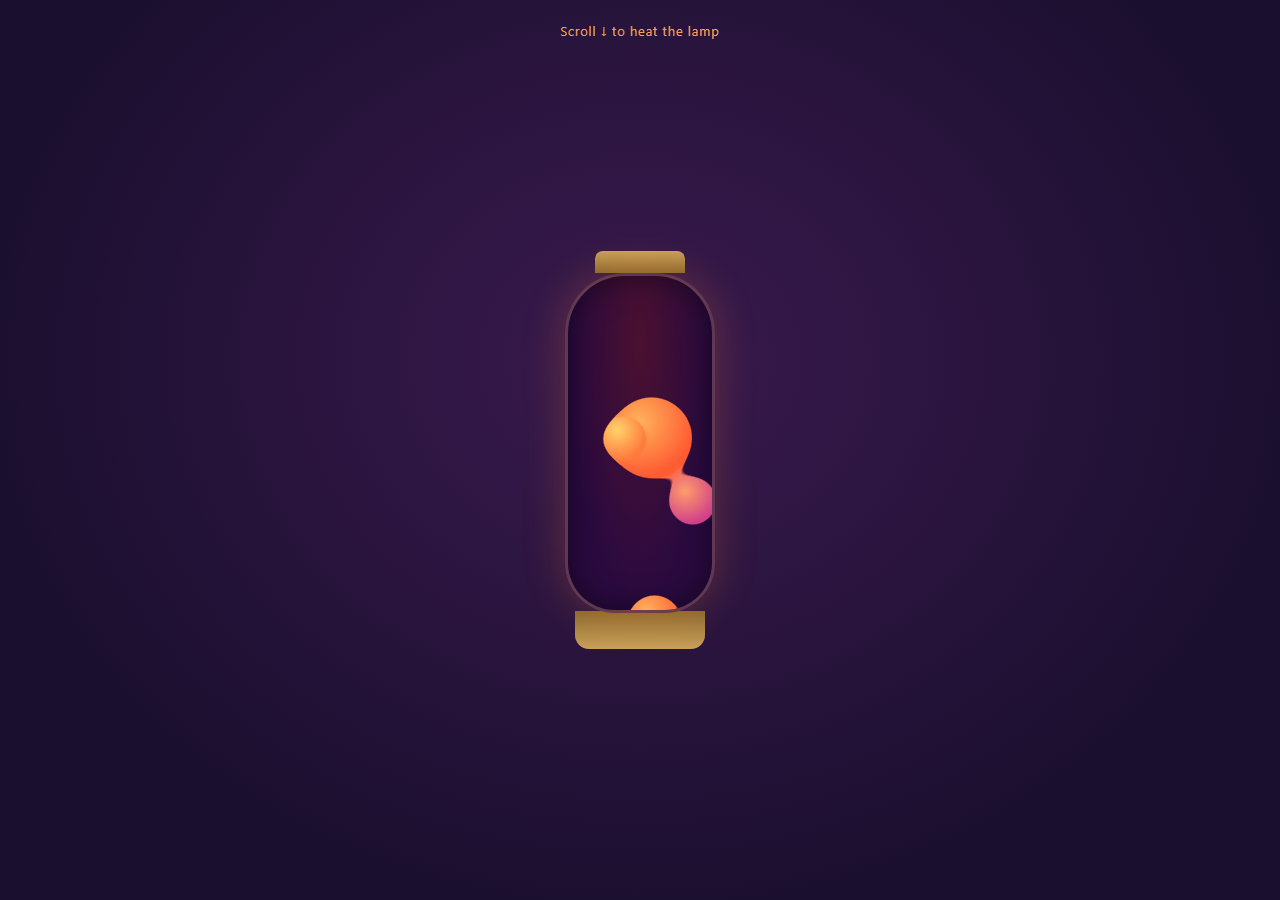
A retro lava-lamp effect built from ordinary blurred circles that appear to melt into and split apart from one another — the classic "goo" illusion — with their rise/merge/split motion mapped directly to scroll position. Pair with Scroll Parallax Layers for another scrub-driven ambient effect, or Three Scroll Tunnel if you want a more immersive pinned scene.
The goo effect is an SVG filter, not just CSS blur
.goo-field has filter: url(#goo) referencing an SVG <filter> defined once in a hidden inline <svg>. Inside it, feGaussianBlur softens every blob's edges heavily (stdDeviation: 10), then feColorMatrix sharpens the alpha channel back up dramatically (the 22 -10 values in its matrix). The blur spreads each blob's edge into a soft gradient; the contrast boost then snaps any overlapping gradients back to a hard, fused edge — that's what makes two nearby blobs look like one molten shape instead of two blurry circles.
Four blobs, one shared scrubbed timeline
Each .blob is a plain radial-gradient div. A single GSAP timeline tweens their x/y/scale in parallel, all inside a pin: true scrubbed ScrollTrigger — as you scroll, blobs rise and drift sideways at slightly different rates and timing offsets. Because the goo filter operates on the rendered pixels of the whole .goo-field container, whenever two blobs' tweened positions bring them close together, the filter fuses them visually without any JavaScript collision logic.
Merge and split from timing offsets alone
Blobs 1 and 2 get short additional tweens later in the timeline (positions 0.55–0.6) that nudge them toward and then away from each other's path — this is what produces the "split apart again" moment partway through the scroll, entirely through separate x/scale keyframes on the same shared timeline, no physics or distance calculation involved.
Why pin: true
The glass lamp is a self-contained "scene" — pinning it for end: '+=200%' of scroll distance keeps the viewer's eye fixed on the lamp while its internal blobs evolve, the same fixed-stage reasoning used for the seismograph and satellite snippets in this library.
Build with AI
Build, Understand, Optimize, and Extend It With AI
Ask an AI assistant to explain the feGaussianBlur + feColorMatrix "goo" filter combination in this snippet in plain terms — specifically why blurring first and then aggressively boosting alpha contrast is what creates the fused-blob look, since that combination shows up constantly in creative-coding blob/metaball effects beyond just lava lamps. It's also a good base to extend: ask the assistant to make blob velocity (via ScrollTrigger's getVelocity()) modulate how intensely they merge, to add more blobs with randomized paths, or to swap the lamp chrome for a plain ambient background layer usable behind other content. Treat it as a working reference for the goo technique, not a finished product.
Prompt to recreate it
Copy this into your AI assistant of choice to build the effect from scratch, or as a jumping-off point for your own variant:
Build a scroll-scrubbed "lava lamp" blob animation in plain HTML, CSS, and JavaScript using GSAP, ScrollTrigger, and an SVG filter — no canvas, no WebGL.

Requirements:
- Define an SVG <filter> (referenced later via CSS filter: url(#id)) containing a feGaussianBlur with a moderate stdDeviation (around 8-12) feeding into a feColorMatrix whose alpha row has a high multiplier and negative offset (values like "0 0 0 22 -10" for the last row), producing the classic goo/metaball fused-edge effect when overlapping blurred shapes are rendered through it.
- Create a glass-lamp-shaped container (rounded, elongated shape via border-radius) with a dark background and a warm outer glow via box-shadow.
- Inside it, create a wrapper div with the goo SVG filter applied, containing 4 absolutely-positioned circular divs ("blobs") with radial-gradient backgrounds in warm orange/red/purple tones and staggered sizes.
- Create one GSAP timeline attached to a ScrollTrigger with pin: true, a numeric scrub value, and enough scroll distance (e.g. end: "+=200%") for a slow, ambient feel.
- Tween each blob's x, y, and scale along a gentle, slightly different path using sine.inOut easing, so they rise and drift sideways at different rates.
- Add 2-3 additional short tweens later in the same timeline that nudge specific blobs' x and scale toward and then away from each other, so that around the timeline's midpoint two blobs' shapes overlap enough that the goo filter visually fuses them into one shape, then separates again as their paths diverge.
- Confirm the whole sequence reverses cleanly when scrolling back up, since it is one scrubbed timeline.
- Style with a warm 70s palette: deep purple/navy background, amber lamp chrome (cap and base), and orange-to-red-to-magenta blob gradients.
Want to tighten it up first? Run this prompt through the AI Prompt Studio to score it across 8 quality dimensions, catch anti-patterns, and tune the wording for Claude, ChatGPT, or Gemini before you paste it in.
Source Code
<div class="hint">Scroll ↓ to heat the lamp</div>
<section class="lamp-stage">
  <svg width="0" height="0" style="position:absolute">
    <filter id="goo">
      <feGaussianBlur in="SourceGraphic" stdDeviation="10" result="blur" />
      <feColorMatrix in="blur" mode="matrix"
        values="1 0 0 0 0  0 1 0 0 0  0 0 1 0 0  0 0 0 22 -10" result="goo" />
      <feComposite in="SourceGraphic" in2="goo" operator="atop" />
    </filter>
  </svg>
  <div class="lamp">
    <div class="cap"></div>
    <div class="glass">
      <div class="goo-field">
        <div class="blob b1"></div>
        <div class="blob b2"></div>
        <div class="blob b3"></div>
        <div class="blob b4"></div>
      </div>
    </div>
    <div class="base"></div>
  </div>
</section>
<div class="spacer"></div>
* { box-sizing: border-box; }
body { margin: 0; font-family: system-ui, sans-serif; background: #1a0f2e; color: #ffd9a0; }
.hint { position: sticky; top: 12px; text-align: center; font-size: 13px; letter-spacing: 0.06em; color: #ff9d4d; z-index: 5; padding: 10px; }
.lamp-stage { height: 100vh; display: flex; align-items: center; justify-content: center; background: radial-gradient(ellipse at 50% 40%, #3a1a4e 0%, #1a0f2e 75%); overflow: hidden; }
.spacer { height: 200vh; }
.lamp { position: relative; width: 200px; display: flex; flex-direction: column; align-items: center; }
.cap { width: 90px; height: 22px; background: linear-gradient(#caa15a, #8a6a30); border-radius: 8px 8px 0 0; }
.base { width: 130px; height: 38px; background: linear-gradient(#8a6a30, #caa15a); border-radius: 0 0 14px 14px; margin-top: -2px; }
.glass { position: relative; width: 150px; height: 340px; border-radius: 60px 60px 50px 50px; overflow: hidden; background: radial-gradient(ellipse at 50% 20%, #4a1030, #2a0a40 70%); box-shadow: inset 0 0 30px rgba(0,0,0,0.5), 0 0 40px rgba(255,120,40,0.25); border: 3px solid rgba(255,200,140,0.25); }
.goo-field { position: absolute; inset: 0; filter: url(#goo); }
.blob { position: absolute; left: 50%; border-radius: 50%; background: radial-gradient(circle at 35% 30%, #ffb35c, #ff5c33 70%); }
.b1 { width: 70px; height: 70px; bottom: 10px; margin-left: -35px; }
.b2 { width: 54px; height: 54px; bottom: 40px; margin-left: -20px; background: radial-gradient(circle at 35% 30%, #ffd36b, #ff7a3d 70%); }
.b3 { width: 46px; height: 46px; bottom: 80px; margin-left: 6px; }
.b4 { width: 60px; height: 60px; bottom: 20px; margin-left: 10px; background: radial-gradient(circle at 35% 30%, #ff9d6b, #d1408a 70%); }gsap.registerPlugin(ScrollTrigger);
var blobs = {
b1: document.querySelector('.b1'),
b2: document.querySelector('.b2'),
b3: document.querySelector('.b3'),
b4: document.querySelector('.b4'),
};
var tl = gsap.timeline({
scrollTrigger: {
trigger: '.lamp-stage',
start: 'top top',
end: '+=200%',
scrub: 0.6,
pin: true,
},
});
tl.to(blobs.b1, { y: -220, x: 20, scale: 1.3, duration: 1, ease: 'sine.inOut' }, 0)
.to(blobs.b2, { y: -180, x: -40, scale: 0.7, duration: 1, ease: 'sine.inOut' }, 0)
.to(blobs.b3, { y: 200, x: -25, scale: 1.4, duration: 1, ease: 'sine.inOut' }, 0)
.to(blobs.b4, { y: -140, x: 30, scale: 0.6, duration: 1, ease: 'sine.inOut' }, 0.1)
.to(blobs.b2, { x: 15, scale: 1.2, duration: 0.4, ease: 'sine.inOut' }, 0.55)
.to(blobs.b1, { x: -10, scale: 0.8, duration: 0.4, ease: 'sine.inOut' }, 0.6);Step by step
How to Use
- 1Scroll through the lampScroll down slowly — the blobs rise inside the glass, drifting and occasionally merging or splitting as they pass near each other.
- 2Scroll back upThe blobs settle back down to their starting positions, confirming the whole sequence is reversible.
- 3Tune the goo intensityIn the SVG filter in the HTML panel, increase feGaussianBlur's stdDeviation for a softer, more liquid merge, or decrease it for crisper blob edges.
- 4Add more blobsDuplicate a .blob div with a new class and add a matching tween in the JS timeline — the goo filter automatically applies to any blob inside .goo-field.
- 5Change the color paletteEdit the radial-gradient colors on each .blob in the CSS panel to shift from the warm orange/purple 70s palette to any other lava-lamp colorway.
- 6Export in your formatClick "HTML" for a standalone file, "JSX" for React, or "Tailwind" for a React + Tailwind version.
Real-world uses
Common Use Cases
Got questions?
Frequently Asked Questions
An SVG filter first blurs the blob shapes heavily with feGaussianBlur, spreading their edges into soft gradients. feColorMatrix then boosts the alpha channel's contrast dramatically, which snaps any overlapping soft edges back into one solid fused shape — the classic "metaball" trick used in lava lamps and blob logos.
No — every blob is a plain absolutely-positioned div with a radial-gradient background. The goo effect is a CSS filter referencing an SVG <filter> definition, and all motion is GSAP tweening transform properties.
There is no collision or distance logic — blobs simply have tweened x/y/scale paths on a shared timeline. When two blobs' tweened positions happen to overlap, the goo filter visually fuses them; when their paths diverge again later in the timeline, they visually separate.
The lamp is meant to be a contained ambient scene the viewer watches evolve, similar to the seismograph or satellite dashboard snippets — pinning keeps the "camera" fixed on the lamp for the scrubbed scroll range instead of scrolling it off screen mid-animation.
Yes — ScrollTrigger exposes a getVelocity() method on its instance. You can read it in an onUpdate callback and use it to modulate blob scale or blur intensity for a more velocity-reactive feel, on top of the position-based motion already driving x/y/scale.