Learn Coding Visually
Learn to code with interactive, live-preview playgrounds — HTML, CSS, JavaScript, React & more.
 HTML Playground42 lessons · Click-based · Live preview
 CSS PlaygroundLearn CSS with a live editor
 JavaScript Playground60 lessons · DOM · Async · Canvas
 React PlaygroundLearn React with a live code editor
 GSAP PlaygroundLearn GSAP animation interactively
 SVG Playground44 lessons · shapes · paths · animation
 SCSS Playground45 lessons · Sass modules · tokens
 Tailwind PlaygroundLearn Tailwind CSS with a live editor
 Bootstrap 5 Playground50 lessons · live preview
Scroll Liquid Blob Morph — SVG Path Interpolation Effect
Scroll Liquid Blob Morph · Scroll · Plain HTML, CSS & JS · Live preview
What's included
Features
About this UI Snippet
How to Build a Scroll-Driven Liquid Blob Morph With SVG and GSAP
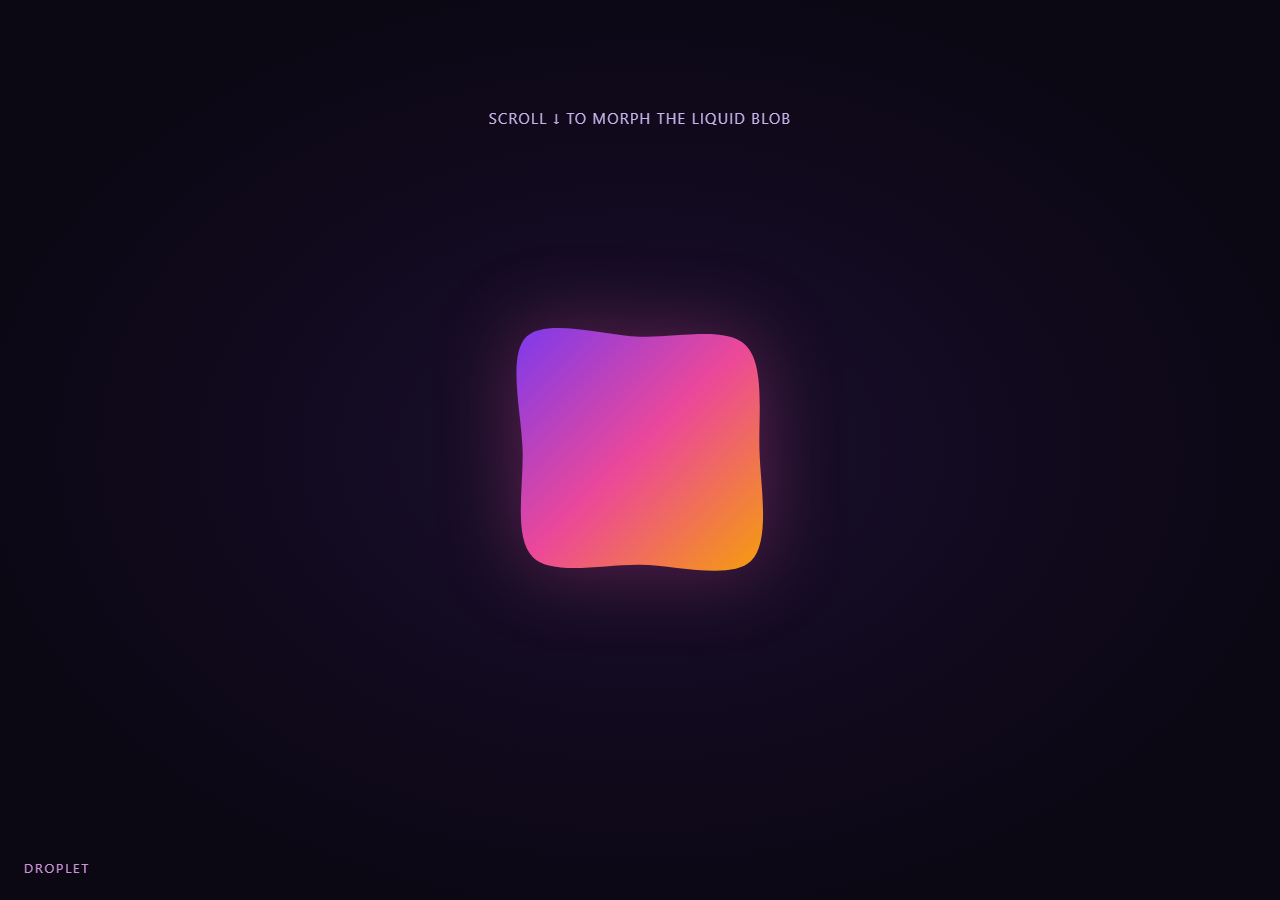
The Scroll Liquid Blob Morph snippet animates one SVG <path> through four distinct organic silhouettes as the visitor scrolls through a pinned stage, without a paid MorphSVG plugin — by tweening a small array of radius numbers and rebuilding the path string from them on every update.
Radius control points instead of raw path strings
Instead of trying to interpolate between two arbitrary SVG path d strings — which only works cleanly when they share identical point counts and structure — this snippet represents every blob shape as an array of eight radius multipliers at evenly spaced angles around a center point. Because every shape is the same N=8-point structure, any two shapes can be linearly interpolated point-by-point, and GSAP does that interpolation on plain numbers, which it already knows how to tween smoothly.
Catmull-Rom to cubic Bezier for a smooth closed curve
Straight lines between eight points would look like an octagon, not a blob. buildPath() converts the eight points into a smooth closed curve by computing Catmull-Rom-style control points for each segment (p1 + (p2 - p0) / 6 and its mirror) and emitting them as SVG cubic Bezier (C) commands — a standard technique for turning a sparse point ring into an organic, rounded outline.
GSAP tweens numbers, not the path directly
Because gsap.to() can tween any object's numeric properties, each transition between two blob shapes is a tween of a small plain object keyed 0 through 7, one key per radius. onUpdate copies the live interpolated values back into the live array and calls buildPath() to regenerate the d attribute — so GSAP handles the easing and the SVG path is just a rendering of whatever the current interpolated radii are.
A four-stop timeline scrubbed by one ScrollTrigger
A single gsap.timeline() chains three sequential tweens (sphere→amoeba, amoeba→droplet, droplet→ripple), and one ScrollTrigger on the pinned stage scrubs the whole timeline's playhead directly to scroll position. Because a GSAP timeline's playhead is fully seekable in both directions, scrolling back up smoothly re-morphs the blob backward through every intermediate shape with no extra code.
A gooey gradient without filter tricks
A diagonal linearGradient from violet through pink to amber, combined with a soft drop-shadow filter on the SVG element, gives the blob a glowing, liquid look — cheaper than SVG feGaussianBlur/feColorMatrix "goo" filter chains and fully supported without vendor-specific quirks.
Build with AI
Build, Understand, Optimize, and Extend It With AI
You do not need a paid morphing plugin to understand how this blob smoothly changes shape on scroll. Paste this snippet's HTML, CSS, and JS into an AI assistant like Claude and ask it to explain why blob shapes are stored as radius arrays instead of path strings, or how the Catmull-Rom control-point formula turns eight points into a smooth closed curve. The same assistant can help you extend it — ask it to add a fifth shape stop, vary the point count for finer or coarser detail, or drive the gradient's colors through the same timeline so hue shifts alongside shape. It can also help optimize further, for instance caching trig values for the fixed angles since only the radius multiplier changes per shape. Treat the code as a conversation starter, not a finished artifact.
Prompt to recreate it
Copy this into your AI assistant of choice to build the effect from scratch, or as a jumping-off point for your own variant:
Build a "scroll-scrubbed liquid blob morph" in plain HTML, CSS, and JavaScript using an inline SVG path, GSAP, and GSAP's ScrollTrigger plugin, all loaded from a CDN (no bundler, no build step, no paid MorphSVG plugin).

Requirements:
- A pinned section containing an inline SVG with one <path> filled with a diagonal gradient, plus a soft drop-shadow filter for a glowing liquid look.
- Represent each blob "shape" as a fixed-length array (e.g. 8 numbers) of radius multipliers at evenly spaced angles around a center point, rather than as a raw SVG path string, so any two shapes have identical structure and can be interpolated point by point.
- Write a function that takes such a radius array and returns a smooth closed SVG path d string by placing a point at each angle/radius, then connecting consecutive points with cubic Bezier curves whose control points are derived from each point's neighbors (a Catmull-Rom-to-Bezier conversion), so the result reads as an organic rounded blob rather than a straight-edged polygon.
- Author 3-4 distinct hand-picked radius arrays as named "shapes" (e.g. a near-sphere, an amoeba-like shape, a droplet, a ripple), each with the same array length.
- Build a single gsap.timeline() attached to a ScrollTrigger on the pinned section, with pin: true, start at top top, a numeric scrub, and a multi-hundred-percent end. Chain sequential tweens inside the timeline that interpolate a live radius array from one shape to the next, each tween built by tweening a plain object with one numeric key per radius value and, in its onUpdate callback, copying the tweened values back into the live array and calling the path-building function to update the SVG path's d attribute.
- Confirm scrolling back up smoothly re-morphs the blob backward through every intermediate shape in reverse order, since the timeline's playhead is directly scrubbed by scroll position in both directions.
Want to tighten it up first? Run this prompt through the AI Prompt Studio to score it across 8 quality dimensions, catch anti-patterns, and tune the wording for Claude, ChatGPT, or Gemini before you paste it in.
Source Code
<section class="blob-stage" id="blobStage">
  <div class="blob-intro"><p>Scroll ↓ to morph the liquid blob</p></div>
  <svg class="blob-svg" viewBox="0 0 400 400" preserveAspectRatio="xMidYMid meet">
    <defs>
      <linearGradient id="blobGrad" x1="0%" y1="0%" x2="100%" y2="100%">
        <stop offset="0%" stop-color="#7c3aed"/>
        <stop offset="50%" stop-color="#ec4899"/>
        <stop offset="100%" stop-color="#f59e0b"/>
      </linearGradient>
    </defs>
    <path id="blobPath" fill="url(#blobGrad)"></path>
  </svg>
  <div class="blob-hud"><span id="blobStageLabel">Sphere</span></div>
</section>
<section class="blob-bottom"><p>Four shapes, one continuous gooey path.</p></section>*{box-sizing:border-box;margin:0;padding:0}
html,body{background:#0b0713;color:#fff;font-family:system-ui,-apple-system,sans-serif}
.blob-bottom{min-height:70vh;display:flex;justify-content:center;align-items:center;color:#8a7aa8;font-size:15px;letter-spacing:.08em;text-transform:uppercase;text-align:center;padding:0 24px}
.blob-stage{height:100vh;position:relative;overflow:hidden;display:flex;align-items:center;justify-content:center;background:radial-gradient(ellipse at center,#1a0f2e 0%,#0b0713 75%)}
.blob-intro{position:absolute;top:12%;left:0;right:0;display:flex;justify-content:center;text-align:center;padding:0 24px;pointer-events:none;z-index:5;color:#c9b6ec;font-size:15px;letter-spacing:.08em;text-transform:uppercase;transition:opacity .4s ease;}
.blob-svg{width:min(70vw,420px);height:min(70vw,420px);filter:drop-shadow(0 0 40px rgba(236,72,153,.35))}
.blob-hud{position:absolute;left:24px;bottom:24px;font-size:13px;letter-spacing:.14em;color:#f0abfc;text-transform:uppercase;opacity:.85}var pathEl = document.getElementById('blobPath');
var labelEl = document.getElementById('blobStageLabel');
var introEl = document.querySelector('.blob-intro');
var CX = 200, CY = 200, BASE = 130;
var N = 8;
// Four hand-authored blob shapes as radius factors (0.6-1.4) at N evenly
// spaced angles. Interpolating between these arrays (rather than raw SVG
// path strings) is what makes smooth in-between morph frames possible
// without a paid MorphSVG plugin.
var shapes = [
[1, 1, 1, 1, 1, 1, 1, 1],
[1.28, 0.82, 1.15, 0.7, 1.3, 0.78, 1.1, 0.85],
[0.75, 1.3, 0.68, 1.22, 0.72, 1.35, 0.66, 1.18],
[1.1, 0.9, 1.35, 0.78, 0.95, 1.2, 0.8, 1.25],
];
var labels = ['Sphere', 'Amoeba', 'Droplet', 'Ripple'];
function buildPath(radii) {
var pts = [];
for (var i = 0; i < N; i++) {
var a = (i / N) * Math.PI * 2;
var r = BASE * radii[i];
pts.push([CX + Math.cos(a) * r, CY + Math.sin(a) * r]);
}
var d = 'M ' + pts[0][0].toFixed(2) + ',' + pts[0][1].toFixed(2) + ' ';
for (var j = 0; j < N; j++) {
var p0 = pts[(j - 1 + N) % N];
var p1 = pts[j];
var p2 = pts[(j + 1) % N];
var p3 = pts[(j + 2) % N];
var c1x = p1[0] + (p2[0] - p0[0]) / 6;
var c1y = p1[1] + (p2[1] - p0[1]) / 6;
var c2x = p2[0] - (p3[0] - p1[0]) / 6;
var c2y = p2[1] - (p3[1] - p1[1]) / 6;
d += 'C ' + c1x.toFixed(2) + ',' + c1y.toFixed(2) + ' ' + c2x.toFixed(2) + ',' + c2y.toFixed(2) + ' ' + p2[0].toFixed(2) + ',' + p2[1].toFixed(2) + ' ';
}
d += 'Z';
return d;
}
// A single live array of radii is what GSAP actually tweens; the SVG path
// string is regenerated from it on every tween update.
var live = shapes[0].slice();
function render() {
pathEl.setAttribute('d', buildPath(live));
}
render();
gsap.registerPlugin(ScrollTrigger);
var tl = gsap.timeline({
scrollTrigger: {
trigger: '#blobStage',
start: 'top top',
end: '+=400%',
scrub: 0.6,
pin: true,
},
});
for (var s = 1; s < shapes.length; s++) {
(function (target, idx) {
var proxy = {};
for (var k = 0; k < N; k++) proxy[k] = live[k];
tl.to(proxy, {
duration: 1,
ease: 'sine.inOut',
onUpdate: function () {
for (var k2 = 0; k2 < N; k2++) live[k2] = proxy[k2];
render();
},
onStart: function () { labelEl.textContent = labels[idx]; },
...(function () {
var vars = {};
for (var k3 = 0; k3 < N; k3++) vars[k3] = target[k3];
return vars;
})(),
});
})(shapes[s], s);
}
ScrollTrigger.create({
trigger: '#blobStage',
start: 'top top',
end: '+=40',
onLeave: function () { if (introEl) introEl.style.opacity = '0'; },
onEnterBack: function () { if (introEl) introEl.style.opacity = '1'; },
});Step by step
How to Use
- 1Load the two GSAP CDN scriptsAdd gsap.min.js and ScrollTrigger.min.js from the CDN panel, in that order.
- 2Paste HTML, CSS, and JSA smooth sphere-like blob appears inside a pinned stage with a live shape-name label.
- 3Scroll downThe blob morphs through amoeba, droplet, and ripple silhouettes in sequence, tracking scroll position exactly.
- 4Scroll back upThe timeline plays in reverse, morphing back through every intermediate shape to the starting sphere.
- 5Add your own shapePush a new 8-number radius array (values roughly 0.6-1.4) into the shapes array and a matching label.
- 6Adjust the pacingChange the ScrollTrigger end value (+=400%) for a slower or faster full morph sequence.
Real-world uses
Common Use Cases
Got questions?
Frequently Asked Questions
Two arbitrary SVG path strings only interpolate correctly if they have identical command sequences and point counts, which is fragile to hand-author and maintain. Representing every blob as the same N=8 radius array sidesteps that entirely — any two shapes can always be linearly interpolated point-by-point, and the smooth path is regenerated fresh from whatever the current interpolated radii are.
No. This snippet only uses free GSAP core and the free ScrollTrigger plugin. Instead of MorphSVG's path-to-path interpolation, it tweens a small object of plain numbers and rebuilds the path's d attribute from those numbers on every update.
buildPath() connects the 8 points with cubic Bezier curves whose control points are derived using a Catmull-Rom-style formula based on each point's neighbors. That produces a smooth, rounded closed curve through all 8 points rather than the sharp octagon straight lines between them would create.
A gsap.timeline() exposes one continuous, seekable playhead across all of its child tweens. Scrubbing that single playhead with one ScrollTrigger means scroll position maps directly and smoothly to progress through the entire multi-shape sequence, including scrolling backward through earlier transitions, without manually tracking which tween is currently active.
Yes. Click JSX for a React component, Vue for a Vue 3 SFC, Angular for a standalone component, or Tailwind for a React + Tailwind version. Build the path element ref, radius arrays, and GSAP timeline inside a mount effect, and on unmount kill the ScrollTrigger instance (or revert a gsap.context) so the pin does not leak between route changes.