


Learn Coding Visually
Learn to code with interactive, live-preview playgrounds — HTML, CSS, JavaScript, React & more.
 HTML Playground42 lessons · Click-based · Live preview
 CSS PlaygroundLearn CSS with a live editor
 JavaScript Playground60 lessons · DOM · Async · Canvas
 React PlaygroundLearn React with a live code editor
 GSAP PlaygroundLearn GSAP animation interactively
 SVG Playground44 lessons · shapes · paths · animation
 SCSS Playground45 lessons · Sass modules · tokens
 Tailwind PlaygroundLearn Tailwind CSS with a live editor
 Bootstrap 5 Playground50 lessons · live preview
Scroll Pinball Flipper Launch — Free HTML CSS JS Snippet
Scroll Pinball Flipper Launch · Scroll · Plain HTML, CSS & JS · Live preview
What's included
Features
About this UI Snippet
Scroll Pinball Flipper Launch — SVG getPointAtLength, Scrubbed Timeline & Bumper Pulses
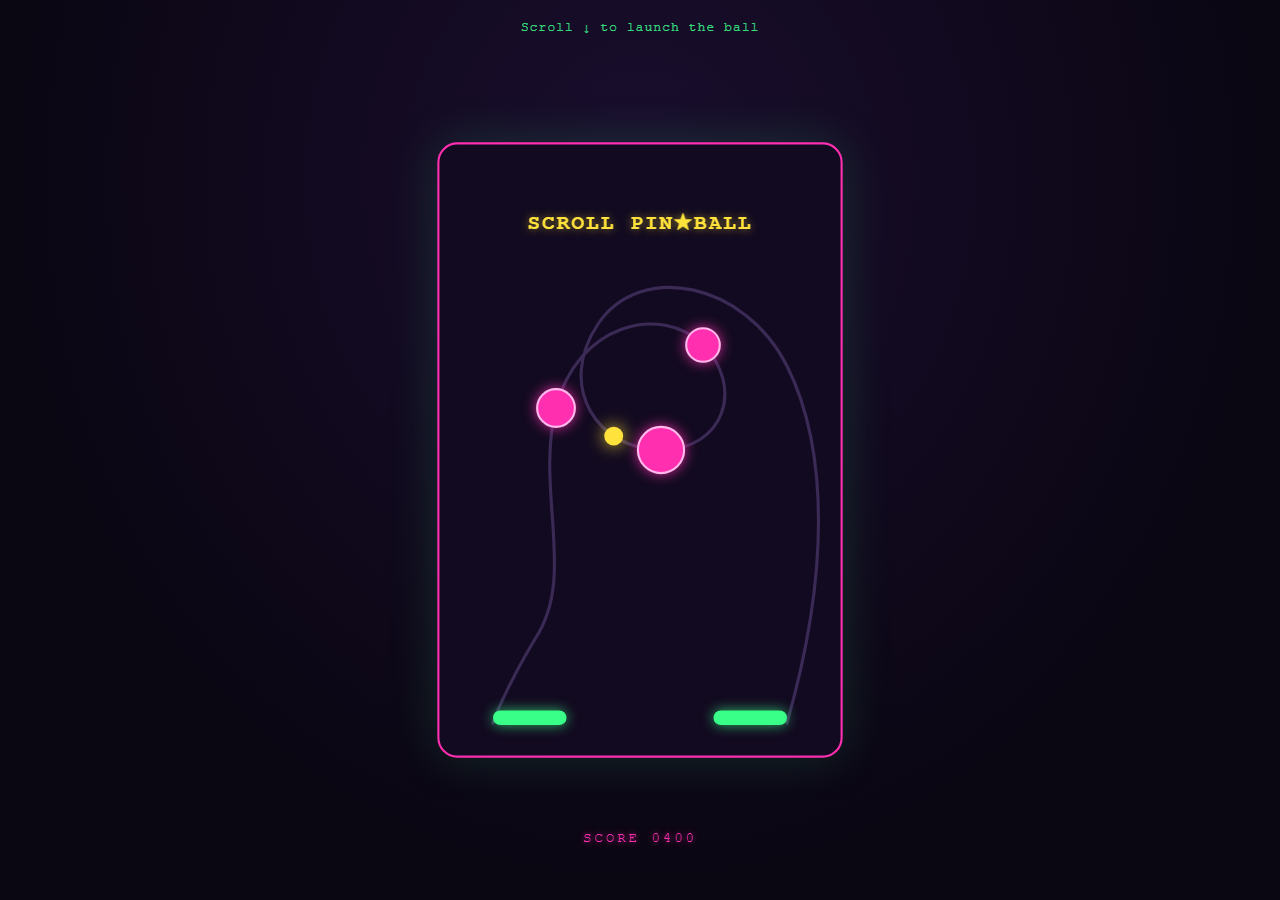
A scroll-driven arcade pinball table where the entire "gameplay" — ball travel, bumper hits, flipper flicks — is a function of scroll position rather than physics or user input. Pair it with Scroll SVG Path Draw for the underlying path-reveal technique, or Scroll Parallax Layers for a simpler scrub-driven effect.
Moving the ball along a hand-drawn rail
The rail is a single <path> (#ballPath) drawn with cubic Beziers looping around the table. Rather than pulling in a motion-path plugin, the snippet reads path.getTotalLength() once and, on every scroll tick, calls path.getPointAtLength(t * len) to get an {x, y} coordinate for any progress t between 0 and 1. The ball circle's cx/cy are set directly to that point — this is the same primitive SVG dash-offset reveal techniques rely on, just read for position instead of used for stroke length.
A tweened progress object drives everything
A plain object { t: 0 } is the single source of truth. A GSAP tween animates t from 0 to 1 inside a scrubbed timeline, calling placeBall(t) on every onUpdate. Because the timeline's scrollTrigger.scrub is a number (smoothing), scrolling up runs t back down and the ball retraces its path exactly — full reversibility for free.
Bumper pulses at fixed timeline positions
Bumpers are SVG circles. At specific timeline positions (0.35, 0.5, 0.68) a callback fires pulse(), which uses gsap.fromTo with yoyo: true, repeat: 1 to scale the bumper up and back down, simulating an impact flash. Because these are timeline-position callbacks inside a scrubbed timeline, GSAP re-runs them appropriately as the scrub head crosses that position in either direction.
Flippers as rotating rects around a transform-origin
Each flipper is a <rect> inside a <g> with transform-origin set to its pivot point (the hinge). Two short tweens rotate it from 0° to roughly 28° and back within a narrow timeline window, so the flick reads as instantaneous relative to the ball's slower travel — exactly like a real flipper's fast snap against a slow-rolling ball.
Why pin: true
The whole table is treated as a fixed stage: pin: true locks the section in the viewport for end: '+=200%' of scroll distance while the internal timeline plays out, so the "camera" never moves — only the game does.
Build with AI
Build, Understand, Optimize, and Extend It With AI
This snippet leans on one under-used SVG primitive — getPointAtLength() — to move an element along an arbitrary curve without a motion-path plugin. Paste the HTML, CSS, and JS into an AI assistant and ask it to explain why reading getTotalLength() once outside the scroll handler matters for performance, and why driving a single tweened {t:0} object rather than separately tweening the ball's cx/cy keeps the whole sequence reversible. It's also a good base to extend: ask the assistant to add ball rotation that follows the path's tangent angle, to make bumper hits trigger a screen-shake, or to add a "tilt" effect that nudges the ball off-path briefly. Treat this as a working reference for scroll-scrubbed motion-path animation, not a finished game.
Prompt to recreate it
Copy this into your AI assistant of choice to build the effect from scratch, or as a jumping-off point for your own variant:
Build a scroll-scrubbed pinball-style animation in plain HTML, CSS, and JavaScript using GSAP and ScrollTrigger — no physics engine, no canvas, no WebGL.

Requirements:
- Draw a looping SVG <path> representing a ball's rail/track using cubic Bezier curve commands.
- On page load, read the path's total length once with getTotalLength(). Write a function that, given a progress value between 0 and 1, calls getPointAtLength(progress * totalLength) and sets an SVG <circle>'s cx/cy to the returned point — this moves the "ball" along the curve without any motion-path plugin.
- Create a single GSAP timeline with scrollTrigger configured with pin: true and a numeric scrub value, so the section stays fixed in the viewport while the timeline plays across a scroll distance you define with end: "+=200%" or similar.
- Inside that timeline, tween a plain object's numeric property from 0 to 1 across the full timeline duration, calling the ball-placement function on every onUpdate.
- Add 2-3 SVG circles representing "bumpers." At fixed timeline positions (specific numbers between 0 and 1, added via timeline.add(callback, position)), trigger a brief scale-up-then-back-down pulse animation on the nearest bumper using gsap.fromTo with yoyo: true and repeat: 1, to simulate an impact flash.
- Add two more SVG shapes representing flippers, each wrapped in a <g> with an explicit transform-origin set to its hinge point. At two narrow timeline windows, rotate each flipper from 0 degrees to roughly 25-30 degrees and back within a fast sub-duration, so the flick reads as a fast snap relative to the ball's slower travel.
- Verify that scrolling back up reverses the entire sequence — the ball retraces its path, bumpers can re-pulse, and flippers reset — since the whole thing is driven by one scrubbed timeline.
- Style it with an arcade neon palette: dark background, magenta or pink bumpers with a glow filter, green flippers, and a yellow marquee-style heading.
Want to tighten it up first? Run this prompt through the AI Prompt Studio to score it across 8 quality dimensions, catch anti-patterns, and tune the wording for Claude, ChatGPT, or Gemini before you paste it in.
Source Code
<div class="pin-hint">Scroll ↓ to launch the ball</div>
<section class="pinball-stage">
  <svg class="table" viewBox="0 0 400 600" preserveAspectRatio="xMidYMid meet">
    <defs>
      <radialGradient id="glow" cx="50%" cy="50%" r="50%">
        <stop offset="0%" stop-color="#39ff88"/>
        <stop offset="100%" stop-color="#39ff88" stop-opacity="0"/>
      </radialGradient>
    </defs>
    <rect x="8" y="8" width="384" height="584" rx="18" class="table-bg"/>
    <path id="ballPath" class="rail" d="M 340 560 C 380 420 380 300 340 220 C 300 140 200 120 160 180 C 120 240 160 300 220 300 C 280 300 300 240 260 200 C 220 160 140 180 120 260 C 100 340 140 420 100 480 C 70 530 60 560 60 560" />
    <circle class="bumper" id="bumper1" cx="220" cy="300" r="22"/>
    <circle class="bumper" id="bumper2" cx="260" cy="200" r="16"/>
    <circle class="bumper" id="bumper3" cx="120" cy="260" r="18"/>
    <text x="200" y="90" class="marquee" text-anchor="middle">SCROLL PIN★BALL</text>
    <g id="flipperL" class="flipper" style="transform-origin: 95px 555px;">
      <rect x="60" y="548" width="70" height="14" rx="7"/>
    </g>
    <g id="flipperR" class="flipper" style="transform-origin: 305px 555px;">
      <rect x="270" y="548" width="70" height="14" rx="7"/>
    </g>
    <circle id="ball" class="ball" r="9" cx="340" cy="560"/>
  </svg>
  <div class="score">SCORE <span id="score">0000</span></div>
</section>
<div class="spacer"></div>
* { box-sizing: border-box; }
body { margin: 0; font-family: 'Courier New', monospace; background: #0a0612; color: #eafff2; }
.pin-hint { position: sticky; top: 12px; text-align: center; z-index: 5; font-size: 13px; letter-spacing: 0.08em; color: #39ff88; opacity: 0.85; padding: 8px; }
.pinball-stage { height: 100vh; display: flex; align-items: center; justify-content: center; overflow: hidden; background: radial-gradient(ellipse at 50% 20%, #1a0e2e 0%, #0a0612 70%); position: relative; }
.spacer { height: 220vh; }
.table { width: min(92vw, 420px); height: auto; filter: drop-shadow(0 0 24px rgba(57,255,136,0.15)); }
.table-bg { fill: #120a20; stroke: #ff2fb0; stroke-width: 2; }
.rail { fill: none; stroke: #3a2a55; stroke-width: 3; stroke-linecap: round; }
.marquee { fill: #ffe23c; font-size: 20px; font-weight: 700; letter-spacing: 2px; text-shadow: 0 0 8px rgba(255,226,60,0.6); }
.bumper { fill: #ff2fb0; stroke: #ffb8ec; stroke-width: 2; filter: drop-shadow(0 0 6px rgba(255,47,176,0.8)); }
.flipper rect { fill: #39ff88; filter: drop-shadow(0 0 6px rgba(57,255,136,0.7)); }
.ball { fill: #ffe23c; filter: drop-shadow(0 0 8px rgba(255,226,60,0.9)); }
.score { position: absolute; bottom: 6%; left: 50%; transform: translateX(-50%); font-size: 14px; letter-spacing: 3px; color: #ff2fb0; text-shadow: 0 0 6px rgba(255,47,176,0.7); }gsap.registerPlugin(ScrollTrigger);
var path = document.getElementById('ballPath');
var ball = document.getElementById('ball');
var len = path.getTotalLength();
var flipperL = document.getElementById('flipperL');
var flipperR = document.getElementById('flipperR');
var bumpers = [document.getElementById('bumper1'), document.getElementById('bumper2'), document.getElementById('bumper3')];
var scoreEl = document.getElementById('score');
var state = { t: 0 };
function placeBall(t) {
var point = path.getPointAtLength(t * len);
ball.setAttribute('cx', point.x);
ball.setAttribute('cy', point.y);
}
function pulse(el) {
gsap.killTweensOf(el);
gsap.fromTo(el, { scale: 1 }, { scale: 1.45, duration: 0.12, yoyo: true, repeat: 1, transformOrigin: '50% 50%', ease: 'power2.out' });
}
var tl = gsap.timeline({
scrollTrigger: {
trigger: '.pinball-stage',
start: 'top top',
end: '+=200%',
scrub: 0.4,
pin: true,
},
});
tl.to(state, {
t: 1,
ease: 'none',
duration: 1,
onUpdate: function () { placeBall(state.t); },
}, 0);
tl.to(flipperR, { rotation: -28, duration: 0.06, transformOrigin: '305px 555px' }, 0.02)
.to(flipperR, { rotation: 0, duration: 0.06, transformOrigin: '305px 555px' }, 0.08);
tl.add(function () { pulse(bumpers[0]); scoreEl.textContent = '0150'; }, 0.35)
.add(function () { pulse(bumpers[1]); scoreEl.textContent = '0400'; }, 0.5)
.add(function () { pulse(bumpers[2]); scoreEl.textContent = '0750'; }, 0.68);
tl.to(flipperL, { rotation: 28, duration: 0.06, transformOrigin: '95px 555px' }, 0.85)
.to(flipperL, { rotation: 0, duration: 0.06, transformOrigin: '95px 555px' }, 0.91)
.add(function () { scoreEl.textContent = '1000'; }, 0.9);
placeBall(0);Step by step
How to Use
- 1Scroll through the tableScroll down slowly in the preview — the ball travels the rail, bumpers flash pink when the ball nears them, and both flippers snap once each.
- 2Reshape the railEdit the "d" attribute on #ballPath in the HTML panel to draw a different loop — the ball will automatically follow the new curve.
- 3Add or move bumpersAdd another <circle class="bumper"> and a matching pulse() call at a new timeline position (a value between 0 and 1) in the JS panel.
- 4Tune flipper timingChange the timeline position numbers (e.g. 0.02, 0.85) that the flipper rotation tweens are placed at to fire earlier or later relative to ball travel.
- 5Adjust pin durationIncrease end: "+=200%" to a larger value to slow the whole sequence down relative to scroll distance, or decrease it to speed it up.
- 6Export in your formatClick "HTML" for a standalone file, "JSX" for React, or "Tailwind" for a React + Tailwind version.
Real-world uses
Common Use Cases
Got questions?
Frequently Asked Questions
The rail is an SVG path. path.getTotalLength() gives its length once; path.getPointAtLength(t * len) returns an {x, y} point for any progress t. The ball's cx/cy are set to that point on every scroll tick — no MotionPathPlugin needed.
A single scrubbed GSAP timeline with scroll position mapped to the 0–1 timeline range guarantees everything stays perfectly reversible and synchronized — scrolling up runs every sub-animation backward automatically.
Callbacks are added to the timeline at fixed positions (e.g. 0.35) with tl.add(fn, 0.35). GSAP calls the function whenever the scrub playhead crosses that position, in either scroll direction.
Yes — edit the "d" path data for the rail and add more <circle class="bumper"> elements plus matching tl.add() pulse calls at whatever timeline position you want them to trigger.
Pinning treats the table as a fixed "stage" so the viewer's attention stays on the ball's travel and the bumper hits rather than on the page scrolling past — the same reasoning used for the seismograph and candlestick chart snippets in this library.