Learn Coding Visually
Learn to code with interactive, live-preview playgrounds — HTML, CSS, JavaScript, React & more.
 HTML Playground42 lessons · Click-based · Live preview
 CSS PlaygroundLearn CSS with a live editor
 JavaScript Playground60 lessons · DOM · Async · Canvas
 React PlaygroundLearn React with a live code editor
 GSAP PlaygroundLearn GSAP animation interactively
 SVG Playground44 lessons · shapes · paths · animation
 SCSS Playground45 lessons · Sass modules · tokens
 Tailwind PlaygroundLearn Tailwind CSS with a live editor
 Bootstrap 5 Playground50 lessons · live preview
Scroll Cassette Tape Rewind — Free HTML CSS JS Snippet
Scroll Cassette Tape Rewind · Scroll · Plain HTML, CSS & JS · Live preview
What's included
Features
About this UI Snippet
Scroll Cassette Tape Rewind — Dual Reel Rotation, Radius Transfer & Tape Counter
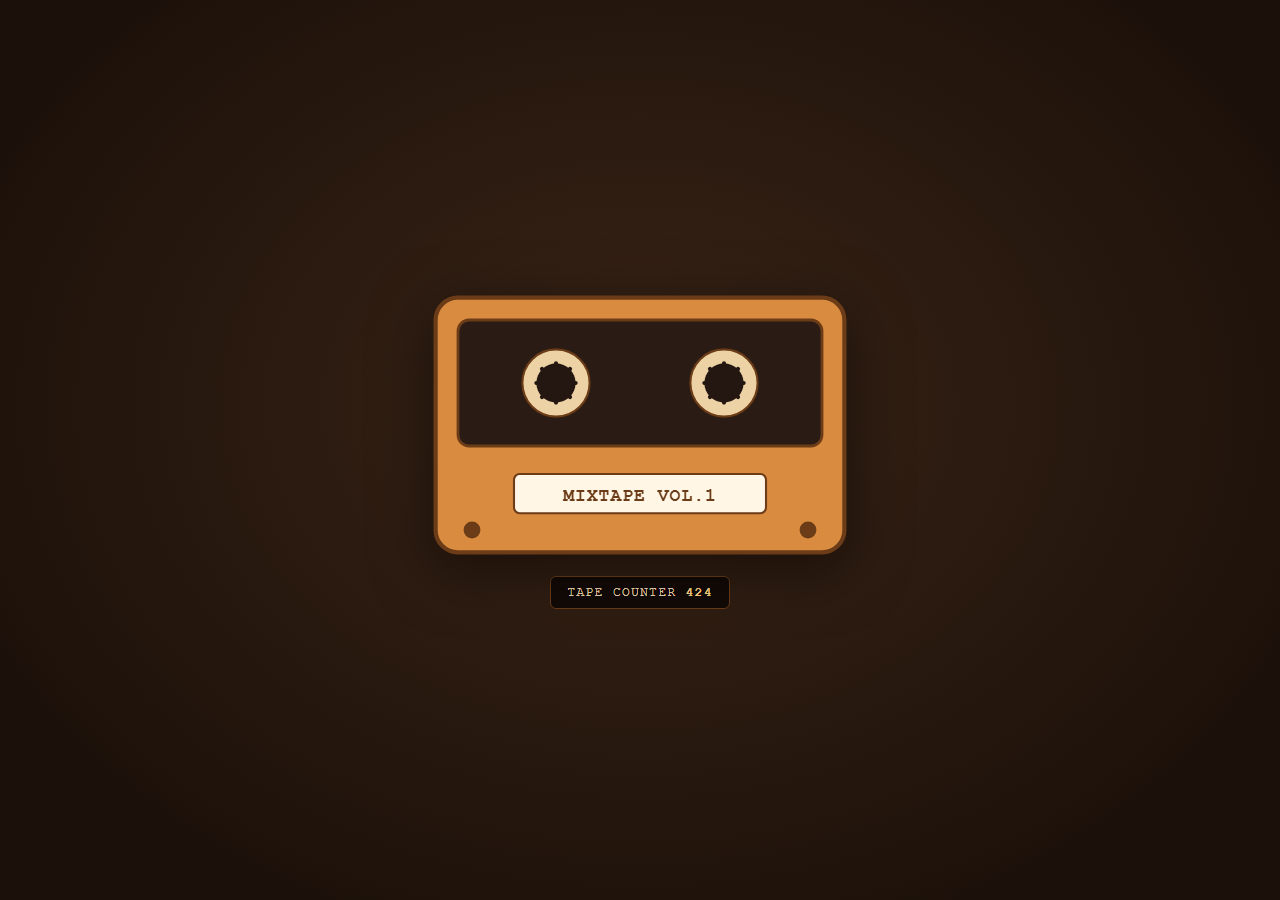
This snippet illustrates a retro cassette tape in SVG with two reels that both spin continuously and visibly change size as scroll progresses — tape "winding" from a full left reel onto an emptying-then-filling right reel — alongside a ticking numeric tape counter, for a nostalgic mixtape feel.
Two independently rotating reel groups
#reelLeft and #reelRight are SVG <g> groups each containing a hub circle and four spoke lines. GSAP rotates them in opposite directions (-1440 and 1440 degrees — four full turns) using an explicit transformOrigin set to each reel's own center coordinates, since SVG group elements don't automatically rotate around their visual center the way CSS box elements with transform-origin: center do.
Radius transfer simulates tape winding
A separate proxy object { progress: 0 } is tweened from 0 to 1 across the same scrubbed timeline. Its onUpdate callback linearly interpolates the visible tape radius of each reel in opposite directions — leftR shrinks from maxR to minR while rightR grows from minR to maxR — by directly setting each reel-background circle's SVG r attribute. Because both values are driven by the same state.progress, the total "tape" always conserves: what the left reel loses in radius, the right reel gains, exactly like tape physically transferring between two spindles.
Live tape counter
The same onUpdate also writes Math.round(state.progress * 847) into a monospace counter display, padded to three digits with padStart(3, '0') — mimicking the mechanical numeric tape counters found on real cassette decks, incrementing as the tape winds.
Continuous spin independent of radius
The reel rotation tweens and the radius-transfer tween are separate animations placed at the same timeline position (0) but with independent easing and targets — this separation means the reels can spin at a constant rate throughout while the radius change follows its own (currently linear, but easily eased) curve, matching how real cassette reels don't necessarily spin at a rate proportional to their radius on a simplified illustration.
Fully reversible
All three animations share the same scrub: true timeline, so scrolling back up spins the reels backward and transfers the tape radius back to its starting distribution.
Pair with Scroll Terrain Contour Lines for another SVG-attribute-driven technique, or Scroll Number Odometer for a related live-counter pattern.
Build with AI
Build, Understand, Optimize, and Extend It With AI
Paste this snippet's HTML, CSS and JS into an AI coding assistant and ask it to explain why the two reels' radii are driven by one shared progress value moving in opposite directions rather than two independent tweens — the conservation trick is what makes the tape-winding illusion convincing. It's a good one to extend: ask the assistant to make rotation speed inversely proportional to the current reel radius for more physically accurate winding, to add a visible looping tape strand connecting the two reels through the cassette window, or to add a stop/play/rewind button set that scrubs the ScrollTrigger's timeline programmatically instead of via scroll.
Prompt to recreate it
Copy this into your AI assistant of choice to build the effect from scratch, or as a jumping-off point for your own variant:
Build a scroll-driven retro cassette tape illustration in HTML, CSS and JavaScript using GSAP and ScrollTrigger, drawn entirely in SVG — no images, no canvas, no WebGL.

Requirements:
- Draw an SVG cassette: an outer shell rectangle, an inner dark "window" rectangle, two circular reel background shapes inside the window, two reel groups each containing a small hub circle and a few spoke lines, a label plate rectangle with text, and a couple of small screw circles for detail.
- Wrap the cassette in a tall scroll section and attach one GSAP timeline via ScrollTrigger with scrub: true.
- Continuously rotate both reel groups in opposite directions across the whole scroll range, using an explicit SVG transform-origin set to each reel's own center coordinates (not the SVG canvas origin).
- Using a single plain JavaScript proxy object tweened from 0 to 1 on the same timeline, in its onUpdate callback linearly interpolate the radius of each reel's background circle in opposite directions (one shrinking from a max radius to a min radius, the other growing from min to max by the same amount) by directly setting their SVG r attributes, so the two reels always look like they conserve a fixed total amount of "tape" between them.
- In the same onUpdate callback, update a live numeric tape-counter text readout that counts up from 000, left-padded to three digits, in sync with the winding progress.
- The whole illustration must animate forward and reverse cleanly and smoothly as the user scrolls down and back up.
- Use a warm mixtape color palette: orange/tan cassette shell, dark brown accents, and a cream label plate.
Want to tighten it up first? Run this prompt through the AI Prompt Studio to score it across 8 quality dimensions, catch anti-patterns, and tune the wording for Claude, ChatGPT, or Gemini before you paste it in.
Source Code
<div class="hint">Scroll ↓ to wind the tape</div>
<div class="tape-wrap">
  <div class="tape-stage">
    <svg viewBox="0 0 300 190" class="tape-svg">
      <rect x="4" y="4" width="292" height="182" rx="16" class="shell" />
      <rect x="20" y="20" width="260" height="90" rx="8" class="window" />
      <circle cx="90" cy="65" r="34" id="reelLeftBg" class="reel-bg" />
      <circle cx="210" cy="65" r="34" id="reelRightBg" class="reel-bg" />
      <g id="reelLeft" class="reel-group">
        <circle cx="90" cy="65" r="14" class="hub" />
        <line x1="90" y1="51" x2="90" y2="79" class="spoke" />
        <line x1="76" y1="65" x2="104" y2="65" class="spoke" />
        <line x1="80" y1="55" x2="100" y2="75" class="spoke" />
        <line x1="100" y1="55" x2="80" y2="75" class="spoke" />
      </g>
      <g id="reelRight" class="reel-group">
        <circle cx="210" cy="65" r="14" class="hub" />
        <line x1="210" y1="51" x2="210" y2="79" class="spoke" />
        <line x1="196" y1="65" x2="224" y2="65" class="spoke" />
        <line x1="200" y1="55" x2="220" y2="75" class="spoke" />
        <line x1="220" y1="55" x2="200" y2="75" class="spoke" />
      </g>
      <rect x="60" y="130" width="180" height="28" rx="4" class="label-plate" />
      <text x="150" y="149" text-anchor="middle" class="label-text">MIXTAPE VOL.1</text>
      <circle cx="30" cy="170" r="6" class="screw" />
      <circle cx="270" cy="170" r="6" class="screw" />
    </svg>
    <div class="counter-readout">TAPE COUNTER <span id="counterNum">000</span></div>
  </div>
</div>
* { box-sizing: border-box; }
body { margin: 0; font-family: 'Courier New', monospace; background: #241611; color: #f0d9b5; }
.hint { text-align: center; padding: 28px 16px; font-size: 13px; letter-spacing: 0.06em; text-transform: uppercase; color: #d9a86c; }
.tape-wrap { height: 400vh; position: relative; }
.tape-stage { position: sticky; top: 0; height: 100vh; display: flex; flex-direction: column; align-items: center; justify-content: center; gap: 18px; background: radial-gradient(ellipse at 50% 45%, #3a2416, #1c110a 80%); }
.tape-svg { width: min(420px, 88vw); height: auto; filter: drop-shadow(0 14px 30px rgba(0,0,0,0.5)); }
.shell { fill: #d98b3f; stroke: #6b3c17; stroke-width: 3; }
.window { fill: #2a1c14; stroke: #6b3c17; stroke-width: 2; }
.reel-bg { fill: #ecd2a4; stroke: #6b3c17; stroke-width: 1.5; }
.hub { fill: #241611; }
.spoke { stroke: #241611; stroke-width: 3; stroke-linecap: round; }
.label-plate { fill: #fff6e6; stroke: #6b3c17; stroke-width: 1.5; }
.label-text { font-family: 'Courier New', monospace; font-size: 13px; font-weight: 700; fill: #6b3c17; letter-spacing: 0.05em; }
.screw { fill: #6b3c17; }
.counter-readout { font-size: 13px; letter-spacing: 0.1em; color: #f0d9b5; background: #120a06; padding: 8px 16px; border-radius: 6px; border: 1px solid #6b3c17; }
.counter-readout span { color: #ffd88a; font-weight: 700; }
@media (max-width: 640px) { .tape-svg { width: 92vw; } }gsap.registerPlugin(ScrollTrigger);
const reelLeft = document.getElementById('reelLeft');
const reelRight = document.getElementById('reelRight');
const reelLeftBg = document.getElementById('reelLeftBg');
const reelRightBg = document.getElementById('reelRightBg');
const counterNum = document.getElementById('counterNum');
const minR = 14;
const maxR = 34;
const state = { progress: 0 };
gsap.timeline({
scrollTrigger: {
trigger: '.tape-wrap',
start: 'top top',
end: 'bottom bottom',
scrub: true,
},
})
.to(reelLeft, { rotate: -1440, transformOrigin: '90px 65px', ease: 'none' }, 0)
.to(reelRight, { rotate: 1440, transformOrigin: '210px 65px', ease: 'none' }, 0)
.to(state, {
progress: 1,
ease: 'none',
onUpdate: () => {
const leftR = maxR - (maxR - minR) * state.progress;
const rightR = minR + (maxR - minR) * state.progress;
reelLeftBg.setAttribute('r', leftR.toFixed(1));
reelRightBg.setAttribute('r', rightR.toFixed(1));
counterNum.textContent = String(Math.round(state.progress * 847)).padStart(3, '0');
},
}, 0);
ScrollTrigger.refresh();Step by step
How to Use
- 1Scroll through the previewScroll down slowly — both reels spin continuously while tape visibly transfers from the left reel to the right one, and the tape counter increments.
- 2Change spin speedEdit the -1440 / 1440 rotate values in the JS panel — larger magnitudes make the reels spin faster relative to the same scroll distance.
- 3Adjust reel size rangeChange minR and maxR to control how dramatically the reels grow and shrink as tape transfers.
- 4Edit the tape counter maxChange the 847 multiplier in the counter onUpdate to set the final counter value reached at full scroll.
- 5Restyle the shell and labelEdit the .shell, .label-plate and .label-text styles/content in the HTML and CSS panels for your own mixtape branding.
- 6Export in your formatClick "HTML" for a standalone file, "JSX" for a React component, or "Tailwind" for a React + Tailwind version.
Real-world uses
Common Use Cases
Got questions?
Frequently Asked Questions
Unlike CSS box elements, SVG <g> groups rotate around the SVG coordinate origin (0,0) by default unless a transform-origin is explicitly set to that group's own center coordinates — otherwise the reel would appear to orbit the whole cassette rather than spin in place.
One shared progress value drives both radii in opposite directions — left shrinks from maxR to minR while right grows from minR to maxR by the same amount at every point in the scroll — so the combined tape volume always looks conserved rather than appearing and disappearing independently.
Yes — instead of a constant rotation rate, compute rotation speed as inversely proportional to the current radius inside the shared onUpdate callback and apply it with gsap.set instead of a separate to() tween.
Math.round(state.progress * 847) computes the raw count and padStart(3, '0') left-pads it with zeros to always show three digits, matching the look of a real mechanical tape counter.
No — the entire cassette shell, reels, spokes, and label plate are drawn with plain SVG shapes, so it is fully stylable via CSS fill/stroke without any external assets.