Learn Coding Visually
Learn to code with interactive, live-preview playgrounds — HTML, CSS, JavaScript, React & more.
 HTML Playground42 lessons · Click-based · Live preview
 CSS PlaygroundLearn CSS with a live editor
 JavaScript Playground60 lessons · DOM · Async · Canvas
 React PlaygroundLearn React with a live code editor
 GSAP PlaygroundLearn GSAP animation interactively
 SVG Playground44 lessons · shapes · paths · animation
 SCSS Playground45 lessons · Sass modules · tokens
 Tailwind PlaygroundLearn Tailwind CSS with a live editor
 Bootstrap 5 Playground50 lessons · live preview
Scroll Constellation Connect Dots — SVG Draw-On Line Effect
Scroll Constellation Connect Dots · Scroll · Plain HTML, CSS & JS · Live preview
What's included
Features
About this UI Snippet
How to Build a Scroll-Driven Constellation Connect-the-Dots With SVG and GSAP
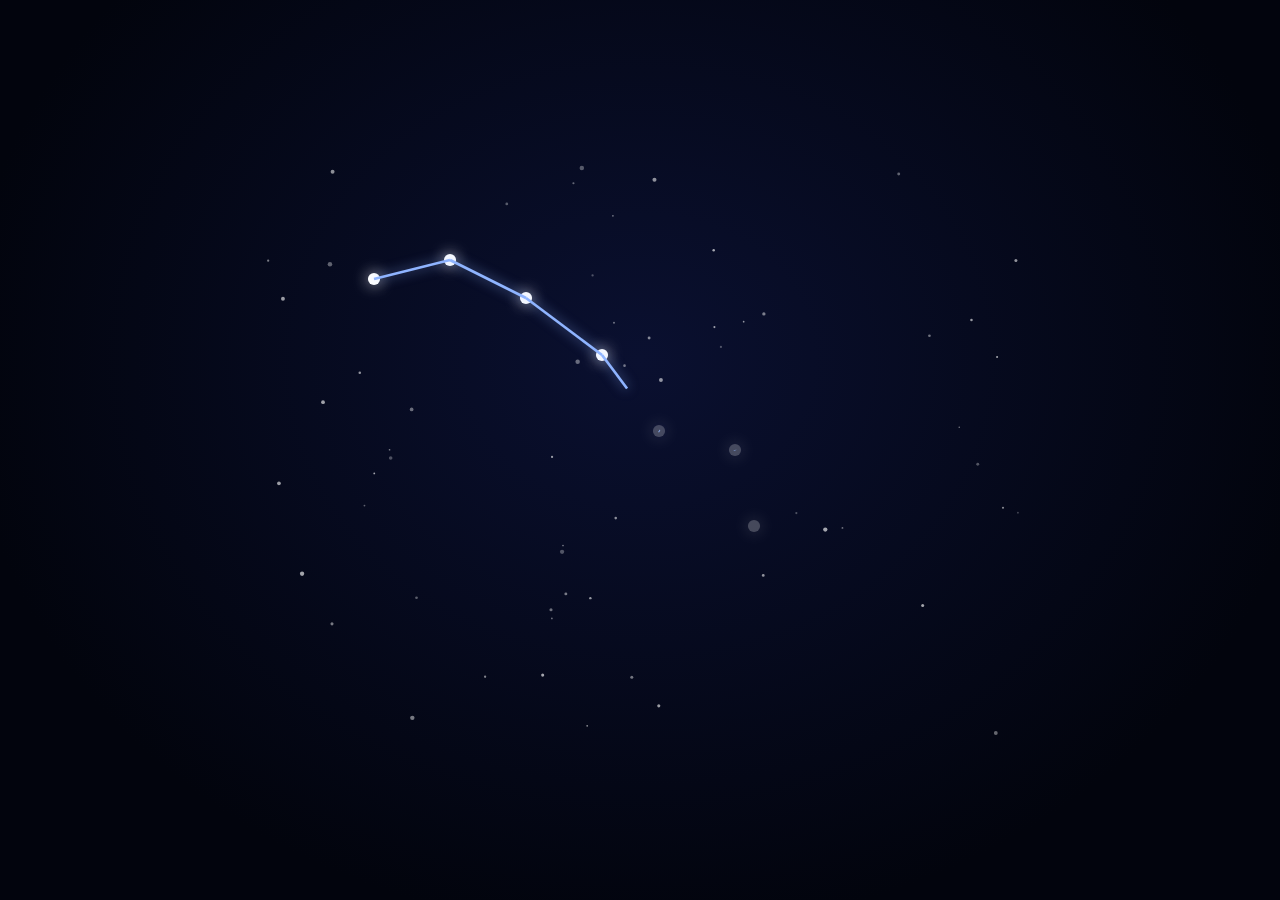
The Scroll Constellation Connect Dots snippet places scattered star points on a night sky and connects them one edge at a time into a recognizable constellation shape as the visitor scrolls through a pinned stage, using the classic SVG stroke-dasharray "draw-on" technique rather than any canvas drawing.
Foreground stars versus background clutter
Two separate sets of <circle> elements are generated: sixty small, randomly placed, low-opacity background stars purely for atmosphere, and a handful of foreground constellation stars at fixed, hand-placed coordinates that actually participate in the shape. Keeping these visually and structurally separate means the connecting lines only ever need to reference the meaningful points, similar to how scroll svg path draw isolates the path being drawn from any decorative backdrop.
stroke-dasharray/stroke-dashoffset as a reveal mechanism
Each connecting <line> is given a stroke-dasharray equal to its own length and a starting stroke-dashoffset of that same length — which makes the entire line invisible, since the one dash exactly equals the gap needed to hide it. Animating stroke-dashoffset down to 0 reveals the line progressively from one end to the other, the standard technique for scroll-scrubbed line drawing with zero JavaScript path-sampling required.
One timeline, staggered per-edge slices
A single gsap.timeline() divides the total scroll range into equal slices, one per edge, and each slice brightens the edge's starting star, draws its connecting line, then brightens the ending star — all positioned at explicit timeline offsets so edges reveal strictly one after another rather than all lines inching forward simultaneously, the same staggering principle used for trace routing in circuit board trace, applied here to constellation edges.
A label that reveals only once
A second lightweight ScrollTrigger watches the same pinned range and toggles a .visible class on the constellation's name label only once scroll progress passes 94% — so the label reads as a payoff for completing the shape rather than appearing arbitrarily partway through.
Why lines over paths for the constellation edges
Because each connecting segment is a simple straight line between two known star coordinates, using individual <line> elements (rather than one combined path) keeps each edge's length calculation trivial (Math.hypot) and lets every edge animate fully independently within its own timeline slice.
Build with AI
Build, Understand, Optimize, and Extend It With AI
You do not need a canvas drawing or a dedicated drawing library to understand how this constellation connects itself on scroll. Paste this snippet's HTML, CSS, and JS into an AI assistant like Claude and ask it to explain why stroke-dasharray is set to a line's own computed length, or how dividing the timeline into equal per-edge slices produces a strictly one-after-another reveal. The same assistant can help you extend it — ask it to add a second constellation that appears after the first fades, make background stars gently twinkle via a subtle opacity animation, or generalize the star/edge data into a JSON format for multiple constellations. It can also help optimize further, for instance batching all lines into one combined SVG path with sub-path length tracking if the constellation grows large. Treat the code as a conversation starter, not a finished artifact.
Prompt to recreate it
Copy this into your AI assistant of choice to build the effect from scratch, or as a jumping-off point for your own variant:
Build a "scroll-scrubbed constellation connect-the-dots" effect in plain HTML, CSS, and JavaScript using inline SVG, GSAP, and GSAP's ScrollTrigger plugin, all loaded from a CDN (no bundler, no build step, no canvas).

Requirements:
- A pinned section containing an inline SVG night-sky scene: a set of small randomly placed, low-opacity background stars purely for atmosphere, and a handful of larger foreground stars at fixed hand-picked coordinates representing a real or invented constellation shape, starting dim/low-opacity.
- Define the constellation as a list of star coordinates plus a list of edges (index pairs) describing which stars connect to which, in the order they should be revealed.
- For each edge, create an SVG line element between its two star coordinates, compute its exact pixel length, and set its stroke-dasharray to that length and its initial stroke-dashoffset to that same length so the line starts fully hidden.
- Build one gsap.timeline() attached to a ScrollTrigger on the pinned section, with pin: true, start at top top, a numeric scrub, and a multi-hundred-percent end. Divide the timeline into equal slices, one per edge, and within each edge's slice: brighten the opacity of its starting star, animate its line's stroke-dashoffset down to 0 (the draw-on reveal), then brighten its ending star — positioned so edges complete strictly one after another rather than animating in parallel.
- Add a text label naming the constellation that fades in only once scroll progress through the pinned range exceeds roughly 94%, using a separate ScrollTrigger or the same timeline's progress callback.
- Confirm scrolling back up retracts each line and dims each star in reverse order exactly, and hides the label again, since the whole sequence is driven by one scrubbed timeline.
Want to tighten it up first? Run this prompt through the AI Prompt Studio to score it across 8 quality dimensions, catch anti-patterns, and tune the wording for Claude, ChatGPT, or Gemini before you paste it in.
Source Code
<section class="con-stage" id="conStage">
  <div class="con-intro"><p>Scroll ↓ to connect the stars into a constellation</p></div>
  <svg class="con-svg" id="conSvg" viewBox="0 0 400 300" preserveAspectRatio="xMidYMid meet">
    <g id="conStars"></g>
    <g id="conLines"></g>
  </svg>
  <div class="con-label" id="conLabel">URSA MINOR</div>
</section>
<section class="con-bottom"><p>The little bear, fully charted.</p></section>*{box-sizing:border-box;margin:0;padding:0}
html,body{background:#02040d;color:#eaf2ff;font-family:system-ui,-apple-system,sans-serif}
.con-bottom{min-height:70vh;display:flex;justify-content:center;align-items:center;color:#4a5a8a;font-size:15px;letter-spacing:.08em;text-transform:uppercase;text-align:center;padding:0 24px}
.con-stage{height:100vh;position:relative;overflow:hidden;display:flex;align-items:center;justify-content:center;background:radial-gradient(ellipse at 50% 40%,#0a1030 0%,#02040d 75%)}
.con-intro{position:absolute;top:10%;left:0;right:0;display:flex;justify-content:center;text-align:center;padding:0 24px;pointer-events:none;z-index:6;color:#a9c0ff;font-size:15px;letter-spacing:.08em;text-transform:uppercase;transition:opacity .4s ease;}
.con-svg{width:min(85vw,760px);height:auto;max-height:70vh}
.con-star{filter:drop-shadow(0 0 4px rgba(255,255,255,.8))}
.con-line{fill:none;stroke:#8fb4ff;stroke-width:1.4;filter:drop-shadow(0 0 3px rgba(143,180,255,.7))}
.con-label{position:absolute;bottom:14%;left:0;right:0;text-align:center;font-size:15px;letter-spacing:.3em;color:#cdd8ff;opacity:0;transition:opacity .6s ease;text-shadow:0 0 12px rgba(140,170,255,.6)}
.con-label.visible{opacity:1}gsap.registerPlugin(ScrollTrigger);
var starsGroup = document.getElementById('conStars');
var linesGroup = document.getElementById('conLines');
var label = document.getElementById('conLabel');
var introEl = document.querySelector('.con-intro');
// A simplified Ursa Minor (Little Dipper) layout in a 400x300 viewBox.
var stars = [
{ x: 60, y: 60 },
{ x: 100, y: 50 },
{ x: 140, y: 70 },
{ x: 180, y: 100 },
{ x: 210, y: 140 },
{ x: 250, y: 150 },
{ x: 260, y: 190 },
];
// Edges connect stars in drawing order (index pairs) — the "handle" then
// the "bowl" of the dipper shape.
var edges = [
[0, 1], [1, 2], [2, 3], [3, 4], [4, 5], [5, 6], [6, 4],
];
// Random background clutter stars for atmosphere; these never connect.
var BG = 60;
for (var b = 0; b < BG; b++) {
var c = document.createElementNS('http://www.w3.org/2000/svg', 'circle');
c.setAttribute('cx', Math.random() * 400);
c.setAttribute('cy', Math.random() * 300);
c.setAttribute('r', (0.4 + Math.random() * 0.8).toFixed(2));
c.setAttribute('fill', '#ffffff');
c.setAttribute('opacity', (0.25 + Math.random() * 0.4).toFixed(2));
starsGroup.appendChild(c);
}
// Foreground constellation stars, drawn on top of clutter, starting dim.
var starEls = stars.map(function (s) {
var el = document.createElementNS('http://www.w3.org/2000/svg', 'circle');
el.setAttribute('cx', s.x);
el.setAttribute('cy', s.y);
el.setAttribute('r', 3.2);
el.setAttribute('fill', '#ffffff');
el.setAttribute('class', 'con-star');
el.style.opacity = '0.25';
starsGroup.appendChild(el);
return el;
});
// One line per edge, each drawn with stroke-dasharray/stroke-dashoffset so
// it can be revealed progressively by scroll ("draw-on").
var lineEls = edges.map(function (e) {
var a = stars[e[0]], b2 = stars[e[1]];
var line = document.createElementNS('http://www.w3.org/2000/svg', 'line');
line.setAttribute('x1', a.x); line.setAttribute('y1', a.y);
line.setAttribute('x2', b2.x); line.setAttribute('y2', b2.y);
line.setAttribute('class', 'con-line');
var len = Math.hypot(b2.x - a.x, b2.y - a.y);
line.setAttribute('stroke-dasharray', len);
line.setAttribute('stroke-dashoffset', len);
linesGroup.appendChild(line);
return { el: line, len: len };
});
var tl = gsap.timeline({
scrollTrigger: {
trigger: '#conStage',
start: 'top top',
end: '+=380%',
scrub: 0.6,
pin: true,
onUpdate: function (self) {
if (introEl) introEl.style.opacity = (self.progress > 0.02) ? '0' : '1';
label.classList.toggle('visible', self.progress > 0.94);
},
},
});
// Each edge gets its own slice of the timeline: the star at its start
// brightens, then the line draws on via dashoffset, staggered one after
// another so the shape visibly connects itself point by point.
var step = 1 / edges.length;
edges.forEach(function (e, i) {
var t0 = i * step;
tl.to(starEls[e[0]].style, { opacity: 1, duration: step * 0.4 }, t0)
.to(lineEls[i].el, { strokeDashoffset: 0, duration: step * 0.85, ease: 'none' }, t0 + step * 0.1)
.to(starEls[e[1]].style, { opacity: 1, duration: step * 0.4 }, t0 + step * 0.5);
});
Step by step
How to Use
- 1Load the two GSAP CDN scriptsAdd gsap.min.js and ScrollTrigger.min.js from the CDN panel, in that order.
- 2Paste HTML, CSS, and JSA scattered night sky appears inside a pinned stage with dim, unconnected constellation stars among the clutter.
- 3Scroll downStars brighten and glowing lines draw on one edge at a time until the full constellation shape is connected.
- 4Reach the endThe constellation's name label fades in once every edge has finished drawing.
- 5Scroll back upThe label fades out and lines retract edge by edge in reverse, exactly undoing the connection sequence.
- 6Plot your own constellationEdit the stars array with new x/y coordinates and the edges array with new index pairs to connect them.
Real-world uses
Common Use Cases
Got questions?
Frequently Asked Questions
Setting stroke-dasharray to a line's exact pixel length creates one dash and one gap of that same length. Starting stroke-dashoffset at that same length shifts the dash entirely out of view, making the line appear invisible. Animating dashoffset down to 0 slides the visible dash back into place from one end, which reads as the line being drawn on.
The sixty background stars exist purely for atmosphere and never participate in the connect-the-dots sequence, so they are generated once at random positions and opacities and left alone. Keeping them in a visually distinct, structurally separate set means the edges array only ever needs to reference the handful of meaningful constellation star coordinates.
The total scroll range is divided into equal slices, one per edge (step = 1 / edges.length). Each edge's brighten-start-star, draw-line, and brighten-end-star tweens are positioned within its own slice of the timeline using explicit time offsets, so edges are guaranteed to complete in order rather than all animating in parallel.
Because every edge is a straight line between two known star coordinates, using separate <line> elements makes each edge's length trivial to compute with Math.hypot for an exact stroke-dasharray value, and lets each edge be independently targeted by its own tween without needing to track sub-path lengths within a single combined path string.
Yes. Click JSX for a React component, Vue for a Vue 3 SFC, Angular for a standalone component, or Tailwind for a React + Tailwind version. Build the SVG elements and timeline inside a mount effect keyed to a container ref, and on unmount kill both ScrollTrigger instances so the pin does not leak between route changes.