Learn Coding Visually
Learn to code with interactive, live-preview playgrounds — HTML, CSS, JavaScript, React & more.
 HTML Playground42 lessons · Click-based · Live preview
 CSS PlaygroundLearn CSS with a live editor
 JavaScript Playground60 lessons · DOM · Async · Canvas
 React PlaygroundLearn React with a live code editor
 GSAP PlaygroundLearn GSAP animation interactively
 SVG Playground44 lessons · shapes · paths · animation
 SCSS Playground45 lessons · Sass modules · tokens
 Tailwind PlaygroundLearn Tailwind CSS with a live editor
 Bootstrap 5 Playground50 lessons · live preview
Three.js Scroll Galaxy Formation — Particle Spiral Effect
Three.js Scroll Galaxy Formation · Scroll · Plain HTML, CSS & JS · Live preview
What's included
Features
About this UI Snippet
How to Build a Scroll-Driven Particle Galaxy Formation With Three.js
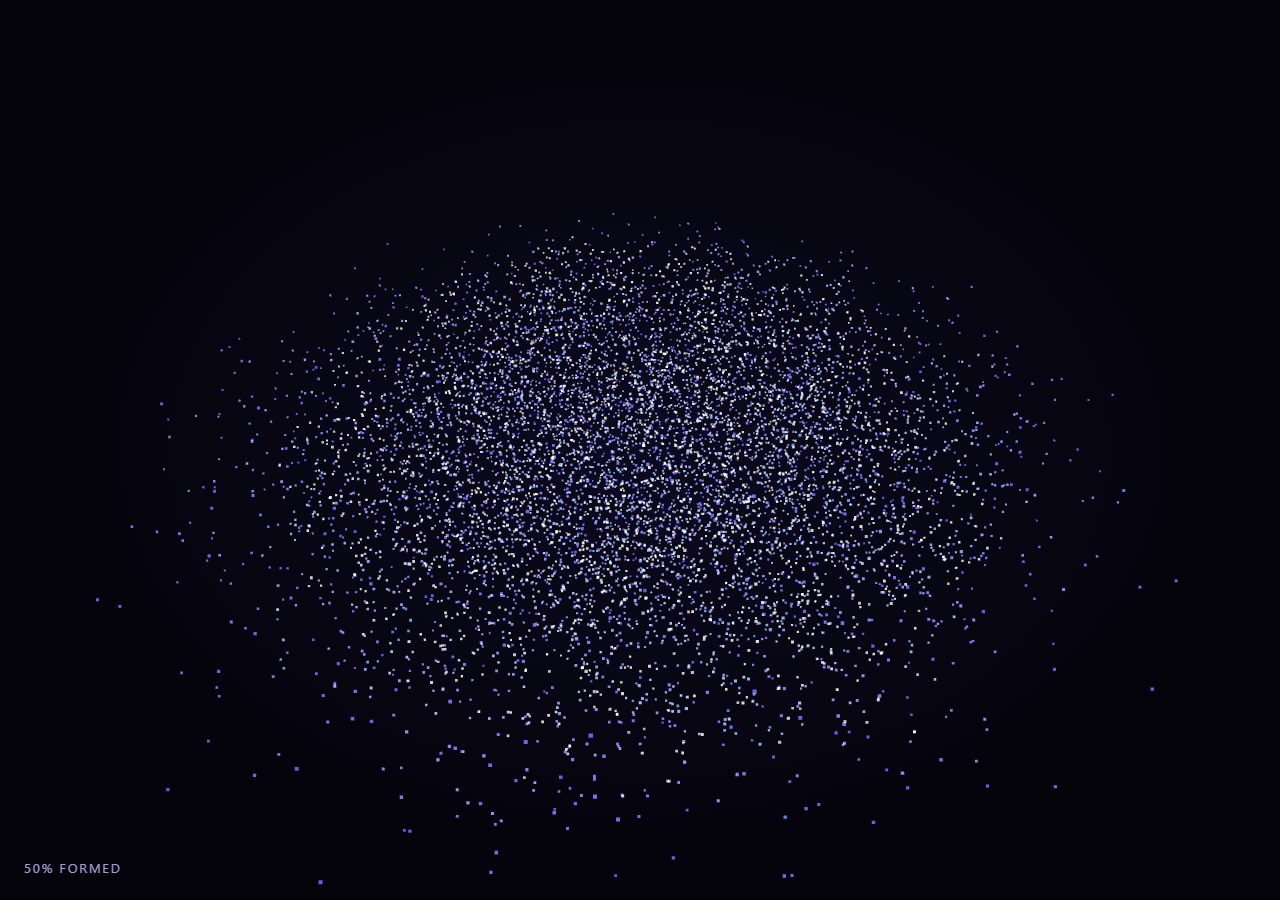
The Three.js Scroll Galaxy Formation snippet takes nine thousand points scattered as a chaotic dust cloud and, as the visitor scrolls through a pinned stage, lerps every single one of them into place along the arms of a rotating spiral galaxy. The whole effect is one THREE.BufferGeometry, one THREE.PointsMaterial, and a scrubbed GSAP tween — no per-particle mesh, no physics engine, just precomputed start and target positions and a per-frame interpolation.
One BufferGeometry, not nine thousand meshes
The naive approach to "thousands of particles" is to spawn a mesh per particle, but that means nine thousand draw calls, nine thousand transform updates, and a frame rate that collapses well before the effect looks good. Instead this snippet allocates a single flat Float32Array of length COUNT * 3 and hands it to THREE.BufferAttribute, so the GPU renders every particle in one THREE.Points draw call. Updating the whole galaxy each frame is just writing floats into that array and flipping posAttr.needsUpdate = true — the same technique used by the particle assembly snippet, applied here to a spiral rather than a logo shape.
Precomputing start and target, not simulating physics
Rather than running an N-body gravity simulation to make particles "fall" into a spiral — expensive and hard to make deterministic on scroll-reverse — every particle's chaotic starting position and its final spiral position are both computed once, up front, and stored in parallel arrays (startPos and targetPos). The animation loop then does nothing more than lerp(start, target, easedProgress) for every particle, every frame. Because both endpoints are fixed, scrolling backward simply lerps the other direction — full reversibility falls out of the math for free, exactly like the scrubbed camera value in the scroll tunnel snippet.
Logarithmic-style spiral arm placement
Each particle's target is generated with a biased random radius t (raised to a power so points cluster densely near the core, matching how real galaxy density falls off), assigned to one of four arms by i % ARMS, and given an angle that increases with distance from the core (armAngle + dist * 0.5 + sqrt(t) * 2.2). That distance-dependent angle term is what makes the arms sweep outward into recognizable spiral curves rather than straight spokes — it is a coarse approximation of a logarithmic spiral, cheap enough to compute nine thousand times without a lookup table.
Hue gradient from white-hot core to violet rim
Color is baked into the same geometry via a second BufferAttribute (color) and vertexColors: true on the material, so no shader is required. Each particle's color is interpolated between a warm near-white core tone, a blue mid-disk tone, and a violet edge tone based on the same t value used for its radius — meaning color and position are derived from one shared variable, so they always agree about which particles are "core" versus "rim" even as the galaxy assembles.
Additive blending for glowing dust
THREE.AdditiveBlending with depthWrite: false is what makes overlapping particles brighten instead of occlude each other, which is essential for a convincing dust-cloud look — normal alpha blending would make dense clusters look like flat gray smudges instead of glowing nebulae. This is the same blending trick used in the galaxy spiral ambient background snippet, but here it is combined with scroll-scrubbed formation instead of a static loop.
Smoothstep easing decoupled from the scrub
The raw scrubbed value form.t moves linearly with scroll position (GSAP's ease: 'none'), but the visual lerp applies its own t * t * (3 - 2 * t) smoothstep on top. This keeps the scrollbar mapping perfectly linear and predictable for ScrollTrigger's pin math, while still giving the particle motion itself an eased, physical acceleration-and-settle feel — two different easings serving two different jobs.
Rotation and camera pull-back tied to the same progress
Once the disk is mostly formed, the whole THREE.Points object spins slowly around Y, and the spin speed itself is scaled by eased * eased so a still-chaotic cloud never visibly rotates — only a recognizable galaxy does. The camera simultaneously pulls back and drops in height as eased climbs, ending on a tilted wide shot of the finished spiral, similar in spirit to the reveal camera move in crystal cluster.
Build with AI
Build, Understand, Optimize, and Extend It With AI
You do not need to reverse-engineer how nine thousand particles collapse into a spiral without a physics engine. Paste this snippet's HTML, CSS, and JS into an AI assistant like Claude and ask it to explain why start and target positions are precomputed rather than simulated, or how the arm-angle formula produces a spiral rather than straight spokes. The same assistant can help you extend it — ask it to add a second particle layer for a surrounding halo, vary particle size by distance from the core for a parallax-like depth cue, or add a subtle color pulse timed to scroll velocity. It can also help optimize further, for instance moving the per-frame lerp into a vertex shader via a custom ShaderMaterial so the CPU loop disappears entirely. Treat the code as a conversation starter, not a finished artifact.
Prompt to recreate it
Copy this into your AI assistant of choice to build the effect from scratch, or as a jumping-off point for your own variant:
Build a "scroll-scrubbed particle galaxy formation" in plain HTML, CSS, and JavaScript using Three.js, GSAP, and GSAP's ScrollTrigger plugin, all loaded from a CDN (no bundler, no build step).

Requirements:
- A pinned section containing a full-size canvas, with a WebGLRenderer and PerspectiveCamera sized to it and updated on window resize including aspect ratio.
- Create roughly 9,000 particles using a single THREE.BufferGeometry with a flat Float32Array position attribute rendered via THREE.Points — never individual meshes per particle.
- For each particle, precompute a scattered random "start" position (a large chaotic sphere) and a "target" position placed along one of several logarithmic-style spiral arms, where the angle around the center increases with distance from the core.
- Bake a per-particle color into a second BufferAttribute (vertexColors: true) that gradients from a warm near-white core color through a blue mid-disk color to a violet rim color, driven by the same radius parameter used to place each particle.
- Use PointsMaterial with AdditiveBlending and depthWrite: false so overlapping particles glow instead of occluding each other.
- Register a GSAP tween on a ScrollTrigger targeting the pinned section, with pin: true, start at top top, a numeric scrub, and a multi-hundred-percent end, animating a single plain progress value from 0 to 1 with linear easing.
- Every animation frame (requestAnimationFrame, independent of the scroll callback), apply an additional smoothstep easing to the scrubbed progress, then lerp every particle's live position between its start and target by that eased value, write the results into the position BufferAttribute, and set needsUpdate to true.
- Once progress is high, slowly rotate the whole particle system and pull the camera back and down to reveal the full spiral.
- Confirm scrolling back up reverses the entire formation smoothly, since every particle lerps between two fixed, precomputed points.
Want to tighten it up first? Run this prompt through the AI Prompt Studio to score it across 8 quality dimensions, catch anti-patterns, and tune the wording for Claude, ChatGPT, or Gemini before you paste it in.
Step by step
How to Use
- 1Load all three CDN scriptsAdd three.min.js, gsap.min.js, and ScrollTrigger.min.js from the CDN panel, in that order.
- 2Paste HTML, CSS, and JSA scattered particle cloud appears inside a pinned 3D stage with a live "% formed" read-out.
- 3Scroll downNine thousand particles lerp from chaotic dust into a four-armed spiral galaxy and begin to rotate.
- 4Scroll back upThe galaxy dissolves back into scattered dust exactly in reverse, since every particle lerps between two fixed points.
- 5Retune the shapeChange ARMS for more or fewer spiral arms, or RADIUS to make the finished galaxy bigger or smaller.
- 6Adjust the pacingChange the ScrollTrigger end value (+=450%) for a slower, more gradual collapse or a snappier one.
Real-world uses
Common Use Cases
Got questions?
Frequently Asked Questions
An N-body simulation is expensive to run every frame and, worse, is not naturally reversible — running it backward does not reliably retrace the same path. By fixing a start position and a target position for every particle up front and simply lerping between them by a scrubbed progress value, scrolling up is mathematically guaranteed to retrace the exact same path in reverse, with no extra state to manage.
Nine thousand individual meshes means nine thousand draw calls and nine thousand matrix updates per frame, which tanks frame rate well before the effect looks convincing. A single THREE.BufferGeometry with a flat Float32Array position attribute lets THREE.Points render every particle in one draw call, and updating positions is just writing floats into that array and setting needsUpdate on the attribute.
THREE.PointsMaterial supports vertexColors natively, so packing a per-particle RGB triple into a second BufferAttribute and setting vertexColors: true gets a smooth hue gradient with zero GLSL code. It is derived from the same t value used for each particle's spiral radius, so color and position always agree about which particles belong to the dense core versus the faint rim.
With normal alpha blending, overlapping semi-transparent particles darken toward gray and dense clusters look like flat smudges. THREE.AdditiveBlending sums overlapping colors instead, so dense regions brighten like real light-emitting dust, and depthWrite: false prevents particles from occluding each other based on draw order, keeping the glow consistent from every angle.
Yes. Click JSX for a React component, Vue for a Vue 3 SFC, Angular for a standalone component, or Tailwind for a React + Tailwind version. Build the geometry, particle arrays, and GSAP ScrollTrigger inside a mount effect keyed to a canvas ref, and on unmount kill the ScrollTrigger instance (or revert a gsap.context), dispose the geometry and material, and call renderer.dispose() so the pin and WebGL context do not leak between route changes.