Source Code
<canvas id="crystalCanvas"></canvas>
<div class="cc-badge">18 gems · glass-like material</div>*{box-sizing:border-box;margin:0;padding:0}
html,body{width:100%;height:100%;overflow:hidden;background:radial-gradient(60% 60% at 50% 35%,#1a1030,#040108)}
#crystalCanvas{display:block;width:100%;height:100%;cursor:grab}
#crystalCanvas:active{cursor:grabbing}
.cc-badge{position:fixed;left:18px;bottom:18px;padding:7px 13px;border-radius:7px;background:rgba(20,10,30,0.7);border:1px solid rgba(196,132,252,0.3);color:#f3e8ff;font:12px ui-monospace,monospace;backdrop-filter:blur(6px)}const canvas = document.getElementById('crystalCanvas');
const renderer = new THREE.WebGLRenderer({ canvas, antialias: true, alpha: true });
renderer.setPixelRatio(Math.min(window.devicePixelRatio, 2));
const scene = new THREE.Scene();
const camera = new THREE.PerspectiveCamera(45, 1, 0.1, 40);
camera.position.set(0, 1.5, 8);
const controls = new THREE.OrbitControls(camera, renderer.domElement);
controls.enableDamping = true;
controls.dampingFactor = 0.07;
controls.autoRotate = true;
controls.autoRotateSpeed = 0.9;
controls.minDistance = 4;
controls.maxDistance = 16;
scene.add(new THREE.AmbientLight(0x2e1065, 0.6));
const key = new THREE.PointLight(0xc084fc, 2.4, 30);
key.position.set(5, 6, 5);
scene.add(key);
const rim = new THREE.PointLight(0x38bdf8, 1.6, 30);
rim.position.set(-6, -2, -4);
scene.add(rim);
const cluster = new THREE.Group();
scene.add(cluster);
const COLORS = [0xc084fc, 0x818cf8, 0x38bdf8, 0xf472b6, 0x34d399];
const GEOMETRIES = [
() => new THREE.OctahedronGeometry(1, 0),
() => new THREE.ConeGeometry(0.7, 1.8, 6),
() => new THREE.IcosahedronGeometry(0.9, 0),
];
const gems = [];
const CRYSTAL_COUNT = 18;
for (let i = 0; i < CRYSTAL_COUNT; i++) {
const geo = GEOMETRIES[i % GEOMETRIES.length]();
const color = COLORS[i % COLORS.length];
// A glassy, low-opacity material with high clearcoat reads as a faceted
// crystal without needing real refraction or an environment capture —
// a much cheaper approximation that still looks convincing at a glance.
const material = new THREE.MeshPhysicalMaterial({
color,
metalness: 0.1,
roughness: 0.15,
clearcoat: 1,
clearcoatRoughness: 0.1,
transparent: true,
opacity: 0.72,
emissive: color,
emissiveIntensity: 0.12,
});
const gem = new THREE.Mesh(geo, material);
// Scatter gems inside a rough cluster shape rather than a perfect sphere
// or grid — each one gets a random position within a bounded volume,
// a random scale, and a random static rotation, so the group reads as
// an organic mineral formation rather than an arranged pattern.
const spread = 2.4;
gem.position.set(
(Math.random() - 0.5) * spread,
(Math.random() - 0.5) * spread * 0.8,
(Math.random() - 0.5) * spread
);
gem.rotation.set(Math.random() * Math.PI, Math.random() * Math.PI, Math.random() * Math.PI);
const scale = 0.35 + Math.random() * 0.5;
gem.scale.setScalar(scale);
cluster.add(gem);
gems.push({ mesh: gem, spinSpeed: (Math.random() - 0.5) * 0.01, phase: Math.random() * Math.PI * 2 });
}
function resize() {
const w = canvas.clientWidth, h = canvas.clientHeight;
renderer.setSize(w, h, false);
camera.aspect = w / h;
camera.updateProjectionMatrix();
}
let t = 0;
function animate() {
requestAnimationFrame(animate);
t += 0.01;
gems.forEach(g => {
g.mesh.rotation.y += g.spinSpeed;
// Each gem drifts up and down independently, on its own phase, so the
// cluster feels alive without any gem moving in lockstep with another.
g.mesh.position.y += Math.sin(t + g.phase) * 0.0015;
});
key.position.x = Math.cos(t * 0.3) * 6;
key.position.z = Math.sin(t * 0.3) * 6;
controls.update();
renderer.render(scene, camera);
}
resize();
window.addEventListener('resize', resize);
animate();Learn Coding Visually
Learn to code with interactive, live-preview playgrounds — HTML, CSS, JavaScript, React & more.
 HTML Playground42 lessons · Click-based · Live preview
 CSS PlaygroundLearn CSS with a live editor
 JavaScript Playground60 lessons · DOM · Async · Canvas
 React PlaygroundLearn React with a live code editor
 GSAP PlaygroundLearn GSAP animation interactively
 SVG Playground44 lessons · shapes · paths · animation
 SCSS Playground45 lessons · Sass modules · tokens
 Tailwind PlaygroundLearn Tailwind CSS with a live editor
 Bootstrap 5 Playground50 lessons · live preview
Three.js Crystal Cluster — Glassy WebGL Gem Formation
Three.js Crystal Cluster · Animations · Plain HTML, CSS & JS · Live preview
What's included
Features
About this UI Snippet
How to Build a Glassy Three.js Crystal Cluster
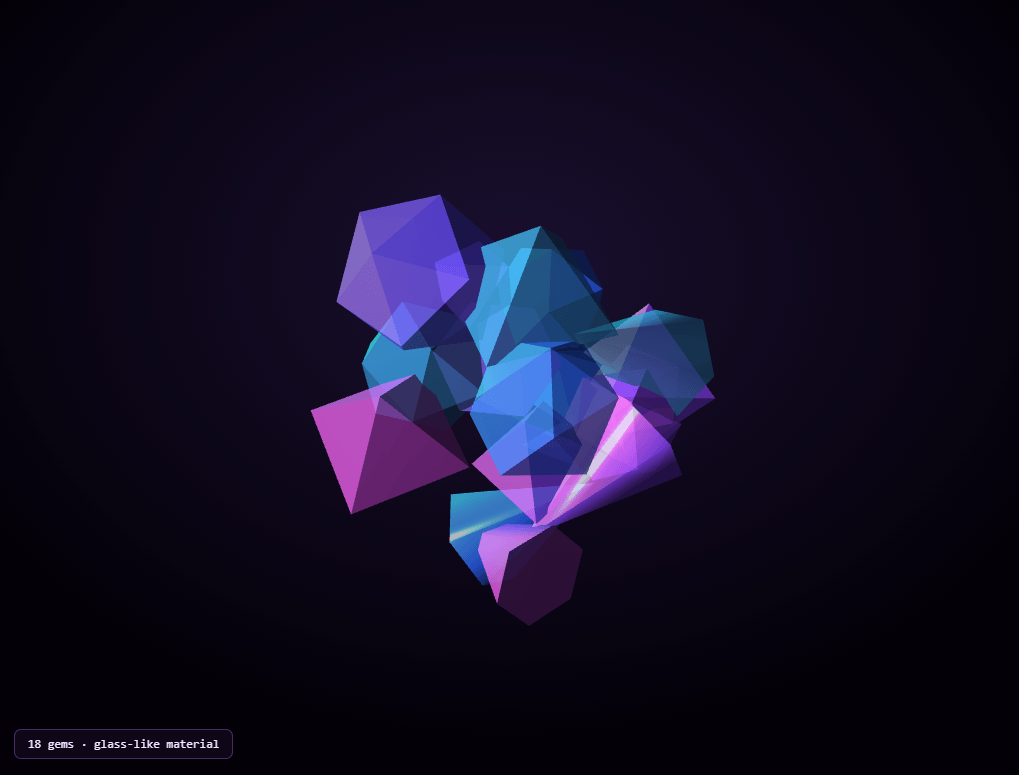
The Three.js Crystal Cluster snippet scatters 18 faceted, semi-transparent gems into an organic mineral-formation shape, lit by an orbiting colored light for a shifting, glassy shine, using MeshPhysicalMaterial's clearcoat property to approximate a glass-like finish without true refraction, all with core Three.js and OrbitControls loaded from a CDN.
Clearcoat as a cheap glass approximation
True glass rendering — physically accurate refraction bending light as it passes through an object — is expensive and typically requires environment capture techniques like the one in the liquid metal sphere snippet. This snippet instead reaches for MeshPhysicalMaterial's clearcoat property: a thin, extra reflective layer on top of the base material, similar to a car's clear lacquer coat over paint. Combined with low roughness, moderate transparency, and a touch of emissive glow, clearcoat produces a shiny, glass-like read that's convincing at a glance and far cheaper to render than real refraction.
Mixed geometry types avoid a repetitive look
Rather than cloning one gem shape 18 times, the snippet cycles through three different geometry generators — an octahedron, a cone, and an icosahedron — so consecutive gems in the cluster are never identical shapes. Combined with per-gem random scale and rotation, this mixed-geometry approach is what keeps a cluster of 18 objects from reading as one shape copy-pasted repeatedly.
Random placement inside a bounded volume, not a formula
Unlike the precisely parametric DNA helix or solar system snippets, crystal formations in nature don't follow a clean mathematical curve — they cluster unevenly. Each gem gets a uniformly random position within a fixed-size bounding volume (flattened slightly on the Y axis so the cluster reads as a mound rather than a sphere), a fully random static rotation, and a random scale between roughly a third and four-fifths of the base geometry size. This intentional randomness, rather than any formula, is what makes the group look like a genuine mineral formation instead of an arranged, artificial pattern.
Independent drift keeps a static-looking cluster alive
Beyond the random initial placement, every gem also has its own tiny, independent vertical drift — a sine wave with a random phase offset and a barely-perceptible amplitude — plus its own slow, independent spin speed (some clockwise, some counter-clockwise, since the speed is randomized around zero). No two gems move identically, which reads as a subtly living formation rather than the initial arrangement simply sitting frozen in place.
An orbiting colored light, not a fixed one
The main point light slowly circles the cluster on a fixed radius using sine and cosine of the shared animation clock. Because every gem's clearcoat highlight depends on the angle between the light and the viewer, a moving light source constantly shifts which facets catch a bright highlight from moment to moment — exactly the detail that makes a static gem cluster look genuinely alive rather than like a single frozen render.
Where this technique applies
The clearcoat-plus-mixed-geometry-plus-random-placement pattern generalizes to any "cluster of similar but distinct objects" scene — gem piles, ice formations, abstract geometric sculptures, or loot/reward visuals in games. Pair this snippet with a morphing blob for a contrast between faceted, hard-edged crystal and smooth, organic form.
Build with AI
Build, Understand, Optimize, and Extend It With AI
You do not have to guess why clearcoat looks glassy through trial and error. Paste this snippet's HTML, CSS, and JS into an AI coding assistant like Claude and ask it to explain exactly what clearcoat adds on top of a standard physically-based material, or why mixing geometry types and randomizing scale and rotation matters more for a convincing cluster than getting any single gem's shape perfect. The same assistant can help optimize it, for instance checking whether the 18 individual meshes could share geometry instances more aggressively to reduce memory use, or whether real environment-mapped reflections (using the CubeCamera technique from the liquid metal sphere snippet) would look better than clearcoat alone for a hero-quality render. It is also useful for extending the effect: ask it to add a soft glow post-processing pass around the brightest gems, make gems gently collide and separate instead of only drifting in place, or vary the emissive intensity per gem to create a few "hero" gems that stand out from the rest. Treat the code less like a finished artifact and more like a starting point for a conversation.
Prompt to recreate it
Copy this into your AI assistant of choice to build the effect from scratch, or as a jumping-off point for your own variant:
Build a "crystal cluster" in plain HTML, CSS, and JavaScript using Three.js and its OrbitControls addon, both loaded from a CDN (no bundler, no build step, no external textures or environment maps).

Requirements:
- A full-viewport canvas with a WebGLRenderer sized to match it, updated on window resize including camera aspect ratio, plus OrbitControls with damping, idle auto-rotation, and a bounded zoom range.
- Light the scene with ambient light plus at least one colored point light that orbits the cluster over time using sine and cosine of a shared time value, and a second point light of a different color for additional depth.
- Create at least 15 gem meshes, cycling between at least three distinct geometry types (for example an octahedron, a cone, and an icosahedron) so consecutive gems are not all the same shape.
- Give each gem a physically-based material with a clearcoat layer enabled (a high clearcoat value and low clearcoat roughness), low metalness, low base roughness, partial transparency, and a small amount of emissive glow matching its base color, so the material reads as glassy rather than fully opaque or fully metallic.
- Position each gem at a uniformly random location within a fixed, bounded volume (flattened somewhat on the vertical axis so the cluster forms a mound rather than a perfect sphere), with a fully random static rotation on all three axes and a random uniform scale within a reasonable range — do not place gems using any mathematical formula or grid pattern.
- Add every gem as a child of one group object for convenience, but ensure each gem still has fully independent animation: every frame, rotate each gem around one axis at its own randomly-assigned speed (which can be positive or negative), and offset each gem's vertical position with a small sine-wave bob using its own randomly-assigned phase offset, so no two gems move identically.
Want to tighten it up first? Run this prompt through the AI Prompt Studio to score it across 8 quality dimensions, catch anti-patterns, and tune the wording for Claude, ChatGPT, or Gemini before you paste it in.
Step by step
How to Use
- 1Load both CDN scriptsAdd three.min.js and OrbitControls.js from the CDN panel, in that order.
- 2Paste HTML, CSS, and JS18 glassy gems appear scattered together, slowly drifting and spinning.
- 3Drag to inspectRotate the camera to see the clearcoat highlights shift across different facets.
- 4Watch the orbiting lightThe main point light circles the cluster, continuously changing which gems catch a bright highlight.
- 5Adjust gem count and spreadChange CRYSTAL_COUNT and the spread constant for a denser, sparser, tighter, or wider cluster.
- 6Retint the gemsEdit the COLORS array for a different palette across the cluster.
Real-world uses
Common Use Cases
Got questions?
Frequently Asked Questions
The material uses MeshPhysicalMaterial's clearcoat property, which adds a thin, extra-reflective surface layer on top of the base material — similar to a clear lacquer coat over paint. Combined with low roughness, partial transparency, and a touch of emissive glow, this produces a shiny, glassy read that is much cheaper to render than true physically-based refraction.
Cycling through an octahedron, a cone, and an icosahedron across the 18 gems, combined with random per-gem scale and rotation, prevents the cluster from reading as one shape simply copy-pasted repeatedly. Mixed geometry is what makes the group look like a genuine, varied mineral formation.
Unlike structures with an inherent mathematical shape (a helix, a spiral galaxy, orbiting planets), a crystal formation in nature clusters unevenly with no clean underlying curve. Each gem gets a uniformly random position within a bounded, flattened volume, which is what makes the result look like an organic mineral cluster rather than an arranged, formulaic pattern.
Every gem is given its own random phase offset for its vertical bobbing sine wave and its own random spin speed (which can be positive or negative). Because no two gems share the exact same motion, the cluster reads as a collection of independently-alive objects rather than a single rigid group animating as one block.
A clearcoat highlight's brightness and position on a surface depend heavily on the angle between the light source and the camera. A light that continuously circles the cluster keeps shifting which facets catch a bright highlight moment to moment, which is what prevents the gems from looking like a single static, frozen render.
Yes. Click JSX for a React component, Vue for a Vue 3 SFC, Angular for a standalone component, or Tailwind for a React + Tailwind CSS utility-class version. Build the cluster group inside a mount effect so the random placement only runs once per mount, and call controls.dispose() plus renderer.dispose() on cleanup.