Source Code
<canvas id="solarCanvas"></canvas>
<button id="solarPause" class="solar-pause">⏸ Pause orbits</button>*{box-sizing:border-box;margin:0;padding:0}
html,body{width:100%;height:100%;overflow:hidden;background:#040611}
#solarCanvas{display:block;width:100%;height:100%;cursor:grab}
#solarCanvas:active{cursor:grabbing}
.solar-pause{position:fixed;right:18px;top:18px;padding:8px 14px;border-radius:8px;border:1px solid rgba(255,255,255,0.18);background:rgba(10,14,26,0.6);color:#e2e8f0;font:12.5px system-ui,sans-serif;font-weight:600;cursor:pointer;backdrop-filter:blur(6px)}
.solar-pause:hover{background:rgba(30,41,59,0.75)}const canvas = document.getElementById('solarCanvas');
const renderer = new THREE.WebGLRenderer({ canvas, antialias: true });
renderer.setPixelRatio(Math.min(window.devicePixelRatio, 2));
const scene = new THREE.Scene();
const camera = new THREE.PerspectiveCamera(50, 1, 0.1, 200);
camera.position.set(0, 14, 24);
const controls = new THREE.OrbitControls(camera, renderer.domElement);
controls.enableDamping = true;
controls.dampingFactor = 0.08;
controls.minDistance = 8;
controls.maxDistance = 60;
scene.add(new THREE.AmbientLight(0x334155, 0.5));
const sun = new THREE.Mesh(
new THREE.SphereGeometry(1.6, 32, 32),
new THREE.MeshBasicMaterial({ color: 0xffb547 })
);
scene.add(sun);
const sunLight = new THREE.PointLight(0xffd28a, 3, 80);
sun.add(sunLight);
// Faint dotted orbit paths, drawn once from a ring of points per planet, so
// the visitor can see each orbit's radius even when the planet itself is on
// the far side of the sun.
function addOrbitPath(radius) {
const pts = [];
for (let i = 0; i <= 128; i++) {
const a = (i / 128) * Math.PI * 2;
pts.push(new THREE.Vector3(Math.cos(a) * radius, 0, Math.sin(a) * radius));
}
const geo = new THREE.BufferGeometry().setFromPoints(pts);
const mat = new THREE.LineBasicMaterial({ color: 0x475569, transparent: true, opacity: 0.5 });
scene.add(new THREE.Line(geo, mat));
}
// Planet definitions: radius from sun, planet size, color, orbit speed,
// self-rotation speed, and an optional moon.
const PLANETS = [
{ dist: 3.4, size: 0.28, color: 0x93c5fd, speed: 1.2, spin: 0.02 },
{ dist: 4.8, size: 0.42, color: 0xf59e0b, speed: 0.85, spin: 0.017 },
{ dist: 6.6, size: 0.46, color: 0x60a5fa, speed: 0.62, spin: 0.02, moon: { dist: 0.9, size: 0.13, color: 0xcbd5e1, speed: 2.4 } },
{ dist: 8.4, size: 0.34, color: 0xf87171, speed: 0.48, spin: 0.018 },
{ dist: 11.2, size: 0.9, color: 0xfbbf24, speed: 0.27, spin: 0.03 },
{ dist: 14, size: 0.72, color: 0xfcd34d, speed: 0.19, spin: 0.028, ring: true },
];
const planets = PLANETS.map(p => {
addOrbitPath(p.dist);
const pivot = new THREE.Object3D();
scene.add(pivot);
const mesh = new THREE.Mesh(
new THREE.SphereGeometry(p.size, 24, 24),
new THREE.MeshStandardMaterial({ color: p.color, roughness: 0.6, metalness: 0.1 })
);
mesh.position.x = p.dist;
pivot.add(mesh);
if (p.ring) {
const ring = new THREE.Mesh(
new THREE.RingGeometry(p.size * 1.4, p.size * 2.1, 48),
new THREE.MeshBasicMaterial({ color: 0xd6c48a, side: THREE.DoubleSide, transparent: true, opacity: 0.6 })
);
ring.rotation.x = Math.PI / 2.3;
mesh.add(ring);
}
let moonPivot = null, moonMesh = null;
if (p.moon) {
moonPivot = new THREE.Object3D();
mesh.add(moonPivot);
moonMesh = new THREE.Mesh(
new THREE.SphereGeometry(p.moon.size, 16, 16),
new THREE.MeshStandardMaterial({ color: p.moon.color, roughness: 0.8 })
);
moonMesh.position.x = p.moon.dist;
moonPivot.add(moonMesh);
}
return { ...p, pivot, mesh, moonPivot, moonSpeed: p.moon ? p.moon.speed : 0 };
});
let paused = false;
const pauseBtn = document.getElementById('solarPause');
pauseBtn.addEventListener('click', () => {
paused = !paused;
pauseBtn.textContent = paused ? '▶ Resume orbits' : '⏸ Pause orbits';
});
function resize() {
const w = canvas.clientWidth, h = canvas.clientHeight;
renderer.setSize(w, h, false);
camera.aspect = w / h;
camera.updateProjectionMatrix();
}
function animate() {
requestAnimationFrame(animate);
if (!paused) {
sun.rotation.y += 0.0015;
planets.forEach(p => {
// Each planet orbits by rotating its own pivot Object3D, not by
// recalculating x/z manually — Three.js's scene graph does the
// orbit math for free once the mesh is offset from its pivot.
p.pivot.rotation.y += p.speed * 0.006;
p.mesh.rotation.y += p.spin;
if (p.moonPivot) p.moonPivot.rotation.y += p.moonSpeed * 0.02;
});
}
controls.update();
renderer.render(scene, camera);
}
resize();
window.addEventListener('resize', resize);
animate();Learn Coding Visually
Learn to code with interactive, live-preview playgrounds — HTML, CSS, JavaScript, React & more.
 HTML Playground42 lessons · Click-based · Live preview
 CSS PlaygroundLearn CSS with a live editor
 JavaScript Playground60 lessons · DOM · Async · Canvas
 React PlaygroundLearn React with a live code editor
 GSAP PlaygroundLearn GSAP animation interactively
 SVG Playground44 lessons · shapes · paths · animation
 SCSS Playground45 lessons · Sass modules · tokens
 Tailwind PlaygroundLearn Tailwind CSS with a live editor
 Bootstrap 5 Playground50 lessons · live preview
Three.js Solar System — Draggable Orbiting Planets in WebGL
Three.js Solar System · Animations · Plain HTML, CSS & JS · Live preview
What's included
Features
About this UI Snippet
How to Build an Orbiting Three.js Solar System With Object3D Pivots
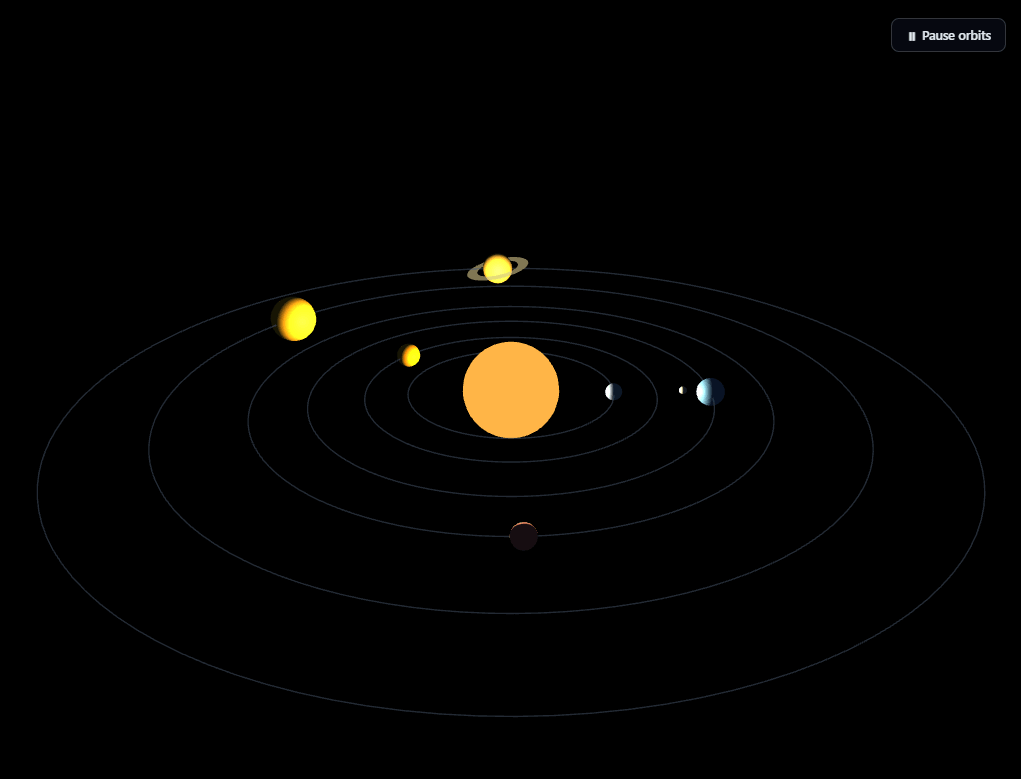
The Three.js Solar System snippet renders a glowing sun with six planets — one carrying a moon, one carrying a ring — all orbiting continuously at their own speeds, with a draggable camera and a pause button, using core Three.js plus its OrbitControls addon loaded from a CDN.
Object3D pivots do the orbit math, not manual trigonometry
The single most important idea in this snippet: each planet's mesh is offset along the X axis from an invisible THREE.Object3D pivot positioned at the origin, and the *pivot* is what actually gets rotated every frame — not the planet's own position. Because the mesh is a child of the pivot in the scene graph, rotating the parent automatically sweeps the offset child mesh through a perfect circular orbit. This completely replaces manually computing x = cos(angle) * radius, z = sin(angle) * radius by hand — Three.js's scene graph transform hierarchy does that math for free, and it's the standard technique for orbital motion in any 3D engine.
Moons nest a second pivot inside the planet
The planet with a moon carries a second Object3D pivot as a *child of the planet mesh itself*, with the moon offset from that inner pivot the same way the planet is offset from its own outer pivot. Rotating the inner pivot orbits the moon around the planet; because the moon-pivot is nested inside the already-orbiting planet, the moon automatically follows the planet around the sun too, with zero extra code to keep them together. This nested-pivot pattern is exactly how you'd extend the scene to add sub-moons, orbiting space stations, or any hierarchy of things-orbiting-things.
Dotted orbit paths use one Line per ring
Each planet's orbit radius is traced once at startup as a THREE.Line built from 128 points sampled around a circle — a static, unmoving ring drawn directly into world space (not attached to any pivot). This lets the visitor see exactly how far out each planet's orbit reaches even when the planet itself is hidden behind the sun or on the far side of the scene.
A ring is just a flat RingGeometry, tilted and parented to its planet
The outermost, ringed planet adds a THREE.RingGeometry — a flat annulus, not a torus — as a child of the planet mesh, tilted on its X axis and rendered with side: THREE.DoubleSide so it doesn't disappear when viewed edge-on or from below. Because it's parented to the planet mesh, the ring automatically follows the planet's orbit and spin without any additional transform logic.
Draggable camera via OrbitControls, bounded so you can't fly through the sun
A second CDN script, Three.js's OrbitControls addon, attaches drag-to-rotate and scroll-to-zoom camera behavior. minDistance and maxDistance keep the visitor from zooming in past the sun or zooming out until the whole system becomes a speck, and enableDamping makes every drag glide smoothly to a stop rather than snapping to a halt the instant the mouse button releases.
A real pause button, not just a visual toggle
Clicking "Pause orbits" sets a single boolean that the animation loop checks before advancing any rotation — the camera itself keeps responding to drags and OrbitControls' damping keeps updating even while paused, so the scene never feels frozen or unresponsive, only the orbital motion stops.
Where this technique scales
The pivot-per-orbiting-object pattern used here is the same one behind any "things circling other things" 3D scene — compare it with the flatter, ring-and-bead approach in orbit rings, or contrast the physically-accurate orbital hierarchy here against the purely decorative circular motion of a CSS-based orbiting icons snippet.
Build with AI
Build, Understand, Optimize, and Extend It With AI
You do not have to reconstruct the pivot hierarchy in your head by reading the code top to bottom. Paste this snippet's HTML, CSS, and JS into an AI coding assistant like Claude and ask it to draw out exactly which Object3D is a child of which, and why rotating a pivot moves its offset planet mesh in a circle without any manual trigonometry in the animation loop. The same assistant can help optimize it, for instance checking whether the six planet geometries and materials could share instances more aggressively, or whether the 128-point orbit-path lines could be simplified on lower-end devices. It is also useful for extending the scene: ask it to add an asteroid belt as a ring of small instanced meshes between two planets, make orbit speed scale with a slider instead of being fixed per planet, or add elliptical rather than perfectly circular orbits by offsetting each pivot's position slightly off-center. Treat the code less like a finished artifact and more like a starting point for a conversation.
Prompt to recreate it
Copy this into your AI assistant of choice to build the effect from scratch, or as a jumping-off point for your own variant:
Build an animated "solar system" scene in plain HTML, CSS, and JavaScript using Three.js and its OrbitControls addon, both loaded from a CDN (no bundler, no build step).

Requirements:
- A full-viewport canvas with a WebGLRenderer sized to match it, updated on window resize including camera aspect ratio, plus OrbitControls with damping enabled and a bounded min/max zoom distance so the camera cannot pass through the sun or zoom out indefinitely.
- A central emissive sun mesh with an attached point light illuminating the rest of the scene, plus a low-intensity ambient light.
- At least six planets, each defined by its own distance from the sun, size, color, orbital speed, and self-rotation speed, stored in a single data array so new planets can be added by adding entries.
- For every planet, create an invisible Object3D "pivot" positioned at the scene origin, then offset the planet's mesh along one axis as a child of that pivot — orbital motion must come from rotating the pivot every frame, not from manually recalculating the planet's x/z position with trigonometry in the render loop.
- Give at least one planet a moon using a second, nested Object3D pivot that is itself a child of the planet's mesh (not the scene root), so rotating the planet's own orbit pivot automatically carries the moon along with it, while the moon's separate inner pivot rotation orbits it around the planet.
- Give at least one planet a flat ring using a RingGeometry parented to that planet's mesh, tilted on one axis, rendered with double-sided material so it remains visible from any viewing angle.
- Draw a static, non-rotating line tracing each planet's orbit radius directly in the scene (not attached to any pivot), built from a couple hundred points sampled evenly around a circle.
- Add a pause/resume button that toggles a boolean flag; when paused, all orbital rotation and self-spin must stop advancing, but the OrbitControls camera dragging and damping must continue to function normally.
Want to tighten it up first? Run this prompt through the AI Prompt Studio to score it across 8 quality dimensions, catch anti-patterns, and tune the wording for Claude, ChatGPT, or Gemini before you paste it in.
Step by step
How to Use
- 1Load both CDN scriptsAdd three.min.js and OrbitControls.js from the CDN panel, in that order.
- 2Paste HTML, CSS, and JSThe sun and six planets appear immediately, orbiting at their own speeds.
- 3Drag to look aroundClick and drag to orbit the camera; scroll or pinch to zoom, bounded between the sun and the outer orbit.
- 4Pause and resumeClick the pause button to freeze all orbital motion; camera dragging still works while paused.
- 5Adjust planet dataEdit the PLANETS array to change distance, size, color, orbit speed, or add a moon or ring to any planet.
- 6Resize the windowRenderer size and camera aspect ratio update automatically.
Real-world uses
Common Use Cases
Got questions?
Frequently Asked Questions
Each planet mesh is offset along the X axis from an invisible Object3D pivot located at the origin. Rotating that pivot every frame automatically sweeps the offset child mesh through a circular path, because Three.js applies the parent's rotation to all of its children. This replaces manual cos/sin position math with the scene graph's built-in transform hierarchy.
The moon has its own Object3D pivot, but that pivot is a child of the planet's mesh rather than the scene root. Because the moon-pivot inherits every transform applied to its parent planet, rotating the planet's own orbit pivot carries the moon along automatically, while independently rotating the inner moon-pivot orbits the moon around the planet.
The dotted orbit rings are static circles in world space — they never move — so they're added directly to the scene root rather than to any pivot. Keeping them separate from the animated pivots means they always show the true, unmoving orbit radius even while planets circle around them.
The ring is a THREE.RingGeometry, a flat annulus, added as a child of the planet mesh and tilted on its X axis. Its material sets side: THREE.DoubleSide because a flat ring viewed edge-on or from below would otherwise render as invisible — by default Three.js only draws the front face of a surface.
No. The pause button only stops the orbital rotation logic inside the animation loop. OrbitControls.update() is still called every frame regardless of the pause state, so dragging to look around and the damped deceleration after a drag both keep working normally.
Yes. Click JSX for a React component, Vue for a Vue 3 SFC, Angular for a standalone component, or Tailwind for a React + Tailwind CSS utility-class version. Build the pivots, planets, and controls inside a mount effect, keep the paused flag in a ref (not React state) so the animation loop can read it without triggering re-renders, and call controls.dispose() plus renderer.dispose() on cleanup.