Source Code
<canvas id="ringsCanvas"></canvas>
<div class="or-hint">Drag to orbit · Scroll to zoom</div>*{box-sizing:border-box;margin:0;padding:0}
html,body{width:100%;height:100%;overflow:hidden;background:#05060d}
#ringsCanvas{display:block;width:100%;height:100%;cursor:grab}
#ringsCanvas:active{cursor:grabbing}
.or-hint{position:fixed;top:18px;left:50%;transform:translateX(-50%);color:#9db4e0;font:12px system-ui,sans-serif;letter-spacing:.05em;text-transform:uppercase;opacity:.7;pointer-events:none}const canvas = document.getElementById('ringsCanvas');
const renderer = new THREE.WebGLRenderer({ canvas, antialias: true, alpha: true });
renderer.setPixelRatio(Math.min(window.devicePixelRatio, 2));
const scene = new THREE.Scene();
const camera = new THREE.PerspectiveCamera(50, 1, 0.1, 100);
camera.position.set(0, 3, 11);
const controls = new THREE.OrbitControls(camera, renderer.domElement);
controls.enableDamping = true;
controls.dampingFactor = 0.06;
controls.minDistance = 5;
controls.maxDistance = 20;
controls.autoRotate = true;
controls.autoRotateSpeed = 0.6;
scene.add(new THREE.AmbientLight(0x33406b, 0.8));
const light = new THREE.PointLight(0x93c5fd, 2, 40);
light.position.set(6, 6, 6);
scene.add(light);
const core = new THREE.Mesh(
new THREE.IcosahedronGeometry(0.9, 1),
new THREE.MeshStandardMaterial({ color: 0x60a5fa, emissive: 0x1d4ed8, emissiveIntensity: 0.6, metalness: 0.4, roughness: 0.3 })
);
scene.add(core);
// Each ring is a thin wireframe torus tilted on its own random axis, orbiting
// the core at its own speed. Group per ring so tilt + spin compose cleanly.
const RING_COUNT = 6;
const rings = [];
const colors = [0x60a5fa, 0x818cf8, 0xa78bfa, 0x38bdf8, 0x34d399, 0xf472b6];
for (let i = 0; i < RING_COUNT; i++) {
const radius = 2.2 + i * 0.9;
const group = new THREE.Group();
group.rotation.x = Math.random() * Math.PI;
group.rotation.y = Math.random() * Math.PI;
const geometry = new THREE.TorusGeometry(radius, 0.012 + i * 0.003, 8, 96);
const material = new THREE.MeshBasicMaterial({ color: colors[i % colors.length], transparent: true, opacity: 0.55 });
const ring = new THREE.Mesh(geometry, material);
group.add(ring);
// A small bead traveling along the ring gives each orbit a visible
// direction and speed, rather than reading as a static static circle.
const bead = new THREE.Mesh(
new THREE.SphereGeometry(0.05 + i * 0.006, 12, 12),
new THREE.MeshStandardMaterial({ color: colors[i % colors.length], emissive: colors[i % colors.length], emissiveIntensity: 0.8 })
);
group.add(bead);
scene.add(group);
rings.push({ group, bead, radius, speed: 0.4 - i * 0.045, phase: Math.random() * Math.PI * 2 });
}
function resize() {
const w = canvas.clientWidth, h = canvas.clientHeight;
renderer.setSize(w, h, false);
camera.aspect = w / h;
camera.updateProjectionMatrix();
}
let t = 0;
function animate() {
requestAnimationFrame(animate);
t += 0.01;
core.rotation.y += 0.004;
core.rotation.x += 0.002;
rings.forEach(r => {
const angle = t * r.speed + r.phase;
r.bead.position.set(Math.cos(angle) * r.radius, 0, Math.sin(angle) * r.radius);
});
controls.update();
renderer.render(scene, camera);
}
resize();
window.addEventListener('resize', resize);
animate();Learn Coding Visually
Learn to code with interactive, live-preview playgrounds — HTML, CSS, JavaScript, React & more.
 HTML Playground42 lessons · Click-based · Live preview
 CSS PlaygroundLearn CSS with a live editor
 JavaScript Playground60 lessons · DOM · Async · Canvas
 React PlaygroundLearn React with a live code editor
 GSAP PlaygroundLearn GSAP animation interactively
 SVG Playground44 lessons · shapes · paths · animation
 SCSS Playground45 lessons · Sass modules · tokens
 Tailwind PlaygroundLearn Tailwind CSS with a live editor
 Bootstrap 5 Playground50 lessons · live preview
Three.js Orbit Rings — Draggable WebGL Orbital System
Three.js Orbit Rings · Animations · Plain HTML, CSS & JS · Live preview
What's included
Features
About this UI Snippet
How to Build a Draggable Three.js Orbit Ring System
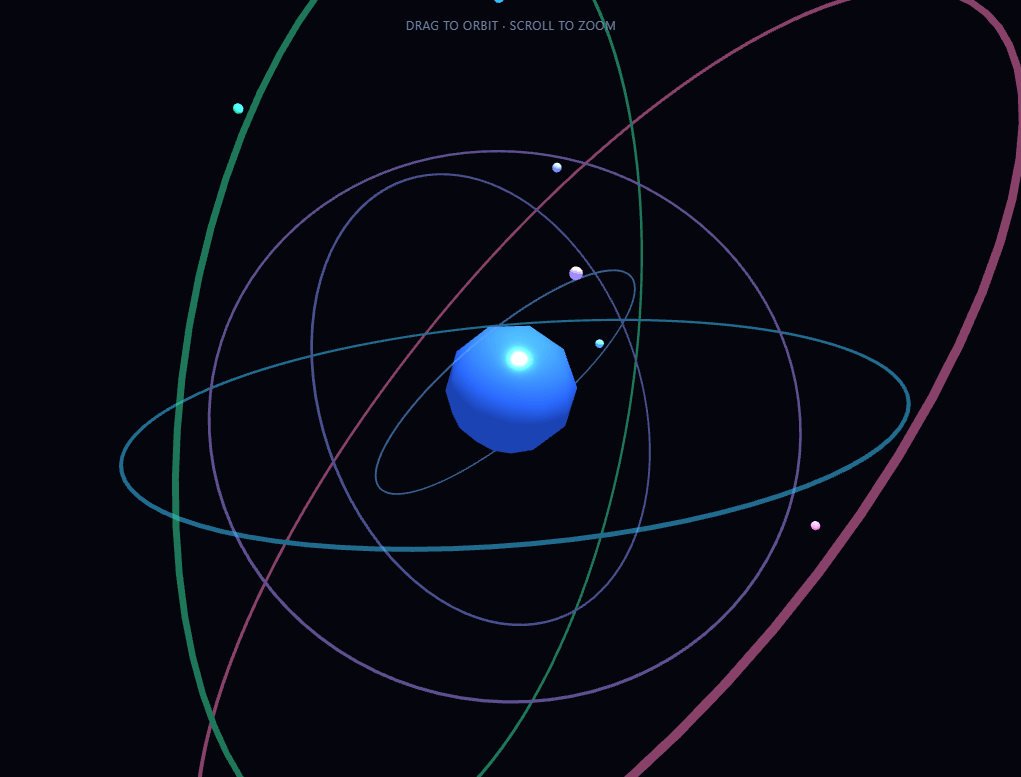
The Three.js Orbit Rings snippet renders six independently tilted, independently spinning wireframe rings around a glowing core — an atom-like or satellite-network visual — and lets the visitor drag to rotate the whole scene and scroll to zoom, using Three.js's OrbitControls addon loaded straight from a CDN alongside the core library.
Grouping tilt and orbit separately
Each ring is wrapped in its own THREE.Group, and the group itself is rotated to a random tilt angle once, at startup. The ring mesh and its traveling bead are added as children of that tilted group. This separation matters: the group's rotation handles the *static* tilt of the whole ring in 3D space, while the bead's position is recalculated every frame purely in the group's own local 2D plane using Math.cos/Math.sin. Because the bead's orbit math never has to account for the tilt directly, adding six differently-tilted rings costs nothing extra in complexity — the parent group's rotation matrix handles that transformation automatically.
A traveling bead gives orbits direction and speed
A static wireframe torus reads as a flat ring, not an orbit. Each ring carries a small glowing sphere whose position is recomputed every frame as (cos(angle) × radius, 0, sin(angle) × radius), where angle combines the shared animation clock with a per-ring speed and phase offset. Six rings orbiting at six different speeds — some fast, some barely moving — is what sells the "orbital system" read rather than "concentric decorative circles."
OrbitControls from a CDN, not a bundler
The scene loads a second script — Three.js's OrbitControls.js addon — directly from jsDelivr after the core three.min.js script, which attaches THREE.OrbitControls onto the global THREE namespace. This is the standard way to add mouse-drag camera control to a plain-script Three.js scene without a bundler: enableDamping makes drags glide to a smooth stop instead of snapping, minDistance/maxDistance bound how far the visitor can zoom in or out, and autoRotate keeps the whole system slowly spinning on its own whenever nobody is actively dragging.
Randomized tilt keeps it from looking engineered
Every ring's tilt is set with Math.random() * Math.PI on two axes at startup, which is what stops the scene from reading like a technical diagram of perfectly stacked, parallel rings. Rerunning the snippet produces a genuinely different arrangement each time, since the randomization happens once when the page loads rather than being hardcoded.
A glowing icosahedron core, not a plain sphere
The center object is a low-subdivision IcosahedronGeometry with an emissive MeshStandardMaterial, giving it faceted, crystalline highlights rather than a smooth, featureless sphere — a small detail that reads as more "energy source" than "billiard ball," reinforcing the orbital-system metaphor the rings are already building.
Where this technique fits
The tilted-group-plus-orbiting-child pattern generalizes well beyond rings: swap the bead for a small planet mesh and you have the beginning of a solar system model, or swap the ring for a path and you have an orbit-camera product viewer. Pair this snippet with a particle network for a two-scene "cosmic" section, or contrast it against the flat, CSS-driven motion of an orbiting icons snippet to show the difference between 2D and true 3D orbital motion.
Build with AI
Build, Understand, Optimize, and Extend It With AI
You do not have to trace the tilt-versus-orbit math by hand to understand it. Paste this snippet's HTML, CSS, and JS into an AI coding assistant like Claude and ask it to explain exactly why each ring's bead position math never needs to account for its group's tilt, or how OrbitControls' enableDamping actually smooths out camera movement between frames. The same assistant can help optimize it, for instance checking whether the six ring geometries could share a single instanced draw call, or whether the torus segment counts could be lowered on mobile without a visible quality loss. It is also useful for extending the scene: ask it to add a second bead per ring traveling in the opposite direction, make ring color or speed respond to scroll position, or replace the beads with small orbiting planet meshes to turn this into a solar-system-style scene. Treat the code less like a finished artifact and more like a starting point for a conversation.
Prompt to recreate it
Copy this into your AI assistant of choice to build the effect from scratch, or as a jumping-off point for your own variant:
Build a "draggable orbit rings" scene in plain HTML, CSS, and JavaScript using Three.js and its OrbitControls addon, both loaded from a CDN (no bundler, no build step).

Requirements:
- A full-viewport canvas with a WebGLRenderer sized to match it, updated on window resize including camera aspect ratio.
- Load core Three.js from a CDN, then load the OrbitControls addon script from a CDN afterward so it attaches to the global THREE namespace; instantiate OrbitControls on the camera and renderer's DOM element with damping enabled, a bounded min/max zoom distance, and idle auto-rotation enabled.
- A glowing central mesh (an icosahedron or similar faceted shape) with an emissive material and at least one point light plus ambient light in the scene.
- Six concentric ring objects, each built from a thin wireframe or low-opacity torus geometry at a different radius, each wrapped in its own group whose rotation is set once at page load to a random tilt on two axes so the rings are not all parallel.
- Inside each ring's group, add a small glowing sphere ("bead") whose local position is recalculated every animation frame using cosine and sine of an angle derived from a shared time value, each ring's own orbit speed, and a random per-ring phase offset — so every ring's bead travels at a visibly different speed and starting position.
- Call the OrbitControls update method once per animation frame so damping and auto-rotate function correctly, and render the scene after that call.
- Do not hardcode the ring tilts to fixed values — they must be randomized once at startup so the arrangement differs on every page load.
Want to tighten it up first? Run this prompt through the AI Prompt Studio to score it across 8 quality dimensions, catch anti-patterns, and tune the wording for Claude, ChatGPT, or Gemini before you paste it in.
Step by step
How to Use
- 1Load both CDN scriptsAdd three.min.js and OrbitControls.js from the CDN panel, in that order.
- 2Paste HTML, CSS, and JSSix tilted rings and a glowing core appear immediately, slowly auto-rotating.
- 3Drag to orbitClick and drag anywhere on the canvas to rotate the camera around the scene manually.
- 4Scroll to zoomMouse wheel or pinch zooms in and out, bounded by minDistance and maxDistance.
- 5Adjust ring count and speedChange RING_COUNT, radius spacing, or each ring's speed for a sparser or busier system.
- 6Toggle auto-rotateSet controls.autoRotate to false if you only want manual dragging with no idle spin.
Real-world uses
Common Use Cases
Got questions?
Frequently Asked Questions
Each ring and its bead live inside a THREE.Group whose rotation is set once at startup to a random tilt. The bead's position is recalculated every frame purely in local X/Z coordinates using cosine and sine of an angle — it never needs to know about the tilt, because the parent group's rotation matrix applies that transformation automatically when rendering.
Load the OrbitControls.js addon script from a CDN after the core three.min.js script — it attaches THREE.OrbitControls to the global THREE object. Instantiate it with new THREE.OrbitControls(camera, renderer.domElement), then call controls.update() once per animation frame for damping and auto-rotate to work correctly.
Every ring is created with its own speed value (slightly slower for rings further from the core) and a random phase offset. Six rings all sharing one uniform speed would read as a mechanical, single-frequency animation; varied speeds and radii sell the layered, orbital-system look.
Yes. Set controls.autoRotate to false to disable it entirely, so the camera only moves when the visitor actively drags. You can also lower controls.autoRotateSpeed for a slower idle spin instead of removing it outright.
Yes. Raise RING_COUNT and extend the colors array with additional hex values; the radius spacing and per-ring speed formulas scale automatically to any count.
Yes. Click JSX for a React component, Vue for a Vue 3 SFC, Angular for a standalone component, or Tailwind for a React + Tailwind CSS utility-class version. Create the renderer, controls, and rings inside a mount effect, call controls.update() and renderer.render() inside your animation loop, and call controls.dispose() plus renderer.dispose() on cleanup so event listeners and the WebGL context don't leak.