Starfield — Canvas Warp-Speed Star Animation JS

Starfield · Animations · Plain HTML, CSS & JS · Live preview

Share & Support

What's included

Features

3D perspective projection
Stars are projected with screen = center + (pos / z) × width, so they accelerate outward.
Infinite recycling
Stars that pass the viewer reset to a far random position, keeping the field endless.
Motion-blur streaks
Each star is a line from its previous to current position, scaling with speed.
Trail via translucent clear
A semi-transparent overpaint each frame fades old streaks into soft trails.
Depth-scaled size
Closer stars are drawn thicker, reinforcing the sense of depth.
Adjustable speed
A slider changes the warp velocity live.
requestAnimationFrame loop
Smooth rendering that pauses in background tabs.
Canvas, no library
Pure canvas 2D and vanilla JS — no images or dependencies.

About this UI Snippet

Starfield — A 3D Warp-Speed Star Animation on HTML Canvas
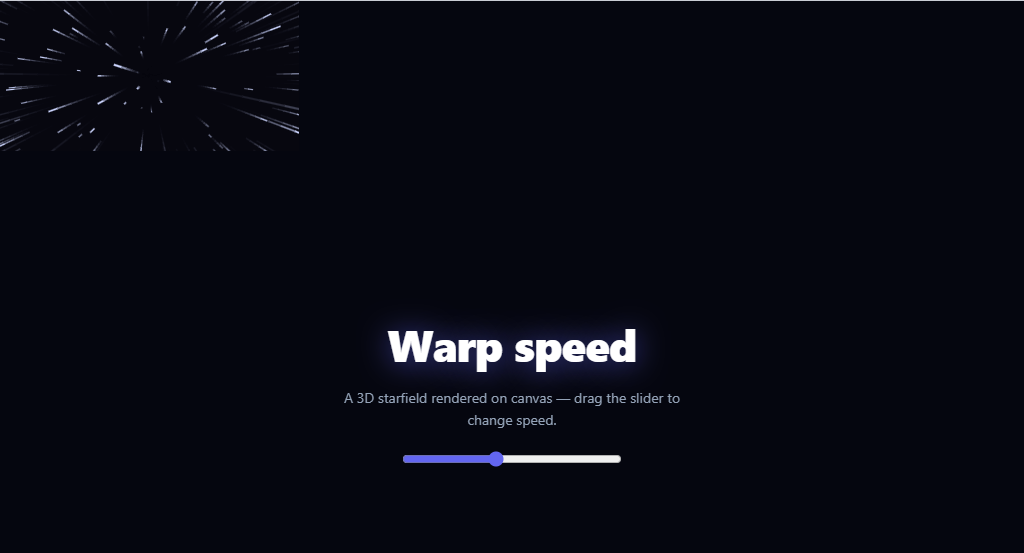
Screenshot of the Starfield snippet rendered live

The warp-speed starfield — stars streaking outward from the centre as if you're flying through space — is a classic, mesmerising background effect. This snippet builds it on an HTML <canvas> with vanilla JavaScript, using real 3D perspective projection and motion-blur trails, plus an adjustable speed — no library and no images.

Real 3D, projected to 2D

Each star has an x, y position in a centred space and a z value representing its depth. Every frame, z decreases (the star flies toward you), and the star is drawn at a screen position computed by perspective projection: screenX = centerX + (x / z) × width. Dividing by z is what creates the perspective — as a star gets closer (smaller z), the same x/y spreads further from the centre, so stars accelerate outward toward the edges exactly like real motion through a star field. When a star passes the viewer (z < 1) it's recycled to a new random far-away position, keeping the field infinite.

Motion-blur streaks, not dots

Stars are drawn as short *lines*, not points: each frame remembers the star's previous z, projects both the old and new positions, and strokes a line between them. So a fast-moving star leaves a streak from where it was to where it is — the speed lines that sell the warp effect. The faster the speed, the longer the gap between frames and the longer the streak, so the motion blur scales naturally with velocity.

Trails via a translucent clear

Instead of clearing the canvas each frame, the snippet paints a semi-transparent dark rectangle over it. This dims the previous frame slightly rather than erasing it, so star streaks fade out over a few frames, adding a soft glowing trail behind everything. This translucent-overpaint trick is a cheap, classic way to get persistence-of-motion trails on canvas without tracking history.

Adjustable speed and responsive

A slider sets the speed (how fast z decreases), letting you go from a gentle drift to a hyperspace jump live. The canvas resizes with the window, recomputing the centre and dimensions, and the whole loop runs on requestAnimationFrame so it's smooth and pauses in background tabs. Closer stars are drawn thicker, reinforcing depth.

Drop-in background and adaptable

It's designed as a full-stage background with overlay content on top (a hero headline and the speed slider here). Tune COUNT for density, the speed range, the trail opacity, or the star colour. It's a complete, dependency-free reference for canvas perspective projection and motion-blur trails — the foundation of starfields, particle warps, and space backgrounds. If you're using this as a hero backdrop rather than a standalone demo, also wrap the requestAnimationFrame call to check prefers-reduced-motion and fall back to a static starry image — a screen-filling field of streaking lines is exactly the kind of motion that triggers discomfort for vestibular-sensitive visitors, and it costs only a few lines to respect the setting. Performance scales mainly with COUNT and canvas area: a single full-viewport canvas with a few hundred stars is cheap on desktop, but on a large 4K display or an underpowered mobile GPU the same pixel count costs more to fill every frame — if you notice dropped frames on low-end hardware, lowering COUNT is a more effective fix than reducing the trail opacity, since the per-star math (not the fill) is what dominates the frame budget at high densities.

Step by step

How to Use

  1. 1
    Paste HTML, CSS, and JSA full-screen starfield animates behind a hero headline and a speed slider.
  2. 2
    Adjust the speedDrag the slider from a gentle drift to a warp-speed streak.
  3. 3
    Resize the windowThe canvas re-fits and the projection centre recomputes.
  4. 4
    Tune densityChange COUNT for more or fewer stars.
  5. 5
    Overlay your contentPut your hero text and CTAs in the overlay above the canvas.
  6. 6
    Restyle itChange the background, star colour, trail opacity, or star size scaling.

Real-world uses

Common Use Cases

Hero and landing backgrounds
A dynamic space backdrop behind a headline — pair with a gradient mesh hero for other ambient looks.
Coming-soon and launch pages
A warp-speed background for a teaser, alongside a coming soon hero.
Game and sci-fi UIs
A flying-through-space effect for menus and loaders.
Login and splash screens
An eye-catching animated backdrop.
Event and product reveals
Build anticipation with motion behind the content.
Learning canvas projection
A reference for 3D-to-2D projection and motion trails — compare with floating particles.

Got questions?

Frequently Asked Questions

Each star has x, y in a centred space and z for depth. The screen position is center + (x / z) × width (and the same for y). Dividing by z is the perspective divide: as z shrinks (the star nears you), the same x/y maps further from the centre, so stars fan outward and accelerate toward the edges — the hallmark of flying through a star field. Each frame z decreases by the speed value.

Stars are drawn as lines, not dots. Each frame the code keeps the star's previous z, projects both the old and new positions to screen coordinates, and strokes a line between them. A star moving fast covers more distance per frame, so the line is longer — the motion blur scales with speed automatically, producing the warp speed-lines.

Clearing fully each frame would show only the current single-frame streaks. Painting a semi-transparent dark rectangle over the previous frame dims it instead of erasing it, so each streak lingers and fades over several frames — adding a soft glowing trail. It's a classic, cheap canvas technique for persistence-of-motion without storing past frames.

COUNT sets the number of stars; a few hundred is smooth on most devices. The loop is O(COUNT) per frame with simple math and one stroke each, so it scales well, but lower COUNT or streak detail on low-end devices. Because it uses requestAnimationFrame, it automatically pauses when the tab is hidden, saving battery.

Put the canvas in a ref, and start the animation loop in a useEffect (React), onMounted (Vue), or ngAfterViewInit (Angular), cancelling the requestAnimationFrame and removing the resize listener on cleanup/unmount to avoid leaks. Hold speed in state bound to the slider. The projection and drawing code is framework-agnostic — only the lifecycle and the canvas ref move into the framework.

Starfield — Export as HTML, React, Vue, Angular & Tailwind

HTML
<!DOCTYPE html>
<html lang="en">
<head>
  <meta charset="UTF-8" />
  <meta name="viewport" content="width=device-width, initial-scale=1.0" />
  <title>Starfield</title>
  <style>
    *{box-sizing:border-box;margin:0;padding:0}
    body{font-family:system-ui,-apple-system,sans-serif}
    
    .sf-stage{position:relative;width:100%;height:100vh;overflow:hidden;background:#05060f}
    .sf-canvas{position:absolute;inset:0;display:block}
    .sf-overlay{position:relative;z-index:2;height:100%;display:flex;flex-direction:column;align-items:center;justify-content:center;gap:14px;color:#fff;text-align:center;padding:20px;pointer-events:none}
    .sf-overlay h1{font-size:44px;font-weight:800;letter-spacing:-.02em;text-shadow:0 2px 30px rgba(99,102,241,.6)}
    .sf-overlay p{font-size:14px;color:#94a3b8;max-width:340px;line-height:1.6}
    .sf-overlay input{pointer-events:auto;width:220px;accent-color:#6366f1;margin-top:6px}
  </style>
</head>
<body>
  <div class="sf-stage">
    <canvas id="sfCanvas" class="sf-canvas"></canvas>
    <div class="sf-overlay">
      <h1>Warp speed</h1>
      <p>A 3D starfield rendered on canvas — drag the slider to change speed.</p>
      <input type="range" id="sfSpeed" min="1" max="20" value="6" aria-label="Speed">
    </div>
  </div>
  <script>
    var canvas = document.getElementById('sfCanvas');
    var ctx = canvas.getContext('2d');
    var speedInput = document.getElementById('sfSpeed');
    var stars = [];
    var COUNT = 400;
    var speed = 6;
    var w, h, cx, cy;
    
    function resize() {
      w = canvas.width = canvas.offsetWidth;
      h = canvas.height = canvas.offsetHeight;
      cx = w / 2; cy = h / 2;
    }
    
    // Each star has x, y in a centered space and z = depth. Smaller z = closer.
    function reset(s) {
      s.x = (Math.random() - 0.5) * w;
      s.y = (Math.random() - 0.5) * h;
      s.z = Math.random() * w;
      s.pz = s.z;       // previous z, for the motion-blur streak
    }
    
    function init() {
      resize();
      stars = [];
      for (var i = 0; i < COUNT; i++) { var s = {}; reset(s); stars.push(s); }
    }
    
    function frame() {
      // Fade the previous frame slightly instead of clearing — leaves light trails.
      ctx.fillStyle = 'rgba(5,6,15,0.35)';
      ctx.fillRect(0, 0, w, h);
      ctx.fillStyle = '#fff';
      ctx.strokeStyle = '#cdd6ff';
      for (var i = 0; i < stars.length; i++) {
        var s = stars[i];
        s.pz = s.z;
        s.z -= speed;                       // fly toward the viewer
        if (s.z < 1) { reset(s); continue; }
        // Project 3D position onto the 2D screen (perspective divide by z).
        var sx = cx + (s.x / s.z) * w;
        var sy = cy + (s.y / s.z) * w;
        var px = cx + (s.x / s.pz) * w;
        var py = cy + (s.y / s.pz) * w;
        var r = (1 - s.z / w) * 2.4;        // closer stars are bigger
        ctx.lineWidth = r;
        ctx.beginPath();
        ctx.moveTo(px, py);
        ctx.lineTo(sx, sy);
        ctx.stroke();
      }
      raf = requestAnimationFrame(frame);
    }
    
    var raf;
    speedInput.addEventListener('input', function () { speed = +speedInput.value; });
    window.addEventListener('resize', function () { resize(); });
    init();
    frame();
  </script>
</body>
</html>
Tailwind
<!DOCTYPE html>
<html lang="en">
<head>
  <meta charset="UTF-8" />
  <meta name="viewport" content="width=device-width, initial-scale=1.0" />
  <title>Starfield</title>
  <!-- Tailwind CSS v3+ — arbitrary value classes (e.g. bg-[#0f172a]) are valid -->
  <script src="https://cdn.tailwindcss.com"></script>
  <style>
    * {
      box-sizing:border-box;margin:0;padding:0
    }

    body {
      font-family:system-ui,-apple-system,sans-serif
    }

    .sf-overlay h1 {
      font-size:44px;font-weight:800;letter-spacing:-.02em;text-shadow:0 2px 30px rgba(99,102,241,.6)
    }

    .sf-overlay p {
      font-size:14px;color:#94a3b8;max-width:340px;line-height:1.6
    }

    .sf-overlay input {
      pointer-events:auto;width:220px;accent-color:#6366f1;margin-top:6px
    }
  </style>
</head>
<body>
  <div class="relative w-full h-screen overflow-hidden bg-[#05060f]">
    <canvas id="sfCanvas" class="absolute inset-0 block"></canvas>
    <div class="sf-overlay relative z-[2] h-full flex flex-col items-center justify-center gap-3.5 text-[#fff] text-center p-5 pointer-events-none">
      <h1>Warp speed</h1>
      <p>A 3D starfield rendered on canvas — drag the slider to change speed.</p>
      <input type="range" id="sfSpeed" min="1" max="20" value="6" aria-label="Speed">
    </div>
  </div>
  <script>
    var canvas = document.getElementById('sfCanvas');
    var ctx = canvas.getContext('2d');
    var speedInput = document.getElementById('sfSpeed');
    var stars = [];
    var COUNT = 400;
    var speed = 6;
    var w, h, cx, cy;
    
    function resize() {
      w = canvas.width = canvas.offsetWidth;
      h = canvas.height = canvas.offsetHeight;
      cx = w / 2; cy = h / 2;
    }
    
    // Each star has x, y in a centered space and z = depth. Smaller z = closer.
    function reset(s) {
      s.x = (Math.random() - 0.5) * w;
      s.y = (Math.random() - 0.5) * h;
      s.z = Math.random() * w;
      s.pz = s.z;       // previous z, for the motion-blur streak
    }
    
    function init() {
      resize();
      stars = [];
      for (var i = 0; i < COUNT; i++) { var s = {}; reset(s); stars.push(s); }
    }
    
    function frame() {
      // Fade the previous frame slightly instead of clearing — leaves light trails.
      ctx.fillStyle = 'rgba(5,6,15,0.35)';
      ctx.fillRect(0, 0, w, h);
      ctx.fillStyle = '#fff';
      ctx.strokeStyle = '#cdd6ff';
      for (var i = 0; i < stars.length; i++) {
        var s = stars[i];
        s.pz = s.z;
        s.z -= speed;                       // fly toward the viewer
        if (s.z < 1) { reset(s); continue; }
        // Project 3D position onto the 2D screen (perspective divide by z).
        var sx = cx + (s.x / s.z) * w;
        var sy = cy + (s.y / s.z) * w;
        var px = cx + (s.x / s.pz) * w;
        var py = cy + (s.y / s.pz) * w;
        var r = (1 - s.z / w) * 2.4;        // closer stars are bigger
        ctx.lineWidth = r;
        ctx.beginPath();
        ctx.moveTo(px, py);
        ctx.lineTo(sx, sy);
        ctx.stroke();
      }
      raf = requestAnimationFrame(frame);
    }
    
    var raf;
    speedInput.addEventListener('input', function () { speed = +speedInput.value; });
    window.addEventListener('resize', function () { resize(); });
    init();
    frame();
  </script>
</body>
</html>
React
import React, { useEffect } from 'react';

// CSS — optionally move to Starfield.module.css
const css = `
*{box-sizing:border-box;margin:0;padding:0}
body{font-family:system-ui,-apple-system,sans-serif}

.sf-stage{position:relative;width:100%;height:100vh;overflow:hidden;background:#05060f}
.sf-canvas{position:absolute;inset:0;display:block}
.sf-overlay{position:relative;z-index:2;height:100%;display:flex;flex-direction:column;align-items:center;justify-content:center;gap:14px;color:#fff;text-align:center;padding:20px;pointer-events:none}
.sf-overlay h1{font-size:44px;font-weight:800;letter-spacing:-.02em;text-shadow:0 2px 30px rgba(99,102,241,.6)}
.sf-overlay p{font-size:14px;color:#94a3b8;max-width:340px;line-height:1.6}
.sf-overlay input{pointer-events:auto;width:220px;accent-color:#6366f1;margin-top:6px}
`;

export default function Starfield() {
  // Auto-generated escape hatch: the original snippet's vanilla JS runs once
  // after mount and queries the rendered DOM. For idiomatic React, lift this
  // into state + handlers.
  useEffect(() => {
    const _listeners = [];
    const _originalAddEventListener = EventTarget.prototype.addEventListener;
    EventTarget.prototype.addEventListener = function(type, listener, options) {
      _listeners.push({ target: this, type, listener, options });
      return _originalAddEventListener.call(this, type, listener, options);
    };
    var canvas = document.getElementById('sfCanvas');
    var ctx = canvas.getContext('2d');
    var speedInput = document.getElementById('sfSpeed');
    var stars = [];
    var COUNT = 400;
    var speed = 6;
    var w, h, cx, cy;
    
    function resize() {
      w = canvas.width = canvas.offsetWidth;
      h = canvas.height = canvas.offsetHeight;
      cx = w / 2; cy = h / 2;
    }
    
    // Each star has x, y in a centered space and z = depth. Smaller z = closer.
    function reset(s) {
      s.x = (Math.random() - 0.5) * w;
      s.y = (Math.random() - 0.5) * h;
      s.z = Math.random() * w;
      s.pz = s.z;       // previous z, for the motion-blur streak
    }
    
    function init() {
      resize();
      stars = [];
      for (var i = 0; i < COUNT; i++) { var s = {}; reset(s); stars.push(s); }
    }
    
    function frame() {
      // Fade the previous frame slightly instead of clearing — leaves light trails.
      ctx.fillStyle = 'rgba(5,6,15,0.35)';
      ctx.fillRect(0, 0, w, h);
      ctx.fillStyle = '#fff';
      ctx.strokeStyle = '#cdd6ff';
      for (var i = 0; i < stars.length; i++) {
        var s = stars[i];
        s.pz = s.z;
        s.z -= speed;                       // fly toward the viewer
        if (s.z < 1) { reset(s); continue; }
        // Project 3D position onto the 2D screen (perspective divide by z).
        var sx = cx + (s.x / s.z) * w;
        var sy = cy + (s.y / s.z) * w;
        var px = cx + (s.x / s.pz) * w;
        var py = cy + (s.y / s.pz) * w;
        var r = (1 - s.z / w) * 2.4;        // closer stars are bigger
        ctx.lineWidth = r;
        ctx.beginPath();
        ctx.moveTo(px, py);
        ctx.lineTo(sx, sy);
        ctx.stroke();
      }
      raf = requestAnimationFrame(frame);
    }
    
    var raf;
    speedInput.addEventListener('input', function () { speed = +speedInput.value; });
    window.addEventListener('resize', function () { resize(); });
    init();
    frame();
    // Cleanup: restore addEventListener and remove all listeners
    return () => {
      EventTarget.prototype.addEventListener = _originalAddEventListener;
      for (const { target, type, listener, options } of _listeners) {
        target.removeEventListener(type, listener, options);
      }
    };
  }, []);

  return (
    <>
      <style>{css}</style>
      <div className="sf-stage">
        <canvas id="sfCanvas" className="sf-canvas"></canvas>
        <div className="sf-overlay">
          <h1>Warp speed</h1>
          <p>A 3D starfield rendered on canvas — drag the slider to change speed.</p>
          <input type="range" id="sfSpeed" min="1" max="20" value="6" aria-label="Speed" />
        </div>
      </div>
    </>
  );
}
React + Tailwind
import React, { useEffect } from 'react';
// Requires Tailwind CSS v3+ — https://tailwindcss.com/docs/installation
// Arbitrary value classes (e.g. bg-[#0f172a]) are valid Tailwind v3+

export default function Starfield() {
  // Auto-generated escape hatch: the original snippet's vanilla JS runs once
  // after mount and queries the rendered DOM. For idiomatic React, lift this
  // into state + handlers.
  useEffect(() => {
    const _listeners = [];
    const _originalAddEventListener = EventTarget.prototype.addEventListener;
    EventTarget.prototype.addEventListener = function(type, listener, options) {
      _listeners.push({ target: this, type, listener, options });
      return _originalAddEventListener.call(this, type, listener, options);
    };
    var canvas = document.getElementById('sfCanvas');
    var ctx = canvas.getContext('2d');
    var speedInput = document.getElementById('sfSpeed');
    var stars = [];
    var COUNT = 400;
    var speed = 6;
    var w, h, cx, cy;
    
    function resize() {
      w = canvas.width = canvas.offsetWidth;
      h = canvas.height = canvas.offsetHeight;
      cx = w / 2; cy = h / 2;
    }
    
    // Each star has x, y in a centered space and z = depth. Smaller z = closer.
    function reset(s) {
      s.x = (Math.random() - 0.5) * w;
      s.y = (Math.random() - 0.5) * h;
      s.z = Math.random() * w;
      s.pz = s.z;       // previous z, for the motion-blur streak
    }
    
    function init() {
      resize();
      stars = [];
      for (var i = 0; i < COUNT; i++) { var s = {}; reset(s); stars.push(s); }
    }
    
    function frame() {
      // Fade the previous frame slightly instead of clearing — leaves light trails.
      ctx.fillStyle = 'rgba(5,6,15,0.35)';
      ctx.fillRect(0, 0, w, h);
      ctx.fillStyle = '#fff';
      ctx.strokeStyle = '#cdd6ff';
      for (var i = 0; i < stars.length; i++) {
        var s = stars[i];
        s.pz = s.z;
        s.z -= speed;                       // fly toward the viewer
        if (s.z < 1) { reset(s); continue; }
        // Project 3D position onto the 2D screen (perspective divide by z).
        var sx = cx + (s.x / s.z) * w;
        var sy = cy + (s.y / s.z) * w;
        var px = cx + (s.x / s.pz) * w;
        var py = cy + (s.y / s.pz) * w;
        var r = (1 - s.z / w) * 2.4;        // closer stars are bigger
        ctx.lineWidth = r;
        ctx.beginPath();
        ctx.moveTo(px, py);
        ctx.lineTo(sx, sy);
        ctx.stroke();
      }
      raf = requestAnimationFrame(frame);
    }
    
    var raf;
    speedInput.addEventListener('input', function () { speed = +speedInput.value; });
    window.addEventListener('resize', function () { resize(); });
    init();
    frame();
    // Cleanup: restore addEventListener and remove all listeners
    return () => {
      EventTarget.prototype.addEventListener = _originalAddEventListener;
      for (const { target, type, listener, options } of _listeners) {
        target.removeEventListener(type, listener, options);
      }
    };
  }, []);

  return (
    <>
      <style>{`
* {
  box-sizing:border-box;margin:0;padding:0
}

body {
  font-family:system-ui,-apple-system,sans-serif
}

.sf-overlay h1 {
  font-size:44px;font-weight:800;letter-spacing:-.02em;text-shadow:0 2px 30px rgba(99,102,241,.6)
}

.sf-overlay p {
  font-size:14px;color:#94a3b8;max-width:340px;line-height:1.6
}

.sf-overlay input {
  pointer-events:auto;width:220px;accent-color:#6366f1;margin-top:6px
}
      `}</style>
      <div className="relative w-full h-screen overflow-hidden bg-[#05060f]">
        <canvas id="sfCanvas" className="absolute inset-0 block"></canvas>
        <div className="sf-overlay relative z-[2] h-full flex flex-col items-center justify-center gap-3.5 text-[#fff] text-center p-5 pointer-events-none">
          <h1>Warp speed</h1>
          <p>A 3D starfield rendered on canvas — drag the slider to change speed.</p>
          <input type="range" id="sfSpeed" min="1" max="20" value="6" aria-label="Speed" />
        </div>
      </div>
    </>
  );
}
Vue
<template>
  <div class="sf-stage">
    <canvas id="sfCanvas" class="sf-canvas"></canvas>
    <div class="sf-overlay">
      <h1>Warp speed</h1>
      <p>A 3D starfield rendered on canvas — drag the slider to change speed.</p>
      <input type="range" id="sfSpeed" min="1" max="20" value="6" aria-label="Speed">
    </div>
  </div>
</template>

<script setup>
import { onMounted } from 'vue';

let canvas;
let ctx;
let speedInput;
var stars = [];
var COUNT = 400;
var speed = 6;
var w, h, cx, cy;
function resize() {
  w = canvas.width = canvas.offsetWidth;
  h = canvas.height = canvas.offsetHeight;
  cx = w / 2; cy = h / 2;
}
// Each star has x, y in a centered space and z = depth. Smaller z = closer.
function reset(s) {
  s.x = (Math.random() - 0.5) * w;
  s.y = (Math.random() - 0.5) * h;
  s.z = Math.random() * w;
  s.pz = s.z;       // previous z, for the motion-blur streak
}
function init() {
  resize();
  stars = [];
  for (var i = 0; i < COUNT; i++) { var s = {}; reset(s); stars.push(s); }
}
function frame() {
  // Fade the previous frame slightly instead of clearing — leaves light trails.
  ctx.fillStyle = 'rgba(5,6,15,0.35)';
  ctx.fillRect(0, 0, w, h);
  ctx.fillStyle = '#fff';
  ctx.strokeStyle = '#cdd6ff';
  for (var i = 0; i < stars.length; i++) {
    var s = stars[i];
    s.pz = s.z;
    s.z -= speed;                       // fly toward the viewer
    if (s.z < 1) { reset(s); continue; }
    // Project 3D position onto the 2D screen (perspective divide by z).
    var sx = cx + (s.x / s.z) * w;
    var sy = cy + (s.y / s.z) * w;
    var px = cx + (s.x / s.pz) * w;
    var py = cy + (s.y / s.pz) * w;
    var r = (1 - s.z / w) * 2.4;        // closer stars are bigger
    ctx.lineWidth = r;
    ctx.beginPath();
    ctx.moveTo(px, py);
    ctx.lineTo(sx, sy);
    ctx.stroke();
  }
  raf = requestAnimationFrame(frame);
}
var raf;

onMounted(() => {
  canvas = document.getElementById('sfCanvas');
  ctx = canvas.getContext('2d');
  speedInput = document.getElementById('sfSpeed');
  speedInput.addEventListener('input', function () { speed = +speedInput.value; });
  window.addEventListener('resize', function () { resize(); });
  init();
  frame();
});
</script>

<style scoped>
*{box-sizing:border-box;margin:0;padding:0}
body{font-family:system-ui,-apple-system,sans-serif}

.sf-stage{position:relative;width:100%;height:100vh;overflow:hidden;background:#05060f}
.sf-canvas{position:absolute;inset:0;display:block}
.sf-overlay{position:relative;z-index:2;height:100%;display:flex;flex-direction:column;align-items:center;justify-content:center;gap:14px;color:#fff;text-align:center;padding:20px;pointer-events:none}
.sf-overlay h1{font-size:44px;font-weight:800;letter-spacing:-.02em;text-shadow:0 2px 30px rgba(99,102,241,.6)}
.sf-overlay p{font-size:14px;color:#94a3b8;max-width:340px;line-height:1.6}
.sf-overlay input{pointer-events:auto;width:220px;accent-color:#6366f1;margin-top:6px}
</style>
Angular
// @ts-nocheck
// Note: vanilla JS DOM manipulation is preserved as-is inside ngAfterViewInit().
// For idiomatic Angular, replace document.getElementById() with @ViewChild() refs
// and move state into component properties with two-way binding.
import { Component, AfterViewInit, ViewEncapsulation } from '@angular/core';
import { CommonModule } from '@angular/common';

@Component({
  selector: 'app-starfield',
  standalone: true,
  imports: [CommonModule],
  encapsulation: ViewEncapsulation.None,
  template: `
    <div class="sf-stage">
      <canvas id="sfCanvas" class="sf-canvas"></canvas>
      <div class="sf-overlay">
        <h1>Warp speed</h1>
        <p>A 3D starfield rendered on canvas — drag the slider to change speed.</p>
        <input type="range" id="sfSpeed" min="1" max="20" value="6" aria-label="Speed">
      </div>
    </div>
  `,
  styles: [`
    *{box-sizing:border-box;margin:0;padding:0}
    body{font-family:system-ui,-apple-system,sans-serif}
    
    .sf-stage{position:relative;width:100%;height:100vh;overflow:hidden;background:#05060f}
    .sf-canvas{position:absolute;inset:0;display:block}
    .sf-overlay{position:relative;z-index:2;height:100%;display:flex;flex-direction:column;align-items:center;justify-content:center;gap:14px;color:#fff;text-align:center;padding:20px;pointer-events:none}
    .sf-overlay h1{font-size:44px;font-weight:800;letter-spacing:-.02em;text-shadow:0 2px 30px rgba(99,102,241,.6)}
    .sf-overlay p{font-size:14px;color:#94a3b8;max-width:340px;line-height:1.6}
    .sf-overlay input{pointer-events:auto;width:220px;accent-color:#6366f1;margin-top:6px}
  `]
})
export class StarfieldComponent implements AfterViewInit {
  ngAfterViewInit(): void {
    var canvas = document.getElementById('sfCanvas');
    var ctx = canvas.getContext('2d');
    var speedInput = document.getElementById('sfSpeed');
    var stars = [];
    var COUNT = 400;
    var speed = 6;
    var w, h, cx, cy;
    
    function resize() {
      w = canvas.width = canvas.offsetWidth;
      h = canvas.height = canvas.offsetHeight;
      cx = w / 2; cy = h / 2;
    }
    
    // Each star has x, y in a centered space and z = depth. Smaller z = closer.
    function reset(s) {
      s.x = (Math.random() - 0.5) * w;
      s.y = (Math.random() - 0.5) * h;
      s.z = Math.random() * w;
      s.pz = s.z;       // previous z, for the motion-blur streak
    }
    
    function init() {
      resize();
      stars = [];
      for (var i = 0; i < COUNT; i++) { var s = {}; reset(s); stars.push(s); }
    }
    
    function frame() {
      // Fade the previous frame slightly instead of clearing — leaves light trails.
      ctx.fillStyle = 'rgba(5,6,15,0.35)';
      ctx.fillRect(0, 0, w, h);
      ctx.fillStyle = '#fff';
      ctx.strokeStyle = '#cdd6ff';
      for (var i = 0; i < stars.length; i++) {
        var s = stars[i];
        s.pz = s.z;
        s.z -= speed;                       // fly toward the viewer
        if (s.z < 1) { reset(s); continue; }
        // Project 3D position onto the 2D screen (perspective divide by z).
        var sx = cx + (s.x / s.z) * w;
        var sy = cy + (s.y / s.z) * w;
        var px = cx + (s.x / s.pz) * w;
        var py = cy + (s.y / s.pz) * w;
        var r = (1 - s.z / w) * 2.4;        // closer stars are bigger
        ctx.lineWidth = r;
        ctx.beginPath();
        ctx.moveTo(px, py);
        ctx.lineTo(sx, sy);
        ctx.stroke();
      }
      raf = requestAnimationFrame(frame);
    }
    
    var raf;
    speedInput.addEventListener('input', function () { speed = +speedInput.value; });
    window.addEventListener('resize', function () { resize(); });
    init();
    frame();

    // Bind inline-handler functions to the component so the template can call them
    Object.assign(this, { resize, reset, init, frame });
  }
}