Source Code
<canvas id="blobCanvas"></canvas>
<div class="mb-caption">Organic vertex-noise sphere · WebGL</div>*{box-sizing:border-box;margin:0;padding:0}
html,body{width:100%;height:100%;overflow:hidden;background:radial-gradient(60% 60% at 50% 40%,#191233,#050308)}
#blobCanvas{display:block;width:100%;height:100%}
.mb-caption{position:fixed;left:50%;bottom:22px;transform:translateX(-50%);color:#d8c9ff;font:12.5px system-ui,sans-serif;letter-spacing:.04em;opacity:.75;text-transform:uppercase}const canvas = document.getElementById('blobCanvas');
const renderer = new THREE.WebGLRenderer({ canvas, antialias: true, alpha: true });
renderer.setPixelRatio(Math.min(window.devicePixelRatio, 2));
const scene = new THREE.Scene();
const camera = new THREE.PerspectiveCamera(45, 1, 0.1, 100);
camera.position.set(0, 0, 7);
scene.add(new THREE.AmbientLight(0x4433aa, 0.7));
const key = new THREE.PointLight(0xa78bfa, 2.2, 30);
key.position.set(5, 4, 6);
scene.add(key);
const rim = new THREE.PointLight(0x38bdf8, 1.4, 30);
rim.position.set(-6, -3, -4);
scene.add(rim);
// High-subdivision icosahedron so the noise displacement reads as smooth,
// organic bumps rather than faceted spikes.
const geometry = new THREE.IcosahedronGeometry(2, 6);
const material = new THREE.MeshStandardMaterial({
color: 0x8b5cf6,
metalness: 0.25,
roughness: 0.25,
emissive: 0x2a1466,
emissiveIntensity: 0.5,
flatShading: false,
});
const blob = new THREE.Mesh(geometry, material);
scene.add(blob);
// Snapshot each vertex's original, un-displaced position once — every
// frame displaces FROM this original, never from the previous frame's
// already-displaced value, so the blob never drifts or balloons over time.
const posAttr = geometry.getAttribute('position');
const original = posAttr.array.slice();
const vertexCount = posAttr.count;
// Cheap hand-rolled 3D "noise": three overlapping sine terms on different
// axes and frequencies. Not true Simplex/Perlin noise, but it produces a
// smooth, non-repeating wobble with zero extra library dependencies.
function noise3(x, y, z) {
return Math.sin(x * 1.6 + z * 0.7) * Math.cos(y * 1.3 + x * 0.5) * Math.sin(z * 1.1 + y * 0.9);
}
function resize() {
const w = canvas.clientWidth, h = canvas.clientHeight;
renderer.setSize(w, h, false);
camera.aspect = w / h;
camera.updateProjectionMatrix();
}
let t = 0;
const AMPLITUDE = 0.32;
const FREQ = 0.9;
function animate() {
requestAnimationFrame(animate);
t += 0.006;
for (let i = 0; i < vertexCount; i++) {
const ox = original[i * 3], oy = original[i * 3 + 1], oz = original[i * 3 + 2];
const n = noise3(ox * FREQ + t, oy * FREQ + t, oz * FREQ + t);
const scale = 1 + n * AMPLITUDE;
posAttr.setXYZ(i, ox * scale, oy * scale, oz * scale);
}
posAttr.needsUpdate = true;
geometry.computeVertexNormals();
blob.rotation.y += 0.0032;
blob.rotation.x = Math.sin(t * 0.4) * 0.15;
key.position.x = Math.cos(t * 0.5) * 6;
key.position.z = Math.sin(t * 0.5) * 6;
renderer.render(scene, camera);
}
resize();
window.addEventListener('resize', resize);
animate();Learn Coding Visually
Learn to code with interactive, live-preview playgrounds — HTML, CSS, JavaScript, React & more.
 HTML Playground42 lessons · Click-based · Live preview
 CSS PlaygroundLearn CSS with a live editor
 JavaScript Playground60 lessons · DOM · Async · Canvas
 React PlaygroundLearn React with a live code editor
 GSAP PlaygroundLearn GSAP animation interactively
 SVG Playground44 lessons · shapes · paths · animation
 SCSS Playground45 lessons · Sass modules · tokens
 Tailwind PlaygroundLearn Tailwind CSS with a live editor
 Bootstrap 5 Playground50 lessons · live preview
Three.js Morphing Blob — WebGL Organic Vertex-Noise Sphere
Three.js Morphing Blob · Animations · Plain HTML, CSS & JS · Live preview
What's included
Features
About this UI Snippet
How to Build a Morphing Blob With Three.js Vertex Displacement
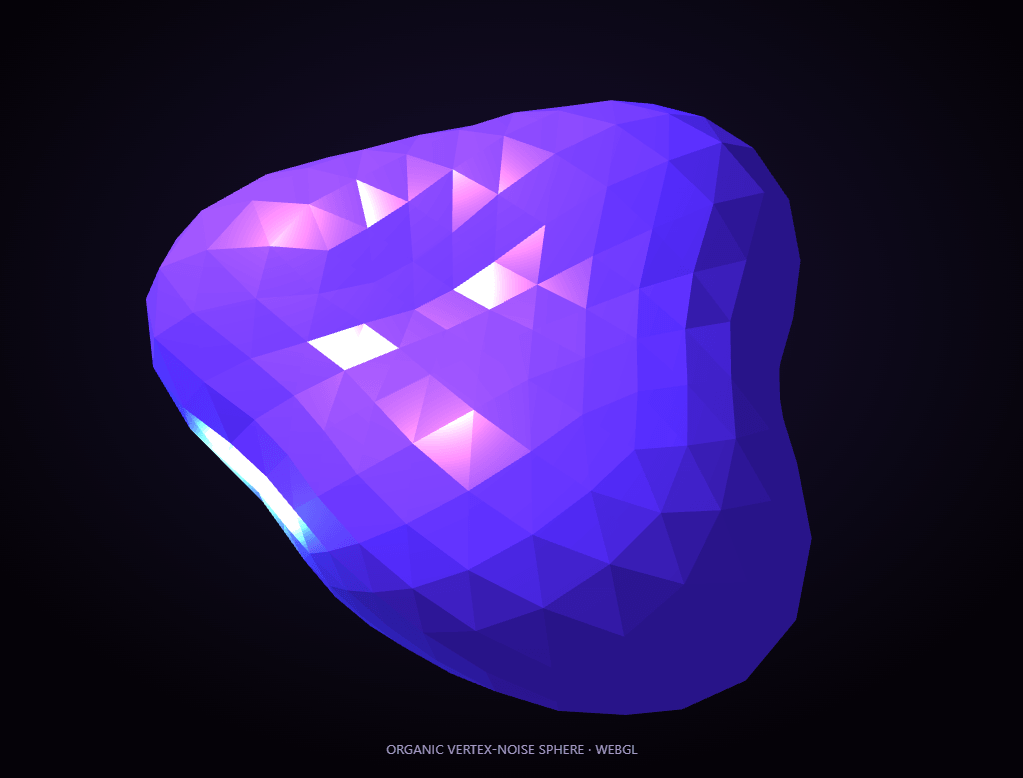
The Three.js Morphing Blob snippet takes a plain sphere and turns it into a continuously breathing, organic form — the kind of effect you see on modern SaaS landing pages — using nothing but a high-subdivision icosahedron, a hand-rolled noise function, and per-vertex displacement recomputed every frame in plain WebGL through Three.js loaded from a CDN.
Why an icosahedron instead of a UV sphere
The base shape is a THREE.IcosahedronGeometry with a subdivision level of 6, which produces thousands of near-evenly-distributed triangles across the surface. A standard SphereGeometry clusters vertices tightly near its poles and stretches them near the equator, which makes any per-vertex displacement look uneven — bulging oddly at the top and bottom. An icosahedron's uniform triangle distribution means the same noise formula produces consistent, evenly-sized bumps everywhere on the surface.
Displacing from a saved original, never from the last frame
The single most important detail in this snippet: the geometry's original vertex positions are copied into a plain array once, at startup, before any animation runs. Every frame, each vertex is recomputed as original position × (1 + noise) — always starting from that saved original, never from wherever the vertex ended up on the previous frame. Get this wrong (displacing cumulatively frame over frame) and the blob will drift, balloon, or collapse within seconds; displacing from a fixed original is what keeps the wobble stable and reversible indefinitely.
A hand-rolled noise function, no library required
Rather than pulling in a Simplex or Perlin noise library, the snippet uses a compact function that multiplies three sine and cosine terms together, each on a different axis, frequency, and phase offset tied to a slowly incrementing time value. It isn't mathematically "true" gradient noise, but it produces a smooth, non-repeating, organic-looking ripple across the surface for zero extra dependencies — proof that convincing procedural motion doesn't always need a proper noise library.
Recomputing normals is what makes the lighting work
After displacing vertices, the snippet calls geometry.computeVertexNormals() every single frame. Skip this step and the surface will still visually deform, but the lighting will look completely wrong — flat, faceted, or oddly shaded — because the MeshStandardMaterial shades each triangle based on its normal vector, and that normal has to be recalculated any time the underlying geometry actually changes shape.
Orbiting point lights sell the "liquid" feel
Two point lights — a violet key light and a cooler cyan rim light — orbit the blob independently of its rotation, one of them tracing a circle over time via simple sine/cosine positioning. Because the surface is constantly shifting, a moving light source catches different facets from moment to moment, which is what makes the material read as glassy or liquid rather than a static plastic sphere with a texture animation layered on top.
Slow rotation and tilt, not just displacement
On top of the noise wobble, the mesh itself slowly rotates on its Y axis and gently tilts back and forth on X using another sine term. Combined with the orbiting lights, this small addition means no two frames ever look quite identical, even though the underlying noise pattern technically does eventually repeat.
Where this technique goes next
The same original-position-plus-noise pattern that drives this blob is the foundation for cloth simulation previews, terrain generation, and audio-reactive visualizers — anywhere a mesh needs to deform smoothly without an actual physics engine. Pair it with a morphing SVG icon set for a coordinated "everything breathes" visual language, or contrast it against the rigid, faceted look of a 3D cube.
Build with AI
Build, Understand, Optimize, and Extend It With AI
You do not have to reverse-engineer the displacement math by staring at the noise function alone. Paste this snippet's HTML, CSS, and JS into an AI coding assistant like Claude and ask it to explain exactly why displacement is computed from a saved original array rather than the previous frame's positions, or why computeVertexNormals has to run every single frame instead of once at startup. The same assistant can help optimize it, for instance checking whether the per-vertex loop could be moved into a custom vertex shader for a large performance win on lower-end devices, or whether normal recomputation could be skipped on frames where the noise amplitude is near zero. It is also useful for extending the effect: ask it to swap the hand-rolled noise for a proper Simplex noise implementation, drive the amplitude from mouse proximity so the blob reacts to the cursor, or add a second, faster-oscillating noise layer for finer surface detail. Treat the code less like a finished artifact and more like a starting point for a conversation.
Prompt to recreate it
Copy this into your AI assistant of choice to build the effect from scratch, or as a jumping-off point for your own variant:
Build a "morphing blob" effect in plain HTML, CSS, and JavaScript using Three.js loaded from a CDN (no bundler, no build step) — an organic, continuously deforming sphere rendered in WebGL.

Requirements:
- A full-viewport canvas with a WebGLRenderer sized to match it, updated on window resize including camera aspect ratio.
- Use an IcosahedronGeometry with a high subdivision level (not a standard SphereGeometry) as the base shape, so vertices are distributed evenly across the surface rather than clustering at poles.
- Apply a MeshStandardMaterial with a visible emissive glow, and light the scene with at least two point lights of different colors so the surface reads as glassy or liquid rather than flat plastic.
- Immediately after creating the geometry, copy its original vertex position array into a separate saved array before any animation begins.
- Write a small hand-rolled noise function (no external noise library) that combines sine and cosine terms on different axes, frequencies, and a shared, continuously incrementing time value, returning a smooth pseudo-random value for any 3D input.
- Every animation frame, for every vertex, compute the new position as the saved original position scaled by (1 plus noise times an amplitude constant) — never compute displacement from the vertex's position on the previous frame, to avoid drift or runaway growth.
- After updating all vertex positions and flagging the position attribute as needing an update, call the geometry's method to recompute vertex normals every frame, so lighting continues to look physically correct as the shape deforms.
- Slowly rotate the mesh independently of the noise animation, and move at least one of the point lights in a circular or orbiting path over time using sine and cosine of the same time value.
- Expose the noise amplitude and frequency as named constants near the top of the script so they're easy to retune.
Want to tighten it up first? Run this prompt through the AI Prompt Studio to score it across 8 quality dimensions, catch anti-patterns, and tune the wording for Claude, ChatGPT, or Gemini before you paste it in.
Step by step
How to Use
- 1Load the Three.js CDNAdd three.min.js from the CDN panel — no other libraries are needed.
- 2Paste HTML, CSS, and JSThe blob fills the viewport and starts animating immediately on load.
- 3Watch it breatheThe surface ripples continuously from the noise-driven vertex displacement.
- 4Tune the wobbleAdjust AMPLITUDE for a subtler or more extreme surface, and FREQ for tighter or broader bumps.
- 5Change the materialSwap color, metalness, and roughness on the MeshStandardMaterial for glass, matte, or metallic looks.
- 6Resize the windowRenderer size and camera aspect ratio update automatically.
Real-world uses
Common Use Cases
Got questions?
Frequently Asked Questions
A SphereGeometry clusters vertices densely near its poles and spaces them widely near the equator, so any per-vertex displacement looks uneven across the surface. An icosahedron with a high subdivision level distributes triangles almost evenly everywhere, so the same noise formula produces consistent-looking bumps across the whole shape.
Displacing directly from the previous frame's already-displaced positions accumulates error — the blob would drift, balloon outward, or collapse inward within seconds. Storing the original geometry once and always computing displaced position = original × (1 + noise) guarantees the shape stays stable and bounded indefinitely, no matter how long the animation runs.
No — it is a compact hand-rolled function that multiplies sine and cosine terms on different axes and frequencies. It is not mathematically equivalent to gradient noise, but it produces a smooth, organic, non-repeating wobble that looks convincing, without pulling in an external noise library.
MeshStandardMaterial shades each triangle based on its normal vector, which describes which way that triangle faces. Once vertex positions change, the old normals no longer match the new shape, so the lighting looks flat or wrong unless the normals are recalculated every frame the geometry actually deforms.
Yes. Lower the AMPLITUDE constant for a barely-perceptible ripple, or raise it for an aggressive, spiky wobble. Adjusting FREQ alongside it controls whether the bumps are broad and smooth or tight and numerous.
Yes. Click JSX for a React component, Vue for a Vue 3 SFC, Angular for a standalone component, or Tailwind for a React + Tailwind CSS utility-class version. Set up the renderer, geometry, and original-position snapshot inside a mount effect (useEffect, onMounted, ngAfterViewInit), and call renderer.dispose() plus cancelAnimationFrame on cleanup so the WebGL context and animation loop don't leak when the component unmounts.