Source Code
<div class="vao">
  <div class="vao-stage">
    <div class="vao-orb" id="vaoOrb">
      <div class="vao-blob vao-b1"></div>
      <div class="vao-blob vao-b2"></div>
      <div class="vao-blob vao-b3"></div>
      <div class="vao-ring"></div>
      <div class="vao-ring vao-r2"></div>
      <div class="vao-eq" id="vaoEq">
        <i></i><i></i><i></i><i></i><i></i>
      </div>
    </div>
  </div>
  <p class="vao-label" id="vaoLabel">Tap the orb to start listening</p>
  <p class="vao-text" id="vaoText"></p>
</div>
* { box-sizing: border-box; margin: 0; padding: 0; }
body { font-family: system-ui, -apple-system, sans-serif; background: #07090f; min-height: 100vh; display: flex; align-items: center; justify-content: center; padding: 24px; }
.vao { display: flex; flex-direction: column; align-items: center; gap: 18px; }
.vao-stage { width: 180px; height: 180px; display: flex; align-items: center; justify-content: center; }
.vao-orb {
position: relative; width: 120px; height: 120px; border-radius: 50%; cursor: pointer;
filter: blur(0px); transition: transform 0.4s cubic-bezier(0.34, 1.56, 0.64, 1);
}
.vao-orb:hover { transform: scale(1.05); }
/* Three hue-shifted blobs drift inside the orb; overflow is clipped by a mask */
.vao-blob {
position: absolute; inset: 0; border-radius: 50%;
mix-blend-mode: screen; filter: blur(14px);
animation: vaoDrift 6s ease-in-out infinite alternate;
}
.vao-b1 { background: radial-gradient(circle at 30% 30%, #818cf8, transparent 62%); }
.vao-b2 { background: radial-gradient(circle at 70% 40%, #22d3ee, transparent 60%); animation-duration: 7.5s; animation-delay: -2s; }
.vao-b3 { background: radial-gradient(circle at 50% 75%, #e879f9, transparent 58%); animation-duration: 9s; animation-delay: -4s; }
@keyframes vaoDrift {
from { transform: translate(-8%, -6%) scale(1); }
to { transform: translate(9%, 7%) scale(1.15); }
}
.vao-ring {
position: absolute; inset: -14px; border-radius: 50%;
border: 1.5px solid rgba(129, 140, 248, 0.4);
opacity: 0; transform: scale(0.8);
}
.vao-r2 { inset: -28px; border-color: rgba(34, 211, 238, 0.3); }
/* State: listening — pulse rings + slow breathing */
.vao-orb.listening { animation: vaoBreathe 1.6s ease-in-out infinite; }
.vao-orb.listening .vao-ring { animation: vaoPulse 1.6s ease-out infinite; }
.vao-orb.listening .vao-r2 { animation-delay: 0.4s; }
@keyframes vaoBreathe { 0%, 100% { transform: scale(1); } 50% { transform: scale(1.08); } }
@keyframes vaoPulse {
0% { opacity: 0.9; transform: scale(0.78); }
100% { opacity: 0; transform: scale(1.25); }
}
/* State: speaking — equalizer bars appear, blobs churn faster */
.vao-eq { position: absolute; inset: 0; display: none; align-items: center; justify-content: center; gap: 5px; }
.vao-eq i { width: 6px; height: 12px; border-radius: 3px; background: rgba(255, 255, 255, 0.92); animation: vaoBar 0.8s ease-in-out infinite alternate; }
.vao-eq i:nth-child(1) { animation-delay: 0s; }
.vao-eq i:nth-child(2) { animation-delay: 0.12s; }
.vao-eq i:nth-child(3) { animation-delay: 0.24s; }
.vao-eq i:nth-child(4) { animation-delay: 0.36s; }
.vao-eq i:nth-child(5) { animation-delay: 0.48s; }
@keyframes vaoBar { from { height: 8px; } to { height: 34px; } }
.vao-orb.speaking .vao-eq { display: flex; }
.vao-orb.speaking .vao-blob { animation-duration: 2.4s; }
.vao-label { font-size: 13px; font-weight: 600; color: #94a3b8; min-height: 18px; transition: color 0.3s; }
.vao-orb.listening ~ .vao-label,
.vao-label.hot { color: #a5b4fc; }
.vao-text { max-width: 300px; text-align: center; font-size: 13.5px; line-height: 1.55; color: #e2e8f0; min-height: 44px; }
.vao-text .vao-caret { display: inline-block; width: 2px; height: 14px; background: #a5b4fc; margin-left: 2px; vertical-align: -2px; animation: vaoCaret 0.8s step-end infinite; }
@keyframes vaoCaret { 50% { opacity: 0; } }const orb = document.getElementById('vaoOrb');
const label = document.getElementById('vaoLabel');
const textEl = document.getElementById('vaoText');
const REPLY = 'Sure — I found 3 flights to Lisbon on Friday. The cheapest leaves at 7:40 AM for $128.';
let state = 'idle'; // idle -> listening -> thinking -> speaking -> idle
let timers = [];
function clearTimers() { timers.forEach(t => clearTimeout(t)); timers = []; }
function setState(next) {
state = next;
orb.classList.toggle('listening', next === 'listening');
orb.classList.toggle('speaking', next === 'speaking');
label.classList.toggle('hot', next !== 'idle');
if (next === 'idle') label.textContent = 'Tap the orb to start listening';
if (next === 'listening') label.textContent = 'Listening… tap again to stop';
if (next === 'thinking') label.textContent = 'Thinking…';
if (next === 'speaking') label.textContent = 'Speaking';
}
function typeReply() {
textEl.innerHTML = '<span class="vao-caret"></span>';
let i = 0;
function tick() {
if (state !== 'speaking') return;
i++;
textEl.innerHTML = REPLY.slice(0, i) + '<span class="vao-caret"></span>';
if (i < REPLY.length) {
timers.push(setTimeout(tick, 24));
} else {
// Done speaking: settle back to idle after a beat
timers.push(setTimeout(() => { textEl.textContent = REPLY; setState('idle'); }, 900));
}
}
tick();
}
orb.addEventListener('click', () => {
clearTimers();
if (state === 'idle') {
textEl.textContent = '';
setState('listening');
// Simulate the user finishing their question after 2.6s
timers.push(setTimeout(() => {
setState('thinking');
timers.push(setTimeout(() => { setState('speaking'); typeReply(); }, 1100));
}, 2600));
} else {
setState('idle');
textEl.textContent = '';
}
});
setState('idle');Learn Coding Visually
Learn to code with interactive, live-preview playgrounds — HTML, CSS, JavaScript, React & more.
 HTML Playground42 lessons · Click-based · Live preview
 CSS PlaygroundLearn CSS with a live editor
 JavaScript Playground60 lessons · DOM · Async · Canvas
 React PlaygroundLearn React with a live code editor
 GSAP PlaygroundLearn GSAP animation interactively
 SVG Playground44 lessons · shapes · paths · animation
 SCSS Playground45 lessons · Sass modules · tokens
 Tailwind PlaygroundLearn Tailwind CSS with a live editor
 Bootstrap 5 Playground50 lessons · live preview
Voice Assistant Orb — Free HTML CSS JS Snippet
Voice Assistant Orb · Animations · Plain HTML, CSS & JS · Live preview
What's included
Features
About this UI Snippet
Voice Assistant Orb — Animated AI Voice UI with Listening, Thinking, and Speaking States
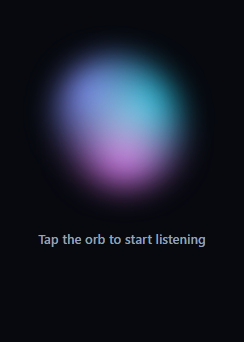
The glowing orb has become the universal visual language for voice AI — Siri, ChatGPT voice mode, Gemini Live, and every AI hardware startup use a soft, living blob of colour that breathes while idle, pulses while listening, and dances while speaking. This component recreates that interface in HTML, CSS, and vanilla JavaScript: a layered gradient orb with a four-state machine (idle → listening → thinking → speaking), expanding pulse rings, an equalizer overlay, and a typewriter transcript of the assistant's reply.
Building the living orb from three blobs
The orb's organic look comes from three absolutely positioned radial-gradient circles — indigo, cyan, and fuchsia — each blurred 14px and combined with mix-blend-mode: screen so overlapping regions add up to bright, shifting hues rather than muddy overlaps. Each blob runs the same vaoDrift keyframe (translate + scale, alternate direction) but at different durations (6s, 7.5s, 9s) with negative animation-delays, so they start mid-cycle and never synchronise. Three out-of-phase loops are enough to make the colour field look continuously random — the same phase-offset trick behind lava-lamp backgrounds like the aurora bg.
The state machine
All behaviour hangs off a single state string and a setState() function that toggles .listening and .speaking classes and updates the status label. Tapping the orb from idle starts listening; the demo then simulates a conversation — 2.6 seconds of listening, 1.1 seconds of thinking, then a typed reply — using setTimeouts collected into a timers array. Every state change first calls clearTimers(), so tapping the orb mid-flow cancels the pending transitions cleanly instead of letting a stale timeout yank the UI back to a dead state. This cancel-on-transition discipline is exactly what you need when wiring real async APIs.
Listening: pulse rings and breathing
In the listening state the orb scales gently between 1 and 1.08 (vaoBreathe), while two border-only rings expand from scale(0.78) to 1.25 and fade out (vaoPulse), the second delayed 0.4s so the pulses alternate — the sonar effect users read as "it can hear me". The rings are pure borders with no fill, so they cost almost nothing to composite, and both animations use only transform and opacity, keeping the whole state GPU-friendly.
Speaking: equalizer and accelerated churn
The speaking state reveals a five-bar equalizer centred on the orb — white bars animating height between 8px and 34px with cascading 0.12s delays — and shortens the blobs' drift duration to 2.4s so the colours churn faster, as if energised by the voice. Meanwhile typeReply() types the assistant's answer character by character (24ms per tick) with a blinking caret built from a step-end opacity keyframe, the same technique as the typewriter effect. The typing loop checks state !== 'speaking' on every tick, so interrupting the assistant stops the text mid-word — matching how real voice UIs handle barge-in.
Connecting real speech APIs
The demo timeouts map one-to-one onto real events: start listening when you call SpeechRecognition.start() (see the speech to text snippet), move to thinking when the final transcript fires and you send it to your LLM, and enter speaking when the response streams back — feeding typeReply() from streamed tokens instead of a fixed string. For output audio, trigger speechSynthesis.speak() alongside the speaking state.
Customisation
Swap the three blob gradients to re-brand the orb, tune drift durations for calmer or wilder motion, resize via the .vao-orb width/height (everything inside is proportional), and replace the demo reply with your streaming response. The label strings live in setState() for easy localisation.
Build with AI
Build, Understand, Optimize, and Extend It With AI
Instead of tracing the timer bookkeeping by hand, paste this snippet's HTML, CSS, and JS into an AI coding assistant like Claude and ask it to explain exactly why clearTimers() runs at the very start of every click handler, and what specific bug would appear if a user tapped the orb mid-sequence without that cancellation in place. It's also worth asking how the three blob animations' different durations and negative delays combine to guarantee the composite color field never visibly repeats. For extending it, have it wire the demo timeouts to a real SpeechRecognition instance and a streaming LLM response instead of the fixed REPLY string, add a visual error state for failed recognition, or make the equalizer bar heights react to actual audio amplitude via an AnalyserNode instead of a fixed keyframe. Treat the code less like a finished artifact and more like a starting point for a conversation.
Prompt to recreate it
Copy this into your AI assistant of choice to build the effect from scratch, or as a jumping-off point for your own variant:
Build a Siri-style animated voice assistant orb in plain HTML, CSS, and vanilla JavaScript with no libraries, driven by a four-state state machine.

Requirements:
- A circular orb built from three overlapping radial-gradient blob layers in different hues, each blurred and set to mix-blend-mode: screen so overlapping colors brighten additively rather than muddying together. Each blob must run the same drift keyframe (translate plus scale, alternating direction) but at a different animation-duration and a different negative animation-delay, so the three loops never fall into a visibly synchronized, repeating pattern.
- Exactly four states: idle, listening, thinking, and speaking, all driven through a single setState function that toggles CSS classes on the orb and updates a status label's text — no state-specific logic scattered elsewhere.
- In the listening state, the orb must gently scale up and down (a breathing animation) while two concentric ring elements expand outward from a smaller starting scale and fade to transparent on a loop, with the second ring's animation delayed relative to the first so the pulses appear staggered rather than simultaneous.
- In the speaking state, a row of several vertical bars must appear centered on the orb, each animating its height between a short and tall value with a small cascading delay per bar to create an equalizer effect, and the blob drift animations must temporarily run at a noticeably faster duration than their idle speed.
- Clicking the orb from idle must start a simulated conversation sequence (listening for a few seconds, then thinking, then speaking a canned reply typed out character by character with a blinking caret) using chained setTimeout calls; every setTimeout handle must be tracked in an array.
- Clicking the orb again at any point during that sequence must immediately clear every tracked pending timeout and any in-progress typing must stop mid-character, then return the orb to idle — implement this cancellation so no previously scheduled state transition can fire after the interruption.
Want to tighten it up first? Run this prompt through the AI Prompt Studio to score it across 8 quality dimensions, catch anti-patterns, and tune the wording for Claude, ChatGPT, or Gemini before you paste it in.
Step by step
How to Use
- 1Paste the HTML, CSS, and JSA glowing orb of drifting indigo, cyan, and fuchsia blobs renders on a dark stage with a "Tap the orb to start listening" prompt.
- 2Tap the orbIt enters the listening state — the orb breathes and two sonar rings pulse outward alternately while the label switches to "Listening…".
- 3Watch the conversation flowAfter 2.6s it moves to "Thinking…", then to speaking — a five-bar equalizer appears and the reply types out with a blinking caret.
- 4Interrupt itTap the orb during any state to cancel — all pending timers clear and the orb settles back to idle, mid-sentence if it was speaking.
- 5Wire real speech APIsMap the states onto SpeechRecognition events and your LLM stream: listening on start(), thinking on final transcript, speaking as tokens arrive.
- 6Re-brand the orbSwap the three radial-gradient colours and drift durations; the size scales from the single .vao-orb dimension.
Real-world uses
Common Use Cases
Got questions?
Frequently Asked Questions
Each blob is a blurred radial-gradient in one hue, and mix-blend-mode: screen makes overlaps additive — indigo over cyan brightens toward white-blue instead of darkening. All three run the same drift keyframe but at 6s, 7.5s, and 9s with negative delays, so their phases never align and the composite never visibly repeats. Changing any one duration changes the whole orb's character.
The demo chains listening → thinking → speaking with nested timeouts. If the user taps the orb mid-chain, a forgotten timeout would still fire later and drag the UI into a wrong state. clearTimers() runs at the start of every click, cancelling everything pending, and the typewriter additionally checks state !== 'speaking' each tick. This cancel-on-transition pattern is essential once real async APIs replace the timeouts.
On tap, call recognition.start() (webkitSpeechRecognition) and setState('listening'). In onresult with a final transcript, setState('thinking') and POST the text to your model. As the response streams, setState('speaking') and append tokens to the transcript element instead of running the fixed-string typewriter; optionally speak them with speechSynthesis. Errors and onend map to setState('idle').
No — almost everything animates transform and opacity, which the compositor handles on the GPU without layout or paint. The blurs are static filters applied once, not animated. The one exception is the equalizer bars animating height, but they are five 6px elements, so relayout cost is negligible. On low-power devices you can honour prefers-reduced-motion by pausing the drift and pulse animations in a media query.
Model state ('idle' | 'listening' | 'thinking' | 'speaking') in useState / ref() / a component field and derive the CSS classes from it in the template — the setState function dissolves into declarative bindings. Timers and speech-API subscriptions belong in useEffect / onMounted / ngOnInit with cleanup that clears them on unmount and on state change. The blob, ring, and equalizer keyframes are pure CSS and port unchanged.