Source Code
<section class="wb-hero">
  <canvas class="wb-canvas" id="wbCanvas" aria-hidden="true"></canvas>
  <div class="wb-content">
    <h1>Ride the wave</h1>
    <p>Layered animated waves rendered on a canvas — smooth at 60fps, zero images.</p>
    <button type="button" class="wb-btn">Get the kit</button>
  </div>
</section>*{box-sizing:border-box;margin:0;padding:0}
body{font-family:system-ui,-apple-system,sans-serif;background:#04040c;color:#fff}
.wb-hero{position:relative;min-height:100vh;overflow:hidden;display:flex;align-items:center;justify-content:center;text-align:center}
.wb-canvas{position:absolute;inset:0;width:100%;height:100%;display:block}
.wb-content{position:relative;z-index:1;padding:0 20px;max-width:560px}
.wb-content h1{font-size:clamp(34px,8vw,72px);font-weight:900;letter-spacing:-.03em;margin-bottom:12px;text-shadow:0 4px 30px rgba(0,0,0,.4)}
.wb-content p{font-size:16px;color:#d4d4e4;line-height:1.55;margin-bottom:24px}
.wb-btn{background:#fff;color:#04040c;border:none;border-radius:12px;padding:13px 24px;font-family:inherit;font-size:15px;font-weight:800;cursor:pointer;transition:transform .15s}
.wb-btn:hover{transform:translateY(-2px)}var canvas = document.getElementById('wbCanvas');
var ctx = canvas.getContext('2d');
var W, H, dpr;
function resize() {
dpr = Math.min(window.devicePixelRatio || 1, 2);
W = canvas.clientWidth; H = canvas.clientHeight;
canvas.width = W * dpr; canvas.height = H * dpr;
ctx.setTransform(dpr, 0, 0, dpr, 0, 0);
}
window.addEventListener('resize', resize);
resize();
// Each layer: color, amplitude, wavelength, speed, vertical anchor.
var LAYERS = [
{ c: 'rgba(99,102,241,.55)', amp: 36, len: 0.006, spd: 0.018, y: 0.62 },
{ c: 'rgba(236,72,153,.45)', amp: 28, len: 0.009, spd: 0.026, y: 0.7 },
{ c: 'rgba(34,211,238,.40)', amp: 44, len: 0.004, spd: 0.012, y: 0.78 }
];
var t = 0;
function draw() {
t += 1;
ctx.clearRect(0, 0, W, H);
ctx.globalCompositeOperation = 'lighter'; // additive blend for glow
LAYERS.forEach(function (l) {
ctx.beginPath();
ctx.moveTo(0, H);
for (var x = 0; x <= W; x += 6) {
// Sum two sines per layer so the crest never looks like a pure sine.
var y = H * l.y +
Math.sin(x * l.len + t * l.spd) * l.amp +
Math.sin(x * l.len * 2.3 + t * l.spd * 1.7) * (l.amp * 0.35);
ctx.lineTo(x, y);
}
ctx.lineTo(W, H);
ctx.closePath();
ctx.fillStyle = l.c;
ctx.fill();
});
ctx.globalCompositeOperation = 'source-over';
requestAnimationFrame(draw);
}
requestAnimationFrame(draw);Learn Coding Visually
Learn to code with interactive, live-preview playgrounds — HTML, CSS, JavaScript, React & more.
 HTML Playground42 lessons · Click-based · Live preview
 CSS PlaygroundLearn CSS with a live editor
 JavaScript Playground60 lessons · DOM · Async · Canvas
 React PlaygroundLearn React with a live code editor
 GSAP PlaygroundLearn GSAP animation interactively
 SVG Playground44 lessons · shapes · paths · animation
 SCSS Playground45 lessons · Sass modules · tokens
 Tailwind PlaygroundLearn Tailwind CSS with a live editor
 Bootstrap 5 Playground50 lessons · live preview
Wavy Background — Free HTML CSS JS Canvas Hero Snippet
Wavy Background · Animations · Plain HTML, CSS & JS · Live preview
What's included
Features
About this UI Snippet
Wavy Background — Layered Animated Canvas Waves
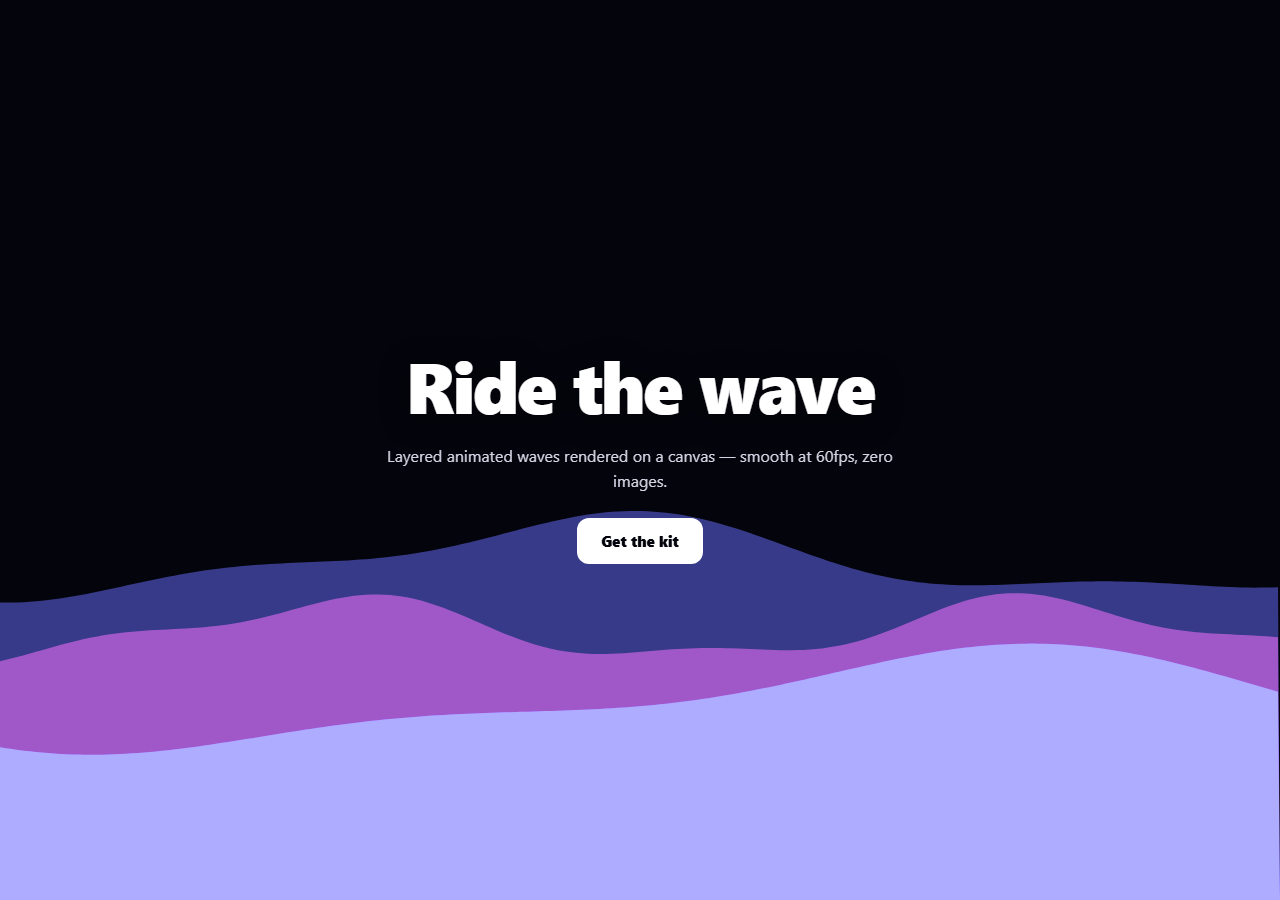
The wavy background is the flowing, colorful hero backdrop that gives landing pages a sense of motion and depth: several translucent waves of different colors rolling at different speeds, blended into a soft glow. This snippet renders it on an HTML <canvas> with plain vanilla JavaScript — smooth at 60fps, sharp on retina displays, and weighing nothing because there are no images.
Sharp on every display
Canvas is resolution-dependent, so the resize function reads devicePixelRatio (capped at 2 to protect performance on phones), sets the canvas's internal pixel buffer to clientWidth * dpr by clientHeight * dpr, then calls ctx.setTransform(dpr, 0, 0, dpr, 0, 0) so all drawing is done in CSS pixels but rendered at device resolution. That's the standard recipe for crisp canvas graphics — without it the waves would look blurry on HiDPI screens. The handler also re-runs on window resize so the scene always fits.
Drawing a wave as a filled path
Each wave is a filled shape, not a stroked line. The path starts at the bottom-left corner, walks across the width sampling a y value every 6 pixels, then closes back along the bottom edge — so the area under the curve fills with color. Sampling every 6px instead of every pixel is a deliberate trade: the curve stays visually smooth while doing a fraction of the work, which keeps the loop cheap even with three layers.
Organic crests from summed sines
A single Math.sin produces a mechanical, obviously-repeating wave. To make the motion feel natural, each layer sums two sines of different wavelengths and speeds — a primary wave plus a smaller, faster harmonic at 2.3× the frequency. The superposition means crests vary in height and the pattern doesn't visibly loop, which is what separates a convincing wave from a clearly synthetic one. Each layer has its own amplitude, wavelength, speed, and vertical anchor so they roll independently.
Additive glow blending
Where the translucent waves overlap, they should brighten rather than muddy. Setting ctx.globalCompositeOperation = 'lighter' before filling makes the colors add together, so intersections glow — purple over cyan reads as a luminous blend instead of a dull mix. The mode is reset to source-over after the layers so it doesn't affect anything else. The waves' own rgba alpha keeps each one translucent.
The animation loop
A requestAnimationFrame loop increments a time counter t, clears the canvas, and redraws all layers each frame. Because each layer's phase is t * speed, the waves drift at their own rates, and the cheap 6px sampling plus additive fills keep the whole thing comfortably at 60fps. The text content sits above the canvas at a higher z-index with a soft text-shadow so it stays legible over the bright waves.
Customizing it
Edit the LAYERS array to add waves, recolor them, or change their amplitude, wavelength, speed, and vertical position. Remove the lighter blend for a flatter, layered-paper look, or increase the harmonic factor for choppier water. Lower the DPR cap or sample step if you target very low-end devices. Pair it with a text generate headline or a shimmer button for a vivid hero.
Build with AI
Build, Understand, Optimize, and Extend It With AI
Ask an AI coding assistant like Claude to explain the devicePixelRatio scaling in resize() step by step — why the canvas's internal pixel buffer is set to clientWidth times dpr while drawing code still works in plain CSS pixel coordinates — since that's the exact recipe that keeps the waves sharp on retina displays instead of blurry. It's worth a performance conversation too: ask specifically what the 6px sampling step and the capped devicePixelRatio of 2 are protecting against on lower-end phones, and whether either could be pushed further without visibly hurting the curve's smoothness. For extending it, ask for waves that respond to scroll position or mouse movement, a color palette that cycles slowly over time instead of staying fixed, or a way to sync the wave speed to music using the Web Audio API. Treat the code less like a finished artifact and more like a starting point for a conversation.
Prompt to recreate it
Copy this into your AI assistant of choice to build the effect from scratch, or as a jumping-off point for your own variant:
Build an animated layered wave background for a hero section in plain HTML, CSS, and JavaScript using only the Canvas 2D API and requestAnimationFrame — no SVG, no WebGL, no library.

Requirements:
- A full-bleed canvas positioned absolutely behind the hero content, with a resize function that reads devicePixelRatio (capped at a maximum such as 2), sets the canvas's internal width and height to the CSS size multiplied by that ratio, and calls setTransform so all subsequent drawing happens in CSS-pixel coordinates while still rendering at full device resolution; re-run this function on window resize.
- Define an array of wave layer configs, each with its own color, amplitude, wavelength, speed, and vertical anchor position.
- For each layer, build a filled path (not a stroked line) by starting at the bottom-left corner, sampling points across the canvas width at a fixed step (such as every 6 pixels rather than every pixel) where each point's y-coordinate sums two sine waves of different wavelengths and speeds — a primary wave plus a smaller, faster harmonic — so the crest height varies and the pattern doesn't look like an obviously repeating single sine, then close the path back along the bottom edge and fill it.
- Set the canvas context's composite operation to an additive/lighter blend mode before filling the wave layers so that overlapping translucent waves visually brighten into a glow rather than muddying into a flat blend, then reset the composite mode afterward.
- Drive the animation with a single requestAnimationFrame loop that increments a time counter each frame, clears the canvas, and redraws every layer with its phase offset by that counter times its own speed, so each layer drifts independently.
- Keep the hero's text content in a normal HTML layer stacked above the canvas with a higher z-index, styled with a subtle text-shadow so it stays legible against the bright moving waves.
Want to tighten it up first? Run this prompt through the AI Prompt Studio to score it across 8 quality dimensions, catch anti-patterns, and tune the wording for Claude, ChatGPT, or Gemini before you paste it in.
Step by step
How to Use
- 1Paste HTML, CSS, and JSA hero fills with layered colored waves rolling across the bottom.
- 2Watch the motionEach wave drifts at its own speed and they glow where they overlap.
- 3Resize the windowThe canvas re-scales and stays crisp on retina screens.
- 4Recolor the wavesEdit the LAYERS array colors and alpha values.
- 5Change the shapeTune amplitude, wavelength, speed, and anchor per layer.
- 6Adjust the blendRemove lighter for a flat layered look.
Real-world uses
Common Use Cases
Got questions?
Frequently Asked Questions
The resize function reads devicePixelRatio (capped at 2), sets the canvas pixel buffer to the CSS size times that ratio, and calls setTransform(dpr,0,0,dpr,0,0). Drawing is then done in CSS pixels but rendered at device resolution. Without this, canvas graphics look blurry on HiDPI displays.
A single sine produces an obviously mechanical, repeating wave. Adding a smaller, faster harmonic at 2.3 times the frequency makes crests vary in height and stops the pattern from visibly looping, which is what makes the water look organic rather than synthetic.
Before filling the waves, the code sets globalCompositeOperation to lighter, which adds overlapping colors together instead of painting over them. So where translucent purple crosses cyan, the pixels brighten into a luminous blend. The mode is reset to source-over afterward so it doesn't affect other drawing.
Yes. The curve is sampled every 6 pixels rather than every pixel, the device pixel ratio is capped at 2, and each wave is a single filled path. Together these keep three animated layers comfortably at 60fps. For very low-end targets you can raise the sample step or lower the DPR cap further.
Put the canvas behind your content with a ref, and run the resize plus rAF draw loop in a mount effect, cancelling the frame and removing the resize listener on unmount. Keep the time counter and layer config in refs or module scope so re-renders don't reset the animation. The component is framework-agnostic; in Tailwind just position the canvas absolute inset-0 behind a relative z-10 content layer.