Learn Coding Visually
Learn to code with interactive, live-preview playgrounds — HTML, CSS, JavaScript, React & more.
 HTML Playground42 lessons · Click-based · Live preview
 CSS PlaygroundLearn CSS with a live editor
 JavaScript Playground60 lessons · DOM · Async · Canvas
 React PlaygroundLearn React with a live code editor
 GSAP PlaygroundLearn GSAP animation interactively
 SVG Playground44 lessons · shapes · paths · animation
 SCSS Playground45 lessons · Sass modules · tokens
 Tailwind PlaygroundLearn Tailwind CSS with a live editor
 Bootstrap 5 Playground50 lessons · live preview
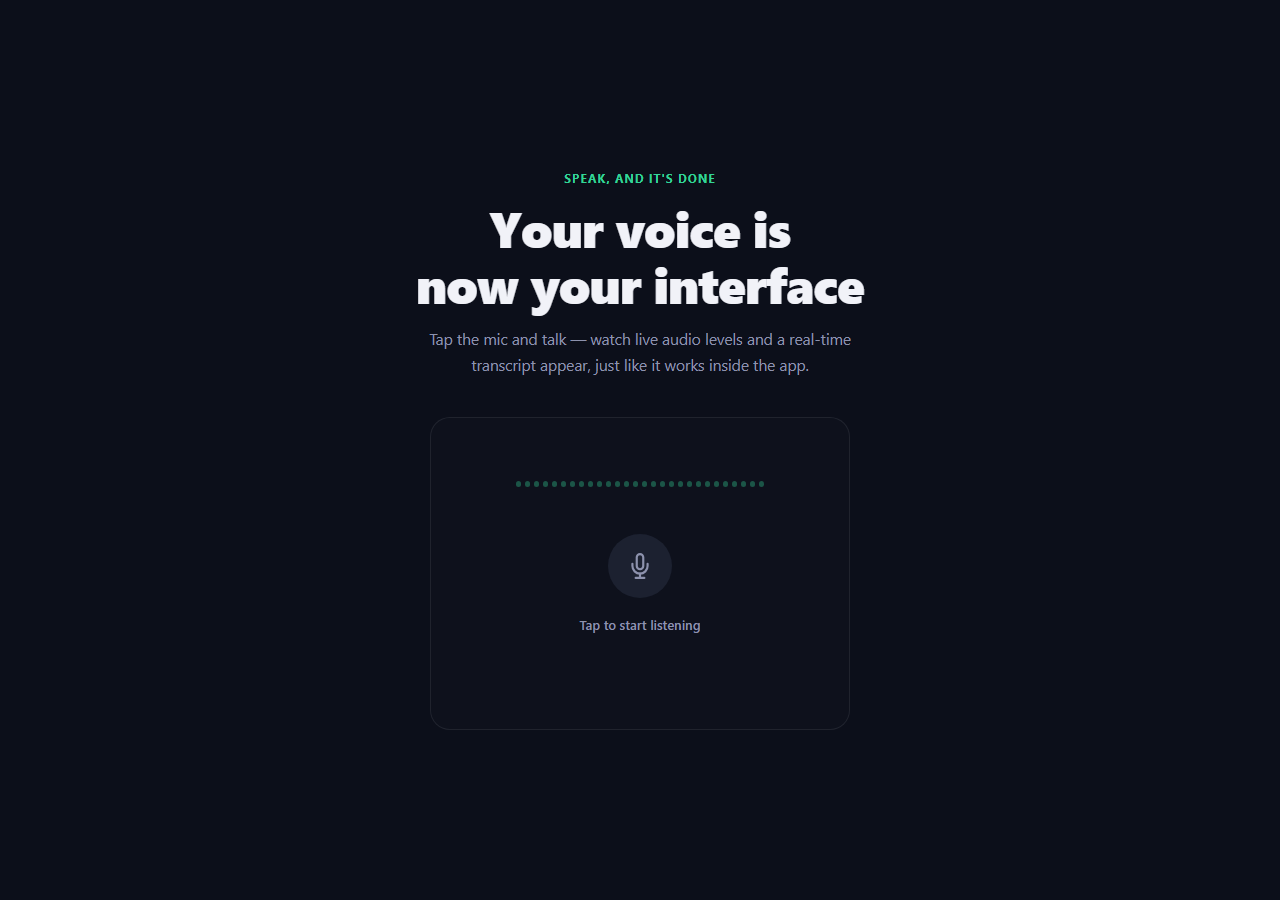
Speech to Text HTML CSS JS — Web Speech API
Speech to Text · Forms · Plain HTML, CSS & JS · Live preview
What's included
Features
About this UI Snippet
How to Build Speech to Text with the Web Speech API in JavaScript
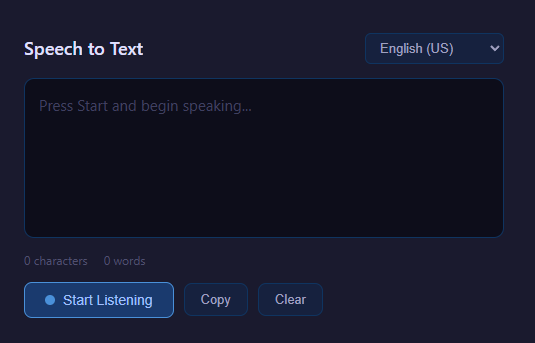
Speech to text turns the microphone into a live transcriber: you talk, and words appear on screen in real time. This component is built entirely in the browser with the Web Speech API — specifically the SpeechRecognition interface — with no server, no cloud key and no library. It supports continuous dictation, shows tentative interim words before they are confirmed, switches between languages, and degrades gracefully where the API is unavailable. Here is exactly how it is constructed.
Accessing the recognition engine
The entry point is the SpeechRecognition constructor, which in Chromium-based browsers is exposed as webkitSpeechRecognition. The code resolves it with a fallback: const SR = window.SpeechRecognition || window.webkitSpeechRecognition. If neither exists — as in browsers without speech support — the script shows a friendly unsupported message and disables the controls instead of throwing. This feature-detection-first approach is essential because Web Speech support is uneven across browsers.
Once available, a recognition instance is created and configured with three key flags. recognition.continuous = true keeps it listening across pauses rather than stopping after the first phrase. recognition.interimResults = true makes the engine emit provisional, not-yet-final guesses as you speak. recognition.lang is set from the language selector so the acoustic and language models match the spoken language.
Separating interim and final results
The heart of the transcriber is the onresult event. Its event object carries a results list, where each entry has an isFinal flag and one or more alternatives with a transcript string. The handler loops from event.resultIndex to the end of the list and splits the output into two buckets: when isFinal is true the text is appended to a persistent finalTranscript string, and when it is false the text is collected into a temporary interim string for that frame.
This separation is what produces the familiar live-typing feel. Final text is rendered solidly and never changes; interim text is shown in a lighter, italic style and is replaced on every event as the engine refines its guess. Because interim results are reissued continuously, the interim element is fully rewritten each time rather than appended, while the final element only ever grows.
Keeping the session alive
Browsers automatically stop recognition after a period of silence and fire the onend event. To provide truly continuous dictation, the handler restarts recognition whenever it ends but the user has not pressed stop. A listening flag tracks intent: if the user still wants to listen, onend calls recognition.start() again; if they pressed stop, it simply updates the UI. This restart loop works around the engine's built-in timeouts so long-form dictation does not silently die.
Handling errors
The onerror event reports a coded error string, and the component handles the common ones explicitly. not-allowed and service-not-allowed mean the user blocked microphone permission, so it shows a permission prompt and stops trying. no-speech fires when nothing was heard; it is non-fatal and recognition can continue or restart. network indicates the speech service could not be reached. aborted occurs on a deliberate stop. Mapping these codes to clear messages prevents the confusing silent failures that plague naive implementations.
Language selection
A select element is populated with several language-locale codes (for example en-US, es-ES, fr-FR, de-DE, hi-IN). Changing it updates recognition.lang; if recognition is currently running it is restarted so the new language model takes effect immediately. Locale codes matter — en-US and en-GB bias toward different vocabularies and accents — so exposing them gives noticeably better accuracy than a bare language name.
The waveform and UI feedback
While listening, a small CSS keyframe animation drives three bars that scale vertically out of phase, mimicking a sound-level meter. The animation is purely cosmetic — it is toggled with a class when listening starts and stops — but it reassures the user that the mic is active. A live word and character count is computed from the combined final transcript, and Copy and Clear buttons let the user grab or reset the text. Copy uses navigator.clipboard.writeText with a brief confirmation label.
Why it is robust
The combination of feature detection, the interim-versus-final split keyed on resultIndex and isFinal, an onend restart loop guarded by an intent flag, and explicit error-code handling is what separates a toy demo from a usable transcriber. Everything runs locally in the browser using only the Web Speech API, so there is nothing to deploy and no audio leaves the device except to the browser's own speech service.
Build with AI
Build, Understand, Optimize, and Extend It With AI
You don't have to trace the restart-loop and interim/final split by hand. Paste this snippet's HTML, CSS, and JS into an AI coding assistant like Claude and ask it to explain exactly why onend calls recognition.start() again only when a listening flag is still true, and how the resultIndex-to-results.length loop separates isFinal text from interim text on every single onresult event. The same assistant can help optimize it, for instance checking whether restarting recognition immediately inside onend could ever fire in a tight loop if the browser rejects start() repeatedly (e.g. after a permission revocation), and whether that needs a backoff or attempt limit. It is just as useful for extending the transcriber: ask it to add basic punctuation insertion from pause detection, persist the transcript to localStorage so a page refresh doesn't lose it, or add a voice-command mode that parses specific phrases out of the final transcript to trigger UI actions. Treat the code less like a finished artifact and more like a starting point for a conversation.
Prompt to recreate it
Copy this into your AI assistant of choice to build the effect from scratch, or as a jumping-off point for your own variant:
Build a continuous "speech to text" transcriber in plain HTML, CSS, and JavaScript using the Web Speech API's SpeechRecognition interface — no server, no external library.

Requirements:
- Resolve the recognition constructor with a fallback: window.SpeechRecognition or window.webkitSpeechRecognition, and if neither exists, show a distinct "unsupported" message and disable the start control instead of throwing an error anywhere else in the code.
- Configure the recognition instance with continuous set to true and interimResults set to true, and a language attribute driven by a select dropdown of locale codes (not just bare language names).
- In the result handler, loop from the event's resultIndex to the end of its results list, and for each result check its isFinal flag: append final results permanently to a persistent finalTranscript string, and collect non-final results into a temporary interim string that gets fully replaced (not appended) on every event, since interim guesses are revised continuously as the engine refines them.
- Render final text and interim text in visually distinct styles (e.g. solid color for final, lighter italic for interim) in two separate inline elements so the difference is visually obvious.
- Implement continuous dictation across the engine's built-in silence timeouts: track a boolean flag reflecting the user's actual intent to keep listening, and in the recognition end event, restart recognition automatically if that intent flag is still true, or finalize the UI state if the user explicitly pressed stop.
- Handle at least three distinct error codes from the error event (permission denied, no speech detected, network error) with distinct human-readable messages rather than one generic error string.
- Add live word and character counts computed from the final transcript, plus copy-to-clipboard and clear controls.
Want to tighten it up first? Run this prompt through the AI Prompt Studio to score it across 8 quality dimensions, catch anti-patterns, and tune the wording for Claude, ChatGPT, or Gemini before you paste it in.
Source Code
<div class="app">
  <div class="header">
    <h2>Speech to Text</h2>
    <select id="langSelect">
      <option value="en-US">English (US)</option>
      <option value="en-GB">English (UK)</option>
      <option value="es-ES">Spanish</option>
      <option value="fr-FR">French</option>
      <option value="de-DE">German</option>
      <option value="ja-JP">Japanese</option>
      <option value="zh-CN">Chinese</option>
      <option value="pt-BR">Portuguese (BR)</option>
    </select>
  </div>
  <div class="transcript-box" id="transcriptBox">
    <span id="finalText"></span><span id="interimText"></span>
    <div class="placeholder" id="placeholder">Press Start and begin speaking...</div>
  </div>
  <div class="waveform" id="waveform">
    <div class="bar"></div><div class="bar"></div><div class="bar"></div>
  </div>
  <div class="stats">
    <span id="charCount">0 characters</span>
    <span id="wordCount">0 words</span>
  </div>
  <div class="actions">
    <button id="startBtn" class="start-btn">
      <span class="dot"></span><span class="btn-label"> Start Listening</span>
    </button>
    <button id="copyBtn" class="act-btn">Copy</button>
    <button id="clearBtn" class="act-btn">Clear</button>
  </div>
  <div id="errorMsg" class="error-msg"></div>
  <div id="unsupported" class="unsupported" style="display:none">
    <svg width="40" height="40" viewBox="0 0 24 24" fill="none" stroke="#e05555" stroke-width="2"><circle cx="12" cy="12" r="10"/><line x1="12" y1="8" x2="12" y2="12"/><line x1="12" y1="16" x2="12.01" y2="16"/></svg>
    <p>Web Speech API is not supported in this browser.<br>Please try Chrome or Edge.</p>
  </div>
</div>
* { margin: 0; padding: 0; box-sizing: border-box; }
body { background: #1a1a2e; color: #e0e0e0; font-family: system-ui, sans-serif; min-height: 100vh; display: flex; align-items: center; justify-content: center; }
.app { width: 520px; max-width: 95vw; display: flex; flex-direction: column; gap: 14px; padding: 20px; }
.header { display: flex; align-items: center; justify-content: space-between; }
.header h2 { font-size: 18px; color: #e0e0ff; font-weight: 600; }
#langSelect {
padding: 6px 10px; background: #16213e; border: 1px solid #0f3460;
border-radius: 6px; color: #a0a0c0; font-size: 13px; cursor: pointer; outline: none;
}
.transcript-box {
min-height: 160px; max-height: 300px; overflow-y: auto;
background: #0d0d1a; border: 1px solid #0f3460; border-radius: 10px;
padding: 14px; font-size: 15px; line-height: 1.7; position: relative;
}
#finalText { color: #e0e0ff; white-space: pre-wrap; }
#interimText { color: #808090; font-style: italic; white-space: pre-wrap; }
.placeholder { position: absolute; top: 14px; left: 14px; color: #404060; pointer-events: none; }
.waveform {
display: none; justify-content: center; align-items: flex-end;
gap: 6px; height: 36px; padding: 4px;
}
.waveform.active { display: flex; }
.bar {
width: 5px; background: #4a90d9; border-radius: 3px;
animation: wave 0.8s ease-in-out infinite;
}
.bar:nth-child(1) { animation-delay: 0s; }
.bar:nth-child(2) { animation-delay: 0.15s; }
.bar:nth-child(3) { animation-delay: 0.3s; }
@keyframes wave {
0%, 100% { height: 8px; }
50% { height: 28px; }
}
.stats { display: flex; gap: 16px; font-size: 12px; color: #505070; }
.actions { display: flex; gap: 10px; align-items: center; flex-wrap: wrap; }
.start-btn {
display: flex; align-items: center; gap: 8px; padding: 9px 20px;
background: #1a3a6e; border: 1px solid #4a90d9; border-radius: 8px;
color: #a0c0ff; font-size: 14px; cursor: pointer; transition: all 0.2s;
}
.start-btn:hover { background: #1e4a8a; }
.start-btn.listening { background: #3a1a1a; border-color: #e05555; color: #ff8080; }
.dot {
width: 10px; height: 10px; border-radius: 50%; background: #4a90d9; flex-shrink: 0;
}
.start-btn.listening .dot {
background: #e05555;
animation: pulse 1s ease-in-out infinite;
}
@keyframes pulse { 0%,100%{transform:scale(1);opacity:1} 50%{transform:scale(1.4);opacity:0.6} }
.act-btn {
padding: 8px 16px; background: #16213e; border: 1px solid #0f3460;
border-radius: 8px; color: #a0a0c0; font-size: 13px; cursor: pointer; transition: all 0.15s;
}
.act-btn:hover { background: #0f3460; color: #e0e0ff; border-color: #4a90d9; }
.error-msg { min-height: 18px; font-size: 13px; color: #e07070; text-align: center; }
.unsupported { display: flex; flex-direction: column; align-items: center; gap: 12px; padding: 30px; background: #1a0f0f; border: 1px solid #3a1a1a; border-radius: 10px; text-align: center; color: #a07070; font-size: 14px; line-height: 1.6; }const SpeechRecognition = window.SpeechRecognition || window.webkitSpeechRecognition;
const startBtn = document.getElementById('startBtn');
const finalText = document.getElementById('finalText');
const interimText = document.getElementById('interimText');
const placeholder = document.getElementById('placeholder');
const waveform = document.getElementById('waveform');
const errorMsg = document.getElementById('errorMsg');
const charCount = document.getElementById('charCount');
const wordCount = document.getElementById('wordCount');
const langSelect = document.getElementById('langSelect');
if (!SpeechRecognition) {
document.getElementById('unsupported').style.display = 'flex';
startBtn.disabled = true;
} else {
let recognition = null;
let listening = false;
let finalTranscript = '';
function createRecognition() {
const r = new SpeechRecognition();
r.continuous = true;
r.interimResults = true;
r.lang = langSelect.value;
r.onresult = e => {
let interim = '';
for (let i = e.resultIndex; i < e.results.length; i++) {
const t = e.results[i][0].transcript;
if (e.results[i].isFinal) {
finalTranscript += t + ' ';
} else {
interim += t;
}
}
finalText.textContent = finalTranscript;
interimText.textContent = interim;
placeholder.style.display = (finalTranscript || interim) ? 'none' : 'block';
updateStats();
};
r.onerror = e => {
const msgs = {
'not-allowed': 'Microphone access denied.',
'no-speech': 'No speech detected. Try again.',
'network': 'Network error occurred.',
};
errorMsg.textContent = msgs[e.error] || ('Error: ' + e.error);
};
r.onend = () => {
if (listening) {
try { r.start(); } catch(ex) {}
} else {
setListening(false);
}
};
return r;
}
function setListening(val) {
listening = val;
startBtn.className = 'start-btn' + (val ? ' listening' : '');
startBtn.querySelector('.dot').style.background = val ? '#e05555' : '#4a90d9';
startBtn.querySelector('.btn-label').textContent = val ? ' Stop Listening' : ' Start Listening';
waveform.className = 'waveform' + (val ? ' active' : '');
}
function updateStats() {
const text = finalText.textContent;
charCount.textContent = text.length + ' characters';
const words = text.trim() ? text.trim().split(/s+/).length : 0;
wordCount.textContent = words + ' words';
}
startBtn.addEventListener('click', () => {
errorMsg.textContent = '';
if (!listening) {
recognition = createRecognition();
listening = true;
setListening(true);
try { recognition.start(); } catch(e) { errorMsg.textContent = 'Could not start microphone.'; setListening(false); }
} else {
listening = false;
if (recognition) recognition.stop();
setListening(false);
interimText.textContent = '';
}
});
document.getElementById('copyBtn').addEventListener('click', () => {
navigator.clipboard.writeText(finalTranscript.trim()).catch(() => {});
document.getElementById('copyBtn').textContent = 'Copied!';
setTimeout(() => document.getElementById('copyBtn').textContent = 'Copy', 1500);
});
document.getElementById('clearBtn').addEventListener('click', () => {
finalTranscript = '';
finalText.textContent = '';
interimText.textContent = '';
placeholder.style.display = 'block';
updateStats();
});
}Step by step
How to Use
- 1Choose a languageSelect your spoken language and locale from the dropdown before you start.
- 2Start listeningClick start and grant microphone permission when the browser asks.
- 3Speak naturallyTalk at a normal pace; tentative words appear in light text and firm up as final.
- 4Watch it continueKeep talking through pauses — the session auto-restarts so dictation does not stop.
- 5Copy the transcriptClick Copy to place the full finalized text on your clipboard.
- 6Clear and restartUse Clear to reset the transcript and begin a fresh session.
Real-world uses
Common Use Cases
Got questions?
Frequently Asked Questions
Speech recognition works in Chromium-based browsers (Chrome, Edge) via webkitSpeechRecognition. Firefox and some others lack it, which is why the code feature-detects and shows an unsupported fallback rather than failing.
The engine automatically ends after a stretch of silence and fires onend. The component restarts recognition in that handler, guarded by a listening flag, so dictation continues until the user explicitly stops.
Interim results are the engine best current guess and change as you keep speaking, shown in light text. Final results carry isFinal true, are locked in, and are appended permanently to the transcript.
The component itself has no backend, but the browser may send audio to its own speech service to perform recognition. No audio is sent to any server you control, and you can review your browser privacy settings for details.
Pick the most specific locale, such as en-GB versus en-US, since each biases the language model toward different vocabulary and pronunciation. Speaking clearly at a steady pace and using a good microphone also helps significantly.
Yes. Use the JSX, Vue, Angular, or Tailwind export buttons. In React, create the SpeechRecognition instance once in a ref, attach result handlers in useEffect, and stop recognition in the cleanup return. The Web Speech API itself works identically in any framework.