Source Code
<canvas id="dnaCanvas"></canvas>
<div class="dna-badge">120 base pairs · double helix</div>*{box-sizing:border-box;margin:0;padding:0}
html,body{width:100%;height:100%;overflow:hidden;background:#020409}
#dnaCanvas{display:block;width:100%;height:100%;cursor:grab}
#dnaCanvas:active{cursor:grabbing}
.dna-badge{position:fixed;right:18px;bottom:18px;padding:7px 13px;border-radius:7px;background:rgba(8,12,20,0.7);border:1px solid rgba(96,165,250,0.25);color:#bfdbfe;font:12px ui-monospace,monospace;backdrop-filter:blur(6px)}const canvas = document.getElementById('dnaCanvas');
const renderer = new THREE.WebGLRenderer({ canvas, antialias: true });
renderer.setPixelRatio(Math.min(window.devicePixelRatio, 2));
const scene = new THREE.Scene();
const camera = new THREE.PerspectiveCamera(48, 1, 0.1, 60);
camera.position.set(6, 0, 9);
const controls = new THREE.OrbitControls(camera, renderer.domElement);
controls.enableDamping = true;
controls.dampingFactor = 0.07;
controls.autoRotate = true;
controls.autoRotateSpeed = 0.8;
controls.minDistance = 4;
controls.maxDistance = 20;
scene.add(new THREE.AmbientLight(0x334155, 0.7));
const light = new THREE.PointLight(0x60a5fa, 2, 40);
light.position.set(6, 6, 8);
scene.add(light);
const helix = new THREE.Group();
scene.add(helix);
const PAIRS = 60;
const RADIUS = 1.3;
const HEIGHT = 14;
const TURNS = 4;
const strandAGeo = new THREE.SphereGeometry(0.11, 12, 12);
const strandBGeo = new THREE.SphereGeometry(0.11, 12, 12);
const strandAMat = new THREE.MeshStandardMaterial({ color: 0x60a5fa, emissive: 0x1d4ed8, emissiveIntensity: 0.5 });
const strandBMat = new THREE.MeshStandardMaterial({ color: 0xf472b6, emissive: 0x9d174d, emissiveIntensity: 0.5 });
const rungMat = new THREE.MeshBasicMaterial({ color: 0x94a3b8, transparent: true, opacity: 0.55 });
const rungs = [];
for (let i = 0; i < PAIRS; i++) {
const t = i / PAIRS;
const angle = t * Math.PI * 2 * TURNS;
const y = t * HEIGHT - HEIGHT / 2;
// Two backbone spheres, 180 degrees apart on the same circle at this
// height, are the entire double-helix structure — everything else
// (the rung, the rotation) follows from these two points.
const ax = Math.cos(angle) * RADIUS, az = Math.sin(angle) * RADIUS;
const bx = Math.cos(angle + Math.PI) * RADIUS, bz = Math.sin(angle + Math.PI) * RADIUS;
const beadA = new THREE.Mesh(strandAGeo, strandAMat);
beadA.position.set(ax, y, az);
helix.add(beadA);
const beadB = new THREE.Mesh(strandBGeo, strandBMat);
beadB.position.set(bx, y, bz);
helix.add(beadB);
// A thin cylinder spans between the two backbone points, representing
// the base pair "rung" of the DNA ladder. Only every third pair gets a
// rung so the structure reads clearly rather than becoming a solid wall.
if (i % 3 === 0) {
const dx = bx - ax, dy = 0, dz = bz - az;
const length = Math.sqrt(dx * dx + dy * dy + dz * dz);
const rung = new THREE.Mesh(new THREE.CylinderGeometry(0.035, 0.035, length, 8), rungMat);
rung.position.set((ax + bx) / 2, y, (az + bz) / 2);
// Orient the cylinder (which defaults to standing up on Y) to point
// from bead A to bead B by rotating it to match that direction.
rung.rotation.z = Math.PI / 2;
rung.rotation.y = -angle;
helix.add(rung);
rungs.push(rung);
}
}
function resize() {
const w = canvas.clientWidth, h = canvas.clientHeight;
renderer.setSize(w, h, false);
camera.aspect = w / h;
camera.updateProjectionMatrix();
}
let t = 0;
function animate() {
requestAnimationFrame(animate);
t += 0.006;
helix.rotation.y = t * 0.5;
helix.position.y = Math.sin(t * 0.6) * 0.4;
controls.update();
renderer.render(scene, camera);
}
resize();
window.addEventListener('resize', resize);
animate();Learn Coding Visually
Learn to code with interactive, live-preview playgrounds — HTML, CSS, JavaScript, React & more.
 HTML Playground42 lessons · Click-based · Live preview
 CSS PlaygroundLearn CSS with a live editor
 JavaScript Playground60 lessons · DOM · Async · Canvas
 React PlaygroundLearn React with a live code editor
 GSAP PlaygroundLearn GSAP animation interactively
 SVG Playground44 lessons · shapes · paths · animation
 SCSS Playground45 lessons · Sass modules · tokens
 Tailwind PlaygroundLearn Tailwind CSS with a live editor
 Bootstrap 5 Playground50 lessons · live preview
Three.js DNA Helix — Animated WebGL Double Helix Structure
Three.js DNA Helix · Animations · Plain HTML, CSS & JS · Live preview
What's included
Features
About this UI Snippet
How to Build a Rotating Three.js DNA Double Helix
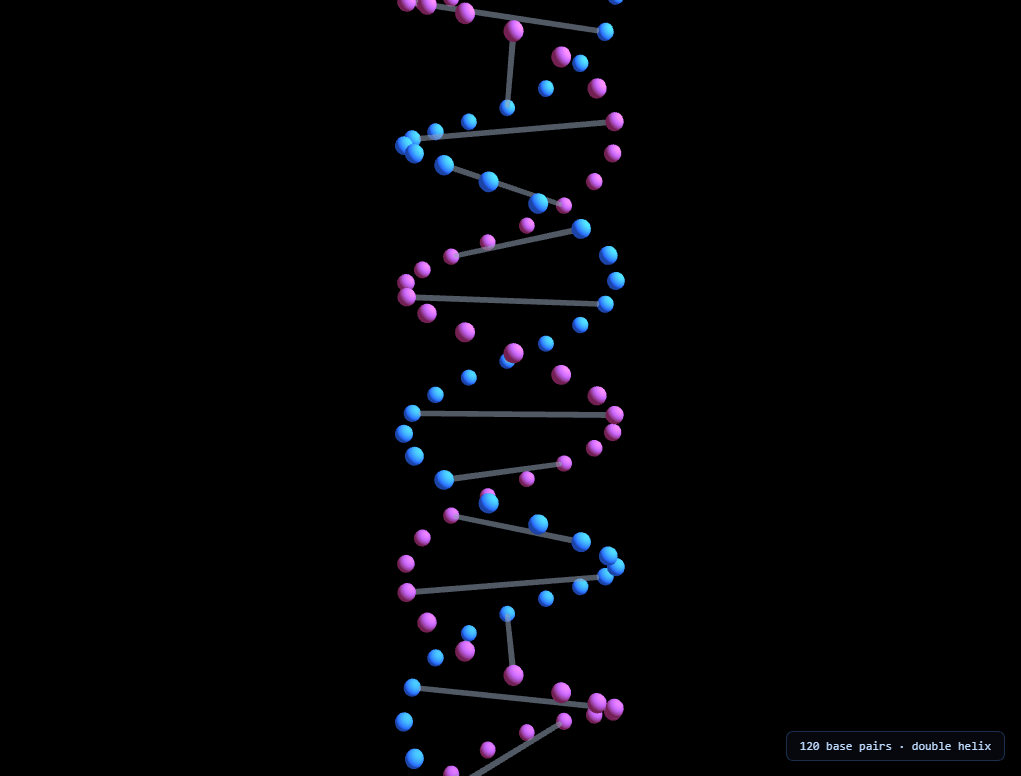
The Three.js DNA Helix snippet builds a recognizable double-helix structure — two intertwined strands of glowing spheres connected by ladder-like rungs, slowly rotating and gently bobbing — from a single parametric formula, using core Three.js and OrbitControls loaded from a CDN.
Two points on a circle, 180 degrees apart, at every height
The entire double-helix shape comes from one loop. At each step i out of PAIRS total steps, the snippet computes a progress value t = i / PAIRS, an angle t * TURNS * 2π (so the helix winds TURNS full rotations from bottom to top), and a height t * HEIGHT - HEIGHT/2 (so it's centered on the origin). One backbone sphere is placed at that angle on a circle of RADIUS; the second backbone sphere is placed at the *same angle plus 180 degrees* — always exactly opposite the first, on the same circle, at the same height. That single "plus 180 degrees" offset is the entire mathematical difference between a single spiral and a genuine double helix.
Rungs connect the two strands at matching heights
Every third step, a thin cylinder is drawn spanning between that step's two backbone points — the "base pair" rung of the DNA ladder. Skipping two out of every three steps keeps the rungs visually distinct and countable, rather than merging into a solid, wall-like tube if every single pair got its own connector.
Orienting a cylinder to point between two arbitrary points
Three.js's CylinderGeometry is built standing upright along the Y axis by default. To make it span horizontally between two points on the helix instead, the snippet rotates it 90 degrees around Z (tipping it onto its side) and then rotates it around Y to match the current helix angle — aligning its horizontal axis with the line connecting the two backbone spheres at that height. This two-step rotation (tip, then aim) is the standard technique for orienting a cylinder along any arbitrary direction without needing a full look-at-style rotation matrix.
Rotating the whole group, not recalculating positions
Rather than recomputing every bead and rung's angle every frame, the entire helix — beads, rungs, everything — is built once inside a single THREE.Group, and only that group's own rotation.y is updated every frame. Because every child object inherits its parent group's rotation automatically, one line (helix.rotation.y = t * 0.5) spins the entire structure without touching a single individual bead or rung's own transform.
A subtle vertical bob adds life without breaking the shape
On top of the rotation, the whole group's Y position oscillates gently via a sine wave, giving the helix a small floating, breathing quality — entirely decoupled from the structural geometry itself, so it can be freely adjusted (or removed) without affecting the helix's actual shape.
Where this parametric pattern applies
The "two points, 180 degrees apart, wound around a shared axis" formula generalizes to any twisted-ladder or braided structure — rope, twisted cable visualizations, or abstract braided logos. Compare its structured, biological precision against the organic, noise-driven look of the morphing blob, or pair it with a network graph for a "structure versus connection" science-themed page pairing.
Build with AI
Build, Understand, Optimize, and Extend It With AI
You do not have to work out the double-helix geometry by sketching it on paper first. Paste this snippet's HTML, CSS, and JS into an AI coding assistant like Claude and ask it to explain exactly why adding 180 degrees to the angle produces a second, opposite strand rather than just duplicating the first one, or how the two-step cylinder rotation correctly points each rung between its two backbone spheres. The same assistant can help optimize it, for instance checking whether the individual bead and rung meshes could be converted to InstancedMesh for better performance at a much higher pair count, or whether rung geometry could be shared more efficiently across all cylinders. It is also useful for extending the effect: ask it to color-code base pairs using a small fixed palette to represent actual nucleotide types, animate the helix unwinding and rewinding on scroll instead of continuous rotation, or add small labels near each rung showing example base-pair letters. Treat the code less like a finished artifact and more like a starting point for a conversation.
Prompt to recreate it
Copy this into your AI assistant of choice to build the effect from scratch, or as a jumping-off point for your own variant:
Build a rotating "DNA double helix" in plain HTML, CSS, and JavaScript using Three.js and its OrbitControls addon, both loaded from a CDN (no bundler, no build step).

Requirements:
- A full-viewport canvas with a WebGLRenderer sized to match it, updated on window resize including camera aspect ratio, plus OrbitControls with damping, idle auto-rotation, and a bounded zoom range.
- Build the structure as a single loop over a fixed number of steps (at least 40). At each step, compute a progress value from 0 to 1, an angle equal to that progress times a chosen number of full turns times two-pi, and a height that spans a fixed total height centered on the origin.
- At each step, place one small glowing sphere at that angle on a circle of a chosen radius at the computed height, and place a second, differently-colored sphere at the exact same angle plus 180 degrees, on the same circle, at the same height — these two spheres per step form the two backbone strands.
- Every third step (not every step), add a thin cylinder spanning between that step's two backbone sphere positions, representing a base-pair rung; orient the cylinder correctly by rotating it 90 degrees so it lies on its side, then rotating it again to align with the current helix angle.
- Add every bead and rung as a child of a single group object, rather than adding them directly to the scene, so the entire structure can be rotated as one unit.
- Every animation frame, update only that one group's rotation around its vertical axis (do not recompute individual bead or rung positions in the render loop), and add a small vertical bobbing motion to the group's position using a sine function of a continuously incrementing time value.
Want to tighten it up first? Run this prompt through the AI Prompt Studio to score it across 8 quality dimensions, catch anti-patterns, and tune the wording for Claude, ChatGPT, or Gemini before you paste it in.
Step by step
How to Use
- 1Load both CDN scriptsAdd three.min.js and OrbitControls.js from the CDN panel, in that order.
- 2Paste HTML, CSS, and JSA rotating double helix appears immediately, slowly spinning and bobbing.
- 3Drag to inspectClick and drag to rotate the camera manually; release to resume auto-rotation.
- 4Adjust pair count and turnsChange PAIRS and TURNS for a longer, shorter, tighter, or looser helix.
- 5Retint the strandsChange strandAMat and strandBMat colors for a different two-tone palette.
- 6Resize the windowRenderer size and camera aspect ratio update automatically.
Real-world uses
Common Use Cases
Got questions?
Frequently Asked Questions
At every step, one backbone sphere is placed at the current helix angle on a circle, and a second sphere is placed at that exact same angle plus 180 degrees — always directly opposite the first, on the same circle, at the same height. That constant 180-degree offset between the two spheres at every step is the entire mathematical difference between a single spiral and a genuine double helix.
Only every third step generates a connecting cylinder rung between its two backbone spheres. If every single pair got its own rung, the rungs would visually merge into a nearly solid tube; spacing them out keeps each individual rung distinct and countable, closer to how a real DNA ladder diagram reads.
Three.js's CylinderGeometry stands upright along the Y axis by default. The snippet first rotates it 90 degrees around the Z axis to tip it onto its side, then rotates it around the Y axis to match the current helix angle at that height — aligning the now-horizontal cylinder with the line connecting the two backbone spheres it needs to span.
All the beads and rungs are added as children of a single THREE.Group when the helix is built. Because Three.js automatically applies a parent's rotation to every child, updating just that one group's rotation.y property every frame spins the entire structure together, without any per-bead position recalculation in the animation loop.
Yes. Raise PAIRS for a longer, more detailed helix (more backbone spheres and rungs), and raise TURNS for a tighter spiral with more visible twists over the same HEIGHT, or lower TURNS for a looser, more open helix.
Yes. Click JSX for a React component, Vue for a Vue 3 SFC, Angular for a standalone component, or Tailwind for a React + Tailwind CSS utility-class version. Build the helix group inside a mount effect so the geometry is only generated once, and call controls.dispose() plus renderer.dispose() on cleanup.