Source Code
<canvas id="netCanvas"></canvas>
<div class="ng-badge">48 nodes · 3D force layout</div>*{box-sizing:border-box;margin:0;padding:0}
html,body{width:100%;height:100%;overflow:hidden;background:#050810}
#netCanvas{display:block;width:100%;height:100%;cursor:grab}
#netCanvas:active{cursor:grabbing}
.ng-badge{position:fixed;left:18px;bottom:18px;padding:7px 13px;border-radius:7px;background:rgba(10,14,26,0.7);border:1px solid rgba(52,211,153,0.25);color:#a7f3d0;font:12px ui-monospace,monospace;backdrop-filter:blur(6px)}const canvas = document.getElementById('netCanvas');
const renderer = new THREE.WebGLRenderer({ canvas, antialias: true });
renderer.setPixelRatio(Math.min(window.devicePixelRatio, 2));
const scene = new THREE.Scene();
const camera = new THREE.PerspectiveCamera(50, 1, 0.1, 100);
camera.position.set(0, 0, 13);
const controls = new THREE.OrbitControls(camera, renderer.domElement);
controls.enableDamping = true;
controls.dampingFactor = 0.08;
controls.autoRotate = true;
controls.autoRotateSpeed = 0.8;
scene.add(new THREE.AmbientLight(0x1e293b, 0.9));
const light = new THREE.PointLight(0x34d399, 1.6, 40);
light.position.set(6, 6, 8);
scene.add(light);
// Nodes are scattered inside a sphere volume (not a flat plane) so the
// network reads as genuinely three-dimensional from every camera angle.
const NODE_COUNT = 48;
const RADIUS = 5;
const nodes = [];
const nodeGroup = new THREE.Group();
scene.add(nodeGroup);
const nodeGeo = new THREE.SphereGeometry(0.09, 12, 12);
const nodeMat = new THREE.MeshStandardMaterial({ color: 0x34d399, emissive: 0x065f46, emissiveIntensity: 0.7 });
for (let i = 0; i < NODE_COUNT; i++) {
// Uniform random point inside a sphere via rejection-free spherical coords.
const u = Math.random(), v = Math.random();
const theta = u * Math.PI * 2;
const phi = Math.acos(2 * v - 1);
const r = RADIUS * Math.cbrt(Math.random());
const x = r * Math.sin(phi) * Math.cos(theta);
const y = r * Math.sin(phi) * Math.sin(theta);
const z = r * Math.cos(phi);
const mesh = new THREE.Mesh(nodeGeo, nodeMat);
mesh.position.set(x, y, z);
nodeGroup.add(mesh);
nodes.push({ mesh, base: new THREE.Vector3(x, y, z), phase: Math.random() * Math.PI * 2, speed: 0.4 + Math.random() * 0.6 });
}
// Connect each node to its two or three geometrically nearest neighbors —
// this produces a natural-looking mesh of edges instead of either a fully
// connected graph (too dense) or fully random pairs (too sparse/arbitrary).
const edges = [];
nodes.forEach((n, i) => {
const distances = nodes
.map((other, j) => ({ j, d: n.base.distanceTo(other.base) }))
.filter(e => e.j !== i)
.sort((a, b) => a.d - b.d)
.slice(0, 3);
distances.forEach(e => {
const key = i < e.j ? i + '-' + e.j : e.j + '-' + i;
if (!edges.find(x => x.key === key)) edges.push({ key, a: i, b: e.j });
});
});
const linePositions = new Float32Array(edges.length * 2 * 3);
const lineGeometry = new THREE.BufferGeometry();
lineGeometry.setAttribute('position', new THREE.BufferAttribute(linePositions, 3));
const lineMaterial = new THREE.LineBasicMaterial({ color: 0x34d399, transparent: true, opacity: 0.35 });
const lines = new THREE.LineSegments(lineGeometry, lineMaterial);
scene.add(lines);
const linePosAttr = lineGeometry.getAttribute('position');
function resize() {
const w = canvas.clientWidth, h = canvas.clientHeight;
renderer.setSize(w, h, false);
camera.aspect = w / h;
camera.updateProjectionMatrix();
}
let t = 0;
function animate() {
requestAnimationFrame(animate);
t += 0.012;
// Each node bobs gently around its base position with its own phase and
// speed, so the graph feels alive without ever losing its overall shape.
nodes.forEach(n => {
const wobble = Math.sin(t * n.speed + n.phase) * 0.18;
n.mesh.position.set(
n.base.x + wobble,
n.base.y + Math.cos(t * n.speed + n.phase) * 0.18,
n.base.z + wobble * 0.6
);
});
edges.forEach((e, i) => {
const a = nodes[e.a].mesh.position;
const b = nodes[e.b].mesh.position;
linePosAttr.setXYZ(i * 2, a.x, a.y, a.z);
linePosAttr.setXYZ(i * 2 + 1, b.x, b.y, b.z);
});
linePosAttr.needsUpdate = true;
controls.update();
renderer.render(scene, camera);
}
resize();
window.addEventListener('resize', resize);
animate();Learn Coding Visually
Learn to code with interactive, live-preview playgrounds — HTML, CSS, JavaScript, React & more.
 HTML Playground42 lessons · Click-based · Live preview
 CSS PlaygroundLearn CSS with a live editor
 JavaScript Playground60 lessons · DOM · Async · Canvas
 React PlaygroundLearn React with a live code editor
 GSAP PlaygroundLearn GSAP animation interactively
 SVG Playground44 lessons · shapes · paths · animation
 SCSS Playground45 lessons · Sass modules · tokens
 Tailwind PlaygroundLearn Tailwind CSS with a live editor
 Bootstrap 5 Playground50 lessons · live preview
Three.js Network Graph — 3D Nearest-Neighbor Node Visualization
Three.js Network Graph · Animations · Plain HTML, CSS & JS · Live preview
What's included
Features
About this UI Snippet
How to Build a 3D Network Graph in Three.js With Nearest-Neighbor Edges
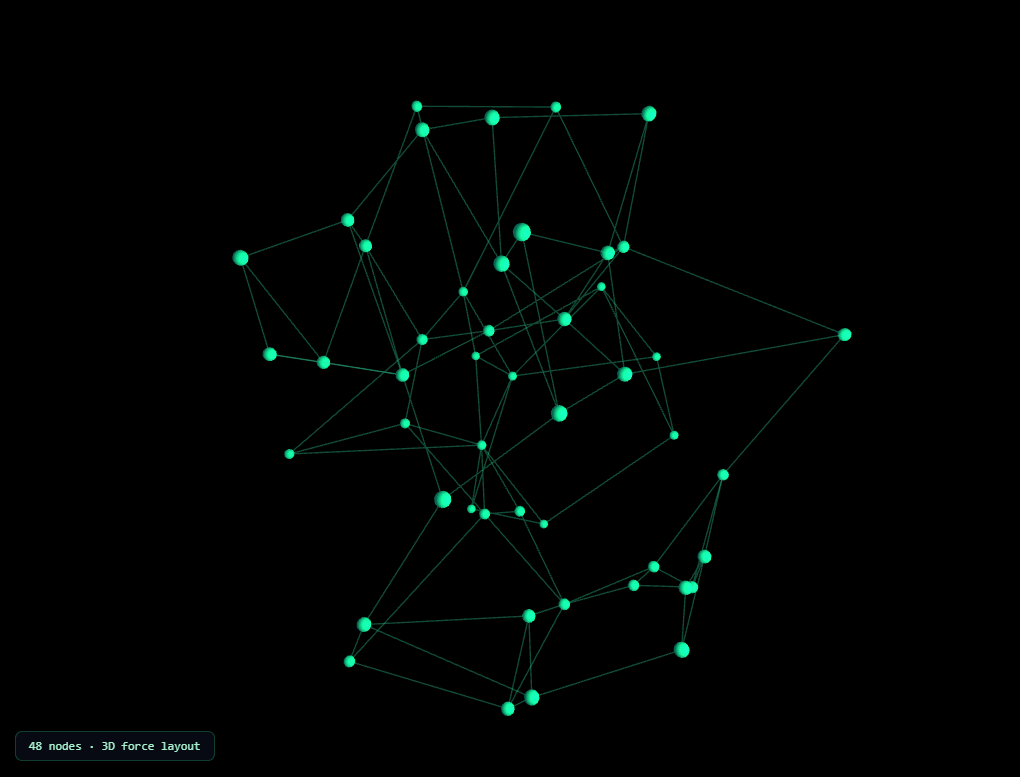
The Three.js Network Graph snippet scatters 48 glowing nodes through a spherical volume, connects each one to its nearest neighbors, and animates every node bobbing gently in place while the connecting lines redraw every frame to follow them — a floating, organic node-and-edge visualization built with core Three.js and its OrbitControls addon, both loaded from a CDN.
Uniform random points inside a sphere, not a cube or a flat plane
Scattering points with plain Math.random() on each of X, Y, and Z independently produces a cube-shaped distribution with visibly denser corners — not a sphere. This snippet instead samples each node's position using spherical coordinates (theta, phi) plus a cube-root-scaled random radius, which is the standard formula for a *uniform* random distribution inside a sphere's volume rather than clustered toward its center or corners. The result is a genuinely spherical, evenly-distributed node cloud from any viewing angle — essential for a graph that's meant to be dragged and viewed from all sides.
Nearest-neighbor edges, not fully random or fully connected
Connecting every node to every other node would produce an unreadable tangle of over a thousand lines; connecting nodes to purely random partners would look arbitrary rather than structural. Instead, each node computes its distance to all 47 others, sorts by distance, and connects to its three geometrically closest neighbors — deduplicated so a pair only gets one edge even if both nodes pick each other. This nearest-neighbor rule is what makes the result look like an organic, plausible network topology rather than a random scribble or an overwhelming mesh.
One LineSegments object for every edge, updated every frame
Rather than one THREE.Line per connection, all edges share a single THREE.LineSegments object backed by one flat BufferGeometry — every pair of positions in that buffer represents one edge's two endpoints. Every frame, after nodes move, the loop rewrites each edge's two endpoint positions directly into that shared buffer and flags needsUpdate, keeping the whole connection mesh in one GPU-friendly draw call no matter how many edges exist.
Independent per-node bobbing keeps the shape stable
Each node stores its own base position (its true, structural location) plus a random phase and speed. Every frame, the node's *rendered* position is offset from that saved base by a small sine/cosine wobble — never accumulated onto the previous frame's already-wobbled position. This is the same original-position-plus-offset principle used to keep any procedural animation bounded: the network visibly breathes and drifts, but it never drifts away from its overall spherical shape or collapses over time.
OrbitControls with auto-rotate for a "floating in space" feel
The camera auto-rotates slowly on its own via OrbitControls' autoRotate, while still responding immediately to a manual drag at any time — damping smooths the transition back to auto-rotation once the visitor lets go, so the graph never feels like it's fighting the visitor's input.
Where this pattern applies
The scatter-plus-nearest-neighbor-edges technique generalizes directly to knowledge graphs, dependency visualizations, social network diagrams, or any dataset where "things relate to nearby things." Pair it with a particle network for a 2D-versus-3D comparison, or contrast its organic, floating structure against the rigid, hierarchical orbits of the solar system snippet.
Build with AI
Build, Understand, Optimize, and Extend It With AI
You do not need to reverse-engineer the spherical sampling formula or the neighbor-selection logic by hand. Paste this snippet's HTML, CSS, and JS into an AI coding assistant like Claude and ask it to explain exactly why the node positions use spherical coordinates with a cube-root-scaled radius instead of three independent Math.random() calls, or how the nearest-neighbor edge deduplication avoids drawing the same connection twice. The same assistant can help optimize it, for instance checking whether the O(n squared) nearest-neighbor search could be replaced with a spatial partitioning structure for a much larger node count, or whether the wobble calculation could be vectorized. It is also useful for extending the graph: ask it to color edges by connection strength or node degree, animate new nodes and edges appearing over time instead of all at once, or add click-to-highlight so hovering a node emphasizes only its direct connections. Treat the code less like a finished artifact and more like a starting point for a conversation.
Prompt to recreate it
Copy this into your AI assistant of choice to build the effect from scratch, or as a jumping-off point for your own variant:
Build a floating "3D network graph" in plain HTML, CSS, and JavaScript using Three.js and its OrbitControls addon, both loaded from a CDN (no bundler, no build step, no external graph library).

Requirements:
- A full-viewport canvas with a WebGLRenderer sized to match it, updated on window resize including camera aspect ratio, plus OrbitControls with damping and idle auto-rotation enabled so the camera drifts on its own but responds instantly to manual dragging.
- Generate at least 40 node positions uniformly distributed inside a sphere's volume using proper spherical coordinate sampling (a random azimuthal angle, a polar angle derived from the arc-cosine of a linearly-mapped random value, and a radius scaled by the cube root of a random value) — do not sample X, Y, and Z independently with plain random numbers, since that produces a cube-shaped distribution instead of a spherical one.
- Render each node as a small glowing sphere mesh with an emissive material.
- For every node, calculate its distance to every other node, sort by distance, and connect it to its three nearest neighbors, deduplicating so that a mutually-nearest pair of nodes produces only one edge rather than two.
- Render all edges as a single THREE.LineSegments object backed by one shared BufferGeometry (not one Line object per edge), where every pair of positions in the buffer represents one edge's two endpoints.
- Store each node's original ("base") position separately from its currently rendered position. Every animation frame, offset each node's rendered position from its saved base using a small sine and cosine wobble driven by a shared time value plus a random per-node phase and speed — never accumulate the wobble onto the node's position from the previous frame.
- Every frame, after updating node positions, rewrite each edge's two endpoint coordinates into the shared line buffer based on its two connected nodes' current positions, and flag the buffer as needing a GPU update once per frame.
Want to tighten it up first? Run this prompt through the AI Prompt Studio to score it across 8 quality dimensions, catch anti-patterns, and tune the wording for Claude, ChatGPT, or Gemini before you paste it in.
Step by step
How to Use
- 1Load both CDN scriptsAdd three.min.js and OrbitControls.js from the CDN panel, in that order.
- 2Paste HTML, CSS, and JS48 nodes and their nearest-neighbor connections appear immediately, gently bobbing.
- 3Drag to look aroundClick and drag to manually rotate the camera; release and it resumes its slow auto-rotation.
- 4Adjust node countChange NODE_COUNT for a sparser or denser graph; edge count scales automatically.
- 5Tune neighbor connectionsChange .slice(0, 3) to connect each node to more or fewer of its nearest neighbors.
- 6Resize the windowRenderer size and camera aspect ratio update automatically on resize.
Real-world uses
Common Use Cases
Got questions?
Frequently Asked Questions
Each node's position is generated using spherical coordinates — a random angle theta, a random angle phi derived from acos(2v - 1), and a radius scaled by the cube root of a random value. This specific formula is required for a mathematically uniform distribution inside a sphere's volume; sampling X, Y, and Z independently with plain random numbers instead produces a cube-shaped distribution with visibly denser corners.
Every node calculates its distance to all other nodes, sorts them by distance, and connects to its three closest neighbors. Connections are deduplicated with a shared key so a pair of mutually-nearest nodes only produces one edge, not two overlapping ones. This nearest-neighbor rule produces a natural-looking network topology instead of either a fully connected tangle or arbitrary random pairs.
A single THREE.LineSegments object backed by one shared BufferGeometry lets every edge render in one GPU draw call. Every frame, each edge's two endpoint positions are rewritten directly into that shared position buffer based on the current positions of its two connected nodes, then the whole buffer is flagged as needing an update once.
Offsetting from a fixed, saved base position every frame keeps the wobble bounded and the overall graph shape stable indefinitely. Accumulating the wobble onto whatever position the node ended up at the previous frame would cause nodes to drift further and further from their intended location over time.
Yes. Raise NODE_COUNT for more nodes (edge count and distance-sorting cost scale accordingly), and change the .slice(0, 3) call to a larger number to connect each node to more of its nearest neighbors for a denser mesh of edges.
Yes. Click JSX for a React component, Vue for a Vue 3 SFC, Angular for a standalone component, or Tailwind for a React + Tailwind CSS utility-class version. Build the nodes, edges, and controls inside a mount effect so the nearest-neighbor calculation only runs once, and call controls.dispose() plus renderer.dispose() on cleanup to release the WebGL context and event listeners.