Source Code
<canvas id="liquidCanvas"></canvas>
<div class="lm-badge">Real-time CubeCamera reflections</div>*{box-sizing:border-box;margin:0;padding:0}
html,body{width:100%;height:100%;overflow:hidden;background:#000}
#liquidCanvas{display:block;width:100%;height:100%;cursor:grab}
#liquidCanvas:active{cursor:grabbing}
.lm-badge{position:fixed;left:18px;top:18px;padding:7px 13px;border-radius:7px;background:rgba(10,10,14,0.7);border:1px solid rgba(255,255,255,0.15);color:#e5e7eb;font:12px ui-monospace,monospace;backdrop-filter:blur(6px)}const canvas = document.getElementById('liquidCanvas');
const renderer = new THREE.WebGLRenderer({ canvas, antialias: true });
renderer.setPixelRatio(Math.min(window.devicePixelRatio, 2));
const scene = new THREE.Scene();
const camera = new THREE.PerspectiveCamera(45, 1, 0.1, 60);
camera.position.set(0, 1, 7);
const controls = new THREE.OrbitControls(camera, renderer.domElement);
controls.enableDamping = true;
controls.dampingFactor = 0.07;
controls.autoRotate = true;
controls.autoRotateSpeed = 1.2;
controls.minDistance = 4;
controls.maxDistance = 14;
scene.add(new THREE.AmbientLight(0x222233, 0.4));
const key = new THREE.PointLight(0xffffff, 2, 30);
key.position.set(5, 6, 5);
scene.add(key);
// A large, inverted, vertex-colored sphere acts as a colorful "environment"
// for the reflective sphere to reflect. Without something colorful nearby,
// a mirror-finish material simply reflects an empty black void.
const envGeo = new THREE.SphereGeometry(20, 24, 24);
const envColors = new Float32Array(envGeo.attributes.position.count * 3);
const topColor = new THREE.Color(0xff6ec7);
const bottomColor = new THREE.Color(0x4f46e5);
for (let i = 0; i < envGeo.attributes.position.count; i++) {
const y = envGeo.attributes.position.getY(i) / 20;
const mixed = bottomColor.clone().lerp(topColor, (y + 1) / 2);
envColors[i * 3] = mixed.r; envColors[i * 3 + 1] = mixed.g; envColors[i * 3 + 2] = mixed.b;
}
envGeo.setAttribute('color', new THREE.BufferAttribute(envColors, 3));
const envMat = new THREE.MeshBasicMaterial({ vertexColors: true, side: THREE.BackSide });
scene.add(new THREE.Mesh(envGeo, envMat));
// A few bright accent shapes floating around, so the reflection on the
// sphere has distinct shapes to pick up rather than just a color gradient.
const accents = [];
const accentGeo = new THREE.TorusGeometry(1.4, 0.28, 12, 32);
for (let i = 0; i < 3; i++) {
const mat = new THREE.MeshBasicMaterial({ color: [0xfacc15, 0x38bdf8, 0xf472b6][i] });
const mesh = new THREE.Mesh(accentGeo, mat);
mesh.position.set(Math.cos(i * 2.4) * 6, Math.sin(i * 1.7) * 3, Math.sin(i * 2.4) * 6);
mesh.rotation.x = Math.random() * Math.PI;
scene.add(mesh);
accents.push(mesh);
}
// A CubeCamera captures a 360-degree view of the scene from the sphere's
// position, six times per update, into a cube render target. Assigning
// that render target's texture as the sphere's envMap is what makes it
// reflect the actual live scene rather than a static, baked-in image.
const cubeRenderTarget = new THREE.WebGLCubeRenderTarget(256, {
format: THREE.RGBFormat,
generateMipmaps: true,
minFilter: THREE.LinearMipmapLinearFilter,
});
const cubeCamera = new THREE.CubeCamera(0.1, 50, cubeRenderTarget);
scene.add(cubeCamera);
const sphere = new THREE.Mesh(
new THREE.SphereGeometry(1.6, 64, 64),
new THREE.MeshStandardMaterial({
color: 0xffffff,
metalness: 1,
roughness: 0.06,
envMap: cubeRenderTarget.texture,
})
);
scene.add(sphere);
function resize() {
const w = canvas.clientWidth, h = canvas.clientHeight;
renderer.setSize(w, h, false);
camera.aspect = w / h;
camera.updateProjectionMatrix();
}
let t = 0;
function animate() {
requestAnimationFrame(animate);
t += 0.01;
accents.forEach((a, i) => {
a.rotation.y += 0.006 + i * 0.002;
a.position.y = Math.sin(t + i * 2) * 3;
});
// Hide the reflective sphere itself just before capturing the cube map —
// otherwise it would try to reflect itself from the inside, producing an
// incorrect black sphere in its own reflection.
sphere.visible = false;
cubeCamera.position.copy(sphere.position);
cubeCamera.update(renderer, scene);
sphere.visible = true;
controls.update();
renderer.render(scene, camera);
}
resize();
window.addEventListener('resize', resize);
animate();Learn Coding Visually
Learn to code with interactive, live-preview playgrounds — HTML, CSS, JavaScript, React & more.
 HTML Playground42 lessons · Click-based · Live preview
 CSS PlaygroundLearn CSS with a live editor
 JavaScript Playground60 lessons · DOM · Async · Canvas
 React PlaygroundLearn React with a live code editor
 GSAP PlaygroundLearn GSAP animation interactively
 SVG Playground44 lessons · shapes · paths · animation
 SCSS Playground45 lessons · Sass modules · tokens
 Tailwind PlaygroundLearn Tailwind CSS with a live editor
 Bootstrap 5 Playground50 lessons · live preview
Three.js Liquid Metal Sphere — Real-Time CubeCamera Reflections
Three.js Liquid Metal Sphere · Animations · Plain HTML, CSS & JS · Live preview
What's included
Features
About this UI Snippet
How to Build Real-Time Reflections in Three.js With CubeCamera
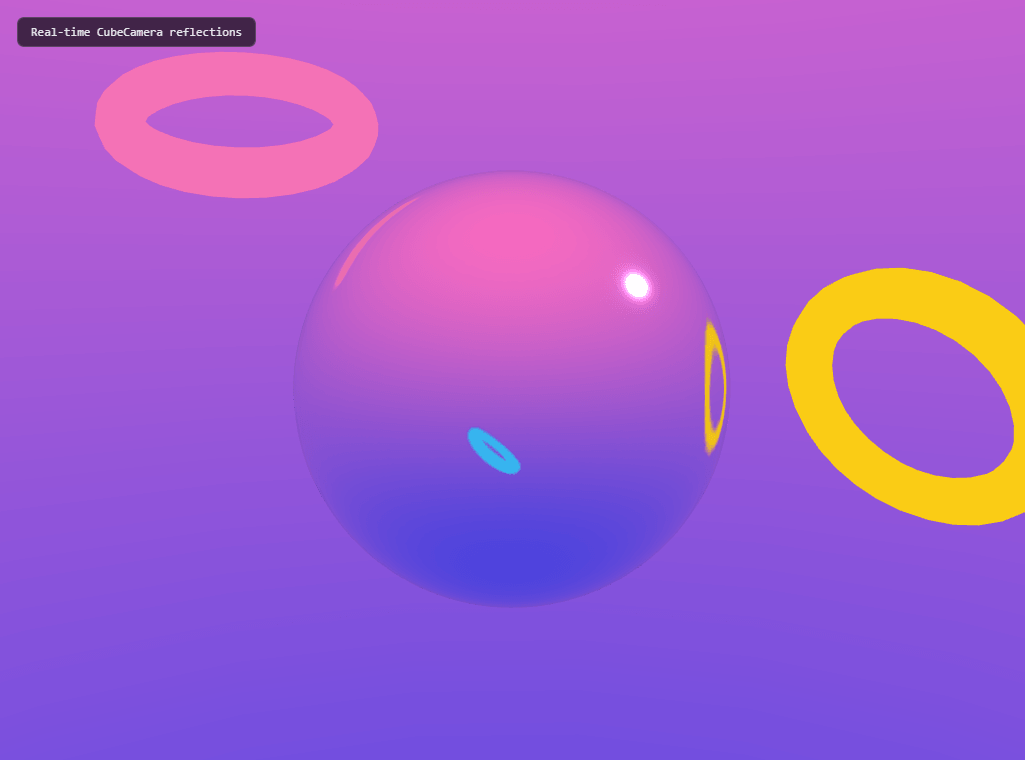
The Three.js Liquid Metal Sphere snippet renders a mirror-finish sphere that reflects its surroundings in real time — no HDRI file, no static environment texture, no baked-in cubemap — using THREE.CubeCamera to continuously capture the live scene and feed it back in as the sphere's own environment map, alongside OrbitControls for inspection, both loaded from a CDN.
A reflective material needs something to reflect
A MeshStandardMaterial with metalness: 1 and near-zero roughness produces a true mirror finish — but a mirror reflecting an empty black scene just looks like a plain dark sphere. This snippet first builds an "environment" worth reflecting: a large, inverted sphere (rendered with THREE.BackSide so its interior surface faces inward) colored with a vertex-color gradient from a warm top to a cool bottom, plus a few brightly colored floating torus shapes. None of this exists to be looked at directly — it exists purely to give the mirror sphere something interesting to show.
CubeCamera: six cameras in one, updated on demand
THREE.CubeCamera isn't a normal camera — internally, it renders the scene six times, once per direction (up, down, left, right, forward, back), into the six faces of a WebGLCubeRenderTarget. Calling cubeCamera.update(renderer, scene) re-captures all six faces from wherever the cube camera is currently positioned, and the resulting texture — cubeRenderTarget.texture — is a genuine live cubemap of the surrounding scene at that instant, assignable directly to any material's envMap property.
Hiding the reflective object during its own capture
Right before calling cubeCamera.update(), the snippet sets sphere.visible = false, then flips it back to true immediately after. Skip this step and the cube camera — positioned at the sphere's own center — would capture the *inside* of the sphere's own geometry in every direction, producing an incorrect black or inverted reflection instead of a clean view of the surrounding environment. This hide-capture-reveal sequence, repeated every single frame, is the standard technique for any self-reflecting object using CubeCamera.
Updating the capture every frame, not once at startup
Because the accent shapes are constantly moving and the camera itself is being dragged by the visitor, the cube camera's capture has to refresh every animation frame to stay accurate — a one-time capture at startup would freeze the reflection into whatever the scene looked like at that single instant, becoming visibly wrong the moment anything in the scene moved.
Why metalness and roughness matter more than color here
The sphere's own base color is set to plain white and barely matters visually — with metalness: 1, the material's appearance comes almost entirely from what it reflects (the envMap) rather than any base color tint. roughness is the real sculpting tool: near zero produces a sharp, mirror-like reflection, while raising it slightly blurs the reflected environment into a brushed-metal or liquid-mercury look.
Where this technique is genuinely used
Real-time environment-mapped reflections via CubeCamera (or its GPU-cheaper cousin, a pre-baked static cubemap) are the standard technique behind car configurators, jewelry viewers, chrome text effects, and any 3D scene where an object needs to convincingly reflect a *dynamic* surroundings rather than a fixed backdrop. Compare its true optical reflection against the emissive, glowing look of the morphing blob, or pair it with a product viewer for a metallic product-showcase variant.
Build with AI
Build, Understand, Optimize, and Extend It With AI
You do not have to piece together how CubeCamera and envMap interact by trial and error. Paste this snippet's HTML, CSS, and JS into an AI coding assistant like Claude and ask it to explain exactly why the sphere must be hidden during its own cube-map capture, or how metalness and roughness together determine how much of the reflection versus the base color actually shows up on screen. The same assistant can help optimize it, for instance checking whether the cube camera's capture could run every other frame instead of every frame to save GPU cost with a barely-noticeable quality difference, or whether a smaller render target resolution would still look acceptable at a lower performance cost. It is also useful for extending the effect: ask it to add a second, differently-tinted reflective sphere so their reflections visibly include each other, animate the roughness value over time to morph between a sharp mirror and a soft liquid look, or replace the accent torus shapes with text or a logo so the reflection shows recognizable brand content. Treat the code less like a finished artifact and more like a starting point for a conversation.
Prompt to recreate it
Copy this into your AI assistant of choice to build the effect from scratch, or as a jumping-off point for your own variant:
Build a "liquid metal sphere" with real-time reflections in plain HTML, CSS, and JavaScript using Three.js and its OrbitControls addon, both loaded from a CDN (no bundler, no build step, no HDRI or texture files).

Requirements:
- A full-viewport canvas with a WebGLRenderer sized to match it, updated on window resize including camera aspect ratio, plus OrbitControls with damping, idle auto-rotation, and a bounded zoom range.
- Build a colorful "environment" for the reflective object to reflect: a large sphere rendered with its material set to back-side rendering (so its interior faces inward) using a vertex color gradient between two different colors based on vertical position, plus at least two or three additional brightly colored, independently moving accent shapes floating in the scene.
- Create a cube render target and a CubeCamera targeting it, added to the scene at the same position as the reflective object.
- Create one sphere mesh using a physically-based material with metalness set to 1, a very low roughness value, and its environment map property set to the cube render target's texture.
- Every animation frame: set the reflective sphere's visibility to false, call the cube camera's update method (passing the renderer and the scene) to refresh its six-sided capture from the sphere's position, then set the sphere's visibility back to true before rendering the main camera's view — in that exact order, every frame, not just once at startup.
- Animate the accent shapes' position and rotation continuously so the reflective sphere's surface visibly shows moving reflections in real time as the visitor watches or drags the camera.
Want to tighten it up first? Run this prompt through the AI Prompt Studio to score it across 8 quality dimensions, catch anti-patterns, and tune the wording for Claude, ChatGPT, or Gemini before you paste it in.
Step by step
How to Use
- 1Load both CDN scriptsAdd three.min.js and OrbitControls.js from the CDN panel, in that order.
- 2Paste HTML, CSS, and JSA mirror-finish sphere appears, reflecting the colorful environment and floating accent shapes.
- 3Drag to inspectRotate the camera to see the reflection change as the viewing angle changes.
- 4Watch the accents moveThe floating torus shapes bob and rotate, and their motion visibly updates in the sphere's live reflection.
- 5Tune the finishLower roughness for a sharper mirror finish, or raise it slightly for a brushed, liquid-metal blur.
- 6Resize the windowRenderer size and camera aspect ratio update automatically.
Real-world uses
Common Use Cases
Got questions?
Frequently Asked Questions
A mirror-finish material has almost no visible base color of its own — its appearance comes entirely from what it reflects. Without a colorful, textured, or shaped environment nearby, a perfectly reflective sphere would simply show a plain dark or black surface, since there is nothing interesting in the scene for it to reflect.
CubeCamera internally renders the scene six times — once per cardinal direction — into the six faces of a WebGLCubeRenderTarget, producing a live cubemap texture of everything surrounding its position. That texture is then assigned as a material's envMap, so the material displays a real, current reflection of the scene rather than a static pre-made image.
The cube camera is positioned at the sphere's own center to capture what surrounds it. If the sphere itself were visible during that capture, the cube camera — sitting inside the sphere's own geometry — would capture the inside surface of the sphere in every direction, producing an incorrect reflection. Hiding it immediately before the capture and revealing it immediately after avoids this self-reflection problem.
The floating accent shapes are continuously moving and the visitor can freely rotate the camera at any time. A cube map captured only once at startup would freeze the reflection into a single instant, becoming visibly incorrect the moment anything in the scene changes. Refreshing the capture every frame keeps the reflection accurate to the scene's current state.
Metalness controls how much of the material's appearance comes from its environment map versus its own base color — at metalness 1, the reflection dominates almost entirely. Roughness controls how sharp or blurred that reflection appears: near zero produces a crisp mirror finish, while a small increase scatters the reflected light into a softer, brushed-metal or liquid-mercury look.
Yes. Click JSX for a React component, Vue for a Vue 3 SFC, Angular for a standalone component, or Tailwind for a React + Tailwind CSS utility-class version. Set up the renderer, cube camera, and environment inside a mount effect, and call renderer.dispose() plus cubeRenderTarget.dispose() on cleanup to free the extra render target's GPU memory.