More Animations Snippets
Front-End Coding Playgrounds
Learn to code with interactive, live-preview playgrounds — HTML, CSS, JavaScript, React & more.
 HTML Playground42 lessons · Click-based · Live preview
 CSS PlaygroundLearn CSS with a live editor
 JavaScript Playground60 lessons · DOM · Async · Canvas
 React PlaygroundLearn React with a live code editor
 GSAP PlaygroundLearn GSAP animation interactively
 SCSS Playground45 lessons · Sass modules · tokens
 Tailwind PlaygroundLearn Tailwind CSS with a live editor
 Bootstrap 5 Playground50 lessons · live preview
Three.js Galaxy Spiral — Procedural WebGL Spiral Galaxy Particles
Three.js Galaxy Spiral · Animations · Plain HTML, CSS & JS · Live preview
What's included
Features
About this UI Snippet
How to Build a Procedural Three.js Spiral Galaxy
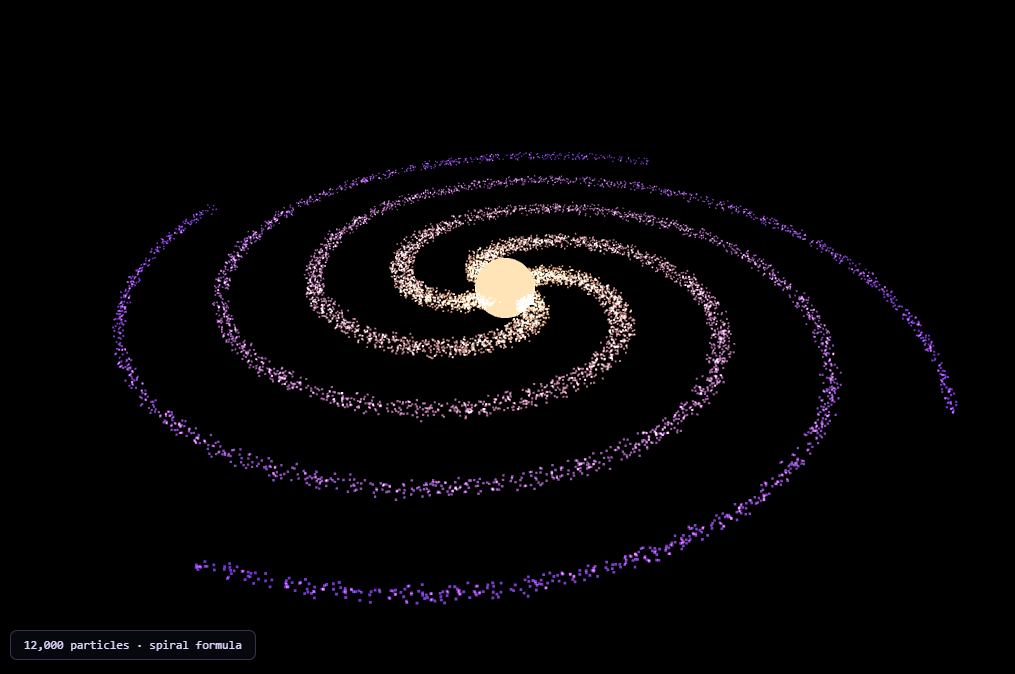
The Three.js Galaxy Spiral snippet procedurally generates 12,000 particles into a convincing spiral-galaxy shape — dense glowing core, four sweeping arms, warm-to-cool color gradient — using nothing but a radius-driven spin formula and additive blending, with core Three.js and OrbitControls loaded from a CDN.
The entire spiral shape comes from one line: spin angle grows with radius
The defining formula of this snippet is deceptively simple: each particle's final angle around the center is armAngle + radius * SPIN. Because particles further from the core have a larger radius, they've been rotated further around their arm than particles close in — and that difference in rotation-per-radius is the *entire* mathematical definition of a logarithmic spiral. Multiple arms come from assigning each particle to one of ARMS evenly-spaced starting angles via (i % ARMS) / ARMS, so the same spin formula, applied to four different starting angles, produces four parallel spiral arms rather than one.
A power-curve radius distribution, not a uniform one
Radius is sampled as Math.random() ** 1.6 * RADIUS rather than plain Math.random() * RADIUS. Raising a 0–1 random value to a power greater than 1 biases the result toward zero — concentrating far more particles near the galactic core and thinning them out toward the edge, matching how real galaxies are visibly denser at the center. A plain linear distribution would produce an unrealistic, evenly-spread disc instead.
Randomness that shrinks toward the edges
Each particle gets a small random X/Y/Z jitter added on top of its ideal spiral position, but that jitter's magnitude is itself scaled by (1 - r/RADIUS) — particles near the core get more scatter, particles near the outer edge get almost none. This produces a galaxy that looks appropriately "fuzzy" and turbulent near its bright center while its outer arms stay crisp and well-defined, rather than uniform noise applied everywhere.
Color mixed by radius, not randomly assigned
Every particle's color is a linear interpolation between a warm inner color and a cooler outer color, using radius / RADIUS as the mix factor via THREE.Color.lerp(). Because that same radius value also drives the spiral math, color and shape share one underlying number — exactly the same principle used in the particle wave snippet's height-to-color link, applied here to radial position instead of elevation.
Differential rotation: inner particles orbit faster than outer ones
Real galaxies don't rotate as a rigid disc — stars closer to the center complete an orbit much faster than stars near the edge. The animation loop gives each particle a rotation speed of 1 / (0.3 + radius), so particles near the core visibly race around while outer-arm particles drift slowly, which is what keeps the spiral arms from ever looking like they're rigidly spinning in lockstep.
Additive blending makes overlapping particles glow
The PointsMaterial uses THREE.AdditiveBlending, which sums overlapping particle colors instead of one drawing over another. Wherever many particles cluster densely — especially near the bright core — their colors add together into a genuinely brighter glow, rather than the topmost particle simply hiding the ones behind it.
Where this generation technique applies
The radius-driven-angle-plus-power-curve-density formula generalizes to any spiral or vortex shape — hurricane visualizations, whirlpool effects, or abstract vortex loaders. Pair it with a starfield warp for a "traveling toward a galaxy" scroll sequence, or contrast its particle-based density against the smooth, continuous surface of the morphing blob.
Build with AI
Build, Understand, Optimize, and Extend It With AI
You do not have to reverse-engineer the spiral-galaxy math by staring at the formulas alone. Paste this snippet's HTML, CSS, and JS into an AI coding assistant like Claude and ask it to explain exactly why raising a random value to a power biases particle density toward the core, or how the differential rotation speed formula keeps inner and outer particles from spinning in rigid lockstep. The same assistant can help optimize it, for instance checking whether the per-particle position rewrite in the animation loop could be restructured to avoid the redundant angle recomputation, or whether particle count could scale down automatically on lower-end GPUs. It is also useful for extending the effect: ask it to add a second, counter-rotating galaxy for a colliding-galaxies visual, tie the color gradient to a different property like particle speed instead of radius, or add a subtle bulge by lifting particles near the core slightly along the Y axis. Treat the code less like a finished artifact and more like a starting point for a conversation.
Prompt to recreate it
Copy this into your AI assistant of choice to build the effect from scratch, or as a jumping-off point for your own variant:
Build a procedural "spiral galaxy" in plain HTML, CSS, and JavaScript using Three.js and its OrbitControls addon, both loaded from a CDN (no bundler, no build step, no external textures or datasets).

Requirements:
- A full-viewport canvas with a WebGLRenderer sized to match it, updated on window resize including camera aspect ratio, plus OrbitControls with damping and idle auto-rotation enabled.
- Generate at least 10,000 particles procedurally. For each particle: sample a radius using a random value raised to a power greater than 1 (so density concentrates toward the center rather than being uniform), assign it to one of several evenly-spaced "arm" starting angles using its index modulo the arm count, and compute its final angle as that arm's starting angle plus the radius multiplied by a spin constant — so particles further from the center are rotated further around, forming a logarithmic spiral.
- Add a small random position offset to each particle, scaled down as radius approaches the maximum radius, so scatter is more pronounced near the core and minimal near the outer edge.
- Color each particle by linearly interpolating between a warm inner color and a cooler outer color based on that particle's radius divided by the maximum radius, using the color interpolation method on Three.js's color class.
- Render all particles as a single THREE.Points object with vertex colors enabled and additive blending, so overlapping particles in dense regions brighten together rather than occluding each other.
- Every animation frame, rotate each particle around the center at a speed inversely related to its radius (smaller radius means faster rotation), so the galaxy exhibits differential rotation rather than spinning as one rigid disc.
- Add a small glowing sphere at the center representing the galactic core, with a subtle pulsing scale animation.
Step by step
How to Use
- 1Load both CDN scriptsAdd three.min.js and OrbitControls.js from the CDN panel, in that order.
- 2Paste HTML, CSS, and JSA 12,000-particle spiral galaxy appears immediately, slowly rotating.
- 3Drag to orbit, scroll to zoomManually inspect the galaxy from any angle; release to resume auto-rotation.
- 4Adjust arm count and spinChange ARMS and SPIN to produce tighter, looser, or more numerous spiral arms.
- 5Retint the galaxyEdit INSIDE_COLOR and OUTSIDE_COLOR for a different core-to-edge color gradient.
- 6Resize the windowRenderer size and camera aspect ratio update automatically.
Real-world uses
Common Use Cases
Got questions?
Frequently Asked Questions
Every particle's final angle is its starting arm angle plus its radius multiplied by a spin constant. Because particles further from the center have a larger radius, that formula rotates them further around — the defining property of a logarithmic spiral. Assigning particles to several evenly-spaced starting arm angles turns one spiral formula into several parallel arms.
Raising a 0-1 random value to a power greater than 1 (1.6 in this snippet) skews the result toward zero, so far more particles land near the galactic core than near the edge — matching how real spiral galaxies are visibly denser at their center. Sampling radius with plain Math.random() would instead produce an unrealistic, evenly-spread disc of particles.
Each particle's random position jitter is multiplied by (1 - radius/RADIUS), which is close to 1 near the core and close to 0 near the outer edge. This produces a galaxy that looks appropriately turbulent and fuzzy near its bright center while its outer spiral arms stay crisp and well-defined.
Real spiral galaxies exhibit differential rotation — stars closer to the center complete an orbit much faster than stars further out. The animation loop gives each particle a rotation speed of 1 divided by (a small constant plus its radius), so smaller radii produce visibly faster rotation, which keeps the arms from looking like a single rigid, uniformly-spinning disc.
THREE.AdditiveBlending sums the colors of overlapping particles instead of the frontmost particle simply hiding the ones behind it. In densely packed regions — especially near the bright core — many overlapping particles' colors add together into a genuinely brighter glow, which is what gives the core its luminous look.
Yes. Click JSX for a React component, Vue for a Vue 3 SFC, Angular for a standalone component, or Tailwind for a React + Tailwind CSS utility-class version. Build the particle buffers and controls inside a mount effect so the generation formula only runs once, and call controls.dispose() plus renderer.dispose() on cleanup.