More Animations Snippets
Front-End Coding Playgrounds
Learn to code with interactive, live-preview playgrounds — HTML, CSS, JavaScript, React & more.
 HTML Playground42 lessons · Click-based · Live preview
 CSS PlaygroundLearn CSS with a live editor
 JavaScript Playground60 lessons · DOM · Async · Canvas
 React PlaygroundLearn React with a live code editor
 GSAP PlaygroundLearn GSAP animation interactively
 SCSS Playground45 lessons · Sass modules · tokens
 Tailwind PlaygroundLearn Tailwind CSS with a live editor
 Bootstrap 5 Playground50 lessons · live preview
Three.js Starfield Warp — WebGL Hyperspace Point Field Effect
Three.js Starfield Warp · Animations · Plain HTML, CSS & JS · Live preview
What's included
Features
About this UI Snippet
How to Build a Three.js Hyperspace Starfield With a Warp-Speed Button
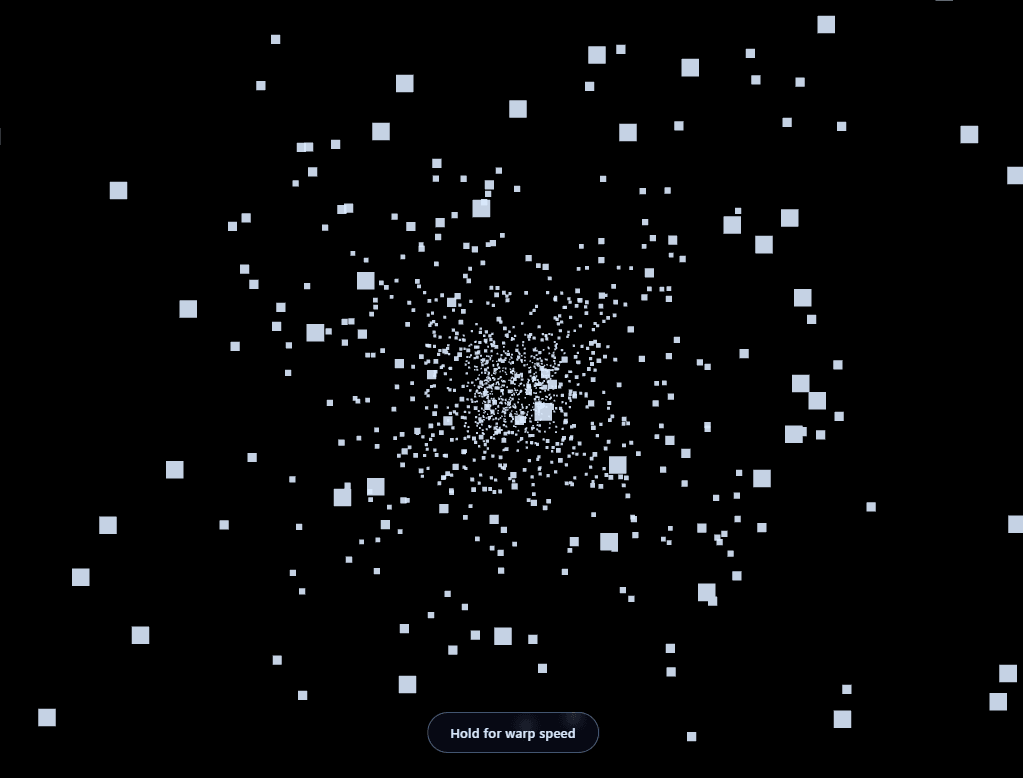
The Three.js Starfield Warp snippet renders thousands of stars flying past the camera in real 3D depth, with a press-and-hold button that pushes the field into "warp speed" — widening the field of view and speeding up the stream — using core Three.js loaded from a CDN and no external texture or model assets.
Perspective division is what makes stars fly outward
Every star is stored as a plain {x, y, z} object, independent of the BufferGeometry that actually renders it. Each frame, a star's on-screen X and Y position is computed as (x / z) × constant — dividing by the star's remaining distance from the camera. As z shrinks toward zero, that division makes the same fixed X/Y spread out further and further from the center of the screen. This one line of perspective math is the entire secret behind the classic "hyperspace" look: stars near the camera appear to streak outward toward the frame edges, while distant stars barely seem to move.
Recycling stars instead of destroying and recreating them
Rather than allocating new star objects as ones pass the camera, every star that reaches z <= 0.1 is simply reassigned a fresh random X/Y and pushed back out to the far edge of the field via resetStar(). The underlying BufferGeometry — and its Float32Array of positions — is allocated exactly once at startup and never resized. This recycling pattern is standard for any continuously-flowing particle effect (rain, snow, sparks, or starfields): allocate a fixed pool once, and cycle members through it forever rather than paying for garbage collection on every reset.
Two separate parameters drive the field: speed and field of view
Holding the warp button changes two things simultaneously, not just one: the per-frame Z-decrement speed (how fast stars travel toward the camera) and the camera's field of view (camera.fov), which is widened from 75° to 92°. Speed alone would just make stars move faster in a straight line; widening the FOV at the same time is what makes the streaks visibly stretch and bow outward toward the frame edges, matching the exaggerated, wide-angle look of film hyperspace sequences.
Point size also scales with warp state
The PointsMaterial's size property doubles while warping, since faster-moving points crossing more screen distance per frame read as thinner without a matching size increase — a detail easy to miss but noticeable by its absence once you compare the effect with and without it.
A press-and-hold button, not a toggle
The warp button responds to pointerdown/pointerup/pointerleave (plus touchstart/touchend for older mobile browsers that fire pointer events inconsistently), rather than toggling on click. That choice matches the interaction pattern of the "hold" metaphor: warp speed is a temporary boost the visitor actively sustains, not a persistent mode they forget is on.
Where to take it from here
This same recycled-particle-with-perspective-division pattern underlies rain, snow, embers, and confetti effects just as much as starfields — only the reset direction and per-particle physics differ. Pair it with a particle network for a "space station" themed section, or contrast the real 3D depth here against the flat Canvas 2D starfield snippet to see the difference perspective division makes.
Build with AI
Build, Understand, Optimize, and Extend It With AI
You do not have to work out the perspective-division math from first principles by yourself. Paste this snippet's HTML, CSS, and JS into an AI coding assistant like Claude and ask it to walk through exactly why dividing each star's X and Y by its remaining Z produces the outward hyperspace streak, or why the warp effect changes both speed and camera field of view rather than just one. The same assistant can help optimize it, for instance checking whether the per-star loop could be restructured to avoid recalculating the perspective divide for stars that haven't moved meaningfully, or whether the star count could scale automatically with device performance. It is also useful for extending the effect: ask it to add colored streak trails using line segments instead of points, trigger an automatic warp burst on page load, or tie the warp intensity to scroll position instead of a button. Treat the code less like a finished artifact and more like a starting point for a conversation.
Prompt to recreate it
Copy this into your AI assistant of choice to build the effect from scratch, or as a jumping-off point for your own variant:
Build a "hyperspace starfield" effect in plain HTML, CSS, and JavaScript using Three.js loaded from a CDN (no bundler, no build step) — thousands of points streaming past the camera with a hold-to-warp control.

Requirements:
- A full-viewport canvas with a WebGLRenderer sized to match it, updated on window resize including camera aspect ratio, and a PerspectiveCamera with a wide field of view positioned near the origin.
- A fixed-size pool of at least 2,000 stars, each tracked as a plain object with its own x, y, and z coordinate, separate from the BufferGeometry's Float32Array used only for rendering.
- Every animation frame, decrement each star's z coordinate by a speed value; when a star's z drops below a small threshold, reset it to a fresh random x/y and push its z back out to the far edge of the field, without ever allocating a new object or resizing the geometry's array.
- Compute each star's rendered X and Y position by dividing its stored x/y by its remaining z (a perspective-divide), so stars closer to the camera appear to spread further from the screen center than distant ones.
- Render all stars as a single THREE.Points object using one BufferGeometry and PointsMaterial, updating the position attribute's needsUpdate flag once per frame.
- Add an on-screen button that, while actively pressed (using pointerdown and pointerup/pointerleave events, with touchstart/touchend as a fallback), increases both the per-frame z speed and the camera's field of view simultaneously, then instantly reverts both values the moment the button is released.
- Also increase the rendered point size while the warp state is active, so fast-moving points remain clearly visible rather than becoming faint thin streaks.
Step by step
How to Use
- 1Load the Three.js CDNAdd three.min.js from the CDN panel — no add-ons are required for this snippet.
- 2Paste HTML, CSS, and JSA slow-drifting starfield begins immediately; 2,600 points recycle continuously.
- 3Hold the warp buttonPress and hold to speed up the field and widen the camera FOV for a hyperspace streak effect.
- 4Release to slow downLetting go instantly returns to the calm, ambient drift speed.
- 5Tune star count and field sizeAdjust STAR_COUNT and FIELD to trade density and depth range for performance.
- 6Resize the windowRenderer size and camera aspect ratio update automatically on resize.
Real-world uses
Common Use Cases
Got questions?
Frequently Asked Questions
Each star's screen X and Y position is computed by dividing its fixed spatial X/Y by its remaining Z distance from the camera. As Z shrinks toward zero, that division makes the same X/Y spread progressively further from the screen center — the mathematical definition of perspective, applied manually rather than left entirely to the camera.
The BufferGeometry's position array is allocated once, at a fixed size, when the scene starts. Recycling a star — giving it a new random X/Y and pushing its Z back to the far edge — reuses that same array slot forever, avoiding any per-frame memory allocation or garbage collection, which keeps the frame rate stable even with thousands of stars cycling continuously.
Speeding up star movement alone just makes the same straight-line motion happen faster. Widening the camera's field of view at the same time exaggerates the outward perspective spread, which is what actually produces the bowed, stretched streak look associated with hyperspace or warp-speed effects in film.
The interaction is meant to feel like actively holding down a boost, not switching a persistent mode on and off. pointerdown starts the warp and pointerup (or pointerleave, in case the cursor slides off the button while pressed) ends it, matching a press-and-hold metaphor rather than a toggle switch.
Yes. Raise STAR_COUNT for a denser field at a higher GPU cost, or increase FIELD to extend how far back stars spawn, giving a longer sense of depth before they reach the camera.
Yes. Click JSX for a React component, Vue for a Vue 3 SFC, Angular for a standalone component, or Tailwind for a React + Tailwind CSS utility-class version. Store the warp boolean in component state or a ref rather than a plain module variable, initialize the renderer and star pool inside a mount effect, and call renderer.dispose() plus cancelAnimationFrame on cleanup so the WebGL context is released when the component unmounts.