Source Code
<canvas id="pwCanvas"></canvas>
<div class="pw-ui">
  <span class="pw-dot"></span>
  <span>8,000 points · WebGL</span>
</div>*{box-sizing:border-box;margin:0;padding:0}
html,body{width:100%;height:100%;overflow:hidden;background:#03050b}
#pwCanvas{display:block;width:100%;height:100%}
.pw-ui{position:fixed;left:18px;bottom:18px;display:flex;align-items:center;gap:8px;padding:9px 14px;border-radius:999px;background:rgba(10,14,26,0.7);border:1px solid rgba(125,211,252,0.25);backdrop-filter:blur(6px);color:#bcd4f5;font:12.5px system-ui,sans-serif;letter-spacing:.02em}
.pw-dot{width:7px;height:7px;border-radius:50%;background:#7dd3fc;box-shadow:0 0 8px 2px rgba(125,211,252,0.7);animation:pw-pulse 1.6s ease-in-out infinite}
@keyframes pw-pulse{0%,100%{opacity:1}50%{opacity:0.35}}const canvas = document.getElementById('pwCanvas');
const renderer = new THREE.WebGLRenderer({ canvas, antialias: true, alpha: true });
renderer.setPixelRatio(Math.min(window.devicePixelRatio, 2));
const scene = new THREE.Scene();
const camera = new THREE.PerspectiveCamera(55, 1, 0.1, 100);
camera.position.set(0, 8.5, 13.5);
camera.lookAt(0, -1, 0);
// Build a COLS x ROWS grid of points; each point's Y is driven by a
// sum of two sine waves each frame, and its color is derived from height.
const COLS = 100, ROWS = 100, SPACING = 0.16;
const count = COLS * ROWS;
const positions = new Float32Array(count * 3);
const colors = new Float32Array(count * 3);
let p = 0;
for (let i = 0; i < COLS; i++) {
for (let j = 0; j < ROWS; j++) {
positions[p * 3] = (i - COLS / 2) * SPACING;
positions[p * 3 + 1] = 0;
positions[p * 3 + 2] = (j - ROWS / 2) * SPACING;
colors[p * 3] = 0.35; colors[p * 3 + 1] = 0.6; colors[p * 3 + 2] = 1;
p++;
}
}
const geometry = new THREE.BufferGeometry();
geometry.setAttribute('position', new THREE.BufferAttribute(positions, 3));
geometry.setAttribute('color', new THREE.BufferAttribute(colors, 3));
const material = new THREE.PointsMaterial({
size: 0.055,
vertexColors: true,
transparent: true,
opacity: 0.92,
depthWrite: false,
});
const points = new THREE.Points(geometry, material);
scene.add(points);
const posAttr = geometry.getAttribute('position');
const colorAttr = geometry.getAttribute('color');
function resize() {
const w = canvas.clientWidth, h = canvas.clientHeight;
renderer.setSize(w, h, false);
camera.aspect = w / h;
camera.updateProjectionMatrix();
}
let t = 0;
function animate() {
requestAnimationFrame(animate);
t += 0.011;
let idx = 0;
for (let i = 0; i < COLS; i++) {
for (let j = 0; j < ROWS; j++) {
const x = (i - COLS / 2) * SPACING;
const z = (j - ROWS / 2) * SPACING;
const y = Math.sin(x * 0.9 + t) * 0.55 + Math.cos(z * 0.85 + t * 0.75) * 0.45;
posAttr.setY(idx, y);
const h = (y + 1) / 2;
colorAttr.setXYZ(idx, 0.25 + h * 0.35, 0.45 + h * 0.45, 0.95);
idx++;
}
}
posAttr.needsUpdate = true;
colorAttr.needsUpdate = true;
points.rotation.y += 0.0016;
renderer.render(scene, camera);
}
resize();
window.addEventListener('resize', resize);
animate();Learn Coding Visually
Learn to code with interactive, live-preview playgrounds — HTML, CSS, JavaScript, React & more.
 HTML Playground42 lessons · Click-based · Live preview
 CSS PlaygroundLearn CSS with a live editor
 JavaScript Playground60 lessons · DOM · Async · Canvas
 React PlaygroundLearn React with a live code editor
 GSAP PlaygroundLearn GSAP animation interactively
 SVG Playground44 lessons · shapes · paths · animation
 SCSS Playground45 lessons · Sass modules · tokens
 Tailwind PlaygroundLearn Tailwind CSS with a live editor
 Bootstrap 5 Playground50 lessons · live preview
Three.js Particle Wave — Animated WebGL Point Cloud Ocean Effect
Three.js Particle Wave · Animations · Plain HTML, CSS & JS · Live preview
What's included
Features
About this UI Snippet
How to Build an Animated Three.js Particle Wave (WebGL Point Cloud)
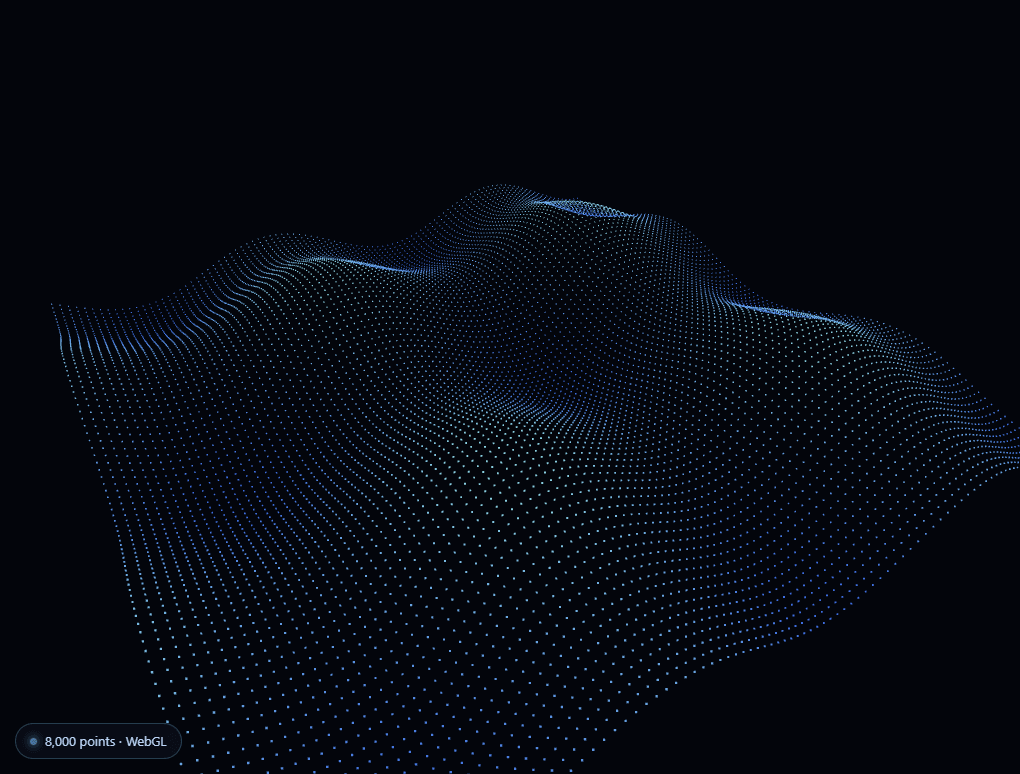
The Three.js Particle Wave snippet turns a flat grid of 10,000 points into a living, undulating ocean surface, rendered entirely in WebGL via a single <canvas> and the Three.js library loaded from a CDN. Every point's height and color update every frame from a small trigonometric formula — no physics engine, no imported terrain data, just math driving a GPU-rendered point cloud.
A BufferGeometry grid, not individual meshes
The scene starts as a 100×100 grid of coordinates packed into a single Float32Array, assigned to a THREE.BufferGeometry via setAttribute('position', ...). Rendering 10,000 individual mesh objects would be prohibitively expensive; rendering 10,000 vertices of one THREE.Points object is nearly free, since the GPU processes the whole buffer in one draw call. This is the same technique behind every performant particle system, snow effect, or starfield built in WebGL.
Height comes from two overlapping sine waves
Each frame, every point's Y coordinate is recomputed as Math.sin(x * freq + t) + Math.cos(z * freq + t * 0.75) — two independent sine waves at slightly different speeds and axes, summed together. Overlapping two waves like this avoids the flat, mechanical look of a single sine ripple; because the two waves drift in and out of phase with each other, the surface never repeats identically, reading as organic water motion instead of a looping GIF.
Vertex colors driven by the same height value
Rather than a flat particle color, each point's RGB is derived from its own normalized height — peaks shade toward a brighter cyan, troughs toward a deeper blue — using the geometry's color buffer attribute with vertexColors: true on the PointsMaterial. This one line of shared math (computing height, then feeding it into both the Y position and the color) is what makes the wave read as a genuine surface rather than a random point cloud.
Updating a BufferAttribute efficiently
The animation loop never recreates the geometry — it writes directly into the existing position and color BufferAttributes with .setY() and .setXYZ(), then flips needsUpdate = true once per attribute per frame. This is the standard, GPU-friendly pattern for per-vertex animation in Three.js: allocate the buffers once, mutate them in place forever after.
A slow ambient rotation ties it together
On top of the wave motion, the whole point cloud rotates very slowly around its Y axis (points.rotation.y += 0.0016), so the camera appears to drift around the ocean surface even though it never actually moves. Combined with a fixed camera angle looking slightly downward, this single extra line adds a huge amount of perceived depth for almost no cost.
Why WebGL instead of CSS or Canvas 2D
A particle field this dense — 10,000 individually colored, individually positioned points, redrawn 60 times a second — is well past what Canvas 2D or CSS transforms can sustain smoothly. Three.js hands the actual per-vertex math to the GPU via a single draw call, which is why a scene like this holds a steady frame rate even on modest hardware. It's the same reason data visualizations like a radar chart or a particle network reach for canvas or WebGL rather than hundreds of DOM nodes once the element count climbs into the thousands.
Build with AI
Build, Understand, Optimize, and Extend It With AI
You do not need to derive the wave math from scratch by reading Three.js docs alone. Paste this snippet's HTML, CSS, and JS into an AI coding assistant like Claude and ask it to explain exactly why the color and height calculations share the same underlying value, or why writing directly into the position BufferAttribute is faster than rebuilding the geometry every frame. The same assistant can help optimize it, for instance checking whether the double nested loop over COLS and ROWS could be flattened or whether a lower devicePixelRatio cap would meaningfully help frame rate on lower-end GPUs. It is also useful for extending the effect: ask it to drive the wave height from an audio frequency analyser instead of time, add a mouse-following ripple on top of the ambient waves, or fade the particle color toward a second palette near the edges of the grid. Treat the code less like a finished artifact and more like a starting point for a conversation.
Prompt to recreate it
Copy this into your AI assistant of choice to build the effect from scratch, or as a jumping-off point for your own variant:
Build an animated "particle wave" effect in plain HTML, CSS, and JavaScript using Three.js loaded from a CDN (no bundler, no build step) — a WebGL point cloud that ripples like an ocean surface.

Requirements:
- A full-viewport canvas element, with a WebGLRenderer sized to match it and updated on window resize (including camera aspect ratio).
- A grid of roughly 100 by 100 points built as a single THREE.BufferGeometry with a flat Float32Array position attribute (do not create individual Mesh or Points objects per grid cell) plus a matching color attribute for per-point vertex colors.
- Render the grid as one THREE.Points object using a PointsMaterial with vertexColors enabled and a small point size, with depthWrite disabled and some transparency.
- Every animation frame, recompute each point's Y coordinate as the sum of two sine/cosine waves using that point's original X and Z coordinates plus a continuously incrementing time value, so the two waves drift in and out of phase rather than producing an exact repeating loop.
- Derive each point's color from the same per-point height value (for example, shifting from a darker blue at troughs to a brighter cyan at peaks), so elevation and color are visually linked.
- Update the existing position and color BufferAttributes in place every frame with setY/setXYZ and set needsUpdate to true on each — never recreate the geometry or buffers after initial setup.
- Add a slow, continuous rotation to the whole point cloud around its vertical axis, independent of the wave animation, for added perceived depth.
- Use a fixed camera position looking down slightly at the grid; no orbit controls or user interaction are required.
Want to tighten it up first? Run this prompt through the AI Prompt Studio to score it across 8 quality dimensions, catch anti-patterns, and tune the wording for Claude, ChatGPT, or Gemini before you paste it in.
Step by step
How to Use
- 1Load the Three.js CDNAdd the three.min.js script from the CDN panel — this snippet needs only core Three.js, no add-ons.
- 2Add the canvas and JSPaste the HTML, CSS, and JS panels. The canvas fills the viewport automatically.
- 3Watch the wave rippleThe point grid animates continuously from two overlapping sine waves — no interaction required.
- 4Resize the windowThe renderer and camera aspect ratio update automatically on resize, so the wave always fills its container.
- 5Tune the grid densityEdit COLS, ROWS, and SPACING to trade particle count for performance and coverage area.
- 6Retint the surfaceChange the color formula in the animation loop to shift the palette from blue-cyan to any gradient.
Real-world uses
Common Use Cases
Got questions?
Frequently Asked Questions
A THREE.Points object renders its entire buffer of vertices in one GPU draw call. Ten thousand separate Mesh objects would each carry their own draw call and matrix, which collapses frame rate almost immediately. Point clouds are the standard technique for any effect with thousands of small, similar elements.
A single sine wave produces a perfectly periodic ripple that visibly loops and feels mechanical. Summing two waves at different frequencies and speeds means their combined pattern rarely repeats exactly, which reads as much more natural, ocean-like motion for very little extra math.
The position and color BufferAttributes are allocated once at startup and then mutated in place with setY() and setXYZ() every frame, followed by needsUpdate = true. Recreating the geometry from scratch each frame would be far slower — writing into existing typed arrays is the performant pattern Three.js expects.
Yes. Raise COLS and ROWS for a denser, more detailed wave at a higher GPU cost, or lower them for a sparser, cheaper effect. Adjust SPACING alongside them to keep the wave covering the same physical area.
Yes. The color formula is a simple function of each point's height, so swapping in a different gradient is a one-line change. To react to scroll or audio, feed a scroll-position or frequency-analysis value into the same formula that currently uses the time variable t.
Yes. Click JSX for a React component, Vue for a Vue 3 SFC, Angular for a standalone component, or Tailwind for a React + Tailwind CSS utility-class version. In React, create the renderer, scene, and geometry inside useEffect once the canvas ref exists, store the animation frame ID, and call cancelAnimationFrame plus renderer.dispose() on cleanup so the WebGL context is released when the component unmounts.