Learn Coding Visually
Learn to code with interactive, live-preview playgrounds — HTML, CSS, JavaScript, React & more.
 HTML Playground42 lessons · Click-based · Live preview
 CSS PlaygroundLearn CSS with a live editor
 JavaScript Playground60 lessons · DOM · Async · Canvas
 React PlaygroundLearn React with a live code editor
 GSAP PlaygroundLearn GSAP animation interactively
 SVG Playground44 lessons · shapes · paths · animation
 SCSS Playground45 lessons · Sass modules · tokens
 Tailwind PlaygroundLearn Tailwind CSS with a live editor
 Bootstrap 5 Playground50 lessons · live preview
Meta & Open Graph Tag Generator — Free Snippet
Meta & Open Graph Tag Generator · Dev · Plain HTML, CSS & JS · Live preview
What's included
Features
About this UI Snippet
Meta Tag & Open Graph Generator — Live Social Card & Google SERP Preview
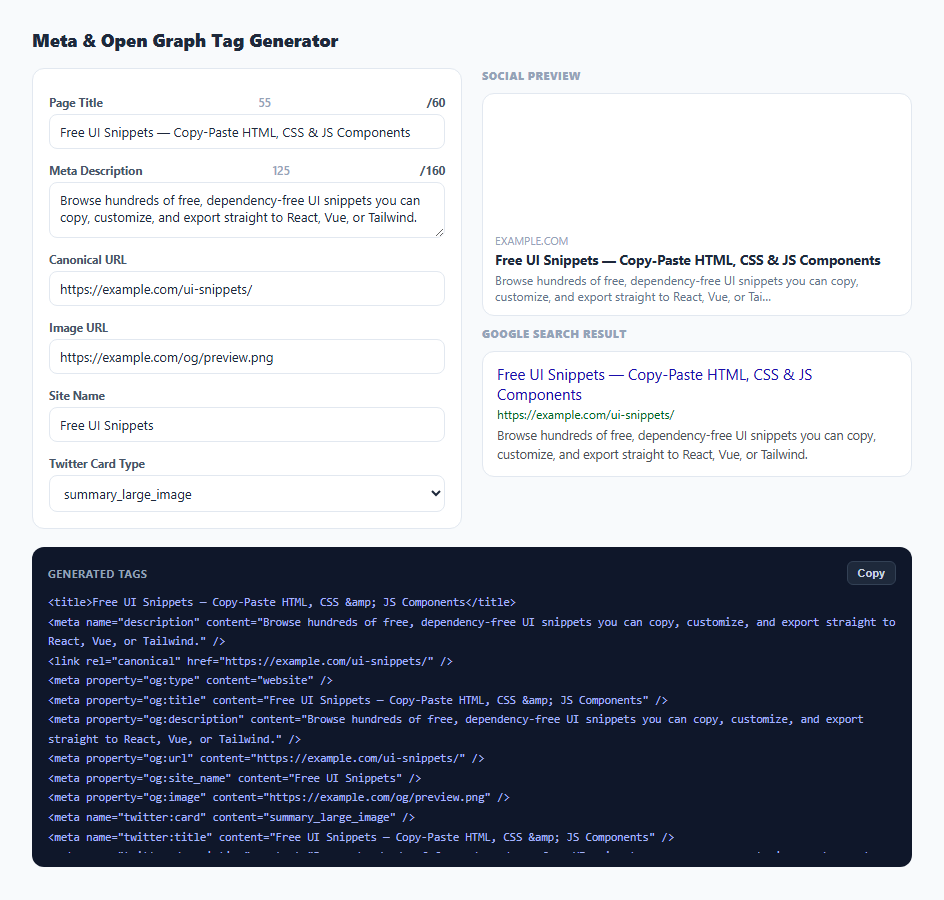
Getting a page to look right when it's shared on Slack, Twitter, or in a Google search result depends on a handful of <meta> tags that are easy to get wrong or forget entirely — a missing og:image, a description over Google's truncation limit, or a Twitter card type that doesn't match what was actually supplied. This snippet generates all three tag families from one shared form and renders a live approximation of how each surface will actually display the page.
One set of fields, three tag families
The form collects six fields — title, description, canonical URL, image URL, site name, and Twitter card type — and render() derives the <title>/<meta name="description"> pair, the full og:* Open Graph tag set, and the twitter:* Twitter Card tags from that same shared data on every keystroke. This mirrors how these tags actually work in practice: Open Graph and Twitter Card both fall back to the same title and description most of the time, so editing them independently would just create three places for them to drift out of sync.
Character counters tied to real truncation limits
Google typically truncates a page title display around 60 characters and a meta description around 160, though the exact cutoff varies by pixel width rather than character count in modern search results. The counters next to Title and Description turn red past those approximate thresholds — not because they enforce a hard limit, but because they give an early visual warning before you find out a title got cut off mid-word in an actual search result.
Deriving the domain from the URL, safely
domainOf() first tries new URL(url).hostname — the correct, spec-compliant way to extract a hostname — wrapped in a try/catch because the URL field is free text and may not be a valid absolute URL while the user is still mid-edit. The catch block falls back to a simple string strip of the protocol and everything after the first slash, so the domain preview never throws or goes blank just because the URL field is temporarily incomplete.
Truncating preview text to match each surface's real limits
truncate() clips text to a maximum length and appends an ellipsis when it overflows, applied with different limits per surface: the social card preview shows a title truncated to 70 characters and description to 120 (roughly matching how Facebook and Slack unfurl cards render), while the Google SERP preview uses 60 and 160 to match search snippet conventions. Seeing the actual truncation happen in the preview — not just a character counter — is what makes the difference between a title that reads naturally when cut off versus one that gets chopped mid-word.
Escaping attribute values in the generated markup
Because the generated output is literal HTML meant to be pasted into a <head>, escapeAttr() replaces &, ", <, and > in every user-supplied value before it's interpolated into a content="..." attribute. Skipping this step would let a title or description containing a quote character break out of its attribute and corrupt the generated tag, or even inject unintended markup if pasted directly into a real page.
Build with AI
Build, Understand, Optimize, and Extend It With AI
Paste this snippet's HTML, CSS, and JS into an AI assistant like Claude and ask it to explain exactly why the social card preview and the Google SERP preview truncate text at different lengths, and how those numbers relate to real-world pixel-based truncation. It is also a good starting point to extend: ask for a JSON-LD structured data block generator alongside the meta tags, an image-dimension warning for Open Graph's recommended 1200x630 aspect ratio, or a Next.js/React Helmet-formatted output mode instead of raw HTML tags.
Prompt to recreate it
Copy this into your AI assistant of choice to build the effect from scratch, or as a jumping-off point for your own variant:
Build a client-side meta tag and Open Graph tag generator in plain HTML, CSS, and JavaScript, no libraries.

Requirements:
- A form with fields for page title, meta description, canonical URL, Open Graph image URL, site name, and a Twitter Card type selector (summary_large_image or summary), updating everything live on every input event.
- Character counters next to the title and description fields that visually flag (e.g. turn red) once the title exceeds roughly 60 characters and the description exceeds roughly 160 characters, without hard-blocking further typing.
- A live social share card preview mimicking a Slack/Facebook/Twitter unfurl: an image area, a domain label, a truncated title, and a truncated description, each using appropriately different truncation lengths than the SERP preview.
- A live Google search result (SERP) preview showing a truncated title, the full canonical URL, and a truncated description using search-result-appropriate limits.
- Safely derive the displayed domain from the canonical URL field using the URL constructor, with a string-based fallback if the field is not yet a valid URL (since the user may still be typing).
- A read-only output panel generating the actual <title>, <meta name="description">, <link rel="canonical">, full Open Graph (og:*) tag set, and Twitter Card (twitter:*) tag set as pasteable HTML, with every user-supplied value HTML-attribute-escaped (ampersands, quotes, angle brackets) so special characters in the copy never break the generated markup.
- A Copy button using the Clipboard API with a brief visual confirmation.
Want to tighten it up first? Run this prompt through the AI Prompt Studio to score it across 8 quality dimensions, catch anti-patterns, and tune the wording for Claude, ChatGPT, or Gemini before you paste it in.
Step by step
How to Use
- 1Fill in the page basicsEnter the page title, meta description, and canonical URL — the character counters warn you if either field runs long.
- 2Add an image and site nameSet the Open Graph image URL and site name used across the social share card and Twitter Card tags.
- 3Choose a Twitter Card typePick summary_large_image for a full-width image card or summary for a small square thumbnail card.
- 4Check both live previewsThe social preview card approximates a Slack/Facebook unfurl; the SERP block approximates a Google search result, both truncated to realistic limits.
- 5Copy the generated tagsClick Copy to grab the full block of title, description, canonical, Open Graph, and Twitter Card tags, ready to paste into your page's <head>.
Real-world uses
Common Use Cases
Got questions?
Frequently Asked Questions
No, it only checks that an image URL was provided and uses it as a CSS background-image in the preview card. It does not verify the image loads, its dimensions, or its file size, all of which matter for real Open Graph rendering.
They approximate widely cited Google search-result truncation points: around 60 characters for a title and around 160 for a description. Google actually truncates based on rendered pixel width, not a strict character count, so these are practical guidelines, not hard limits.
summary_large_image renders a full-width image above the title and description, similar to a Facebook unfurl. summary renders a small square thumbnail beside the text. The generated twitter:card tag switches between the two based on your selection.
domainOf() parses the URL field with the built-in URL constructor to extract just the hostname. If what you have typed is not yet a valid URL, it falls back to a simple string-based guess rather than showing a blank or broken preview.
Yes. Every value is passed through an escaping function that converts &, ", <, and > into their HTML entity equivalents before being placed inside a content="..." attribute, so the generated tags stay valid even if your copy contains quotation marks.
No. Every preview and every generated tag is computed entirely in the browser from the form fields — nothing is transmitted anywhere, so it is safe to use for unpublished or embargoed page copy.