Learn Coding Visually
Learn to code with interactive, live-preview playgrounds — HTML, CSS, JavaScript, React & more.
 HTML Playground42 lessons · Click-based · Live preview
 CSS PlaygroundLearn CSS with a live editor
 JavaScript Playground60 lessons · DOM · Async · Canvas
 React PlaygroundLearn React with a live code editor
 GSAP PlaygroundLearn GSAP animation interactively
 SVG Playground44 lessons · shapes · paths · animation
 SCSS Playground45 lessons · Sass modules · tokens
 Tailwind PlaygroundLearn Tailwind CSS with a live editor
 Bootstrap 5 Playground50 lessons · live preview
SQL Query Formatter — Free HTML CSS JS Snippet
SQL Query Formatter · Dev · Plain HTML, CSS & JS · Live preview
What's included
Features
About this UI Snippet
SQL Query Formatter — Beautify SELECT, JOIN, WHERE & GROUP BY Clauses with Live Preview
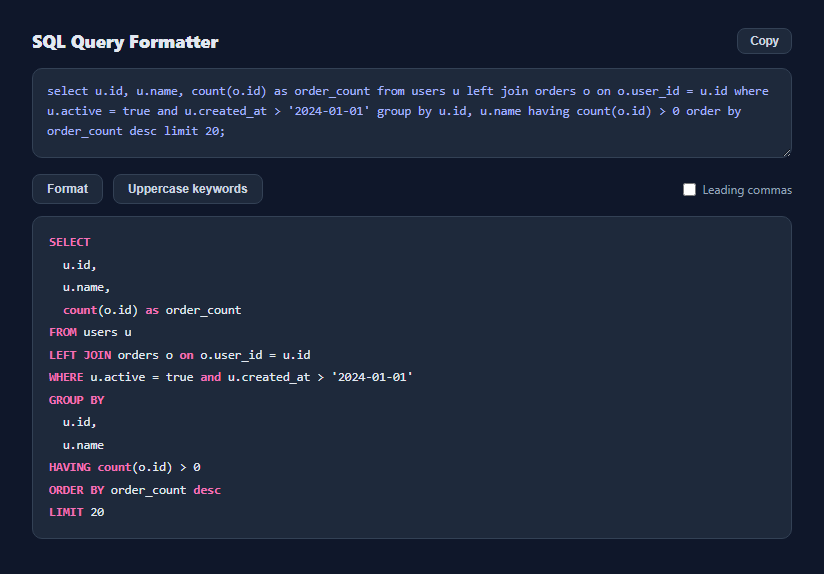
A one-line SQL query with three joins and a handful of conditions is nearly unreadable, but most SQL formatting tools are either a paid IDE plugin or a website that requires uploading the query. This snippet formats real SQL entirely client-side using pattern-based clause detection — no server round trip, no query text ever transmitted.
Detecting clause boundaries without a full parser
Writing a complete SQL parser is a large undertaking, so splitOnMajorClauses() takes a pragmatic approach: it builds one regular expression alternation from a list of major clause keywords (SELECT, FROM, WHERE, LEFT JOIN, GROUP BY, and so on), sorted longest-first so a phrase like GROUP BY matches before a bare BY could be mistaken for something else. Scanning the query for these keyword boundaries and slicing the text between consecutive matches reliably reconstructs each clause's text — the technique real formatting tools use before falling back to a full grammar for edge cases.
Splitting comma-separated lists without breaking on commas inside function calls
The naive way to split a SELECT list on commas breaks the moment a column expression contains a function call like COUNT(o.id, o.status) — a plain split(',') would cut the two function arguments into separate columns. splitTopLevelCommas() instead walks the text character by character, tracking parenthesis depth, and only treats a comma as a list separator when depth === 0. This is a genuinely correct approach — no comma inside any level of nested parentheses is ever mistaken for a top-level column separator.
Formatting SELECT, GROUP BY, ORDER BY and SET as vertical lists
Once a clause's items are correctly split, list-style clauses render one item per line, indented two spaces, which is how most style guides format anything beyond two or three selected columns. A "Leading commas" toggle switches between trailing-comma style (col1, then col2) and leading-comma style (col1 then , col2) — a genuine, actively-debated SQL style choice, included because different teams and style guides disagree on which is more readable and easier to diff in version control.
Keyword casing is a separate, reversible transform
The "Uppercase keywords" button runs an independent uppercaseKeywords() pass over the raw input before formatting, replacing every recognized keyword (again matched longest-first, so GROUP BY is replaced as a unit rather than GROUP and BY separately) with its uppercase form. Keeping this as a separate transform from clause splitting means a user who prefers lowercase keywords can format without ever triggering the case change.
Highlighting reuses the same keyword list
Rather than a separate token classifier, highlightKeywords() runs the identical KEYWORDS list used for uppercasing against the already-formatted text and wraps each match in a <span class="kw">, so the highlighted keywords in the output are guaranteed to be exactly the same set the formatter itself understands — there is no drift between what gets colored and what gets recognized as a clause.
Build with AI
Build, Understand, Optimize, and Extend It With AI
Paste this snippet's JavaScript into an AI assistant like Claude and ask it to explain why splitTopLevelCommas() needs to track parenthesis depth instead of using a plain string split, and how that generalizes to also respecting nested parentheses in a WHERE clause's boolean logic. It is also a good base to extend: ask for CTE (WITH clause) support, automatic indentation of nested subqueries, or a "compact" mode that collapses the formatted query back to a single line for pasting into a one-line log filter.
Prompt to recreate it
Copy this into your AI assistant of choice to build the effect from scratch, or as a jumping-off point for your own variant:
Build a client-side SQL query formatter in plain HTML, CSS, and JavaScript, no libraries.

Requirements:
- A textarea where a pasted or typed SQL query (SELECT, INSERT, UPDATE, or DELETE) is reformatted live on every input event.
- Detect major clause boundaries (SELECT, FROM, all JOIN variants, WHERE, GROUP BY, HAVING, ORDER BY, LIMIT, INSERT INTO / VALUES, UPDATE / SET) using a keyword-based regular expression approach rather than a full SQL parser, matching longer keyword phrases like "GROUP BY" before shorter ones like "BY" so they are never split apart.
- Start each detected clause on its own line.
- For comma-separated lists inside SELECT, GROUP BY, ORDER BY and SET clauses, split each item onto its own indented line — but implement the comma-splitting by tracking parenthesis nesting depth character by character, so a comma inside a nested function call like COUNT(a, b) is never mistaken for a list separator.
- Add a toggle between trailing-comma style (comma at the end of each line) and leading-comma style (comma at the start of the following line).
- Add a separate "Uppercase keywords" button that normalizes all recognized SQL keywords in the raw input to uppercase, independent of the formatting/line-breaking transform.
- Lightweight syntax highlighting of the formatted output that wraps recognized keywords in a styled span, using the same keyword list the formatter itself uses.
- A Copy button using the Clipboard API with a brief visual confirmation.
Want to tighten it up first? Run this prompt through the AI Prompt Studio to score it across 8 quality dimensions, catch anti-patterns, and tune the wording for Claude, ChatGPT, or Gemini before you paste it in.
Step by step
How to Use
- 1Paste a SQL queryAny SELECT, INSERT, UPDATE, or DELETE statement works — formatting runs live as you type or paste.
- 2Read the formatted outputMajor clauses (FROM, WHERE, JOIN, GROUP BY, ORDER BY) each start a new line; SELECT and GROUP BY lists break one column per line.
- 3Toggle leading commasSwitch between trailing-comma and leading-comma list style to match your team's SQL style guide.
- 4Uppercase keywordsClick "Uppercase keywords" to normalize SELECT, FROM, WHERE, and every other recognized keyword to uppercase before formatting.
- 5Copy the resultClick Copy to place the formatted query on your clipboard, ready to paste into a migration file or code review comment.
Real-world uses
Common Use Cases
Got questions?
Frequently Asked Questions
No. It uses pattern-based clause detection rather than a full SQL grammar parser, which correctly handles the vast majority of everyday SELECT, INSERT, UPDATE, and DELETE queries but is not a substitute for a real SQL parser for exotic vendor-specific syntax.
No — splitTopLevelCommas() tracks parenthesis depth character by character and only treats a comma as a column separator when depth is zero, so something like COUNT(a, b) stays intact as a single list item.
Trailing-comma style puts the comma at the end of each line (col1,\ncol2). Leading-comma style puts it at the start of the next line (col1\n, col2). Both are real, actively-used SQL style conventions — the toggle switches between them without changing anything else about the formatting.
The keyword matcher uses word-boundary regular expressions against a fixed list of SQL keywords, so it only replaces those exact recognized words — it does not scan inside quoted string literals for keyword-shaped substrings in normal usage.
Yes. INSERT INTO / VALUES and UPDATE / SET are both included in the major clause list, so those statement types get the same clause-aware line breaking as SELECT queries.
No. All parsing, splitting, and formatting logic runs entirely in your browser with plain JavaScript — no network request is made, so it is safe to format queries containing sensitive table or column names.