Learn Coding Visually
Learn to code with interactive, live-preview playgrounds — HTML, CSS, JavaScript, React & more.
 HTML Playground42 lessons · Click-based · Live preview
 CSS PlaygroundLearn CSS with a live editor
 JavaScript Playground60 lessons · DOM · Async · Canvas
 React PlaygroundLearn React with a live code editor
 GSAP PlaygroundLearn GSAP animation interactively
 SVG Playground44 lessons · shapes · paths · animation
 SCSS Playground45 lessons · Sass modules · tokens
 Tailwind PlaygroundLearn Tailwind CSS with a live editor
 Bootstrap 5 Playground50 lessons · live preview
cURL Command Builder — Generate curl Commands from a Form
cURL Command Builder · Dev · Plain HTML, CSS & JS · Live preview
What's included
Features
About this UI Snippet
cURL Command Builder — Generate a Correctly Escaped curl Request from Method, Headers & Body
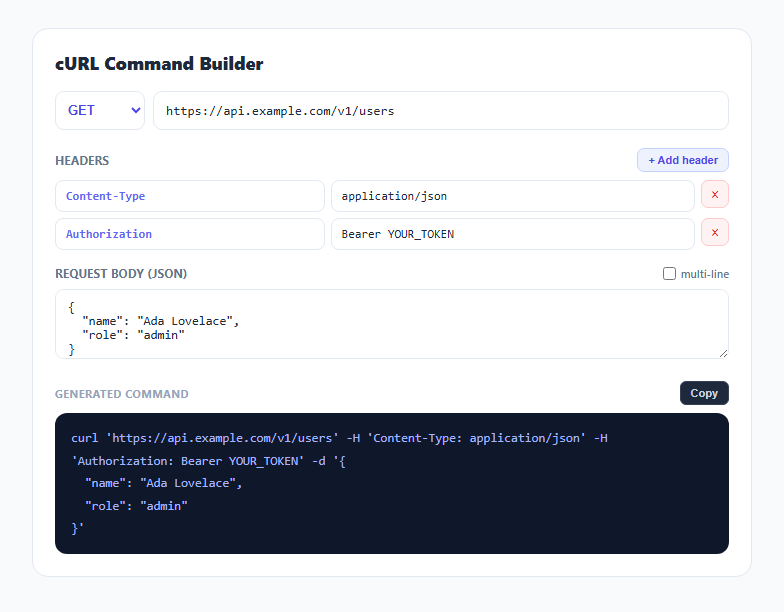
Hand-writing a curl command with multiple headers and a JSON body means juggling quote characters, escaping, and line-continuation backslashes — and one misplaced quote silently breaks the whole command. This snippet flips that process around: fill in a method, a URL, a list of headers, and a JSON body through ordinary form fields, and it assembles a correctly shell-escaped curl command as you type, ready to paste straight into a terminal.
Why every value goes through shellEscape()
The single most important function in this tool is shellEscape(), which wraps every dynamic value — the URL, each header's key: value pair, and the JSON body — in single quotes, and handles the one tricky case: a literal single quote appearing inside a value. POSIX shells cannot escape a quote character *inside* single quotes directly, so the standard trick is used: close the quote, insert an escaped single quote, then reopen the quote ('\''). Every value passed through shellEscape() is safe to paste into bash, zsh, or any POSIX-compatible shell without breaking the command or allowing accidental shell injection, regardless of what punctuation the header value or JSON body contains.
Method flag omitted for GET, matching curl's actual default
The -X method flag is only added when the method is not GET, because curl defaults to GET and explicitly adding -X GET is both redundant and, in one curl-specific edge case, can subtly change how a request with a body is sent. This mirrors what an experienced engineer writing curl commands by hand would actually do — omit flags that aren't needed rather than including every option unconditionally.
Headers as an editable array with a default useful pair
Headers are stored as an array of { key, value } objects, pre-populated with a realistic Content-Type: application/json and Authorization: Bearer YOUR_TOKEN pair since those two headers appear in the overwhelming majority of authenticated JSON API requests. Each header contributes its own -H flag with the shell-escaped "key: value" string, and empty-key rows are silently skipped when building the command so an in-progress blank row never corrupts the output.
Live JSON validation on the body without blocking the command
The body textarea is validated with JSON.parse() inside a try/catch purely for feedback — an invalid JSON body highlights the textarea in red as a warning, but the command is still generated and includes the -d flag with whatever text is present. This is a deliberate choice: sometimes a request body is intentionally not strict JSON (form-encoded data, a GraphQL query string, or a body under active editing), so validation should warn without ever blocking output.
Pretty-print mode for multi-line readability
Toggling "multi-line" changes the separator between each part of the command from a plain space to \\\n — a trailing backslash followed by a newline and indentation, which is the standard shell line-continuation syntax. This produces a command that reads cleanly across multiple lines in documentation or a README, functionally identical to the single-line version when pasted into a terminal, since the shell treats a backslash-newline sequence as if it were not there at all.
Build with AI
Build, Understand, Optimize, and Extend It With AI
Paste this snippet's JavaScript into an AI assistant like Claude and ask it to explain exactly why the single-quote-close-escape-reopen trick in shellEscape() is necessary for safe shell escaping, and what could go wrong with a naive approach that just wraps values in double quotes instead. It is also a solid base to extend: ask for a reverse mode that parses a pasted curl command back into the form fields, support for --data-urlencode for form-encoded bodies, or a "copy as fetch()" button that generates equivalent JavaScript fetch code from the same form state.
Prompt to recreate it
Copy this into your AI assistant of choice to build the effect from scratch, or as a jumping-off point for your own variant:
Build a curl command builder in plain HTML, CSS, and JavaScript, no libraries.

Requirements:
- A method dropdown (GET, POST, PUT, PATCH, DELETE, HEAD) and a URL text input, both driving a live-generated curl command.
- An editable list of HTTP header rows (key and value text inputs each), with an add button that appends a new blank row and a remove button per row, pre-populated with one or two realistic example headers.
- A textarea for a JSON request body, validated with JSON.parse() inside a try/catch purely to show a non-blocking visual warning on invalid JSON — the body must still be included in the generated command even if it fails validation.
- A shell-escaping function applied to every dynamic value (URL, each header's "key: value" string, and the body) that wraps values in single quotes and correctly handles a literal single quote appearing inside the value using the standard POSIX close-quote/escaped-quote/reopen-quote technique, so the output is always safe to paste into a real shell.
- Omit the -X method flag entirely when the method is GET, matching curl's actual default behavior, and skip any header row whose key is empty.
- A "multi-line" checkbox toggle that reformats the command using backslash-newline shell line-continuation syntax between each part instead of plain spaces.
- A Copy button that copies the final generated command to the clipboard using the Clipboard API, with a brief visual confirmation.
Want to tighten it up first? Run this prompt through the AI Prompt Studio to score it across 8 quality dimensions, catch anti-patterns, and tune the wording for Claude, ChatGPT, or Gemini before you paste it in.
Step by step
How to Use
- 1Choose a method and enter a URLSelect GET, POST, PUT, PATCH, DELETE, or HEAD, and type the target endpoint URL.
- 2Add or edit headersTwo common headers are pre-filled. Click "+ Add header" for more, or edit the key/value fields directly.
- 3Write the JSON request bodyType or paste a JSON body. Invalid JSON is highlighted in red as a warning without blocking the generated command.
- 4Toggle multi-line formattingCheck "multi-line" to format the command across multiple lines with backslash continuations, ideal for documentation.
- 5Copy the generated commandClick "Copy" to copy the fully shell-escaped curl command to your clipboard.
- 6Export in your formatClick HTML for a standalone file, JSX for a React component, or Tailwind for a React + Tailwind version.
Real-world uses
Common Use Cases
Got questions?
Frequently Asked Questions
It wraps the whole value in single quotes, and for any literal single quote inside the value it uses the standard POSIX trick of closing the quote, inserting an escaped quote, and reopening the quote ('\''). This produces a string that is always safe to paste into bash or zsh regardless of what characters the value contains.
curl defaults to a GET request when no -X flag is given, so omitting it for GET requests produces a cleaner command and avoids a curl-specific edge case where -X GET combined with certain other flags can behave slightly differently than a true default GET.
The textarea border turns red as a non-blocking warning, but the command is still generated using whatever text is present in the -d flag. This is intentional since the body field is sometimes used for non-JSON payloads like form-encoded data or a GraphQL query.
It replaces the plain space separator between each command part with a backslash, a newline, and two spaces of indentation — the standard shell line-continuation syntax. The resulting multi-line command behaves identically when pasted into a terminal.
No. A header row with an empty key is skipped entirely when building the command, so adding a blank row while editing never produces a broken -H flag.
No. Everything is assembled client-side as a plain string; no request is actually made and nothing is transmitted to a server, so it is safe to fill in real tokens and payloads while building the command.