Learn Coding Visually
Learn to code with interactive, live-preview playgrounds — HTML, CSS, JavaScript, React & more.
 HTML Playground42 lessons · Click-based · Live preview
 CSS PlaygroundLearn CSS with a live editor
 JavaScript Playground60 lessons · DOM · Async · Canvas
 React PlaygroundLearn React with a live code editor
 GSAP PlaygroundLearn GSAP animation interactively
 SVG Playground44 lessons · shapes · paths · animation
 SCSS Playground45 lessons · Sass modules · tokens
 Tailwind PlaygroundLearn Tailwind CSS with a live editor
 Bootstrap 5 Playground50 lessons · live preview
URL Query String Parser & Builder — Free Snippet
URL Query String Parser & Builder · Dev · Plain HTML, CSS & JS · Live preview
What's included
Features
About this UI Snippet
Query String Parser & Builder — Live URLSearchParams Editing with Correct Percent-Encoding
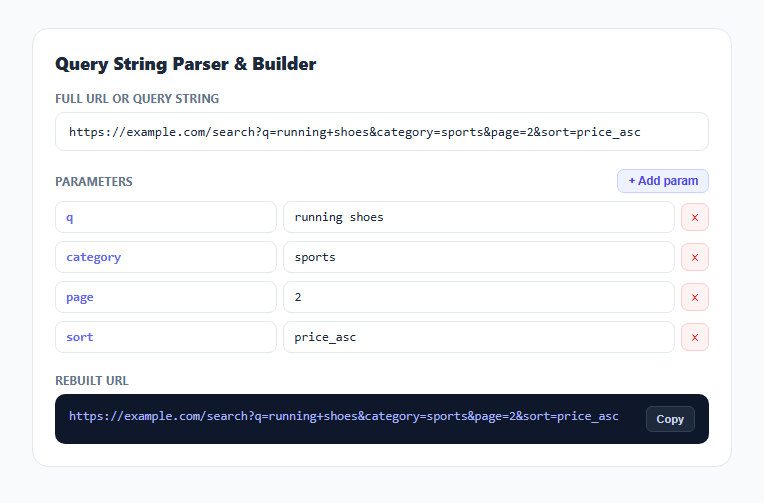
A URL's query string looks simple until you have to hand-edit one with an ampersand inside a value, a plus sign that means a literal space, or a parameter repeated twice with different values. This snippet parses any full URL or bare query string into an editable table of key/value rows using the browser's own URLSearchParams API, then rebuilds a correctly percent-encoded URL from those rows on every edit — so you never have to remember encoding rules by hand.
Splitting the URL from its query string
splitUrl() finds the first ? character and splits the input into a prefix (everything before it — scheme, host, and path) and a query (everything after). This is a deliberately simple split rather than a full URL-parsing implementation, because it needs to accept both a complete URL and a bare query string like a=1&b=2 typed on its own, which the stricter built-in URL constructor would reject for lacking a scheme and host.
URLSearchParams does the real parsing
new URLSearchParams(query) is the browser's native query-string parser: it understands &-separated pairs, =-separated key/value pairs, + as an encoded space (per the application/x-www-form-urlencoded convention used in query strings), and full percent-decoding of any %XX sequence. Iterating it with .forEach((value, key) => ...) correctly yields every occurrence of a repeated key as a separate pair, so ?tag=a&tag=b becomes two distinct rows in the editable list rather than being collapsed or overwritten — a detail a hand-rolled split('&').map(...) parser very commonly gets wrong.
Editable rows kept as an in-memory array of objects
Parsed parameters are stored as a plain array of { key, value } objects, re-rendered into a row of two text inputs and a remove button per parameter. Editing a key or value field updates that array entry directly via a single delegated input listener on the container (reading data-idx and data-field attributes from the event target), rather than attaching a listener to every individual input — a pattern that scales cleanly regardless of how many parameters are added or removed.
Rebuilding with correct encoding, not string concatenation
renderOutput() builds a fresh URLSearchParams from the current row data and calls .append(key, value) for each one, then .toString() to produce the encoded query string. This is the critical correctness detail: manually concatenating key + '=' + value + '&' would produce a broken URL the moment any value contains an &, a space, or a non-ASCII character, since none of those get escaped. Delegating to URLSearchParams.toString() guarantees standards-correct percent-encoding every time, matching exactly what fetch() or XMLHttpRequest would produce for the same parameters.
Adding, removing, and copying
The "+ Add param" button pushes an empty row and focuses its key input immediately, keeping the editing flow fast for building a query string from scratch rather than only editing an existing one. Each row's remove button splices that entry out of the array by index. The final rebuilt URL is shown in a read-only panel with a one-click Copy button using navigator.clipboard.writeText(), with a safe fallback confirmation if the Clipboard API is unavailable.
Build with AI
Build, Understand, Optimize, and Extend It With AI
Paste this snippet's JavaScript into an AI assistant like Claude and ask it to explain exactly why manually concatenating key=value&key2=value2 strings is unsafe compared to using URLSearchParams.toString(), with concrete examples of values that would break the naive approach. It is also a solid base to extend: ask for a "decode all values" toggle that shows the raw decoded value next to the encoded one, sorting parameters alphabetically before rebuilding, or a diff view comparing the original and edited query strings side by side.
Prompt to recreate it
Copy this into your AI assistant of choice to build the effect from scratch, or as a jumping-off point for your own variant:
Build a URL query string parser and builder in plain HTML, CSS, and JavaScript, no libraries.

Requirements:
- A text input accepting either a full URL with a query string or a bare query string on its own, parsed live on every keystroke.
- Split the base path from the query string using the first ? character, then parse the query portion using the browser's native URLSearchParams object so repeated keys, + as space, and percent-encoded characters are all handled correctly rather than with hand-written string splitting.
- Render each parsed parameter as an editable row with a key input and a value input; editing either field updates an in-memory array of {key, value} objects and immediately re-renders the final rebuilt URL.
- Provide an "Add parameter" button that appends a new blank editable row and focuses its key field, and a remove button on each row that deletes that parameter.
- Rebuild the final URL by constructing a new URLSearchParams from the current rows and calling its toString() method (not manual string concatenation) to guarantee standards-correct percent-encoding, and display the result alongside the original base path.
- Add a "Copy" button that copies the final rebuilt URL to the clipboard using the Clipboard API, with a brief visual confirmation and a safe fallback if the API is unavailable.
Want to tighten it up first? Run this prompt through the AI Prompt Studio to score it across 8 quality dimensions, catch anti-patterns, and tune the wording for Claude, ChatGPT, or Gemini before you paste it in.
Step by step
How to Use
- 1Paste a URL or query stringPaste a full URL with a ?query or just a bare a=1&b=2 style string into the top input — it parses immediately.
- 2Edit parameters as rowsEach key and value becomes its own editable text field. Change either one and the rebuilt URL updates live below.
- 3Add a new parameterClick "+ Add param" to append a blank row, ready to type a new key and value into.
- 4Remove a parameterClick the × button on any row to delete that parameter entirely.
- 5Copy the rebuilt URLClick "Copy" to copy the correctly percent-encoded final URL to your clipboard.
- 6Export in your formatClick HTML for a standalone file, JSX for a React component, or Tailwind for a React + Tailwind version.
Real-world uses
Common Use Cases
Got questions?
Frequently Asked Questions
Splitting the base URL from the query string uses a simple indexOf('?') split, but all actual query-string parsing and rebuilding is delegated to the browser's native URLSearchParams object, which correctly handles percent-decoding, + as a space, and repeated keys.
URLSearchParams.forEach() correctly yields both occurrences as separate entries, so they appear as two distinct editable rows rather than being merged or having one silently overwrite the other.
Instead of concatenating strings by hand, the rebuild step constructs a fresh URLSearchParams object from the current rows and calls its .toString() method, which applies standards-correct percent-encoding automatically — the same encoding fetch() or a native form submission would produce.
Yes. If there is no ? in the pasted text, it is treated entirely as the base path with no parameters; if there is a ?, everything before it becomes the base and everything after is parsed as parameters. A bare a=1&b=2 with no leading path also works since it is passed straight to URLSearchParams.
No. Edits update the specific entry in an in-memory array of key/value objects via a single delegated input listener, and only the rebuilt-URL output re-renders — the full input field is not re-parsed on every keystroke inside a parameter row.
No. All parsing, editing, and rebuilding happens client-side using URLSearchParams; nothing is transmitted anywhere, so it is safe to use with URLs containing sensitive query parameters during local debugging.