Learn Coding Visually
Learn to code with interactive, live-preview playgrounds — HTML, CSS, JavaScript, React & more.
 HTML Playground42 lessons · Click-based · Live preview
 CSS PlaygroundLearn CSS with a live editor
 JavaScript Playground60 lessons · DOM · Async · Canvas
 React PlaygroundLearn React with a live code editor
 GSAP PlaygroundLearn GSAP animation interactively
 SVG Playground44 lessons · shapes · paths · animation
 SCSS Playground45 lessons · Sass modules · tokens
 Tailwind PlaygroundLearn Tailwind CSS with a live editor
 Bootstrap 5 Playground50 lessons · live preview
JWT Decoder & Inspector — Free HTML CSS JS Snippet
JWT Decoder & Inspector · Dev · Plain HTML, CSS & JS · Live preview
What's included
Features
About this UI Snippet
JWT Decoder — Client-Side Base64Url Decode of Header, Payload & Expiry Detection
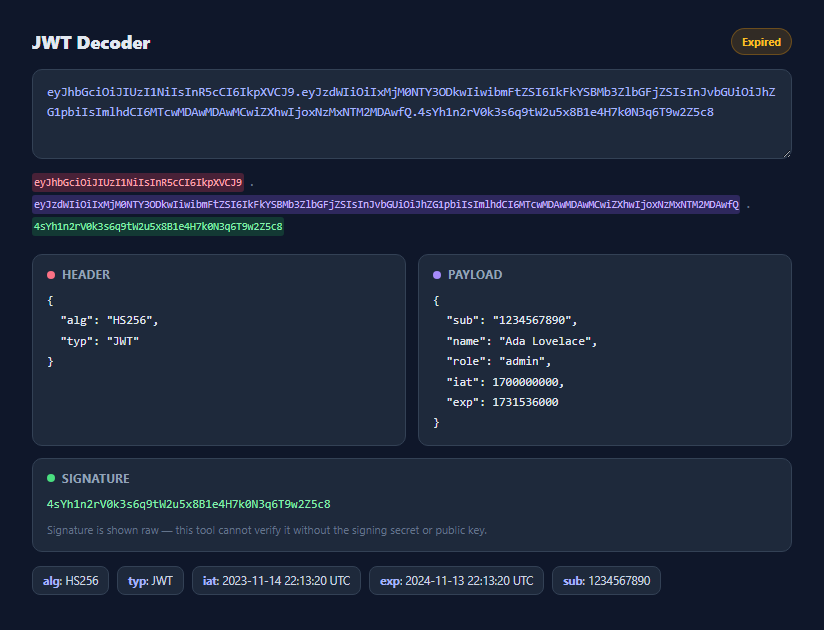
A JSON Web Token is three base64url-encoded segments joined by dots: a header describing the signing algorithm, a payload carrying claims, and a signature proving the first two segments weren't tampered with. Debugging a JWT usually means copy-pasting it into some third-party website — this snippet does the same decoding entirely in the browser, with no network request and no token ever leaving the page.
Base64url is not the same as base64
JWTs use base64url encoding (RFC 4648 §5), which swaps + and / for - and _ and drops trailing = padding so the token is safe to embed in URLs and HTTP headers without escaping. The browser's built-in atob() only understands standard base64, so base64UrlDecode() first reverse-swaps those characters and re-pads the string to a multiple of four characters before calling atob(). The result is then run through TextDecoder('utf-8') on a Uint8Array built from the decoded binary string — a detail that matters because atob() alone mangles any non-ASCII characters in claim values (unicode names, for example) if you skip the byte-array round trip.
Splitting and rendering the three segments
decode() calls token.split('.') and immediately checks the result has exactly three parts. A token with the wrong number of segments is flagged as malformed rather than silently decoding garbage. Each of the three raw segments is also rendered as a colored inline chip in the .segments row so you can see visually which characters of the raw token correspond to header, payload, and signature — useful when comparing two tokens byte-for-byte.
Header and payload are parsed as JSON, independently
The header and payload segments are decoded and JSON.parsed in separate try/catch blocks. This means a JWT with a valid header but a corrupted payload (or vice versa) still shows you the segment that *did* parse correctly, with a clear message on the one that didn't — rather than a single try/catch around the whole token that would hide which half failed.
Expiry detection using the `exp` claim
Per RFC 7519, the exp claim is a Unix timestamp (seconds, not milliseconds) after which the token should be rejected by any consumer. The tool compares payload.exp against Math.floor(Date.now() / 1000) and flips the status badge to an amber "Expired" state when the token is past its expiry — a fast way to check "is this the stale token I've been debugging with all morning" without doing the math by hand.
Signature is shown, never verified
The signature segment is displayed raw as the third panel, but this tool makes no attempt to verify it — verifying an HMAC-signed token requires the shared secret, and verifying an RS256/ES256 token requires the issuer's public key, neither of which a client-side decoder should ever ask you to paste in. The note under the signature panel is intentional: decoding a JWT tells you what it *claims*, not whether it's authentic. Trusting a JWT's contents always requires signature verification on a server that holds the correct key.
Claim chips for common fields
Below the three panels, decode() builds small chips for whichever of alg, typ, iat, exp, and sub are present, formatting the Unix timestamps into a readable UTC string via fmtTime(). This gives an at-a-glance summary without having to mentally parse the raw JSON for the fields you check most often when debugging an auth issue.
Build with AI
Build, Understand, Optimize, and Extend It With AI
Paste this snippet's JavaScript into an AI assistant like Claude and ask it to walk through exactly why base64url decoding needs the character substitution and re-padding steps before atob() will accept the string — it's a detail that trips up a lot of hand-rolled JWT tooling. It's also a good starting point to extend: ask for HS256 signature verification using the Web Crypto SubtleCrypto API when a shared secret is supplied, support for the nbf (not-before) claim alongside exp, or a compact "copy as curl Authorization header" button.
Prompt to recreate it
Copy this into your AI assistant of choice to build the effect from scratch, or as a jumping-off point for your own variant:
Build a client-side JWT (JSON Web Token) decoder in plain HTML, CSS, and JavaScript, no libraries.

Requirements:
- A textarea where a user pastes a three-segment dot-separated JWT (header.payload.signature), decoding live on every input event.
- Implement real base64url decoding (RFC 4648 section 5: - and _ instead of + and /, no padding) built on the browser's atob(), including correct re-padding, and decode the resulting bytes through TextDecoder('utf-8') so unicode claim values render correctly rather than through atob()'s output directly.
- Parse the decoded header and payload segments as JSON independently, in separate try/catch blocks, so a failure in one segment doesn't prevent the other valid segment from displaying.
- Render the header and payload as pretty-printed JSON in separate panels, and show the raw signature segment in a third panel with a clear note that the tool does not and cannot verify the signature without the signing key.
- Show a status badge that reads a decoded-OK state, an amber "Expired" state when the payload's exp claim (a Unix timestamp in seconds) is earlier than the current time, or an invalid/malformed state when the token doesn't have exactly three segments or fails to decode.
- Never make a network request — everything must run entirely in the browser using only built-in APIs.
Want to tighten it up first? Run this prompt through the AI Prompt Studio to score it across 8 quality dimensions, catch anti-patterns, and tune the wording for Claude, ChatGPT, or Gemini before you paste it in.
Step by step
How to Use
- 1Paste a JWT into the textareaAny three-segment token (header.payload.signature) decodes live as you type or paste — no submit button needed.
- 2Read the colored segment breakdownThe row under the textarea shows exactly which raw characters belong to the header, payload, and signature.
- 3Inspect the Header and Payload panelsBoth segments are base64url-decoded and pretty-printed as JSON. A parse failure on either segment is reported independently.
- 4Check the status badgeIt reads "Decoded OK", "Expired" (when the exp claim is in the past), or an error state for malformed tokens.
- 5Scan the claim chipsCommon fields — alg, typ, iat, exp, sub — are pulled out into quick-reference chips with human-readable timestamps.
- 6Remember: this never verifies signaturesThe signature panel is display-only. Verifying authenticity requires the signing secret or public key on a trusted server, never in the browser.
Real-world uses
Common Use Cases
Got questions?
Frequently Asked Questions
No. Verifying a signature requires either the shared HMAC secret (for HS256) or the issuer's public key (for RS256/ES256/etc.), and a client-side tool should never ask you to paste secrets into it. This snippet only decodes and displays the three segments — treat the decoded payload as unverified claims, not proof of authenticity.
JWTs use base64url encoding, which replaces the standard base64 characters + and / with - and _ and omits trailing = padding so the token is URL-safe. Calling atob() on a raw JWT segment without first reversing those substitutions and re-adding padding produces garbage or throws. base64UrlDecode() handles both steps before delegating to atob().
If the pasted text doesn't split into exactly three dot-separated segments, the badge reports it as malformed immediately. If it has three segments but one doesn't decode to valid base64url JSON, that specific panel reports a decode/parse failure while the other panel (if valid) still renders normally.
The tool reads the payload's exp claim, a Unix timestamp in seconds per RFC 7519, and compares it against Math.floor(Date.now() / 1000). If exp is in the past, the status badge switches to an amber "Expired" state.
No — the decoder runs the base64url-decoded binary string through a Uint8Array and TextDecoder('utf-8') rather than trusting atob()'s raw output directly, which is what makes multi-byte UTF-8 sequences in claim values render correctly instead of as mojibake.
No. Everything happens with browser built-ins (atob, TextDecoder, JSON.parse) directly in the page — nothing is transmitted anywhere, which is exactly why it's safe to paste production tokens into it for debugging.