Learn Coding Visually
Learn to code with interactive, live-preview playgrounds — HTML, CSS, JavaScript, React & more.
 HTML Playground42 lessons · Click-based · Live preview
 CSS PlaygroundLearn CSS with a live editor
 JavaScript Playground60 lessons · DOM · Async · Canvas
 React PlaygroundLearn React with a live code editor
 GSAP PlaygroundLearn GSAP animation interactively
 SVG Playground44 lessons · shapes · paths · animation
 SCSS Playground45 lessons · Sass modules · tokens
 Tailwind PlaygroundLearn Tailwind CSS with a live editor
 Bootstrap 5 Playground50 lessons · live preview
User-Agent String Parser — Browser, OS & Device Detector
User-Agent String Parser · Dev · Plain HTML, CSS & JS · Live preview
What's included
Features
About this UI Snippet
User-Agent Parser — Detect Browser, Rendering Engine, OS & Device from a UA String
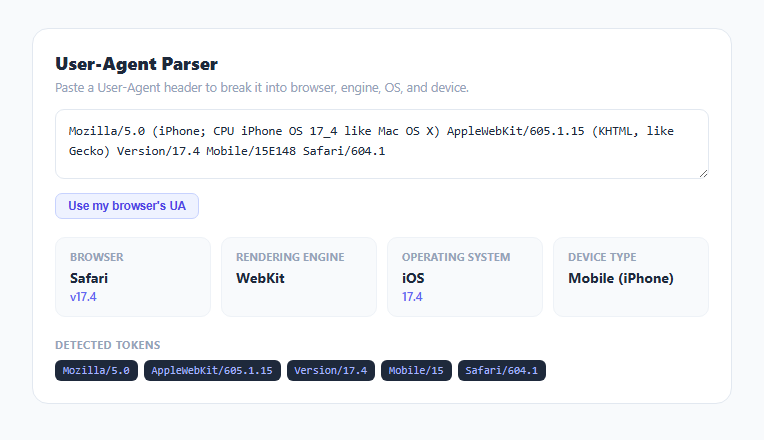
A User-Agent header is a dense, historically accreted string that packs browser identity, rendering engine, operating system, and device hints into one line — and it is famously unreliable because nearly every browser lies about being several other browsers at once for compatibility reasons. This snippet parses that string using the same kind of ordered regex pattern-matching real user-agent detection libraries use, breaking it into browser, engine, OS, and device type, plus every individual product/version token found.
Why browser detection has to check in a specific order
detectBrowser() runs a sequence of regex checks in a very deliberate order, because most browsers include misleading substrings inherited from Safari and Chrome compatibility. A real Chrome UA contains Safari/537.36; a real Edge UA contains both Chrome/ and Safari/; an Opera UA also contains Chrome/. Checking for Edg/ before Chrome/, and Chrome/ before Safari/, is what makes the detection correct — reversing that order would misidentify Edge and Opera as plain Chrome. The final catch for Safari is Version\/([\d.]+).*Safari, deliberately using the Version/ token rather than the Safari/ build number, since Safari's actual user-facing version number lives in Version/, not in the WebKit-derived Safari/ number that other browsers also carry.
Distinguishing the rendering engine from the browser brand
detectEngine() is intentionally separate from browser detection because engine and brand do not map one-to-one: Edge, Opera, and Chrome are all different brands running the same Blink engine, distinguishable from Safari's WebKit only by checking for Chrome/, Chromium/, Edg/, or OPR/ tokens alongside AppleWebKit. This separation mirrors how real compatibility decisions get made in practice — a rendering bug is usually an engine-level issue affecting every Blink-based browser identically, not a Chrome-specific one.
Operating system version formatting
Apple's own UA convention encodes OS version numbers with underscores instead of dots (iPhone OS 17_4), a historical artifact of early UA string generation. detectOS() matches that pattern and replaces underscores with dots via .replace(/_/g, '.') before display, so "17_4" reads as the expected "17.4". Windows versions are translated through a small lookup table, since Windows NT kernel version numbers (like 10.0) do not match their marketing names — Windows NT 10.0 covers both Windows 10 and Windows 11, which the UA string genuinely cannot distinguish between.
Device type from Mobile and tablet-specific hints
detectDevice() checks for iPad, iPhone, and Android's own combination of an Android token with or without a separate Mobile token — Android's convention is that phone UAs include the word Mobile while tablet UAs omit it, a subtle distinction that a naive "if it says Android, it's a phone" check would get wrong.
Extracting every product/version token generically
Beyond the specific browser/OS/device detection, extractTokens() runs a general regex, /([A-Za-z][A-Za-z0-9._-]*)\/([\d][\d.]*)/g, matching the standard User-Agent grammar of "Product/Version" pairs, and lists every one found as a chip. This surfaces tokens the targeted detectors above do not specifically name — build identifiers, embedded WebView versions, or app-specific tokens some UAs append — useful when debugging a UA string that does not match any of the well-known patterns cleanly.
Build with AI
Build, Understand, Optimize, and Extend It With AI
Paste this snippet's JavaScript into an AI assistant like Claude and ask it to explain exactly why the browser-detection regex checks must run in a specific order, using the Edge-contains-Chrome-contains-Safari nesting as the concrete example — it is one of the most common bugs in hand-rolled UA parsers. It is also a good base to extend: ask for support for additional browsers like Vivaldi or Brave, a bot/crawler detection mode that flags strings containing tokens like Googlebot or bingbot, or a side-by-side comparison mode for two pasted UA strings.
Prompt to recreate it
Copy this into your AI assistant of choice to build the effect from scratch, or as a jumping-off point for your own variant:
Build a User-Agent string parser in plain HTML, CSS, and JavaScript, no libraries.

Requirements:
- A textarea where a user pastes a raw User-Agent header string, parsing live on every input event, plus a button that loads navigator.userAgent from the current browser as a quick example.
- Detect the browser name and version using an ordered sequence of regular expression checks that correctly distinguishes browsers whose UA strings contain misleading substrings from other browsers (e.g. Edge and Opera both include a Chrome/ token; Chrome itself includes a Safari/ token) — more specific tokens must be checked before more generic ones.
- Separately detect the rendering engine (Blink, WebKit, Gecko, or Trident) using its own distinct logic from the browser-brand detection, since multiple browser brands can share the same engine.
- Detect the operating system and its version, converting Apple's underscore-separated version format (like 17_4) to standard dotted notation (17.4), and mapping the Windows NT kernel version number to a readable Windows version range.
- Detect device type (desktop, mobile, or tablet), correctly distinguishing Android phones from Android tablets using the presence or absence of a Mobile token, and detecting iPad and iPhone separately.
- Below the parsed summary, extract and list every generic Product/Version token found in the string using a general-purpose regex, to surface tokens not covered by the specific detectors.
- Do not make any network request — parsing must rely entirely on local pattern matching.
Want to tighten it up first? Run this prompt through the AI Prompt Studio to score it across 8 quality dimensions, catch anti-patterns, and tune the wording for Claude, ChatGPT, or Gemini before you paste it in.
Step by step
How to Use
- 1Paste a User-Agent stringCopy one from a network request header, a server log, or an analytics tool, and paste it into the textarea — it parses live.
- 2Or use your own browser's UAClick "Use my browser's UA" to instantly load and parse the User-Agent header your current browser is actually sending.
- 3Read the summary cardsBrowser name and version, rendering engine, operating system and version, and device type are shown as four separate cards.
- 4Check the detected tokens rowEvery Product/Version pair found in the raw string is listed as a chip, useful for spotting unusual or app-specific tokens.
- 5Compare against a known-bad UAPaste a User-Agent from a bug report to quickly confirm which real browser, OS, and device combination it actually represents.
- 6Export in your formatClick HTML for a standalone file, JSX for a React component, or Tailwind for a React + Tailwind version.
Real-world uses
Common Use Cases
Got questions?
Frequently Asked Questions
Many browsers include misleading substrings for compatibility reasons — Edge and Opera both contain Chrome/, and Chrome itself contains Safari/. Checking more specific tokens like Edg/ or OPR/ before the generic Chrome/ or Safari/ checks is what prevents misidentifying one browser as another.
No. It covers the most common desktop and mobile browsers, engines, and operating systems using pattern matching, but User-Agent strings are inherently unreliable and can be spoofed or customized by any client, so no parser (commercial or otherwise) can guarantee perfect accuracy.
Apple's User-Agent generator historically encodes OS version numbers with underscores instead of dots (an old URL-safety convention). The parser reverses that with a simple underscore-to-dot replacement so the version reads in the familiar dotted format.
No, and neither can any other UA parser — both report the identical Windows NT 10.0 kernel version in their User-Agent string. The tool labels this case "10 / 11" rather than guessing incorrectly at one or the other.
A generic regex extracts every Product/Version pair from the raw string (the standard User-Agent grammar), listing tokens the targeted browser/OS/device detectors above do not specifically name — useful for spotting embedded WebViews, app identifiers, or unusual build tags.
No. All parsing happens with local regular expressions in the browser; there is no external database call or network request, so it is safe to paste UA strings containing no sensitive data from internal logs.