Learn Coding Visually
Learn to code with interactive, live-preview playgrounds — HTML, CSS, JavaScript, React & more.
 HTML Playground42 lessons · Click-based · Live preview
 CSS PlaygroundLearn CSS with a live editor
 JavaScript Playground60 lessons · DOM · Async · Canvas
 React PlaygroundLearn React with a live code editor
 GSAP PlaygroundLearn GSAP animation interactively
 SVG Playground44 lessons · shapes · paths · animation
 SCSS Playground45 lessons · Sass modules · tokens
 Tailwind PlaygroundLearn Tailwind CSS with a live editor
 Bootstrap 5 Playground50 lessons · live preview
Regex Tester & Match Visualizer — Free HTML CSS JS Snippet
Regex Tester & Match Visualizer · Dev · Plain HTML, CSS & JS · Live preview
What's included
Features
About this UI Snippet
Regex Tester — Live JavaScript RegExp Matching with Highlighted Matches & Capture Groups
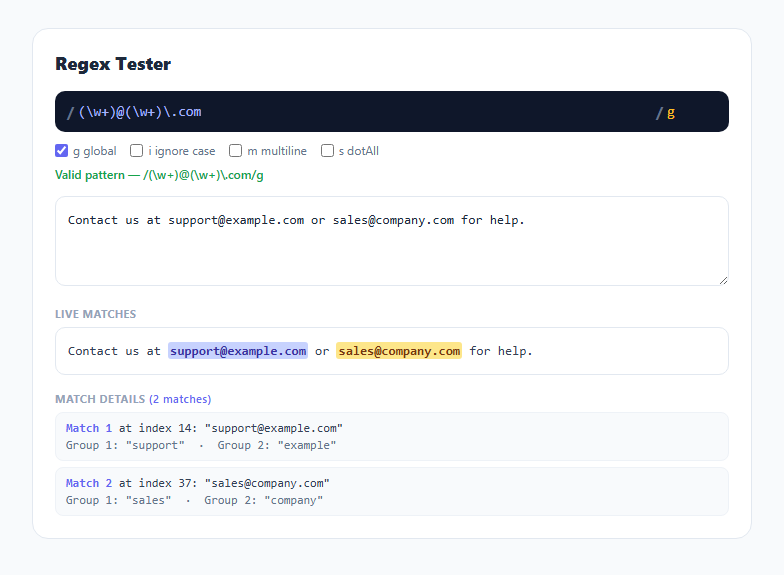
Regular expressions are notoriously hard to read back once written, and the fastest way to understand what a pattern actually matches is to see it highlighted against real text. This snippet is a real JavaScript regex engine test — every match shown is produced by the browser's native RegExp object running against whatever pattern and test string you type, not a simulated or approximated matcher.
Building the RegExp object safely
run() reads the raw pattern string and flags string, sanitizes the flags with flags.replace(/[^gimsuy]/g, '') to strip anything that isn't a real JavaScript regex flag, and wraps construction in a try/catch. An invalid pattern — unbalanced parentheses, a bad character class, an unsupported escape — throws a SyntaxError from the RegExp constructor itself, and the caught message is shown directly in the status line. This is real engine validation, not a hand-rolled regex syntax checker, so the error messages match exactly what you'd see in a browser console.
Forcing the global flag for iteration, without changing displayed intent
To collect *all* matches rather than just the first, the exec loop needs the g flag set internally regardless of whether the user's flag string includes it — otherwise RegExp.exec() always returns the same first match forever, since without g it doesn't advance lastIndex. The snippet handles this by constructing the working regex with flags.includes('g') ? flags : flags + 'g', so iteration always works, while the status line still displays the flags exactly as the user entered them for accuracy. The classic infinite-loop trap with zero-length matches (a pattern like x* matching an empty string) is guarded against explicitly: if (m.index === re.lastIndex) re.lastIndex++, which forces the engine to advance past a zero-width match instead of looping forever at the same index — combined with a hard 500-iteration cap as a second line of defense.
Building the highlighted view without a virtual DOM
The highlight box is built by walking the matches in order and slicing the original text between them: everything from the cursor position up to the next match's .index is escaped and appended as plain text, then the matched substring itself is wrapped in a <mark>, alternating a CSS class between two colors so adjacent matches remain visually distinguishable even when they're touching. escapeHtml() is applied to every literal text slice before insertion — including inside the <mark> — so a test string containing literal < or & characters can never break the rendered markup or, worse, get interpreted as HTML.
Capture groups shown per match
Each match object from exec() is an array where index 0 is the full match and indices 1+ are capture groups in pattern order; match.length > 1 signals the pattern actually has capture groups. The per-match detail row lists each group's value, explicitly labeling an unmatched optional group as (undefined) rather than silently omitting it — an easy source of confusion when a pattern has an optional group like (foo)? that sometimes doesn't participate in a given match.
Build with AI
Build, Understand, Optimize, and Extend It With AI
Paste this snippet's JavaScript into an AI assistant like Claude and ask it to explain exactly why the zero-length-match guard (if (m.index === re.lastIndex) re.lastIndex++) is necessary — it's the kind of edge case that causes a naive regex-iteration loop to freeze a tab. It's also a solid base to extend: ask for named capture group support (reading match.groups instead of numeric indices), a "common patterns" dropdown (email, URL, IPv4, hex color) to load as starting points, or a replace-preview mode that shows the result of String.replace() with a user-supplied replacement string.
Prompt to recreate it
Copy this into your AI assistant of choice to build the effect from scratch, or as a jumping-off point for your own variant:
Build a live regex tester in plain HTML, CSS, and JavaScript, no libraries.

Requirements:
- A pattern input and a flags input (plus optional checkboxes for g, i, m, s that stay synced with the flags text), and a test-string textarea, all updating results live on every keystroke.
- Construct the actual RegExp object from the user's pattern and flags inside a try/catch, and display real JavaScript SyntaxError messages inline when the pattern is invalid, rather than silently failing.
- Regardless of whether the user's flags include g, internally force it on for the matching loop so all matches (not just the first) are collected, while still showing the user's actual entered flags in the UI.
- Guard against infinite loops on patterns that can match a zero-length string by manually advancing lastIndex when a match's index doesn't move it forward, plus a hard iteration cap as a backstop.
- Render the test string with every match wrapped in a highlighted <mark> element, alternating between two colors so consecutive or adjacent matches remain visually distinguishable, with all literal text properly HTML-escaped.
- Below the highlighted text, list every match with its start index, matched substring, and the value of every capture group (explicitly showing when an optional group didn't participate in that match).
Want to tighten it up first? Run this prompt through the AI Prompt Studio to score it across 8 quality dimensions, catch anti-patterns, and tune the wording for Claude, ChatGPT, or Gemini before you paste it in.
Step by step
How to Use
- 1Type a pattern between the slashesThe pattern field accepts standard JavaScript regex syntax without the surrounding slashes — they're shown as static decoration.
- 2Toggle flags with the checkboxes or the flags fieldg (global), i (ignore case), m (multiline), and s (dotAll) can be set either by checkbox or by typing directly into the flags input — both stay in sync.
- 3Edit the test stringMatches update live on every keystroke in the textarea, no submit button required.
- 4Read the highlighted viewMatched substrings are wrapped in alternating-colored marks directly in the test text, so you can see exactly what the pattern captured in context.
- 5Check the match details listEach match shows its start index, matched text, and every capture group's value below the highlighted view.
- 6Watch the status line for syntax errorsAn invalid pattern shows the real JavaScript SyntaxError message from the RegExp constructor instead of silently failing.
Real-world uses
Common Use Cases
Got questions?
Frequently Asked Questions
It uses the browser's native JavaScript RegExp object directly — new RegExp(pattern, flags) followed by real .exec() calls. Every match, capture group, and error message you see is exactly what the same pattern would produce in any JavaScript environment.
Without the global flag, RegExp.exec() always returns the same first match and never advances, making it impossible to iterate through multiple matches. The tool internally appends g for the iteration loop while still displaying your actual chosen flags in the status line, so what you see reflects your real pattern configuration.
A pattern like x* can match a zero-length string, which would otherwise leave lastIndex unchanged and loop forever. The exec loop checks if (m.index === re.lastIndex) and manually increments lastIndex in that case, forcing the engine past the zero-width match, plus a hard cap of 500 iterations as a safety backstop.
It means that specific group is part of the pattern but did not participate in this particular match — typically because it's inside an optional group like (foo)? that wasn't present in the matched text. JavaScript's match arrays represent this as undefined at that group's index, and the tool labels it explicitly rather than showing a blank.
Yes — any valid JavaScript regex syntax works, since the pattern is passed straight to the native RegExp constructor. Named groups appear in match.groups, though this tool's detail view currently lists groups by their numeric index rather than by name.
No. Everything runs client-side using the browser's built-in RegExp engine — nothing is transmitted to a server, so it's safe to test against real (non-sensitive) log lines or sample data.