You Might Also Like
Learn Coding Visually
Learn to code with interactive, live-preview playgrounds — HTML, CSS, JavaScript, React & more.
 HTML Playground42 lessons · Click-based · Live preview
 CSS PlaygroundLearn CSS with a live editor
 JavaScript Playground60 lessons · DOM · Async · Canvas
 React PlaygroundLearn React with a live code editor
 GSAP PlaygroundLearn GSAP animation interactively
 SVG Playground44 lessons · shapes · paths · animation
 SCSS Playground45 lessons · Sass modules · tokens
 Tailwind PlaygroundLearn Tailwind CSS with a live editor
 Bootstrap 5 Playground50 lessons · live preview
Text Diff Checker — Free HTML CSS JS Word-Level Diff Snippet
Text Diff Checker · Dev · Plain HTML, CSS & JS · Live preview
What's included
Features
About this UI Snippet
Text Diff Checker — LCS Dynamic Programming Diff, No Library
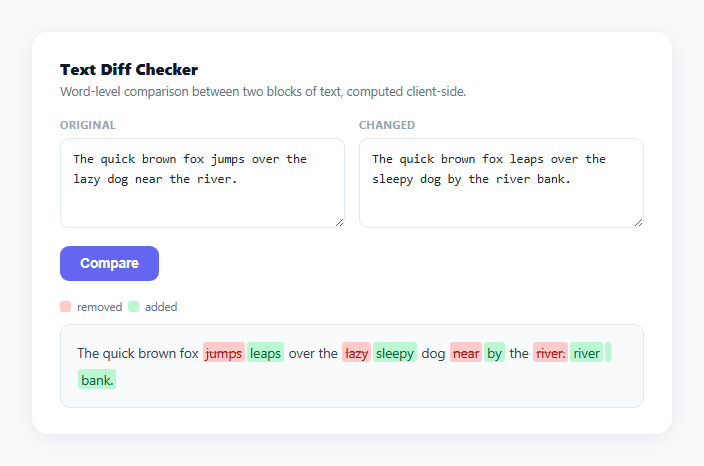
Comparing two versions of a document, contract, or paragraph word-by-word is exactly the kind of problem that looks trivial until you try to implement it — a naive character comparison produces useless, noisy output. This snippet implements a real longest common subsequence (LCS) diff algorithm from scratch in vanilla JavaScript, operating on whitespace-preserving word tokens instead of individual characters.
Tokenizing without losing whitespace
tokenize() splits on /(\s+)/ with a capturing group, which — unlike a plain split on whitespace — keeps every run of spaces, tabs, and newlines as its own token in the resulting array. That means the diff algorithm treats "quick brown" and "quick brown" (two spaces) as genuinely different token sequences, and reassembling the output never needs to guess where whitespace should go — it's already preserved token-for-token.
Building the LCS table bottom-up
dp[i][j] holds the length of the longest common subsequence between the tail of array a starting at index i and the tail of b starting at index j. The nested loop fills this table from the bottom-right corner backward: dp[i][j] = a[i] === b[j] ? dp[i+1][j+1] + 1 : Math.max(dp[i+1][j], dp[i][j+1]) — if the tokens match, extend the best subsequence found one cell diagonally; otherwise take whichever neighboring cell (skip a token from a, or skip one from b) gives the longer subsequence. This is the same core recurrence used by diff, git diff, and most text-comparison tools.
Backtracking to recover the actual edits
Once the table is built, a forward walk from (0, 0) reconstructs the operations: matching tokens are eq, and at a mismatch the walk follows whichever neighbor cell in the DP table has the larger value — dp[i+1][jj] >= dp[i][jj+1] — deciding whether this token was deleted from a or inserted from b. This greedy-looking walk is provably optimal because the table already encodes the best subsequence length at every position.
Rendering with real `<del>`/`<ins>` elements
Deleted tokens render inside <del> and inserted tokens inside <ins> — the semantically correct HTML elements for this exact purpose, not just styled <span>s — while every token is passed through escapeHtml() first so pasted text containing <, >, or & can't break the output markup.
Customizing it
Swap word-level tokenization for character-level (drop the whitespace-preserving regex and split on '') for finer-grained diffs, or add a line-level mode by tokenizing on \n first and running the same diffWords() function on lines instead of words.
Build with AI
Build, Understand, Optimize, and Extend It With AI
You don't have to work out the dynamic-programming recurrence by hand. Paste this snippet's HTML, CSS, and JS into an AI coding assistant like Claude and ask it to explain why dp[i][j] = a[i] === b[j] ? dp[i+1][j+1] + 1 : Math.max(dp[i+1][j], dp[i][j+1]) correctly computes the longest common subsequence, and how the backtracking walk turns that table into a concrete list of matched, deleted, and inserted tokens. The same assistant can help optimize it too — ask whether a line-level pre-pass would make the algorithm practical for multi-page documents where the full O(n×m) table would otherwise be too large. It's also useful for extending the tool: ask it to add character-level highlighting within changed words, a side-by-side (rather than inline) diff view, or a copy-as-markdown export of the diff result. Treat the code less like a finished artifact and more like a starting point for a conversation.
Prompt to recreate it
Copy this into your AI assistant of choice to build the effect from scratch, or as a jumping-off point for your own variant:
Build a "text diff checker" that highlights word-level differences between two blocks of text, in plain HTML, CSS, and JavaScript with no external diff library — implement the diff algorithm yourself.

Requirements:
- Two text areas labeled "Original" and "Changed", each containing editable sample text, and a "Compare" button.
- A tokenizer that splits each text into an array of word and whitespace tokens using a whitespace-preserving strategy (e.g. splitting with a regex capturing group on whitespace runs) so that spacing differences between the two texts are preserved as real tokens, not discarded.
- A from-scratch implementation of a longest common subsequence dynamic-programming algorithm over the two token arrays: build a 2D table bottom-up where each cell represents the LCS length of the remaining suffixes, then backtrack (or walk forward) through that table to reconstruct an ordered list of operations tagged as unchanged, deleted (only in the original), or inserted (only in the changed text).
- Render the reconstructed operations inline: unchanged tokens as plain text, deleted tokens wrapped in real <del> elements with strikethrough and a red background, and inserted tokens wrapped in real <ins> elements with a green background — concatenated in order so the output reads as continuous prose with the changes highlighted in place.
- HTML-escape every token's text before inserting it into the page so pasted text containing angle brackets or ampersands can't break the rendered output.
- A small legend explaining the red/green color convention, and a responsive two-column input layout that collapses to one column on narrow screens.
Want to tighten it up first? Run this prompt through the AI Prompt Studio to score it across 8 quality dimensions, catch anti-patterns, and tune the wording for Claude, ChatGPT, or Gemini before you paste it in.
Step by step
How to Use
- 1Paste HTML, CSS, and JSTwo sample paragraphs load with a diff already rendered below.
- 2Edit either text areaChange the "Original" or "Changed" text to whatever you want to compare.
- 3Click CompareThe diff output re-renders, showing removed words struck through in red and added words highlighted in green.
- 4Read the resultUnchanged words appear plain; only the actual differing spans are highlighted, not the whole line.
- 5Switch to character-level diffingIn tokenize(), remove the whitespace-preserving split and split the string into individual characters instead.
- 6Add line-level diffingTokenize on newlines first, run diffWords() on the resulting line arrays, then run it again within each changed line for word-level detail.
Real-world uses
Common Use Cases
Got questions?
Frequently Asked Questions
It builds a dynamic-programming table where dp[i][j] represents the length of the longest common subsequence between the remaining tokens of each text starting at positions i and j. Filling that table from the end backward, then walking it forward from the start while following whichever neighbor has the larger stored value, reconstructs the optimal sequence of matches, deletions, and insertions.
Character-level diffing on prose tends to produce noisy, hard-to-read output — a single added word can make every following character look "different" until things realign. Word-level tokens keep the diff granularity matched to how humans actually read changes: word by word, not letter by letter.
tokenize() splits using a regex with a capturing group around whitespace, /(\s+)/, which — unlike a normal split — includes the matched whitespace runs as their own array entries instead of discarding them. This means spacing differences are diffed and reconstructed exactly like word differences.
The DP table is O(n × m) in both time and memory, where n and m are the token counts of each text. That's fine for paragraphs and typical documents, but for very large files (thousands of lines) you'd want a line-level pre-pass first — diff at the line granularity, then only run this word-level diff on the lines that actually changed.
Yes — run diffWords() a second time, but on the individual characters of just the words marked del/add adjacent to each other, rather than on the full token arrays. This two-pass approach (word-level first, then character-level within changed spans) is how most polished diff tools get fine-grained highlighting.