Learn Coding Visually
Learn to code with interactive, live-preview playgrounds — HTML, CSS, JavaScript, React & more.
 HTML Playground42 lessons · Click-based · Live preview
 CSS PlaygroundLearn CSS with a live editor
 JavaScript Playground60 lessons · DOM · Async · Canvas
 React PlaygroundLearn React with a live code editor
 GSAP PlaygroundLearn GSAP animation interactively
 SVG Playground44 lessons · shapes · paths · animation
 SCSS Playground45 lessons · Sass modules · tokens
 Tailwind PlaygroundLearn Tailwind CSS with a live editor
 Bootstrap 5 Playground50 lessons · live preview
HTTP Status Code Reference — Free HTML CSS JS Snippet
HTTP Status Code Reference · Dev · Plain HTML, CSS & JS · Live preview
What's included
Features
About this UI Snippet
HTTP Status Code Reference — Searchable 1xx-5xx Lookup Table with Click-to-Copy
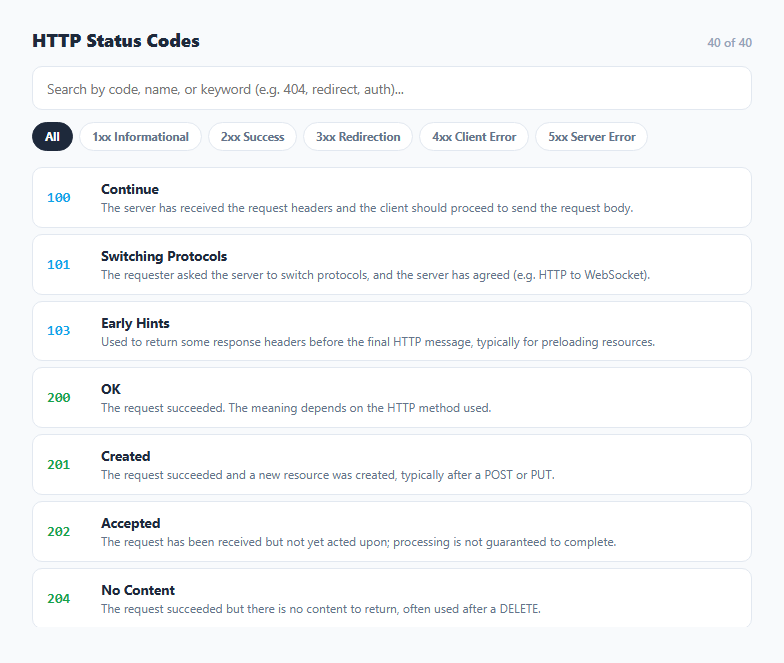
Every developer eventually forgets the exact difference between a 401 and a 403, or whether a 307 preserves the request method during a redirect while a 302 technically does not always guarantee it. This snippet is a self-contained, searchable reference table covering the full range of standard HTTP status codes from informational 1xx responses through server error 5xx responses, built entirely from a static JavaScript array with no network request and no external API — everything renders instantly and works offline.
The data model
The core of the tool is the STATUS_CODES array, where each entry is a plain object with code, name, and desc fields. Descriptions are written to be accurate and concise, summarizing the relevant RFC 9110 (and predecessor RFC 7231/2616) semantics in a sentence rather than reproducing the full specification text. Because it is just a JavaScript array, extending it with additional or custom status codes — a proprietary 499 Client Closed Request used by some proxies, for instance — is a one-line addition.
Live filtering by category and free text
render() is the single function responsible for producing the visible list. It filters STATUS_CODES against two independent conditions: the active category filter (all, or one of 1 through 5 matching the first digit of the code) and a free-text query matched case-insensitively against the code number, the name, and the description. This means typing "redirect" surfaces every 3xx code even without knowing their numbers, while typing "404" or clicking the "4xx Client Error" filter narrows immediately. Both filters combine with logical AND, so a search term and a category filter can be applied simultaneously.
Category color coding
Each row's code number gets a CSS class derived from categoryClass(), which simply takes the first character of the status code and prefixes it with c (so 404 becomes .c4). This produces the familiar color convention seen in most HTTP tooling and browser dev tools — blue for informational, green for success, amber for redirection, red for client errors, and purple for server errors — giving an instant visual read of a code's category before even reading the number.
Click-to-copy for pasting into code or documentation
Clicking any row calls navigator.clipboard.writeText() with a formatted string like "404 Not Found", useful for pasting directly into a commit message, a code comment, or an API error response body. The button briefly shows a "Copied!" confirmation and a green border via the .copied class, then reverts after 1.1 seconds. A fallback path runs the same visual confirmation even if the Clipboard API is unavailable (for example in a restricted iframe), so the interaction never silently fails.
Why this beats a static cheat sheet
A printed or static HTML table of status codes requires scanning through potentially 40 rows to find the one you want. Combining a live text filter with category buttons turns that into a two-keystroke lookup: type part of what you remember (the number, a fragment of the name, or even a keyword from the description like "rate limit" for 429) and the matching rows are the only ones left. That single interaction — search-as-you-type against multiple fields at once — is the same pattern worth reusing for any reference table where users often remember only a fragment of what they are looking for.
Build with AI
Build, Understand, Optimize, and Extend It With AI
Paste this snippet into an AI assistant like Claude and ask it to help extend the STATUS_CODES data set with less common but real-world codes you actually encounter, such as 226, 300, or vendor-specific extensions like Cloudflare's 520-527 range, complete with accurate descriptions. It is also a natural base for adding a "copy as JSON" button, grouping the list by category into collapsible sections instead of a flat list, or wiring the search box to also match against common aliases developers use informally, like "teapot" for 418.
Prompt to recreate it
Copy this into your AI assistant of choice to build the effect from scratch, or as a jumping-off point for your own variant:
Build a searchable HTTP status code reference tool in plain HTML, CSS, and JavaScript, no libraries.

Requirements:
- A static JavaScript array of objects covering the standard 1xx through 5xx HTTP status codes, each with a numeric code, a short name, and a one-sentence RFC-accurate description.
- A text input that filters the visible list live on every keystroke, matching the query case-insensitively against the code number, the name, and the description text.
- A row of category filter buttons (All, 1xx, 2xx, 3xx, 4xx, 5xx) that narrow the list to codes whose first digit matches, combinable with the text search using logical AND.
- Color-code each status code by its first digit (e.g. blue for 1xx, green for 2xx, amber for 3xx, red for 4xx, purple for 5xx) to match common developer-tool conventions.
- Clicking any row copies a formatted "code name" string to the clipboard using the Clipboard API, with a brief visual "Copied!" confirmation, and a safe fallback if the Clipboard API is unavailable.
- Show a live count of how many codes currently match the applied filters.
- Do not make any network request — the entire code list must be a hardcoded JavaScript array.
Want to tighten it up first? Run this prompt through the AI Prompt Studio to score it across 8 quality dimensions, catch anti-patterns, and tune the wording for Claude, ChatGPT, or Gemini before you paste it in.
Step by step
How to Use
- 1Browse the full listAll standard HTTP status codes from 100 to 505 are listed by default, grouped visually by category color.
- 2Search by code, name, or keywordType a number like 404, a name fragment like "redirect", or a concept like "rate limit" — the list filters live against all three fields.
- 3Filter by categoryClick 1xx, 2xx, 3xx, 4xx, or 5xx to narrow the list to just that class of response, combinable with the search box.
- 4Click a row to copy itClicking any row copies "code name" (e.g. "429 Too Many Requests") to your clipboard for pasting into code or docs.
- 5Add your own codesIn the JS panel, add an object with code, name, and desc to the STATUS_CODES array to include custom or proprietary codes.
- 6Export in your formatClick HTML for a standalone file, JSX for a React component, or Tailwind for a React + Tailwind version.
Real-world uses
Common Use Cases
Got questions?
Frequently Asked Questions
No. All status codes and their descriptions live in a static JavaScript array (STATUS_CODES) inside the snippet itself. There is no network request, so it works fully offline and loads instantly.
The render() function filters STATUS_CODES with a single condition that checks the lowercased query against String(item.code), item.name.toLowerCase(), and item.desc.toLowerCase(), so a match on any of the three fields includes that row.
Yes. The category filter and the text search are two independent conditions combined with logical AND inside the same filter callback, so clicking "4xx Client Error" and then typing "auth" shows only client-error codes whose name or description mentions authentication or authorization.
Clicking a row copies a formatted string of the code and its name, such as "403 Forbidden", to your clipboard via navigator.clipboard.writeText(), useful for pasting directly into code comments or documentation.
Yes. Add a new object with code, name, and desc fields to the STATUS_CODES array in the JS panel. It automatically appears in the list, gets a category color based on its first digit, and becomes searchable.
The descriptions summarize the semantics defined by RFC 9110 and its predecessors (RFC 7231, RFC 2616) in plain language. For legally or contractually precise wording, always refer to the current RFC text directly.