Learn Coding Visually
Learn to code with interactive, live-preview playgrounds — HTML, CSS, JavaScript, React & more.
 HTML Playground42 lessons · Click-based · Live preview
 CSS PlaygroundLearn CSS with a live editor
 JavaScript Playground60 lessons · DOM · Async · Canvas
 React PlaygroundLearn React with a live code editor
 GSAP PlaygroundLearn GSAP animation interactively
 SVG Playground44 lessons · shapes · paths · animation
 SCSS Playground45 lessons · Sass modules · tokens
 Tailwind PlaygroundLearn Tailwind CSS with a live editor
 Bootstrap 5 Playground50 lessons · live preview
Number Base Converter — Binary, Octal, Decimal & Hex
Number Base Converter · Dev · Plain HTML, CSS & JS · Live preview
What's included
Features
About this UI Snippet
Number Base Converter — Live Binary, Octal, Decimal & Hexadecimal with Bit Breakdown
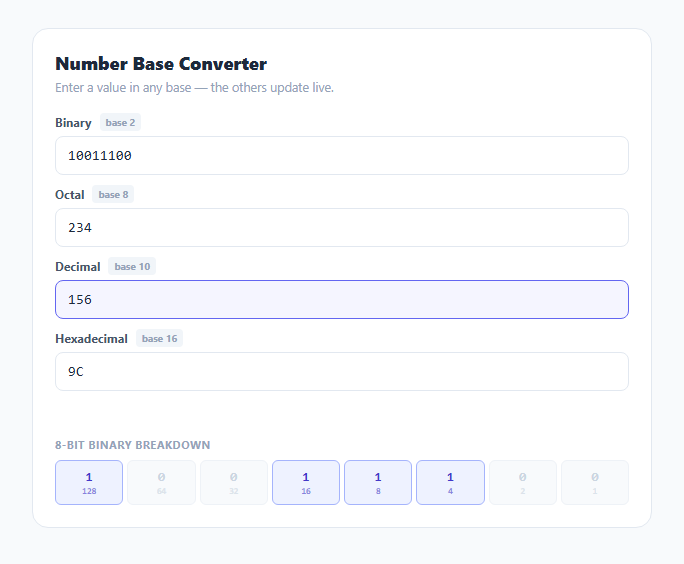
Converting between number bases by hand is a rite of passage in every programming course, and a tool you still reach for years later when debugging a bitmask, a file permission value, or a color hex code. This snippet keeps four inputs — binary, octal, decimal, and hexadecimal — permanently in sync: type in any one of them and the other three update instantly using JavaScript's own radix-aware number parsing and formatting, not a hand-rolled conversion algorithm.
parseInt and toString do the real conversion work
The core conversion logic is exactly two built-in calls. parseInt(raw, sourceBase) reads the input string as a number in whichever base the user typed into, and value.toString(targetBase) re-renders that same numeric value into any other base's string representation. This is deliberate: JavaScript's Number type and these two methods already implement correct, well-tested radix conversion, so there is no reason to hand-write digit-by-digit division-and-remainder logic that could introduce subtle bugs. The interesting engineering is entirely in validation and UI synchronization, not in the math itself.
Per-base input validation before conversion
Each base has a different valid character set, checked with a dedicated regular expression before any conversion is attempted: /^[01]*$/ for binary, /^[0-7]*$/ for octal, /^[0-9]*$/ for decimal, and /^[0-9a-fA-F]*$/ for hex. This catches invalid input — typing "2" into the binary field, or "G" into the hex field — before it reaches parseInt, which would otherwise silently parse only the valid leading digits and produce a confusingly wrong number rather than an obvious error. The offending row is marked with a red border and the status line names exactly which base rejected the input.
Avoiding an infinite update loop
Because every input listens for changes and rewrites the other three fields, a naive implementation would trigger the hex field's own input handler when the converter programmatically sets its value, cascading into every other field again. updateFrom(sourceBase) sidesteps this entirely by writing to inputs[b].value directly — a plain DOM property assignment — rather than calling any method that dispatches a synthetic input event, so only the field the user actually typed into ever fires the update function.
A 32-bit range guard
Values above 4294967295 (2³²−1) are rejected with an explicit message rather than allowed to silently produce Infinity or lose precision, since Number.prototype.toString(radix) on values beyond safe integer precision can behave unpredictably. This keeps the tool honest about its limits instead of quietly returning a wrong answer for very large inputs.
The 8-bit visual breakdown
Below the four synced inputs, renderBits() takes the current value modulo 256 (via a bitwise & 0xff) and extracts its low 8 bits one at a time using n & 1 followed by a right shift, building an array of individual bit values. Each bit renders as its own cell labeled with the binary place value it represents (128, 64, 32, ... down to 1), with "on" bits highlighted in a distinct color. This makes bitwise concepts — which single bit toggling produces which change in decimal, how a byte's most significant bit relates to values 128 and above — visible rather than abstract, which is exactly the kind of thing that is much easier to understand by watching a highlighted cell flip than by reading an explanation of it.
Build with AI
Build, Understand, Optimize, and Extend It With AI
Paste this snippet's JavaScript into an AI assistant like Claude and ask it to walk through exactly why parseInt and toString(radix) are sufficient for correct base conversion without any custom digit-by-digit math, and why the 32-bit range guard exists. It's also a good base to extend: ask for a signed two's-complement mode for negative numbers, support for arbitrary custom bases beyond the four shown, or a 32-bit bit grid (four rows of 8) instead of just the low byte for full-width bitmask work.
Prompt to recreate it
Copy this into your AI assistant of choice to build the effect from scratch, or as a jumping-off point for your own variant:
Build a number base converter in plain HTML, CSS, and JavaScript, no libraries.

Requirements:
- Four text inputs, one each for binary, octal, decimal, and hexadecimal, all kept in sync live: typing in any one field immediately updates the value shown in the other three.
- Use JavaScript's built-in parseInt(string, radix) to read the source value and Number.prototype.toString(radix) to render it into the other bases — no hand-written conversion algorithm.
- Validate each field's input against a regular expression matching that base's legal digit set before converting (binary: 0-1, octal: 0-7, decimal: 0-9, hex: 0-9a-fA-F case-insensitive), and show a clear inline error naming the offending base when an invalid character is typed, without attempting to convert.
- Ensure programmatic updates to the other three fields do not themselves trigger further update cycles (avoid an infinite loop by setting the value property directly rather than dispatching input events).
- Reject values above 4294967295 (32-bit unsigned max) with an explicit error message instead of silently losing precision.
- Below the inputs, render an 8-cell visual grid showing the low byte of the current value broken into individual bits, each cell labeled with its binary place value (128 down to 1) and visually highlighted when the bit is set to 1.
Want to tighten it up first? Run this prompt through the AI Prompt Studio to score it across 8 quality dimensions, catch anti-patterns, and tune the wording for Claude, ChatGPT, or Gemini before you paste it in.
Step by step
How to Use
- 1Type into any fieldEnter a value in Binary, Octal, Decimal, or Hexadecimal — the other three fields convert and update instantly.
- 2Watch invalid input get flaggedTyping a digit that is not valid for that base (like "9" in binary) highlights the field red and explains why in the status line.
- 3Read the bit breakdownThe 8-bit grid below shows the low byte of your value broken into individual bits with their place values (128 down to 1).
- 4Try a hex color or file permission valuePaste a hex code like FF or an octal permission like 755 to see it instantly cross-referenced in the other bases.
- 5Clear a field to resetClearing any input clears the others too, giving you a blank slate to start a new conversion.
- 6Export in your formatClick HTML for a standalone file, JSX for a React component, or Tailwind for a React + Tailwind version.
Real-world uses
Common Use Cases
Got questions?
Frequently Asked Questions
No. It relies entirely on JavaScript built-ins: parseInt(string, radix) to read the typed value in its source base, and Number.prototype.toString(radix) to render that same numeric value into every other base. This is the same well-tested conversion logic every JavaScript engine already implements.
A regex validates the input against that base's legal character set before any conversion happens — for example /^[01]*$/ for binary. An invalid character marks the field red and shows a specific error message rather than silently parsing only the valid leading digits.
When the converter writes a computed value into the other three fields, it sets the DOM .value property directly rather than calling anything that dispatches a synthetic input event. Only genuine user keystrokes in a field trigger that field's own update handler.
Yes, values above 4294967295 (2 to the 32nd power minus 1, the classic 32-bit unsigned integer maximum) are rejected with an explicit error rather than silently losing precision, since toString(radix) on very large numbers can behave unpredictably near JavaScript's safe integer limit.
It shows the low byte (value modulo 256) of your current number broken into its 8 individual bits, each labeled with the binary place value it represents (128, 64, 32, 16, 8, 4, 2, 1), with set bits highlighted so you can see exactly which powers of two sum to your value.
No. The hex input accepts both uppercase and lowercase a-f, and the converter always outputs uppercase hex digits (via .toUpperCase()) for consistency, matching common formatting conventions.