Learn Coding Visually
Learn to code with interactive, live-preview playgrounds — HTML, CSS, JavaScript, React & more.
 HTML Playground42 lessons · Click-based · Live preview
 CSS PlaygroundLearn CSS with a live editor
 JavaScript Playground60 lessons · DOM · Async · Canvas
 React PlaygroundLearn React with a live code editor
 GSAP PlaygroundLearn GSAP animation interactively
 SVG Playground44 lessons · shapes · paths · animation
 SCSS Playground45 lessons · Sass modules · tokens
 Tailwind PlaygroundLearn Tailwind CSS with a live editor
 Bootstrap 5 Playground50 lessons · live preview
.env File Parser & Validator — Free HTML CSS JS Snippet
.env File Parser & Validator · Dev · Plain HTML, CSS & JS · Live preview
What's included
Features
About this UI Snippet
.env File Parser — Validate KEY=VALUE Syntax, Find Duplicates & Generate .env.example
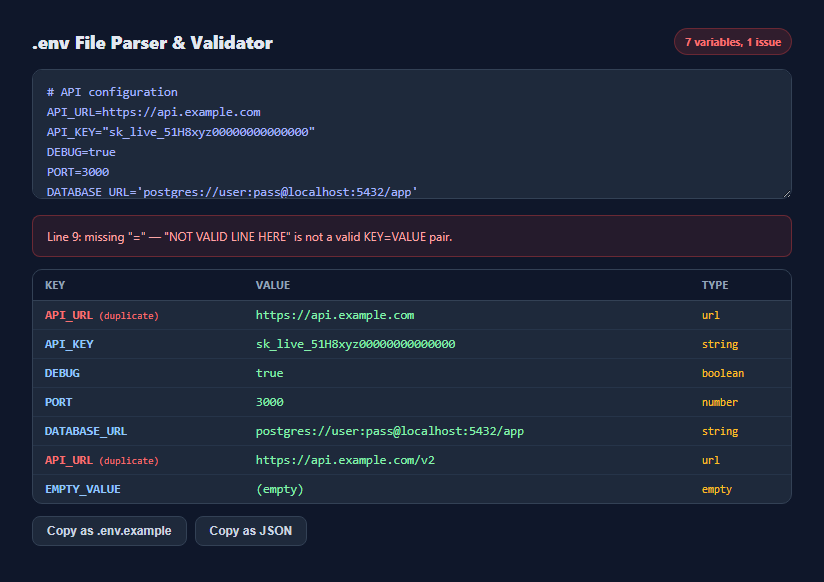
A .env file looks trivially simple — one KEY=VALUE pair per line — but it is surprisingly easy to introduce a subtle bug: a duplicate key where only the last value silently wins, a variable name with an invalid character, or quoting that does not match what the loading library actually expects. This snippet parses real .env syntax entirely in the browser and surfaces exactly those problems before they cause a confusing runtime bug.
Line-by-line parsing that mirrors how dotenv loaders actually work
parseEnv() splits the input on newlines and processes each line independently, skipping blank lines and full-line comments starting with # — the same convention used by the dotenv npm package and most language equivalents. Each remaining line is split on the first = character only, via indexOf('=') rather than split('='), which matters because a value like DATABASE_URL=postgres://user:pass@host/db?ssl=true legitimately contains additional = characters after the first one — splitting on every occurrence would truncate the value.
Validating the variable name, not just its presence
Every key is checked against /^[A-Za-z_][A-Za-z0-9_]*$/, matching the actual identifier rules most language environment-variable APIs enforce: a variable name must start with a letter or underscore and contain only letters, digits, and underscores after that. A line like NOT VALID LINE HERE (no = at all) or a key starting with a digit is reported with its exact line number rather than silently ignored or half-parsed.
Stripping quotes the way real loaders do
.env values are commonly wrapped in single or double quotes to preserve leading/trailing whitespace or embed special characters. stripQuotes() checks whether the trimmed value both starts and ends with a matching quote character before removing them — a value with only a leading quote is left untouched rather than partially stripped, since that mismatch is far more likely to be a typo than an intentional unbalanced quote.
Flagging every occurrence of a duplicate key
Most .env loaders resolve a duplicate key by silently keeping whichever assignment appears last, which is exactly the kind of bug that is invisible until a value mysteriously does not match what was set higher in the file. The parser counts occurrences of each key across the whole file and marks every row sharing a repeated key — not just the second one — so both the shadowed value and the value that wins are equally visible in the table.
Inferring a lightweight type per value
detectType() classifies each parsed value as boolean, number, URL, empty, or plain string using simple pattern checks. This is not a strict schema — .env values are always strings at runtime — but the inferred type column makes it easy to spot a value that looks wrong for its apparent purpose, like a PORT value that is not actually numeric.
Generating a redacted .env.example and a JSON view
The tool separately builds two derived outputs: a .env.example where every key keeps its name but the value is replaced with a type-appropriate placeholder (true for booleans, 0 for numbers, https:// for URLs, empty for strings) so real secrets never appear in a template file meant for version control, and a plain JSON object mapping keys to their real values for quick programmatic use elsewhere.
Build with AI
Build, Understand, Optimize, and Extend It With AI
Paste this snippet's JavaScript into an AI assistant like Claude and ask it to explain why the parser splits on only the first "=" character instead of using a plain string split, and why every occurrence of a duplicate key is flagged rather than just the second one. It is also a good base to extend: ask for a diff mode comparing two .env files (e.g. .env versus .env.production) to spot missing or extra keys, expansion of dollar-brace variable interpolation (VAR referencing another key), or a strictness toggle that also flags keys present in .env.example but missing from the pasted .env.
Prompt to recreate it
Copy this into your AI assistant of choice to build the effect from scratch, or as a jumping-off point for your own variant:
Build a client-side .env file parser and validator in plain HTML, CSS, and JavaScript, no libraries.

Requirements:
- A textarea where pasted .env-style content is parsed live on every input event, correctly skipping blank lines and full-line # comments.
- Split each remaining line on only the first "=" character (not every occurrence), so a value containing further equals signs, like a database URL query string, is preserved intact.
- Validate that each key matches real environment-variable identifier rules (starts with a letter or underscore, followed by letters, digits, or underscores only) and report any invalid line with its 1-indexed line number in a visible issues list.
- Strip matching single or double quotes surrounding a value, but leave a value with mismatched or only one-sided quoting untouched.
- Detect and count duplicate keys across the whole file, and visually highlight every row sharing a repeated key (not just the later one), since most real dotenv loaders silently let the last assignment win.
- Infer a lightweight type per value (boolean, number, URL, empty, or generic string) using simple pattern matching, and display it in a table alongside each key and value.
- Render all parsed variables in a table with Key, Value, and Type columns.
- Two copy actions: one that copies a redacted .env.example where every key keeps its name but the value is replaced with a type-appropriate placeholder (never the real value), and one that copies a plain JSON object of all parsed key-value pairs. Both should use the Clipboard API with a brief visual confirmation.
Want to tighten it up first? Run this prompt through the AI Prompt Studio to score it across 8 quality dimensions, catch anti-patterns, and tune the wording for Claude, ChatGPT, or Gemini before you paste it in.
Step by step
How to Use
- 1Paste your .env contentAny real .env file works — comments and blank lines are recognized and skipped automatically.
- 2Check the status badgeIt shows how many variables were parsed and how many syntax issues were found.
- 3Read flagged issuesLines missing an "=" or with an invalid variable name are listed with their exact line number.
- 4Look for duplicate-key rowsAny key repeated more than once in the file is highlighted in red — only the last one actually takes effect in most loaders.
- 5Review the inferred type columnBoolean, number, URL, empty, and string values are auto-detected to help catch a value that looks wrong for its purpose.
- 6Copy a redacted template or JSONUse "Copy as .env.example" for a safe, secret-free template, or "Copy as JSON" for a plain key-value object.
Real-world uses
Common Use Cases
Got questions?
Frequently Asked Questions
No. Parsing, validation, and both generated outputs are computed entirely in the browser using plain JavaScript string operations — nothing is transmitted over the network, which is exactly why it is safe to paste real .env content with live secrets.
A value like a database connection string can legitimately contain further "=" characters, for example in a query string parameter. Splitting on only the first occurrence via indexOf keeps the rest of the line intact as the value instead of truncating it.
The parser counts every occurrence of each key across the file and highlights every row that shares a repeated key, not just the second occurrence. This mirrors the real risk: most .env loaders let the last matching assignment silently win, which is easy to miss without this kind of highlighting.
Anything that does not match the pattern of a letter or underscore followed by any number of letters, digits, or underscores — the same rule most shells and language runtimes enforce for environment variable names. A name starting with a digit or containing a space or hyphen is flagged with its line number.
Each key keeps its exact name, but the value is replaced based on the inferred type: true for booleans, 0 for numbers, https:// for URLs, and an empty value for plain strings — so the template documents which variables exist without exposing any real secret.
It strips a value only when it starts and ends with the same matching quote character (both single or both double). A value with a stray or mismatched quote is left as-is, since silently guessing at a fix could hide a real typo in the source file.