Source Code
<section class="pas-top"><p>Scroll ↓ to assemble</p></section>
<section class="pas-stage" id="pasStage">
  <canvas id="pasCanvas"></canvas>
  <h2 class="pas-label" id="pasLabel">Scattered</h2>
</section>
<section class="pas-bottom"><p>Every point found its place.</p></section>*{box-sizing:border-box;margin:0;padding:0}
html,body{background:#060810;color:#fff;font-family:system-ui,-apple-system,sans-serif}
.pas-top,.pas-bottom{min-height:70vh;display:flex;justify-content:center;align-items:center;color:#767ea0;font-size:15px;letter-spacing:.08em;text-transform:uppercase}
.pas-stage{height:100vh;position:relative;overflow:hidden;background:radial-gradient(60% 60% at 50% 45%,#111634,#060810)}
#pasCanvas{display:block;width:100%;height:100%}
.pas-label{position:absolute;left:0;right:0;bottom:34px;text-align:center;font-size:13px;letter-spacing:.32em;text-transform:uppercase;color:#a5b4fc;pointer-events:none}const canvas = document.getElementById('pasCanvas');
const label = document.getElementById('pasLabel');
const renderer = new THREE.WebGLRenderer({ canvas, antialias: true, alpha: true });
renderer.setPixelRatio(Math.min(window.devicePixelRatio, 2));
const scene = new THREE.Scene();
const camera = new THREE.PerspectiveCamera(60, 1, 0.1, 100);
camera.position.set(0, 0, 7);
const COUNT = 2600;
// Two coordinate sets are pre-computed for every particle: a random cloud
// "scattered" position, and an ordered "target" position on the surface of a
// sphere. Scroll blends each particle from its scattered spot to its target.
const scattered = new Float32Array(COUNT * 3);
const target = new Float32Array(COUNT * 3);
const positions = new Float32Array(COUNT * 3);
const colors = new Float32Array(COUNT * 3);
for (let i = 0; i < COUNT; i++) {
const i3 = i * 3;
// Scattered: a loose box of noise around the origin.
scattered[i3] = (Math.random() - 0.5) * 16;
scattered[i3 + 1] = (Math.random() - 0.5) * 16;
scattered[i3 + 2] = (Math.random() - 0.5) * 16;
// Target: an even Fibonacci-sphere distribution so the assembled shape is
// smooth rather than clumpy.
const y = 1 - (i / (COUNT - 1)) * 2;
const r = Math.sqrt(1 - y * y);
const theta = i * 2.399963229728653; // golden angle
target[i3] = Math.cos(theta) * r * 2.4;
target[i3 + 1] = y * 2.4;
target[i3 + 2] = Math.sin(theta) * r * 2.4;
const c = new THREE.Color().setHSL(0.55 + (y + 1) * 0.12, 0.75, 0.6);
colors[i3] = c.r; colors[i3 + 1] = c.g; colors[i3 + 2] = c.b;
}
positions.set(scattered);
const geo = new THREE.BufferGeometry();
geo.setAttribute('position', new THREE.BufferAttribute(positions, 3));
geo.setAttribute('color', new THREE.BufferAttribute(colors, 3));
const points = new THREE.Points(geo, new THREE.PointsMaterial({
size: 0.05, vertexColors: true, transparent: true, opacity: 0.9,
blending: THREE.AdditiveBlending, depthWrite: false,
}));
scene.add(points);
gsap.registerPlugin(ScrollTrigger);
// 'p' is the assembly progress, 0 = fully scattered, 1 = fully assembled.
const state = { p: 0 };
gsap.to(state, {
p: 1,
ease: 'none',
scrollTrigger: {
trigger: '#pasStage',
start: 'top top',
end: '+=350%',
scrub: 0.5,
pin: true,
onUpdate: (self) => {
const v = self.progress;
label.textContent = v < 0.15 ? 'Scattered' : v > 0.85 ? 'Assembled' : 'Assembling…';
},
},
});
const posAttr = geo.getAttribute('position');
function resize() {
const w = canvas.clientWidth, h = canvas.clientHeight;
renderer.setSize(w, h, false);
camera.aspect = w / h;
camera.updateProjectionMatrix();
}
function animate() {
requestAnimationFrame(animate);
// Smooth-step the raw progress so the assembly eases in and out.
const p = state.p * state.p * (3 - 2 * state.p);
const arr = posAttr.array;
for (let i = 0; i < COUNT; i++) {
const i3 = i * 3;
arr[i3] = scattered[i3] + (target[i3] - scattered[i3]) * p;
arr[i3 + 1] = scattered[i3 + 1] + (target[i3 + 1] - scattered[i3 + 1]) * p;
arr[i3 + 2] = scattered[i3 + 2] + (target[i3 + 2] - scattered[i3 + 2]) * p;
}
posAttr.needsUpdate = true;
points.rotation.y += 0.0016;
renderer.render(scene, camera);
}
resize();
window.addEventListener('resize', resize);
animate();Learn Coding Visually
Learn to code with interactive, live-preview playgrounds — HTML, CSS, JavaScript, React & more.
 HTML Playground42 lessons · Click-based · Live preview
 CSS PlaygroundLearn CSS with a live editor
 JavaScript Playground60 lessons · DOM · Async · Canvas
 React PlaygroundLearn React with a live code editor
 GSAP PlaygroundLearn GSAP animation interactively
 SVG Playground44 lessons · shapes · paths · animation
 SCSS Playground45 lessons · Sass modules · tokens
 Tailwind PlaygroundLearn Tailwind CSS with a live editor
 Bootstrap 5 Playground50 lessons · live preview
Three.js Scroll Particle Assembly — GSAP Effect
Three.js Scroll Particle Assembly · Scroll · Plain HTML, CSS & JS · Live preview
What's included
Features
About this UI Snippet
How to Build a Scroll-Driven Particle Assembly Effect With Three.js and GSAP
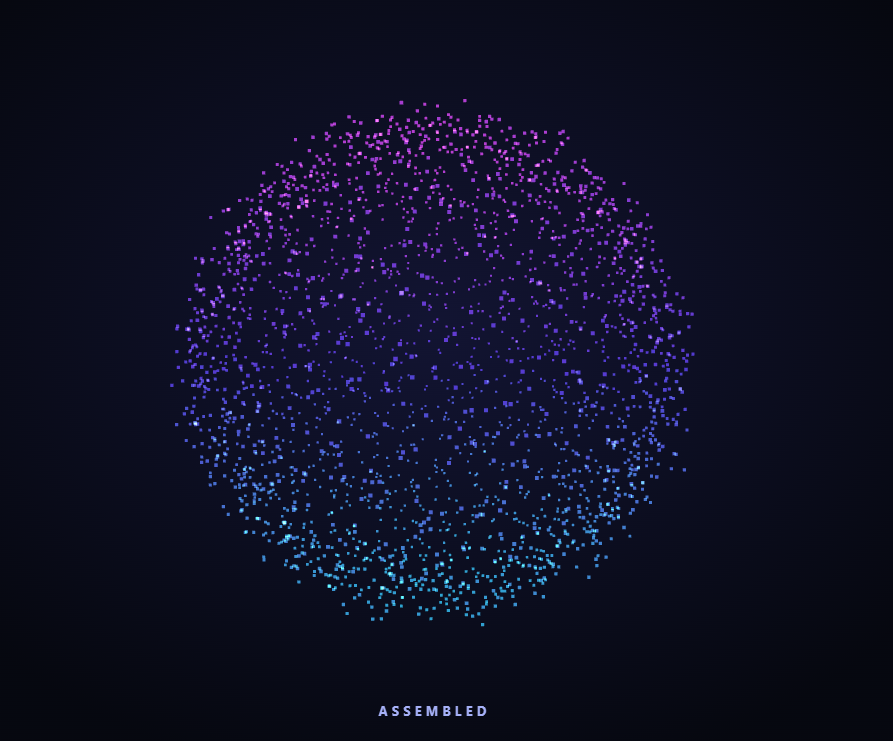
The Three.js Scroll Particle Assembly snippet starts with a cloud of 2,600 scattered points and pulls each one into an ordered sphere as the visitor scrolls — the scrollbar drives the assembly progress directly, not a timer — using a Three.js Points cloud and GSAP's ScrollTrigger plugin, both loaded from a CDN.
Two positions per particle, blended by one number
The core idea is that every particle carries two pre-computed 3D coordinates: a random "scattered" position in a loose box of noise, and an ordered "target" position on the surface of a sphere. Neither is ever recomputed. Scroll only moves a single value p from 0 to 1, and each frame the live position is a straight linear interpolation between the two stored coordinates. This is dramatically cheaper than physics or per-particle easing, because the expensive random layout is done once at startup and every frame is just addition and multiplication.
A Fibonacci sphere for an even assembled shape
If the target positions were random points on a sphere, the assembled form would look clumpy and uneven. Instead the targets use the golden-angle spiral (a Fibonacci sphere): each particle's Y is stepped evenly from top to bottom and its angle advances by the golden angle of about 2.39963 radians. This spreads the points across the surface with almost no clustering, so the moment of full assembly reads as a clean, deliberate sphere rather than a noisy blob.
Smooth-step so the assembly eases
The raw scrubbed progress is passed through the classic smooth-step curve p * p * (3 - 2p) before it drives the interpolation. This means the particles accelerate out of the scattered state and decelerate into the assembled state, rather than crossing at a constant, mechanical rate. The visitor feels the shape "settling" into place at the end of the scroll, which a linear blend never achieves.
One BufferAttribute updated in place
All 2,600 positions live in a single Float32Array backing a BufferAttribute. Each frame the loop rewrites that array in place and sets needsUpdate = true, so there is exactly one geometry upload per frame regardless of particle count. Colors are set once at startup from each particle's height and never touched again, keeping the per-frame work to position math only.
Additive blending for a glowing cloud
The PointsMaterial uses additive blending with depthWrite disabled, so where particles overlap their colors add toward white and the cloud glows from within. Disabling depth writes prevents the sorting artifacts that otherwise plague large transparent point clouds, and the slight constant Y rotation keeps the shape alive even when the visitor pauses mid-scroll.
scrub: 0.5 and a live status label
A small numeric scrub smooths the assembly against noisy input, and ScrollTrigger's onUpdate callback reads self.progress to swap a caption between "Scattered", "Assembling…", and "Assembled". This same scatter-to-target pattern powers the scroll text grid snippet, which targets a flat grid instead of a sphere. Contrast it with the physically-simulated magnetic particles or pair it with a starfield warp intro.
Build with AI
Build, Understand, Optimize, and Extend It With AI
You do not have to work out how thousands of particles move together without lag. Paste this snippet's HTML, CSS, and JS into an AI assistant like Claude and ask it to explain why each particle stores two positions and why the target uses a golden-angle spiral instead of random spherical points. The same assistant can help you change the destination shape — ask it to assemble the particles into a cube, a torus, or the outline of a word by generating a new target array — or to add a subtle per-particle delay so the sphere assembles in a wave rather than all at once. It can also optimize the loop, for instance moving the interpolation into a GLSL shader so the CPU stops rewriting the buffer every frame. Treat the code as a starting point for a conversation, not a finished artifact.
Prompt to recreate it
Copy this into your AI assistant of choice to build the effect from scratch, or as a jumping-off point for your own variant:
Build a "scroll-scrubbed particle assembly" in plain HTML, CSS, and JavaScript using Three.js, GSAP, and GSAP's ScrollTrigger plugin, all loaded from a CDN (no bundler, no build step).

Requirements:
- A pinned section containing a full-size canvas, with a WebGLRenderer and PerspectiveCamera sized to it and updated on window resize including aspect ratio.
- Create about 2,600 particles as a THREE.Points cloud backed by a single BufferGeometry position attribute.
- For every particle, pre-compute two fixed positions once at startup: a random "scattered" coordinate in a loose noise box, and a "target" coordinate on the surface of a sphere using a Fibonacci / golden-angle spiral for an even distribution. Also set a per-particle color once from its height, using vertexColors.
- Use a PointsMaterial with additive blending and depthWrite disabled for a glowing cloud.
- Register a GSAP tween on a ScrollTrigger targeting the pinned section, with pin: true, start at top top, a small numeric scrub (~0.5), and an end a few hundred percent tall, animating a single plain value p from 0 to 1. Use the ScrollTrigger onUpdate callback to swap a caption between scattered / assembling / assembled based on self.progress.
- Every animation frame (requestAnimationFrame), pass p through a smooth-step curve, then rewrite the position buffer in place as a linear blend from each particle's scattered position to its target position, and set needsUpdate. Add a slow constant rotation so the cloud stays alive when scrolling pauses.
- Confirm scrolling back up dissolves the sphere back into the cloud, since p is fully scrubbed rather than a one-way timer.
Want to tighten it up first? Run this prompt through the AI Prompt Studio to score it across 8 quality dimensions, catch anti-patterns, and tune the wording for Claude, ChatGPT, or Gemini before you paste it in.
Step by step
How to Use
- 1Load all three CDN scriptsAdd three.min.js, gsap.min.js, and ScrollTrigger.min.js from the CDN panel, in that order.
- 2Paste HTML, CSS, and JSA scattered cloud of glowing particles appears in a pinned 3D stage with a status label.
- 3Scroll downThe particles migrate from their scattered positions into an ordered sphere, tied to scroll.
- 4Scroll back upThe sphere dissolves back into the cloud exactly, since the progress value is fully scrubbed.
- 5Change the target shapeReplace the Fibonacci-sphere math in the target loop to assemble a cube, ring, or text layout instead.
- 6Tune density and paceAdjust COUNT for more or fewer particles and the ScrollTrigger end value for a longer or shorter assembly.
Real-world uses
Common Use Cases
Got questions?
Frequently Asked Questions
Each particle keeps a fixed scattered coordinate and a fixed target coordinate, both computed once at startup. Scroll only moves one value p, and the live position is a linear blend between the two. This avoids per-particle easing objects or physics entirely, so even thousands of points cost only a little addition and multiplication per frame.
It distributes points on a sphere by stepping Y evenly and rotating each point by the golden angle (~2.39963 radians). Compared with random spherical points, it spreads particles almost uniformly with no visible clumping, so the assembled shape reads as a clean, deliberate sphere at the end of the scroll.
The raw scrubbed progress is linear. Running it through p*p*(3-2p) makes the particles accelerate away from the scattered state and decelerate into the assembled state, so the shape appears to settle into place. A linear blend, by contrast, moves every particle at a constant, mechanical rate the whole way.
All positions share one Float32Array behind a single BufferAttribute. The animation loop rewrites that array in place and flags needsUpdate once, producing exactly one geometry upload per frame no matter how many particles there are. Colors are written once at startup and never recomputed, so per-frame work is limited to position interpolation.
Yes. Click JSX for a React component, Vue for a Vue 3 SFC, Angular for a standalone component, or Tailwind for a React + Tailwind version. Allocate the typed arrays and build the Points cloud and GSAP timeline inside a mount effect against a canvas ref, and on cleanup kill the ScrollTrigger, call geometry.dispose() and renderer.dispose(), so buffers and the WebGL context are freed on unmount.