Learn Coding Visually
Learn to code with interactive, live-preview playgrounds — HTML, CSS, JavaScript, React & more.
 HTML Playground42 lessons · Click-based · Live preview
 CSS PlaygroundLearn CSS with a live editor
 JavaScript Playground60 lessons · DOM · Async · Canvas
 React PlaygroundLearn React with a live code editor
 GSAP PlaygroundLearn GSAP animation interactively
 SVG Playground44 lessons · shapes · paths · animation
 SCSS Playground45 lessons · Sass modules · tokens
 Tailwind PlaygroundLearn Tailwind CSS with a live editor
 Bootstrap 5 Playground50 lessons · live preview
Three.js Scroll Horizontal Gallery — GSAP Coverflow
Three.js Scroll Horizontal Gallery · Scroll · Plain HTML, CSS & JS · Live preview
What's included
Features
About this UI Snippet
How to Build a Vertical-Scroll Horizontal 3D Gallery With Three.js and GSAP
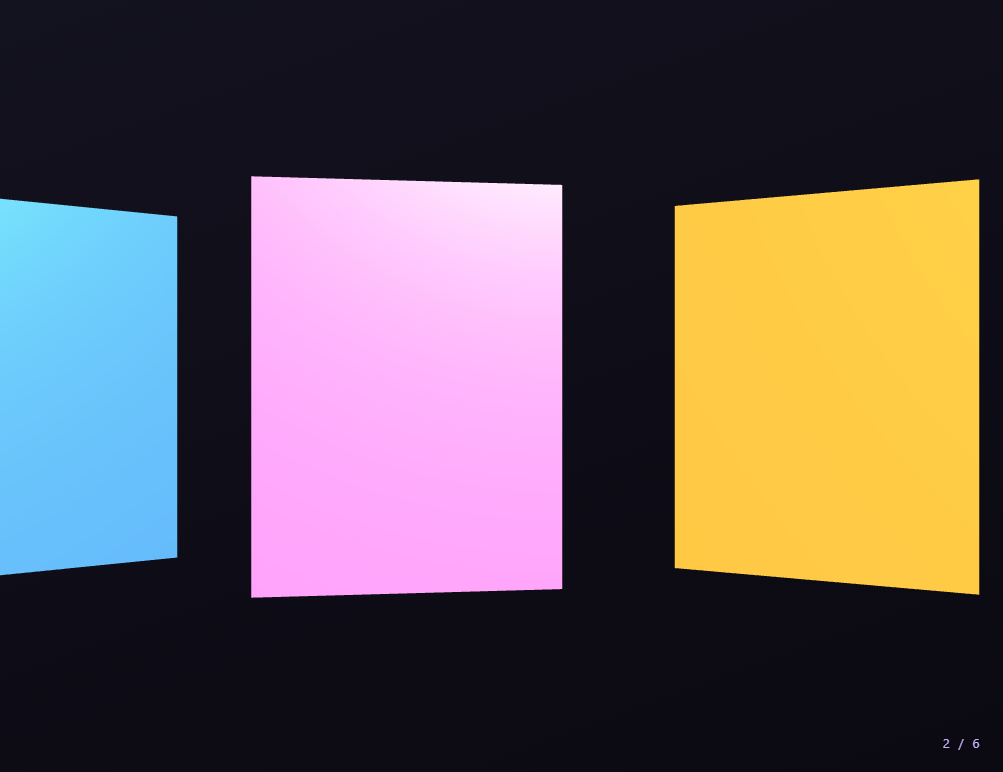
The Three.js Scroll Horizontal Gallery snippet takes plain vertical page scroll and turns it into a horizontal pan across a strip of six 3D panels — the scrollbar slides the whole gallery sideways while each panel rotates coverflow-style toward the camera — using core Three.js and GSAP's ScrollTrigger plugin, both loaded from a CDN.
Vertical scroll, horizontal motion
The defining trick of this pattern is decoupling input direction from output direction: the visitor scrolls down as usual, but a single scrubbed value moves a Three.js Group along its X axis, so the panels slide left across the viewport. This "vertical-in, horizontal-out" gallery is one of the most requested scroll effects because it lets a horizontal showcase live inside an ordinary vertical page without hijacking the scrollbar's native behavior or fighting touch devices.
Panels in a group, panned as one
All six panels are added to a single THREE.Group at fixed X offsets a constant gap apart. Scroll never touches the individual panels' base positions — it only moves the group. Panning the container rather than each panel means the strip's layout is defined once, and lengthening the gallery is just a matter of adding another panel and letting the travel distance recompute from the panel count and gap.
Coverflow depth derived from screen position
Each frame, every panel's world X (its own offset plus the group's current pan) is used to compute two things: a Y rotation clamped so the panel turns to face the camera as it nears center and angles away toward the edges, and a small negative Z push proportional to its distance from center so off-center panels recede slightly. This is what gives the flat strip its sense of 3D depth — panels at the focus stand upright and forward, while their neighbors tilt back like album covers in a coverflow.
Emissive glow marks the focused panel
The panel nearest the center also gets the most emissive intensity, fading to zero as it slides away. Because this is computed from the same distance-from-center value that drives rotation and depth, the highlight tracks the focus automatically — there is no separate "which panel is active" state to keep in sync; the geometry's position *is* the state.
One scrubbed value, a derived index
The group's X is tweened from 0 to minus the full strip width so the last panel ends centered, and ScrollTrigger's onUpdate maps self.progress to a 1-of-6 counter for the on-screen index. Keeping a single source of truth — the scrubbed pan — means the visible index, the rotations, the depth, and the glow all derive from it consistently, and scrolling back up reverses every one of them exactly.
scrub: 0.6 and a pinned stage
A numeric scrub smooths the pan against noisy wheel and trackpad input, and pinning the stage for +=450% gives each panel a comfortable moment at center. The same pinned-scrub-derive approach powers the scroll camera path flythrough; here it drives a lateral pan instead of forward travel. Pair it with a scroll particle assembly intro or a product stages close-up section.
Build with AI
Build, Understand, Optimize, and Extend It With AI
You do not need to figure out how to make a downward scroll move things sideways. Paste this snippet's HTML, CSS, and JS into an AI assistant like Claude and ask it to explain why the panels live in a single Group and how each panel's rotation and depth are derived from its distance to screen center. The same assistant can help you extend it — ask it to load real image textures onto the panels, add a title caption that fades in for whichever panel is centered, or snap the pan to the nearest panel when the visitor stops scrolling. It can also optimize the per-frame loop, for instance caching the emissive Color objects instead of allocating a new one each frame. Treat the code as a starting point for a conversation, not a finished artifact.
Prompt to recreate it
Copy this into your AI assistant of choice to build the effect from scratch, or as a jumping-off point for your own variant:
Build a "vertical-scroll horizontal 3D gallery" in plain HTML, CSS, and JavaScript using Three.js, GSAP, and GSAP's ScrollTrigger plugin, all loaded from a CDN (no bundler, no build step).

Requirements:
- A pinned section containing a full-size canvas, with a WebGLRenderer and PerspectiveCamera sized to it and updated on window resize including aspect ratio, plus ambient and directional lighting.
- Create about six flat panel meshes (thin boxes) added to a single THREE.Group, each at a fixed X offset a constant gap apart, in different colors.
- Register a GSAP tween on a ScrollTrigger targeting the pinned section, with pin: true, start at top top, a numeric scrub (~0.6), and an end several hundred percent tall, animating one plain value from 0 to minus the total strip width so the last panel ends centered. Use onUpdate to map self.progress to a 1-of-N index counter.
- Every animation frame (requestAnimationFrame), set the Group's X to the scrubbed value, then for each panel compute its world X (offset plus Group X) and derive: a clamped Y rotation that faces the camera near center and angles away toward the edges, a small negative Z push proportional to distance from center, and an emissive intensity that peaks at center — giving a coverflow depth effect.
- Confirm scrolling back up reverses the pan, rotations, depth, and glow, since everything derives from one fully scrubbed value rather than a timer.
Want to tighten it up first? Run this prompt through the AI Prompt Studio to score it across 8 quality dimensions, catch anti-patterns, and tune the wording for Claude, ChatGPT, or Gemini before you paste it in.
Step by step
How to Use
- 1Load all three CDN scriptsAdd three.min.js, gsap.min.js, and ScrollTrigger.min.js from the CDN panel, in that order.
- 2Paste HTML, CSS, and JSA strip of six colored 3D panels appears in a pinned stage with a 1-of-6 counter.
- 3Scroll downVertical scroll pans the whole gallery sideways; panels rotate toward the camera as they reach center.
- 4Scroll back upThe pan, rotations, depth, and glow all reverse exactly, since everything derives from one scrubbed value.
- 5Add or restyle panelsChange the PANELS count, GAP, and colors array; the travel distance recomputes automatically.
- 6Tune the pacingAdjust the ScrollTrigger end value (+=450%) for a slower or faster pan across the collection.
Real-world uses
Common Use Cases
Got questions?
Frequently Asked Questions
ScrollTrigger scrubs a single value that is applied to a THREE.Group's X position, not to the page. The visitor scrolls down normally, but the output is the group sliding left, so a horizontal gallery lives inside a vertical page without overriding native scroll behavior or breaking touch input.
All panels sit at fixed offsets inside one Group, and scroll only moves the Group. This defines the strip layout a single time and keeps the animation trivial: adding a panel just extends the strip and recomputes the total travel from the panel count and gap, with no change to the tween or per-panel positions.
Each frame, every panel's world X (its offset plus the Group pan) is turned into a clamped Y rotation and a small negative Z push proportional to its distance from screen center. Panels at the focus stand upright and forward; their neighbors tilt back and recede, giving the flat strip a convincing coverflow depth.
The emissive intensity of each panel is computed from the same distance-from-center value that drives its rotation and depth, peaking at center and fading to zero at the edges. Because the highlight derives from geometry position, there is no separate active-panel state to track — the panel's position is the source of truth.
Yes. Click JSX for a React component, Vue for a Vue 3 SFC, Angular for a standalone component, or Tailwind for a React + Tailwind version. Build the Group, panels, and GSAP timeline inside a mount effect against a canvas ref, drive panel data from props, and on cleanup kill the ScrollTrigger and call renderer.dispose() so the pin and WebGL context are released on unmount.