Source Code
<section class="scp-top"><p>Scroll ↓ to fly through</p></section>
<section class="scp-stage" id="scpStage">
  <canvas id="scpCanvas"></canvas>
</section>
<section class="scp-bottom"><p>You've reached the end of the gallery.</p></section>*{box-sizing:border-box;margin:0;padding:0}
html,body{background:#05060c;color:#fff;font-family:system-ui,-apple-system,sans-serif}
.scp-top,.scp-bottom{min-height:70vh;display:flex;justify-content:center;align-items:center;color:#8a90a8;font-size:15px;letter-spacing:.08em;text-transform:uppercase}
.scp-stage{height:100vh;position:relative;overflow:hidden;background:radial-gradient(70% 65% at 50% 45%,#141a30,#05060c)}
#scpCanvas{display:block;width:100%;height:100%}const canvas = document.getElementById('scpCanvas');
const renderer = new THREE.WebGLRenderer({ canvas, antialias: true, alpha: true });
renderer.setPixelRatio(Math.min(window.devicePixelRatio, 2));
const scene = new THREE.Scene();
const camera = new THREE.PerspectiveCamera(55, 1, 0.1, 100);
scene.add(new THREE.AmbientLight(0x334155, 0.6));
const light = new THREE.PointLight(0x93c5fd, 2, 60);
light.position.set(0, 6, 10);
scene.add(light);
// A small gallery of distinct shapes placed along the Z axis. The camera
// will fly through them in sequence as the visitor scrolls.
const SHAPES = [
{ geo: new THREE.IcosahedronGeometry(1.1, 0), color: 0x60a5fa, z: -2 },
{ geo: new THREE.TorusGeometry(1, 0.35, 16, 48), color: 0xf472b6, z: -16 },
{ geo: new THREE.BoxGeometry(1.6, 1.6, 1.6), color: 0xfbbf24, z: -30 },
{ geo: new THREE.OctahedronGeometry(1.2, 0), color: 0x34d399, z: -44 },
{ geo: new THREE.TorusKnotGeometry(0.9, 0.28, 120, 16), color: 0xa78bfa, z: -58 },
];
const meshes = SHAPES.map(s => {
const mat = new THREE.MeshStandardMaterial({ color: s.color, metalness: 0.3, roughness: 0.4, emissive: s.color, emissiveIntensity: 0.15 });
const mesh = new THREE.Mesh(s.geo, mat);
mesh.position.set((Math.random() - 0.5) * 2.4, (Math.random() - 0.5) * 1.6, s.z);
scene.add(mesh);
return mesh;
});
// The camera itself travels along Z from 6 down to just past the last
// shape; a separate "look target" also moves so the camera always aims
// slightly ahead rather than staring straight down a static axis.
const cameraTarget = new THREE.Vector3(0, 0, 0);
camera.position.set(0, 0.6, 6);
camera.lookAt(cameraTarget);
gsap.registerPlugin(ScrollTrigger);
const path = { z: 6, lookZ: -4 };
gsap.timeline({
scrollTrigger: {
trigger: '#scpStage',
start: 'top top',
end: '+=400%',
scrub: 0.6,
pin: true,
},
})
.to(path, { z: -64, lookZ: -74, ease: 'none' });
function resize() {
const w = canvas.clientWidth, h = canvas.clientHeight;
renderer.setSize(w, h, false);
camera.aspect = w / h;
camera.updateProjectionMatrix();
}
function animate() {
requestAnimationFrame(animate);
camera.position.z = path.z;
cameraTarget.set(0, 0, path.lookZ);
camera.lookAt(cameraTarget);
meshes.forEach((m, i) => {
m.rotation.x += 0.004 + i * 0.0006;
m.rotation.y += 0.006 + i * 0.0004;
});
renderer.render(scene, camera);
}
resize();
window.addEventListener('resize', resize);
animate();Learn Coding Visually
Learn to code with interactive, live-preview playgrounds — HTML, CSS, JavaScript, React & more.
 HTML Playground42 lessons · Click-based · Live preview
 CSS PlaygroundLearn CSS with a live editor
 JavaScript Playground60 lessons · DOM · Async · Canvas
 React PlaygroundLearn React with a live code editor
 GSAP PlaygroundLearn GSAP animation interactively
 SVG Playground44 lessons · shapes · paths · animation
 SCSS Playground45 lessons · Sass modules · tokens
 Tailwind PlaygroundLearn Tailwind CSS with a live editor
 Bootstrap 5 Playground50 lessons · live preview
Three.js Scroll Camera Path — GSAP ScrollTrigger WebGL Flythrough
Three.js Scroll Camera Path · Scroll · Plain HTML, CSS & JS · Live preview
What's included
Features
About this UI Snippet
How to Build a Scroll-Scrubbed Three.js Camera Flythrough With GSAP
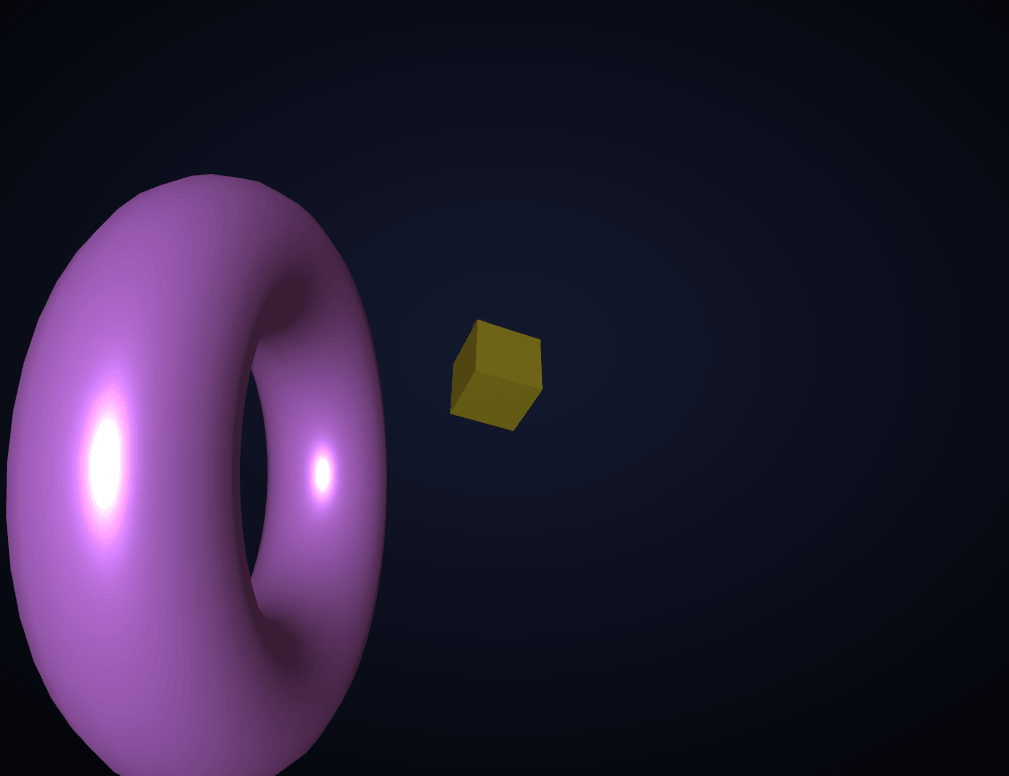
The Three.js Scroll Camera Path snippet pins a WebGL scene in place and flies the camera through a small gallery of five distinct 3D shapes as the visitor scrolls — with the scrollbar directly controlling camera position, not a timer — combining GSAP's ScrollTrigger plugin with core Three.js, both loaded from a CDN.
The camera moves, not the shapes
It would be tempting to animate each shape's own position as the visitor scrolls past it, but this snippet does the opposite: every shape sits at a fixed Z position along one axis, placed once at startup, and it's the camera that travels through that fixed gallery. This mirrors how a real flythrough or dolly shot works, and it means adding a sixth or seventh shape to the gallery requires no changes to the animation logic at all — just another entry in the shape list at whatever Z depth you choose.
A plain object as the tweened value, not the camera directly
Rather than handing GSAP the camera object to tween directly, the snippet tweens a tiny plain object — { z, lookZ } — with GSAP's ScrollTrigger scrub, and then, every single animation frame, manually copies those two numbers onto the camera's actual position and look-target. This indirection matters: it decouples "what GSAP is scrubbing" from "how Three.js renders it," which means the same scrubbed values could just as easily drive a camera path with curves, banking, or multiple axes without changing how the ScrollTrigger timeline itself is defined.
The look target moves too, not just the camera
If only the camera's Z position moved while it kept staring straight down a fixed axis, the flythrough would feel mechanical and flat. Instead, a separate lookZ value — always kept a fixed distance ahead of the camera's own Z — is tweened in lockstep, and camera.lookAt() is called every frame with that shifting target. This is what gives the flythrough a sense of "heading toward" the next shape rather than sliding sideways past a static viewing direction.
scrub: 0.6, not scrub: true
Unlike a typing effect where the scrubbed value must snap exactly to scroll position, camera motion benefits from a small amount of smoothing. scrub: 0.6 tells ScrollTrigger to let the tweened values glide toward the current scroll position over roughly six-tenths of a second rather than matching it with zero latency, which smooths out the inevitable jitter of real trackpad and mouse-wheel input into something that reads as a deliberate, cinematic camera move rather than a jerky, frame-perfect scrollbar-slave.
A pinned stage, +=400% of extra scroll distance
The #scpStage section is pinned in place for +=400% of the viewport's height worth of additional scrolling — enough room for five distinct shapes to each get a clear, unhurried moment as the camera passes through their vicinity. Widening that value stretches the whole flythrough across more scroll distance, giving each shape more screen time; narrowing it compresses the whole trip into a quicker scroll.
Each shape spins independently, at its own rate
While the camera trip itself is precisely scroll-driven, every individual shape's own rotation runs on the regular requestAnimationFrame clock, completely independent of scroll position, each at a slightly different speed. This keeps the gallery feeling alive even while the visitor pauses scrolling mid-flight — the camera holds still, but the shapes keep turning.
Why combine two libraries instead of one
Three.js has no built-in concept of "scroll," and GSAP's ScrollTrigger has no concept of a 3D scene — each library does exactly one job well. This is the same combination used by the scroll typewriter snippet, just applied to camera position instead of character opacity, and it's a useful pattern to internalize: any property that can be represented as a plain number or object can be scrubbed by ScrollTrigger, then applied manually to whatever rendering system — DOM, Canvas 2D, or WebGL — actually needs it. Pair this flythrough with a starfield warp as a "before" scene, or contrast its cinematic pacing against the physically-orbiting motion of orbit rings.
Build with AI
Build, Understand, Optimize, and Extend It With AI
You do not have to piece together how GSAP and Three.js hand off values to each other by reading both libraries' docs separately. Paste this snippet's HTML, CSS, and JS into an AI coding assistant like Claude and ask it to explain exactly why the timeline tweens a plain {z, lookZ} object instead of the camera itself, or why the look target needs its own tweened value rather than the camera always facing a fixed direction. The same assistant can help optimize it, for instance checking whether the per-frame camera.lookAt() call could be replaced with a cheaper quaternion slerp for very long galleries, or whether shape geometries far from the current camera position could be temporarily hidden to save render cost. It is also useful for extending the flythrough: ask it to add a curved (not perfectly straight) camera path using a CatmullRomCurve3, fade each shape's opacity in and out as the camera approaches and passes it, or synchronize a text caption per shape that appears exactly when the camera is nearest to it. Treat the code less like a finished artifact and more like a starting point for a conversation.
Prompt to recreate it
Copy this into your AI assistant of choice to build the effect from scratch, or as a jumping-off point for your own variant:
Build a "scroll-scrubbed camera flythrough" in plain HTML, CSS, and JavaScript using Three.js, GSAP, and GSAP's ScrollTrigger plugin, all loaded from a CDN (no bundler, no build step).

Requirements:
- A pinned section containing a full-size canvas, with a WebGLRenderer and PerspectiveCamera sized to match it and updated on window resize including camera aspect ratio.
- At least five distinct 3D shapes (different geometries, e.g. an icosahedron, a torus, a box, an octahedron, and a torus knot), each placed once at a fixed, increasingly negative Z position along one axis so they form a sequence a camera could travel through, with a small randomized X/Y offset per shape.
- Do not animate the shapes' positions based on scroll — only the camera should move through the fixed gallery.
- Register a GSAP timeline on a ScrollTrigger targeting the pinned section, with pin: true, a start at the top of the viewport, a numeric scrub value around 0.5 to 0.7 (not scrub: true) for smoothed rather than zero-latency motion, and an end several hundred percent of the viewport tall.
- Inside that timeline, tween a plain JavaScript object (not the camera itself) containing at least a camera-Z value and a separate look-target-Z value, animating both from their starting values down to values just past the furthest shape's position.
- Every animation frame (using requestAnimationFrame, independent of the ScrollTrigger callback), copy the tweened object's current camera-Z value onto the actual camera's Z position, set a look-target vector's Z coordinate from the tweened look-target value, and call the camera's look-at method with that target.
- Independently of the scroll-driven camera motion, continuously rotate each shape on its own axis at its own speed inside the same animation frame loop, so the shapes keep animating even while scrolling is paused.
- Confirm that scrolling back upward reverses the entire flythrough exactly, since the camera and look-target values are fully driven by the ScrollTrigger scrub rather than a one-way timer.
Want to tighten it up first? Run this prompt through the AI Prompt Studio to score it across 8 quality dimensions, catch anti-patterns, and tune the wording for Claude, ChatGPT, or Gemini before you paste it in.
Step by step
How to Use
- 1Load all three CDN scriptsAdd three.min.js, gsap.min.js, and ScrollTrigger.min.js from the CDN panel, in that order.
- 2Paste HTML, CSS, and JSFive shapes appear in a pinned 3D scene; scrolling begins the flythrough.
- 3Scroll down slowlyThe camera flies past each shape in sequence, tied directly to scroll position.
- 4Scroll back upThe flythrough reverses exactly, since the tweened camera values are fully scrubbed, not timer-based.
- 5Add or reposition shapesEdit the SHAPES array's z values and geometry types to change the gallery's contents and spacing.
- 6Stretch or compress the tripChange the ScrollTrigger end value (+=400%) for a longer, slower flythrough or a shorter, quicker one.
Real-world uses
Common Use Cases
Got questions?
Frequently Asked Questions
Keeping every shape at a fixed Z position and moving only the camera mirrors how a real flythrough or dolly shot works, and it means the gallery scales cleanly — adding a sixth shape only requires one new entry in the shape list, with no changes needed to the scroll or camera logic itself.
Tweening a small {z, lookZ} object and manually copying its values onto the camera every frame decouples what ScrollTrigger is scrubbing from how Three.js renders it. This makes it straightforward to later swap in a curved path, add banking rotation, or drive multiple cameras from the same scrubbed values without changing how the ScrollTrigger timeline itself is defined.
If the camera only translated forward while always looking down a fixed, static direction, the flythrough would feel mechanical, like sliding sideways past a wall. Moving the look target a fixed distance ahead of the camera's own position, and calling camera.lookAt() with it every frame, gives the camera a genuine sense of heading toward whatever comes next.
A numeric scrub value tells ScrollTrigger to let the tweened values glide toward the current scroll position over that many seconds, rather than matching it with zero latency. Camera movement benefits from this small smoothing — it filters out the jitter of real trackpad and wheel input into motion that reads as a deliberate cinematic move rather than a jerky, frame-perfect scrollbar-slave.
Yes. The ScrollTrigger end value (+=400%) controls how much scroll distance the whole trip spans — increase it to stretch the flythrough across more scrolling (giving each shape more relative screen time), or decrease it to compress the whole gallery into a shorter scroll.
Yes. Click JSX for a React component, Vue for a Vue 3 SFC, Angular for a standalone component, or Tailwind for a React + Tailwind CSS utility-class version. Set up the renderer, shapes, and GSAP timeline inside a mount effect against refs (not document queries), and revert a gsap.context (or manually kill the ScrollTrigger instance) plus call renderer.dispose() on cleanup so the pin and WebGL context don't linger after the component unmounts.